<?xml version="1.0" encoding="UTF-8"?>
<feed xmlns="http://www.w3.org/2005/Atom" xml:lang="">
                        <id>https://milos.support-hub.io/feed/1</id>
                                <link href="https://milos.support-hub.io/feed/1" rel="self"></link>
                                <title><![CDATA[Vanguard - Advanced PHP Login and User Management Article Feed]]></title>
                    
                                <subtitle></subtitle>
                                                    <updated>2025-12-29T14:31:10+00:00</updated>
                        <entry>
            <title><![CDATA[Installation]]></title>
            <link rel="alternate" href="https://milos.support-hub.io/articles/vanguard-installation" />
            <id>https://milos.support-hub.io/2</id>
            <author>
                <name><![CDATA[Milos Stojanovic]]></name>
            </author>
            <summary type="html">
                <![CDATA[<p><a></a></p>
<h3>Server Requirements</h3>
<p>In order to install the Vanguard application, your server must meet the following requirements:</p>
<ul><li>PHP &gt;= 8.1.0</li>
<li>OpenSSL PHP Extension</li>
<li>PDO PHP Extension</li>
<li>Mbstring PHP Extension</li>
<li>Tokenizer PHP Extension</li>
<li>Ctype PHP Extension</li><li>JSON PHP Extension</li>
<li>XML PHP Extension</li>
<li>GD PHP Extension</li>
<li>Fileinfo PHP Extension</li>
<li>Xdebug Max Nesting Level (&gt;= 500)</li>
</ul><p><a></a></p>
<h3>File System Permissions</h3>
<p>To be able to start the installation at all, you must set appropriate permissions for <code>storage</code> folder and it's subfolders. So, the very first thing to do is to set permissions to <code>777</code> for <code>storage</code> folder, all it's subfolders as well as <code>settings.json</code> file.</p>
<p>After setting the permissions you are ready to proceed to the installation.</p>
<p><a></a></p>
<h3>Installing Vanguard</h3>
<p>After downloading the ZIP archive, and uploading it to your server, the first thing you have to do is to create the database where system tables will be created. Let's say, you create the database called <strong>vanguard</strong>.</p>
<h4>Step 1 - Welcome Screen</h4>
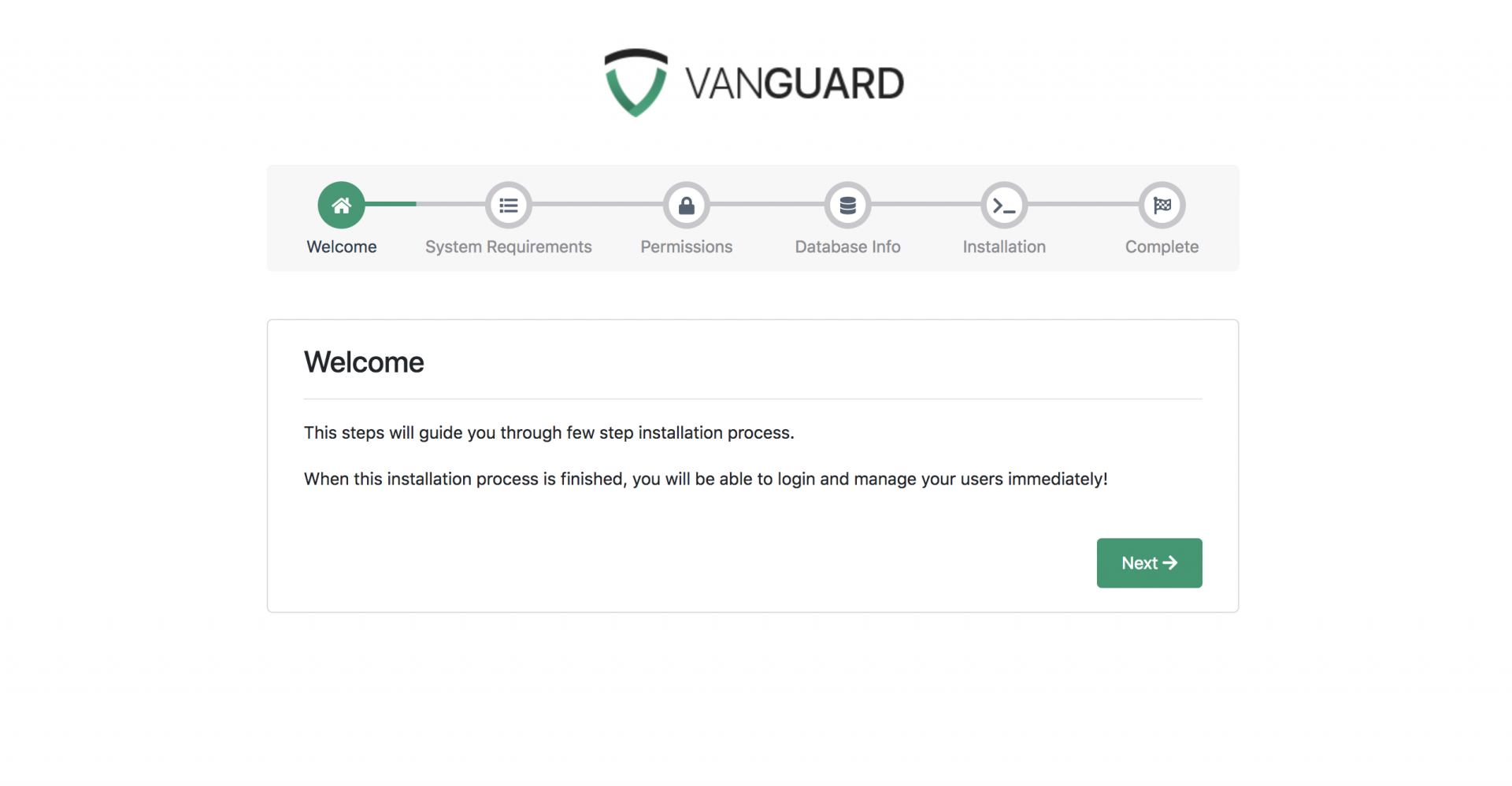
<p>After creating the database next step is accessing the application URL from a browser. One thing you need to know is that Laravel is designed to allow HTTP access to the application from your <code>public</code> folder only. This means that Vanguard application will be available at <code>yourdomain.com/public</code>. It is good enough for installation and development purposes, however, for production you will probably want to have your application available at <code>yourdomain.com</code>. In <a href="#application-url">next section</a> I will show you how you can accomplish that.</p>
<p>Ok, since this is the first time that you are accessing the system, the installation wizard, will be displayed.</p><p><img src="https://support-hub--assets.s3.eu-west-2.amazonaws.com/assets/1/images/dvexoFEICW4N0DVTHqfFFED2FGjMDA1PJOzvkLoq.png" alt="dvexoFEICW4N0DVTHqfFFED2FGjMDA1PJOzvkLoq.png" /><br /></p><p><strong>Note!</strong> If you get <code>500 Server Error</code> when you try to access the script installer, this usually means that your <code>storage/</code> directory is not writable and that Laravel is unable to compile views or start the session. To fix this, just update the permissions like it is described <a href="#file-system-permissions">above</a>.<br /></p>
<p><strong>Note!</strong> If you are not able to access the website by accessing <code>yourdomain.com/public</code>, but you are able to access it via <code>yourdomain.com/public/index.php</code>, this means that you probably don't have Apache <code>mod_rewrite</code> installed and enabled. You can find more info about fixing this issue <a href="https://milos.support-hub.io/articles/the-requested-url-install-was-not-found-on-this-server">here</a>.</p>

<h4>Step 2 - System Requirements</h4>
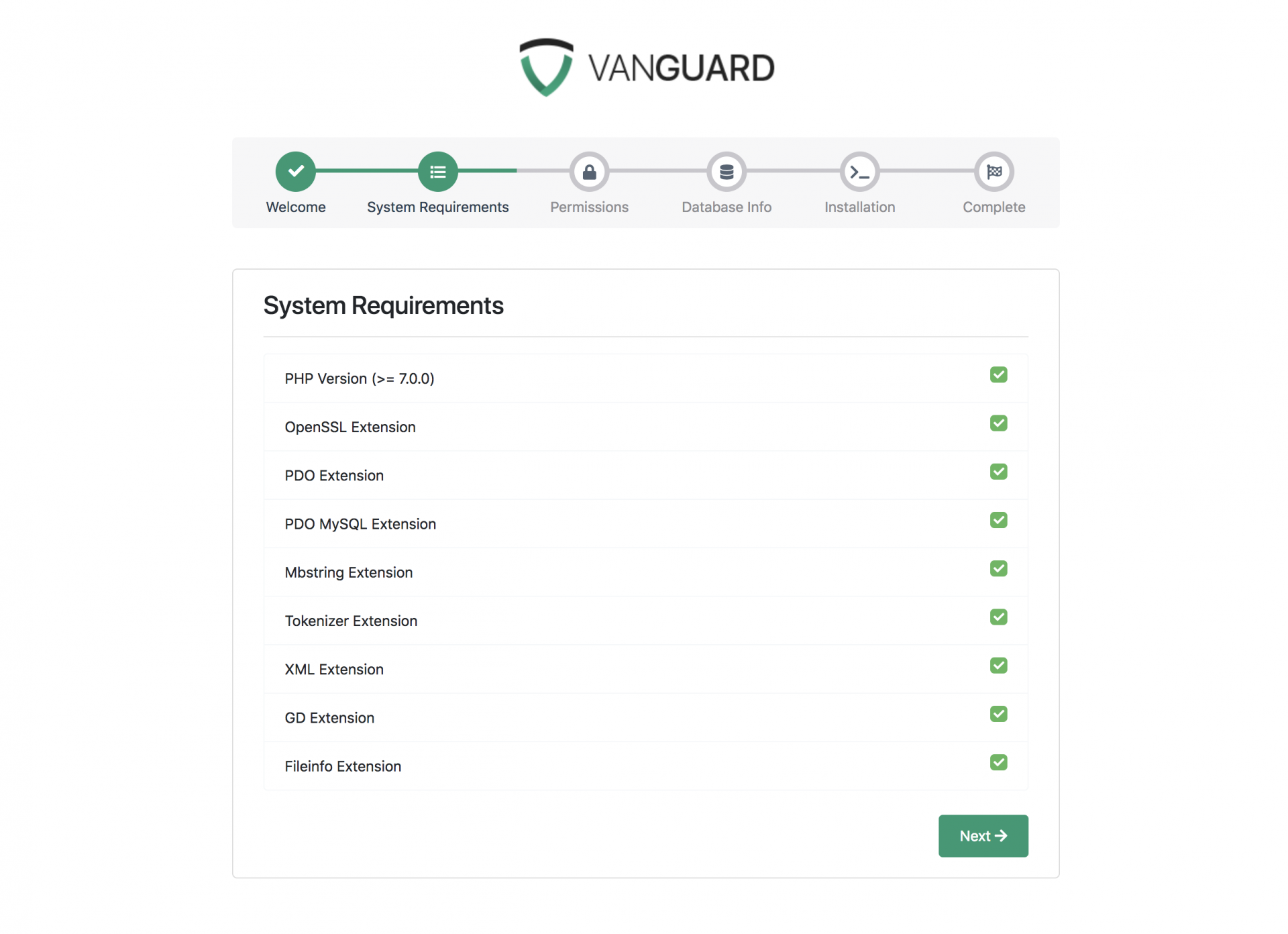
<p>After clicking on "Next" button, you will be redirected to the second step during the installation wizard, System Requirements.</p><p><img src="https://support-hub--assets.s3.eu-west-2.amazonaws.com/assets/1/images/KAmMMDWS0t2nbJv4l0pwHg8t3oS8y6p7bH57FSpZ.png" alt="KAmMMDWS0t2nbJv4l0pwHg8t3oS8y6p7bH57FSpZ.png" /><br /></p>
<p><a href="assets/img/install_step2.png"></a></p>
<p>In order to install the script, your system must have installed and enabled all PHP extensions listed on that second installation step.</p>
<h4>Step 3 - Directory Permissions</h4>
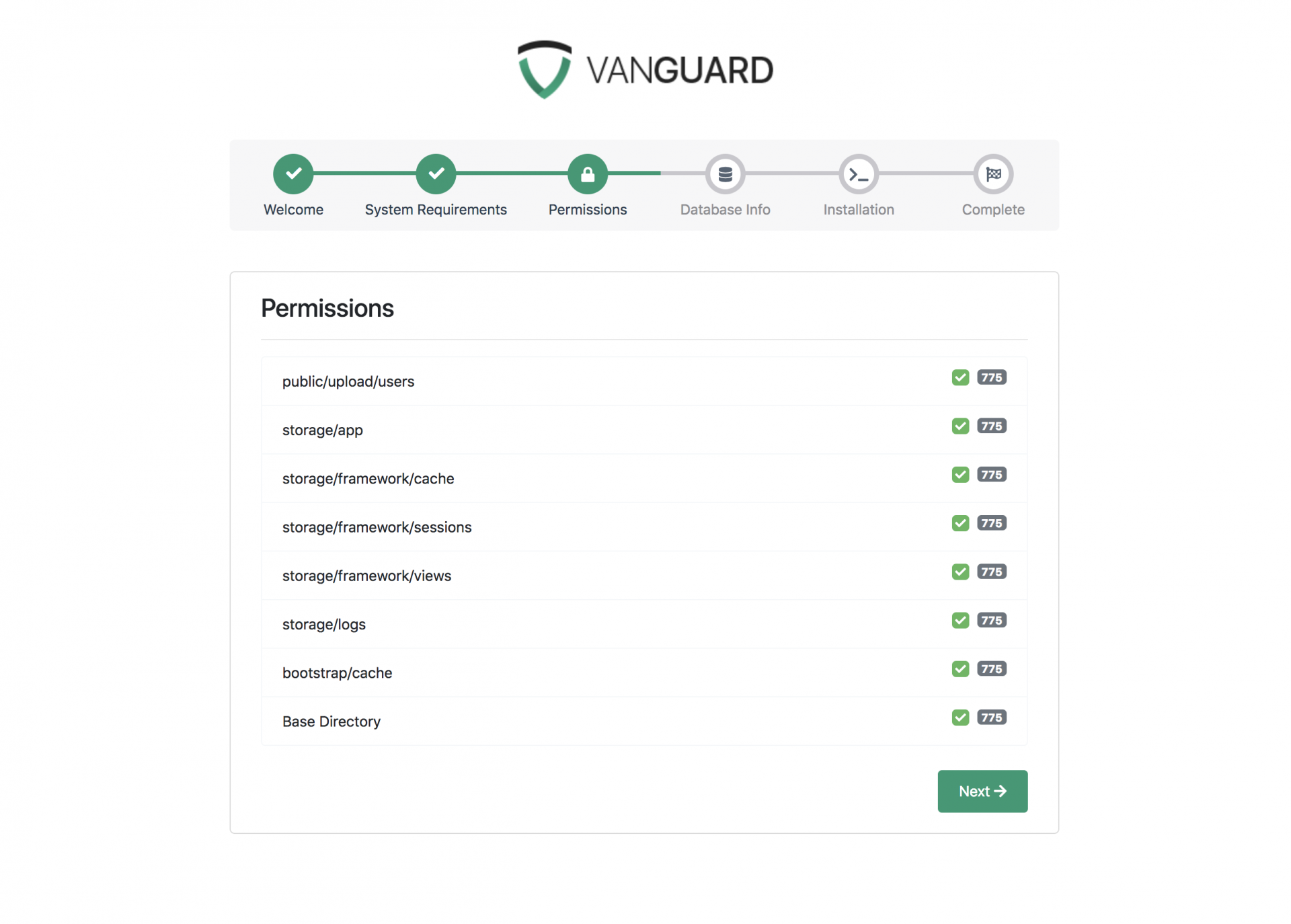
<p>After successfully enabling and installing all required PHP extensions, next step is to set the appropriate permissions for some system folders. All directories listed on step 3 has to be writable by the application, as it is displayed on the following picture.</p><p><img src="https://support-hub--assets.s3.eu-west-2.amazonaws.com/assets/1/images/iexYTdRxPrUv3eAH9vK1ewwhpWSt8IktkxdnfT9O.png" alt="iexYTdRxPrUv3eAH9vK1ewwhpWSt8IktkxdnfT9O.png" /><br /></p><p>After making all those directories writable by changing their permissions to <code>777</code> (or <code>775</code>, if the owner of your files is web server user), you are ready to proceed to next step and insert your database credentials.<br /></p>
<h4>Step 4 - Database Info</h4>
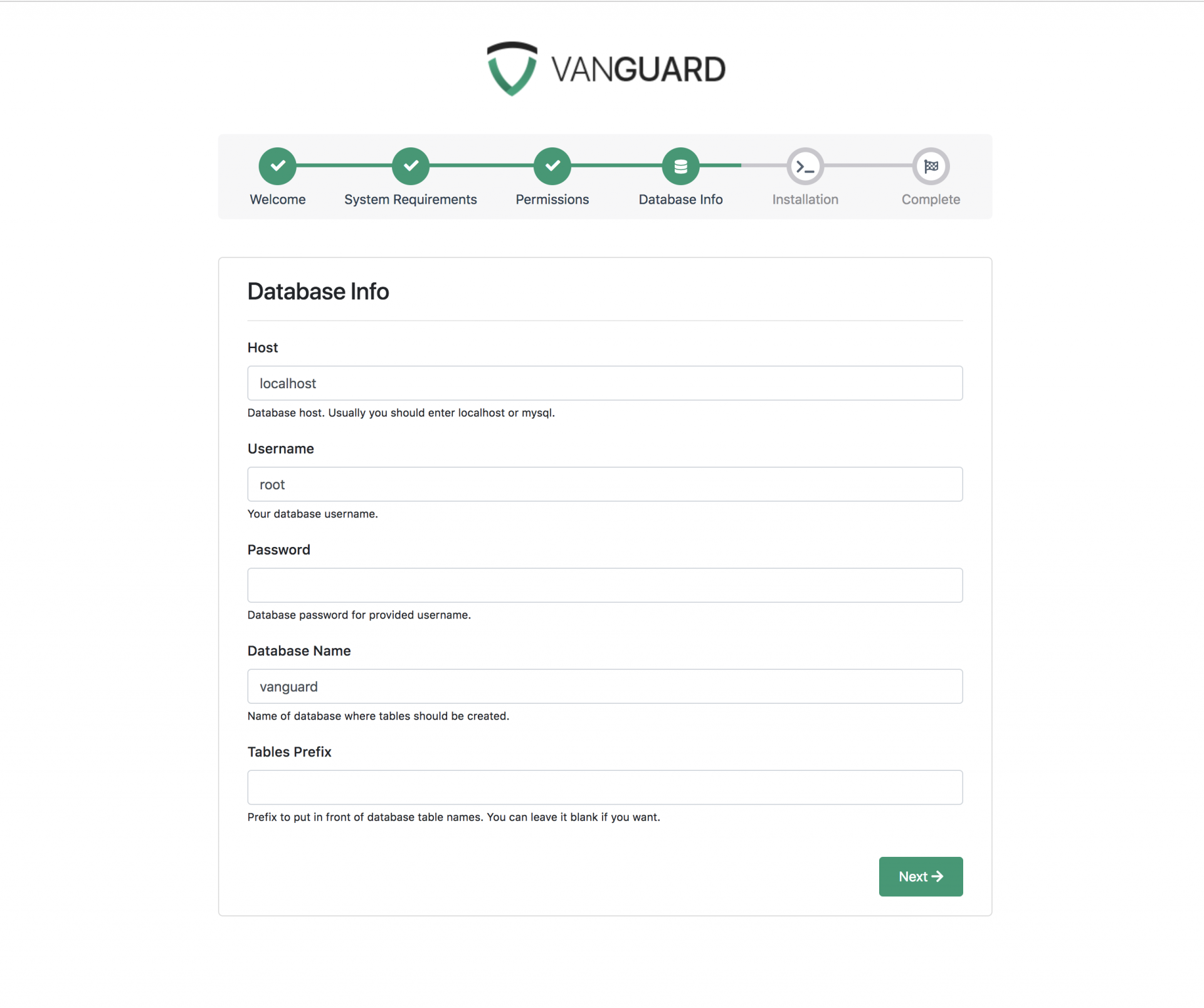
<p>On step 4 you have to fill in your database credentials and choose a prefix for your database tables if you want. Of course, you can leave prefix field empty if you don't want your database tables to be prefixed.</p><p><img src="https://support-hub--assets.s3.eu-west-2.amazonaws.com/assets/1/images/6oNkfJMvI1xZ6EL9jUSKBqdUrZsWP2Q8aT57q5UE.png" alt="6oNkfJMvI1xZ6EL9jUSKBqdUrZsWP2Q8aT57q5UE.png" /><br /></p><p>If you have any problems saying that Vanguard is unable to connect to your database, you can check error log inside <code>storage/logs</code> directory for more information about the error.<br /></p>
<h4>Step 5 - Installation</h4>
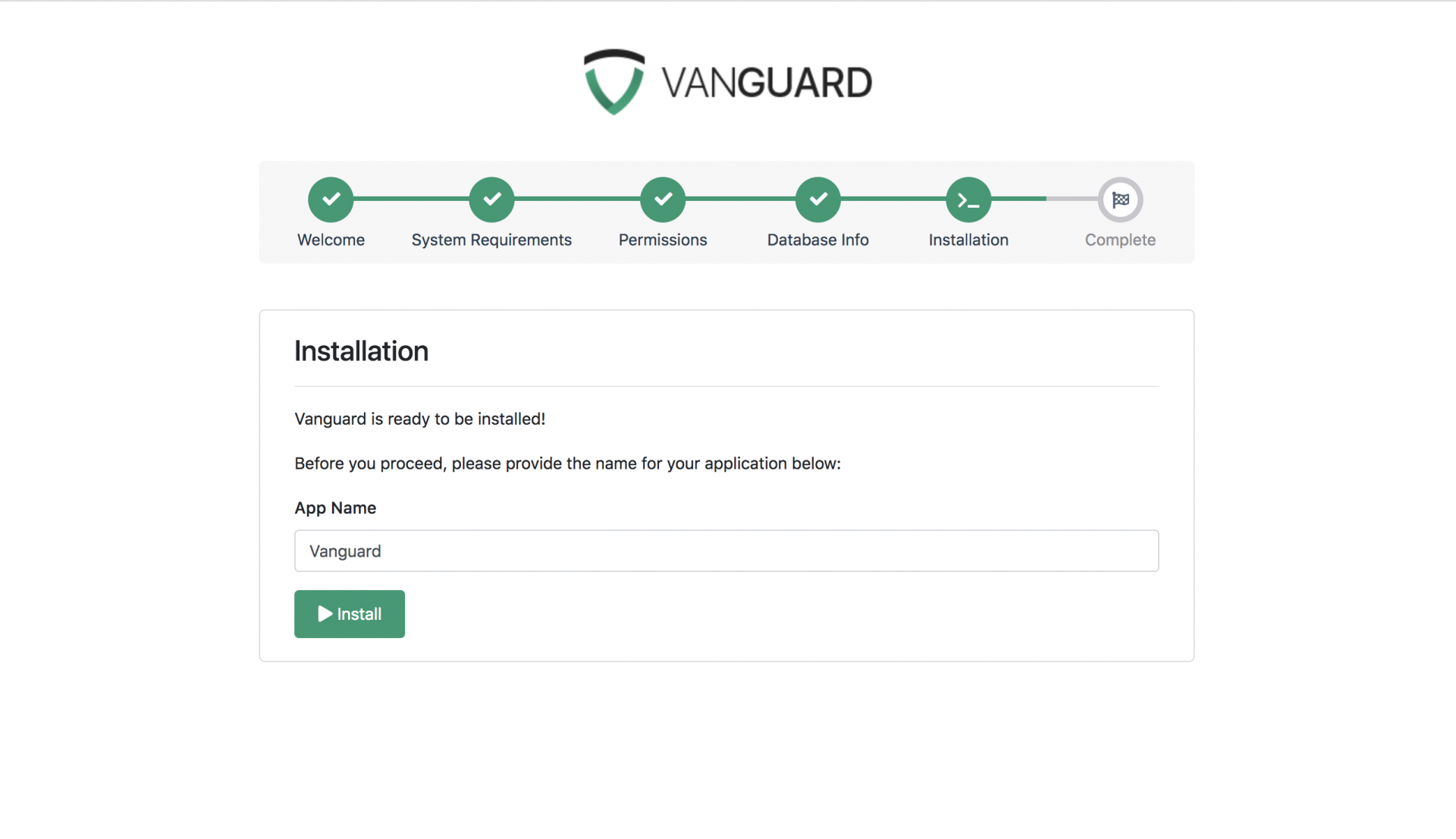
<p>After passing all those steps, you are now ready to install your application. If you want, you can change application name to something else by typing the application name here, before you press the <b>Install</b> button.</p><p><img src="https://support-hub--assets.s3.eu-west-2.amazonaws.com/assets/1/images/HdOP1l4NrLlzcjTcCEaK5PJUqg4wrO48r96EuMPN.png" alt="HdOP1l4NrLlzcjTcCEaK5PJUqg4wrO48r96EuMPN.png" /><br /></p><p>Once you are ready, just press the <strong>Install</strong> button and installation process will start immediately. It should not take more than few seconds.<br /></p>
<h4>Step 6 - Complete Installation</h4>
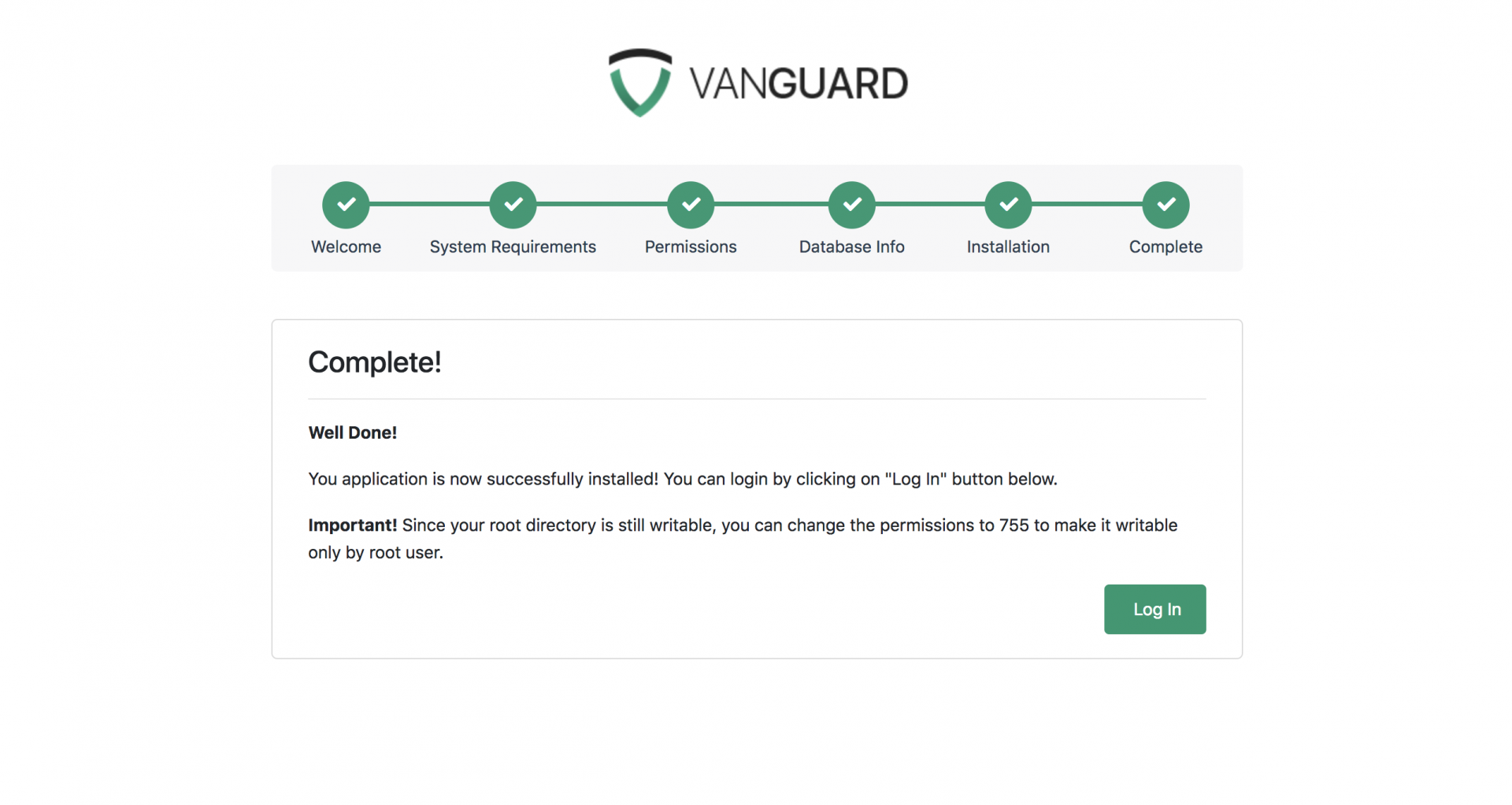
<p>Once the application is successfully completed, you will see the last step from installation wizard, as per below</p><p><img src="https://support-hub--assets.s3.eu-west-2.amazonaws.com/assets/1/images/ozRemxMYkgBRq3N8QnUoXOBcwgQTXfp4sG0y6hQA.png" alt="ozRemxMYkgBRq3N8QnUoXOBcwgQTXfp4sG0y6hQA.png" /><br /></p><p>A default user will be created for you with following credentials:<br /></p>
<p><strong>username:</strong> admin <strong>password:</strong> admin123</p>

<p><strong>NOTE!</strong> Since your root directory is still writable by the group, you should now change the permissions to <code>755</code> and make it writable only by root system user. This is for security reasons.</p>
<p><strong>NOTE!</strong> Don't forget to change default user's credentials before you put the application to production!</p>

<p><a></a></p>
<h3>Application URL</h3>
<p>So, if you are wondering why your application is available only when you access the <code>public</code> folder of your website, the answer is relatively simple: <strong>because of security!</strong> This means that <strong>only</strong> your <code>public</code> folder should be accessible from the browser and that <code>app</code>, <code>storage</code> and other folders should not.</p>
<p>The best way to use your application in production is to change the document root inside nginx or Apache configuration files, to point to your <code>public</code> directory.</p>
<p>If you are using nginx, <a href="http://nginx.org/en/docs/beginners_guide.html">here</a> is beginners guide that will let you know how you can change your document root to point to <code>public</code> folder, instead of root application folder.</p>
<p>On the other hand, if you are using Apache, there is good <a href="http://stackoverflow.com/questions/5891802/how-do-i-change-the-root-directory-of-an-apache-server">Stack Overflow</a> answer to how you can change the document root to point to some other folder (<code>public</code> folder in our case). Also, you can create Apache Virtual Hosts (more info on this can be found <a href="https://www.digitalocean.com/community/tutorials/how-to-set-up-apache-virtual-hosts-on-ubuntu-14-04-lts">here</a>) that will allow you to point your application to serve files from <code>public</code> folder and leave your other applications on same server untouched.</p>
<p>But, what if you are hosting your application on some shared hosting and you are not able to change your document root? In that case, you will have to modify some application files.</p>
<h4>Changing Application's Public Directory</h4>
<p>Let's say that you want to upload your application to some shared hosting. Typically, there will be an <code>public_html</code> directory where you would upload your application since everything that's inside that directory will be accessible via HTTP. But, as it is already mentioned, it is not good from a security standpoint.</p>
<h4>Step 1 - Uploading the application</h4>
<p>So, in this case, the best way is to upload Vanguard application into its own folder that is <strong>one level above</strong> the <code>public_html</code> folder. In that case, your directory structure will look something like this:</p>
<pre><code><span>.</span>
<span>.</span><span>.</span>
<span>/</span>public_html
<span>/</span>some_other_folder
<span>/</span>Vanguard</code></pre>
<p>In this case, we have uploaded our whole Vanguard app into <code>Vanguard</code> folder that is on the same level as your <code>public_html</code> folder, and it is <strong>not</strong> accessible from your browser.</p>
<h4>Step2 - Copying public files</h4>
<p>Now you need to copy <strong>everything</strong> from Vanguard's <code>public</code> folder to <code>public_html</code> folder on your server (you can remove <code>Vanguard/public</code> folder after moving those files).</p>
<p>This will allow us to change the name and location of <code>public</code> folder for our application.</p>
<h4>Step3 - Updating index.php file</h4>
<p>The final step is to update the <code>index.php</code> file you have copied from <code>public</code> to <code>public_html</code> directory. So, go to <code>public_html</code> and edit <code>index.php</code> file and update it as follows:</p>
<pre><code><span>//update path to autoload.php file</span>
<span>require</span> <span>__DIR__</span><span>.</span><span>'/../Vanguard/vendor/autoload.php'</span><span>;</span>

<span>//update path to app.php file</span>
<span>$app</span> <span>=</span> <span>require_once</span> <span>__DIR__</span><span>.</span><span>'/../Vanguard/bootstrap/app.php'</span><span>;</span>

<span>//this line should be added right after previous line where $app variable </span>
<span>//is defined and it is used to tell Laravel where your public folder is now. </span>
<span>//Do not change it, just copy and paste it!</span>
$app-&gt;usePublicPath(__DIR__);

<span>//leave the rest unchanged</span></code></pre>
<p>And that's it, Vanguard application will now be available at <code>yourdomain.com</code>, and all application files will be secured.</p>
<p>Of course, if you want, you can place <code>public</code> Vanguard files (those files you have copied to <code>public_html</code> directory int Step 2) into any other folder/subfolder on your website, as long as you update the path to <code>autoload.php</code> and <code>app.php</code> files inside your <code>index.php</code> file.</p>
<p><a></a></p>
<h3>Re-Installing The App</h3>
<p>Let's say that you have installed the Vanguard application, but, for some reason, you want to re-install it and start from scratch.</p>
<p>In that case, the easiest way is to just delete the whole application and drop all DB tables and start the installation process again. However, in case you have modified only one or two files, you don't have to delete and re-upload the whole app because of that. You simply can replace those modified files with original files from the ZIP archive, remove the database and remove <code>.env</code> file from Vanguard's root folder. The <code>.env</code> file is the key here since Vanguard will check if that file exists on every request and, if a file does not exist, you will be redirected to the installation wizard automatically.</p>]]>
            </summary>
                                    <updated>2023-04-11T09:42:02+00:00</updated>
        </entry>
            <entry>
            <title><![CDATA[Configuration]]></title>
            <link rel="alternate" href="https://milos.support-hub.io/articles/vanguard-configuration" />
            <id>https://milos.support-hub.io/3</id>
            <author>
                <name><![CDATA[Milos Stojanovic]]></name>
            </author>
            <summary type="html">
                <![CDATA[<p>This section contains some important configuration options that are specific to the Vanguard application. Since Vanguard is using the Laravel PHP framework, full configuration options for some framework-specific stuff can be found in <a href="https://laravel.com/docs/5.3/configuration">Laravel documentation</a>.</p>
<p><a></a></p>
<h3>Social Authentication</h3>
<p>If you want to allow social authentication for your users, you will have to define which social providers you want to allow. The list of social providers is declared inside <code>config/auth.php</code> file. Vanguard supports <strong>Facebook</strong>, <strong>Twitter,</strong> and <strong>Google+</strong> by default.</p>
<p>The following code is an example of allowing all three default supported providers for Vanguard application:</p>
<pre><code><span>'social'</span> <span>=</span><span>&gt;</span> <span>[</span>
    <span>'providers'</span> <span>=</span><span>&gt;</span> <span>[</span><span>'facebook'</span><span>,</span> <span>'twitter'</span><span>,</span> <span>'google'</span><span>]</span>
<span>]</span><span>,</span></code></pre>
<p>If you want to disable some social providers, just remove it from that providers array and you are good to go. Also, if you don't want social authentication on your website, just <strong>empty</strong> that providers array, as follows:</p>
<pre><code><span>'social'</span> <span>=</span><span>&gt;</span> <span>[</span>
    <span>'providers'</span> <span>=</span><span>&gt;</span> <span>[</span><span>]</span>
<span>]</span><span>,</span></code></pre>
<h4>Facebook</h4>
<p><a href="https://developers.facebook.com/docs/apps/register">Here</a> is a detailed explanation of how you can create a Facebook application and acquire the application id and secret key, required for social authentication. During the application creation and configuration, make sure that you have entered the correct application domain on the application's settings page.</p>
<p>After you create an application, you can find your App ID and App Secret keys on your application's Dashboard. Those keys should be copied to <code>.env</code> the configuration file available inside Vanguard's root directory, as follows:</p>
<pre><code><span>FACEBOOK_CLIENT_ID</span><span>=</span>your_application_id_from_facebook
<span>FACEBOOK_CLIENT_SECRET</span><span>=</span>your_application_secret_from_facebook
<span>FACEBOOK_CALLBACK_URI</span><span>=</span>http<span>:</span><span>//YOUR_DOMAIN/auth/facebook/callback</span></code></pre> 
<p><strong>Note!</strong> The <code>.env</code> file will be available inside your root folder <strong>after</strong> successful installation, so make sure that you have already installed the application before you start the configuration process.</p>

<p><strong>Note on Callback URL</strong></p>
<p>Since all social providers require a callback url, if you haven't removed <code>public</code> from your application url, make sure that you provide the correct callback url that also contains <code>public</code> segment. So, for example, your Facebook callback will look like this</p>
<pre><code>http<span>:</span><span>//YOUR_DOMAIN/public/auth/facebook/callback</span></code></pre>
<h4>Twitter</h4>
<p>In order to create Twitter application, and get the required Application Id and Secret key, go to <a href="https://apps.twitter.com/">Twitter Application Management</a> and click <strong>Create New App</strong> button at the top right corner. When app creation form is opened, fill all required fields and click <strong>Create your Twitter Application</strong> button at the bottom of the page.</p>

<p><strong>Note!</strong> Your <strong>Callback URL</strong> is <code>http://YOUR_DOMAIN/auth/twitter/callback</code>.</p>

<p>After the application is created, go to the <strong>Keys and Access Tokens</strong> tab, grab your Consumer Key and Consumer Secret, and paste them into your <code>.env</code> file as follows:</p>
<pre><code><span>TWITTER_CLIENT_ID</span><span>=</span>your_consumer_key
<span>TWITTER_CLIENT_SECRET</span><span>=</span>your_consumer_secret
<span>TWITTER_CALLBACK_URI</span><span>=</span>http<span>:</span><span>//YOUR_DOMAIN/auth/twitter/callback</span></code></pre>
<h4>Google+</h4>
<p>In order to utilize Google+ Authentication, first you need to create a new Google Project/Application. To do that, go to <a href="https://console.developers.google.com/project">https://console.developers.google.com/project</a>, click the <strong>Create project</strong> button at the top left corner, and enter your Project name.</p>
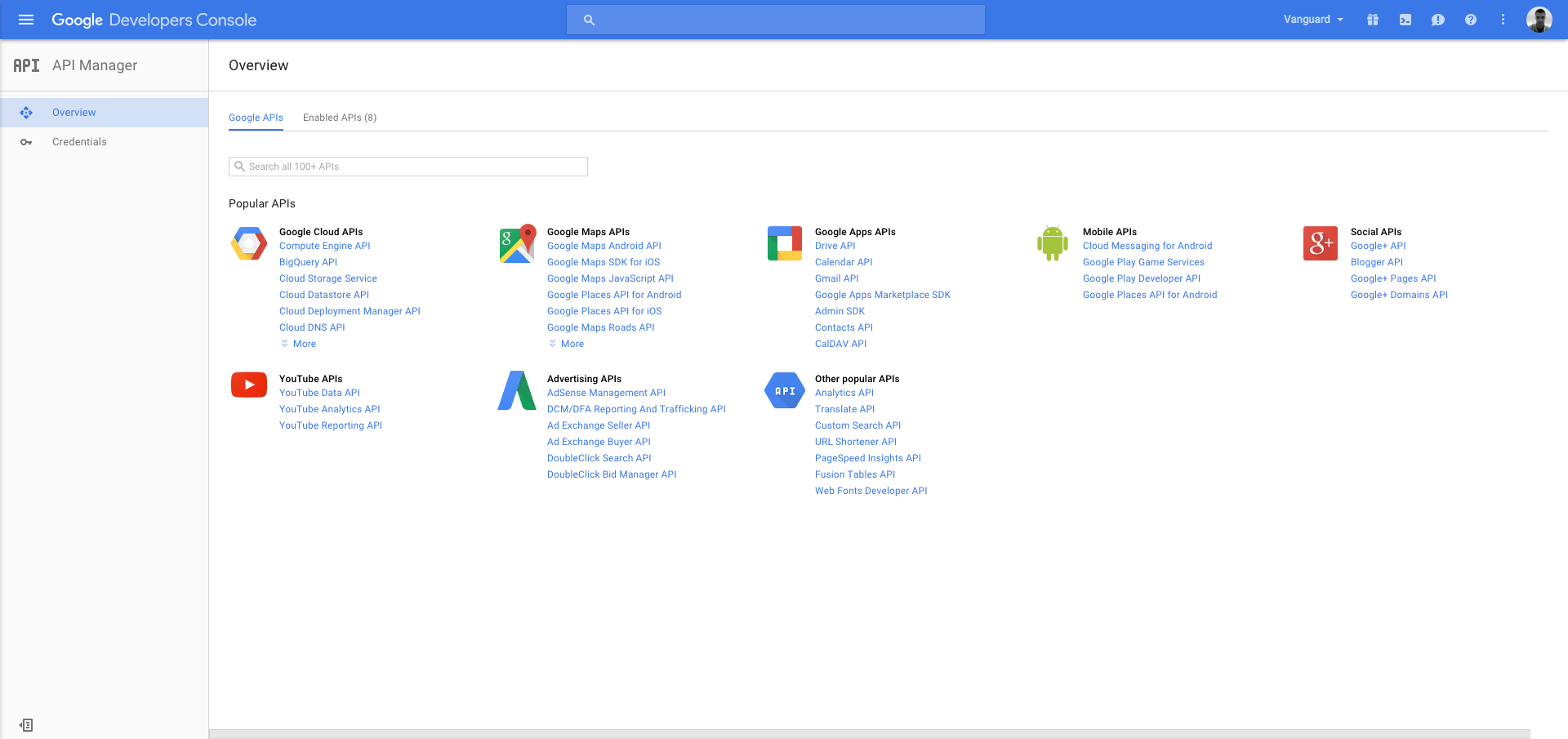
<p>After you have created your project, you now have to enable Google+ API and get the credentials that will be used for authentication. Go to <a href="https://console.developers.google.com/apis/library">https://console.developers.google.com/apis/library</a>, select your project from the drop-down available on the top right header, and click on the Google+ API link inside the list of available Google APIs.</p><p><img src="https://support-hub--assets.s3.eu-west-2.amazonaws.com/assets/1/images/UkOqgICJD1ilgUeo2JiJ274BY1yRQSIDRjg3lBWU.png" alt="UkOqgICJD1ilgUeo2JiJ274BY1yRQSIDRjg3lBWU.png" /><br /></p>
<p><a href="assets/img/g_plus_api.png"></a></p>
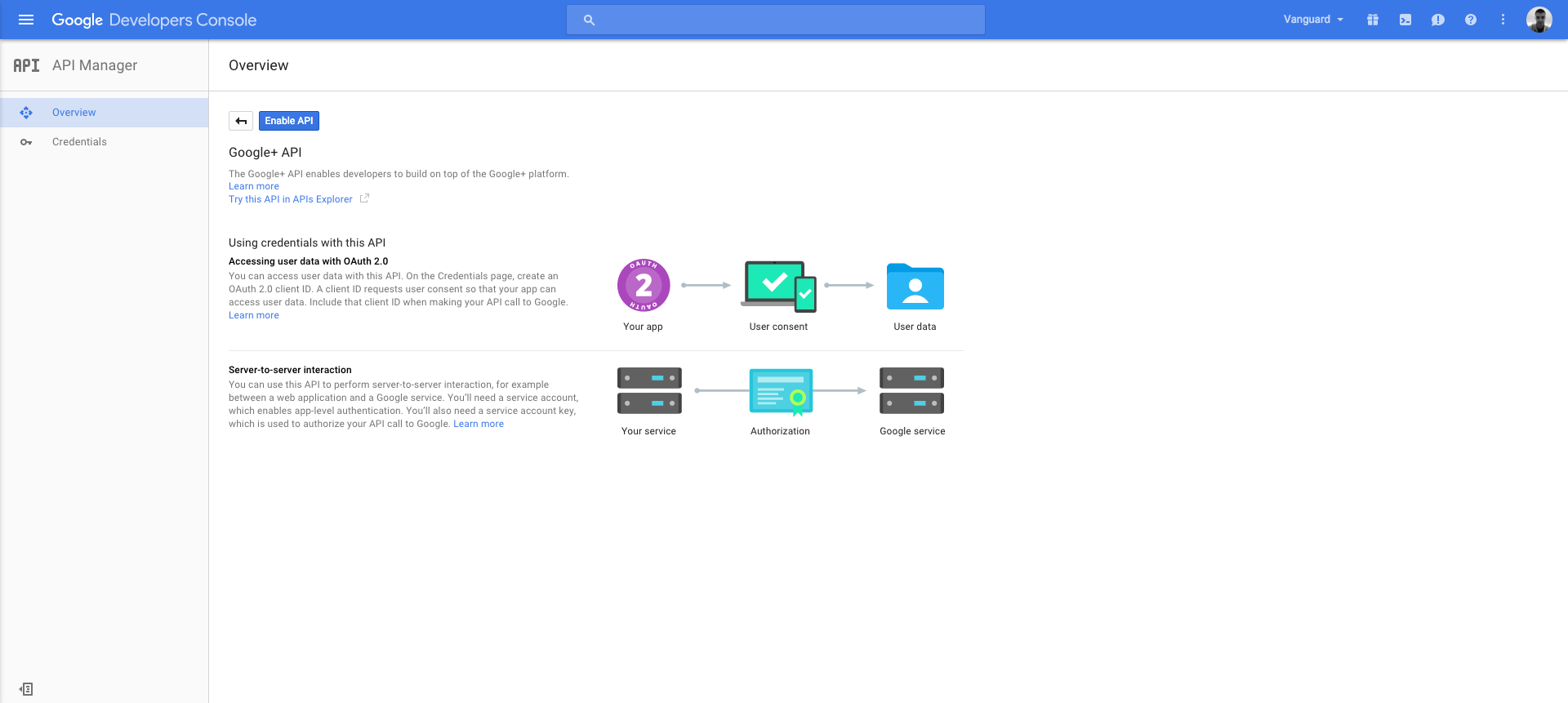
<p>After opening the Google+ API page, click the <strong>Enable API</strong> button in order to enable the API.</p><p><img src="https://support-hub--assets.s3.eu-west-2.amazonaws.com/assets/1/images/Q4EyLEk1LMJw4DGcBBuG2ea08PLcUDSNQoqkaWa0.png" alt="Q4EyLEk1LMJw4DGcBBuG2ea08PLcUDSNQoqkaWa0.png" /><br /></p>
<p><a href="assets/img/g_plus_api_enable.png"></a></p>
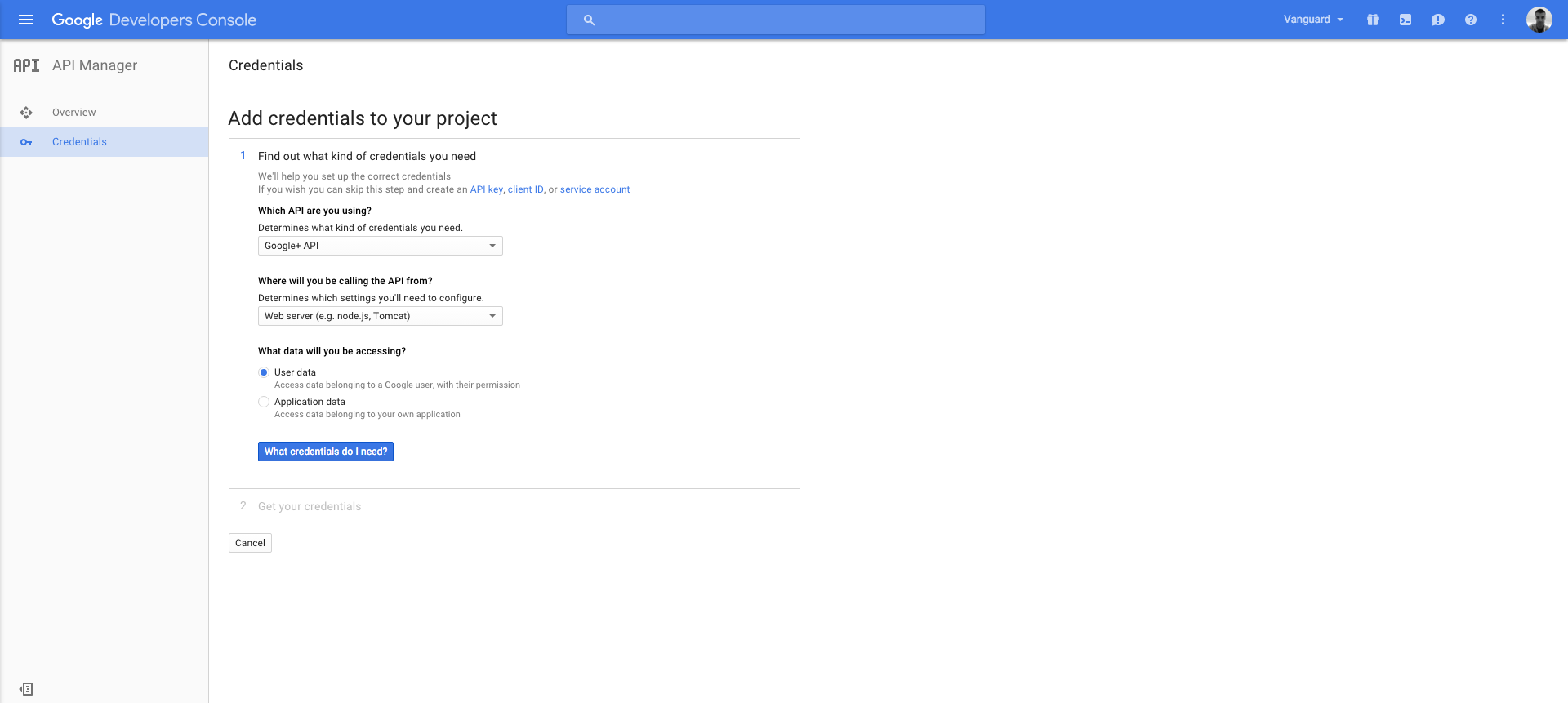
<p>After enabling the API, the only remaining step is to get the credentials you need. Just click on the <strong>Go to Credentials</strong> button, fill in the displayed credentials form as follows, and click <strong>What credentials do I need?</strong> button:</p><p><img src="https://support-hub--assets.s3.eu-west-2.amazonaws.com/assets/1/images/mkRVFAs9POIrgS9eAEW2HIeKpTyCvvNkuv8Ol4m2.png" alt="mkRVFAs9POIrgS9eAEW2HIeKpTyCvvNkuv8Ol4m2.png" /><br /></p>
<p><a href="assets/img/g_plus_api_credentials1.png"></a></p>
<p>After entering the required application Name, make sure that you enter <code>http://YOUR_DOMAIN</code> in <strong>Authorized JavaScript origins</strong> section, and <code>http://YOUR_DOMAIN/auth/google/callback</code> in <strong>Authorized redirect URIs</strong> section.</p>
<p>After you fill those fields, click <strong>Create client ID</strong> button, provide your product name as required, and get your Client Id and Client Secret keys.</p>
<p>When you have those keys, the only thing left for you to do is to paste them into your <code>.env</code> file as follows:</p>
<pre><code><span>GOOGLE_CLIENT_ID</span><span>=</span>your_client_id
<span>GOOGLE_CLIENT_SECRET</span><span>=</span>your_client_secret
<span>GOOGLE_CALLBACK_URI</span><span>=</span>http<span>:</span><span>//YOUR_DOMAIN/auth/google/callback</span></code></pre>
<p><a></a></p>
<h3>Google reCAPTCHA</h3>
<p>Google's reCAPTCHA is available for Vanguard's user registration form. Enabling reCAPTCHA is, fortunately, an easy thing to do. Just go to <a href="https://www.google.com/recaptcha/intro/index.html">reCaptcha Website</a>, pick the "Challenge (v2)" for the reCaptcha type, get your <em>Site Key</em> and <em>Secret Key,</em> and paste them into your <code>.env</code> file as follows:</p>
<pre><code><span>RECAPTCHA_SECRETKEY</span><span>=</span>your_recaptcha_secret_key
<span>RECAPTCHA_SITEKEY</span><span>=</span>your_recaptcha_site_key</code></pre>
<p>That's all you need to do. Now you can enable or disable reCAPTCHA on your registration page from the <a href="settings.html#auth">Auth and Registration</a> settings page.</p>
<p><a></a></p>
<h3>Email Configuration</h3>
<p>By default, Vanguard will be configured to use a native PHP mail driver for sending emails. However, you can configure it to use <code>SMTP</code>, <code>Sendmail</code>, <code>Mailgun</code>, <code>Mandrill</code>, <code>Amazon SES</code> or <code>Log</code> driver (good for development purposes).</p>
<p>Here we will cover only SMTP configuration, and if you are interested in other options mentioned above, you can find all details of how to enable them inside <a href="https://laravel.com/docs/5.3/mail#introduction">Laravel Documentation</a>.</p>
<h4>SMTP</h4>
<p>In order to switch to an SMTP driver, instead of native PHP mail, just open your <code>.env</code> file and define your mail environment variables as follows:</p>
<pre><code><span>MAIL_MAILER</span><span>=</span>smtp
<span>MAIL_HOST</span><span>=</span>your_smtp_host
<span>MAIL_PORT</span><span>=</span>your_smtp_port
<span>MAIL_USERNAME</span><span>=</span>your_smtp_username
<span>MAIL_PASSWORD</span><span>=</span>your_smtp_password
<span>MAIL_ENCRYPTION</span><span>=</span>your_smtp_encryption</code></pre> 
<p><strong>Note!</strong> If your SMTP server does not have encryption, just set it to <code>null</code>, or set it to blank like this: <code>MAIL_ENCRYPTION=</code>.</p>

<h4>Additional Mail Configuration</h4>
<p>One thing that you would want to configure for your application is your "From" email address and "From" name. You can do that by editing <code>config/mail.php</code> file and updating <code>from</code> array to fit your needs.</p>
<p><a></a></p>
<h3>Session Configuration</h3>
<p>Vanguard supports multiple session drivers like <code>File</code>, <code>Cookie</code>, <code>Database</code>, <code>APC</code>, <code>Memcached</code>, <code>Redis</code> and <code>Array</code> (used for testing purposes only).</p>

<p><strong>Note!</strong> The default session driver is <strong>Database</strong>, since it is the only driver that supports user session management. If you change the database driver to any other driver than the session, Active Sessions Management feature will be <strong>disabled</strong>.</p>

<p>Changing the session driver is as easy as updating your <code>SESSION_DRIVER</code> variable inside <code>.env</code> file and changing its value to one of the above drivers (all lowercase).</p>
<p>For example, if you want to switch to <code>File</code> session driver, you will update your <code>.env</code> file like the following:</p>
<pre><code><span>SESSION_DRIVER</span><span>=</span>file</code></pre>
<p>That's it, you don't have to change anything inside your codebase. Everything will be working as usual, except you won't be able to track user sessions.</p>
<p>More session configuration options are available inside the <code>config/session.php</code> configuration file. Feel free to check that file and configure things such as session lifetime, session cookie name, etc.</p>
<p><a></a></p>
<h3>HTTPS</h3>
<p>If you want to force all the pages to be accessed via HTTPS, the recommended way to do so is via your web server configuration. If you are using Apache or Nginx, or some other web server, you can easily configure them to redirect all traffic to HTTPS.</p>
<p>However, if you are not sure how to do that or your server configuration does not allow you so, you can simply add <code>FORCE_SSL</code> variable to your <code>.env</code> file and set it to <code>true</code>. It will force all links to be served via HTTPS. So, inside your <code>.env</code> file, it should look like the following:</p>
<pre><code><span>//... </span>
<span>FORCE_SSL</span><span>=</span><span>true</span></code></pre>
<p><a></a></p>
<h3>Date/Time Format</h3>
<p>Date and date-time format can be configured inside the <code>config/app.php</code> file. By editing <code>date_format</code> and <code>date_time_format</code> configuration parameters you are able to configure how it will be formatted across the application.</p>
<p><a></a></p>
<h3>JSON API</h3>
<p>Built-in JSON API is disabled by default, and if you want to enable it, just add a new <code>.env</code> variable like the following:</p>
<pre><code><span>//... </span>
<span>EXPOSE_API</span><span>=</span><span>true</span></code></pre>
<p>After that, your API will be located at <code>yourcomain.com/api</code> and you can start using it. More info about the JSON API can be found <a href="https://milos.support-hub.io/articles/vanguard-json-api">here</a>.</p>]]>
            </summary>
                                    <updated>2024-08-06T08:31:09+00:00</updated>
        </entry>
            <entry>
            <title><![CDATA[Using Vanguard for Existing Website]]></title>
            <link rel="alternate" href="https://milos.support-hub.io/articles/using-vanguard-for-existing-website" />
            <id>https://milos.support-hub.io/17</id>
            <author>
                <name><![CDATA[Milos Stojanovic]]></name>
            </author>
            <summary type="html">
                <![CDATA[<h2>Introduction</h2>
<p>If you already have an existing PHP application, and you want to add user login and registration features, this section will show you how to accomplish that with Vanguard.</p>
<p>If can, it is highly recommended to move your application to Laravel framework and incorporate it inside Vanguard application. This will give you a ton of great features and abilities, and make your website more organised and maintainable.</p>
<p>For the purpose of this example, we will create a very simple one-page website that we will protect using Vanguard. We will first protect the whole page and make it be available for authenticated users only. After that, we will make that webpage display some content only for authenticated users, and if user is a guest then he won't be able to see that content. For the purpose of this example, we will create a very simple one-page website that we will protect using Vanguard. We will first protect the whole page and make it be available for authenticated users only. After that, we will make that webpage display some content only for authenticated users, and if user is a guest then he won't be able to see that content.</p>
<p><a></a></p>
<h2>Website Structure</h2>
<p>The HTML for example page is given below:</p>
<pre><code><span><span><span>&lt;</span>!doctype</span> <span>html</span><span>&gt;</span></span>
<span><span><span>&lt;</span>html</span> <span>lang</span><span><span>=</span><span>"</span>en<span>"</span></span><span>&gt;</span></span>
<span><span><span>&lt;</span>head</span><span>&gt;</span></span>
    <span><span><span>&lt;</span>meta</span> <span>charset</span><span><span>=</span><span>"</span>UTF-8<span>"</span></span><span>&gt;</span></span>
    <span><span><span>&lt;</span>title</span><span>&gt;</span></span>My Website<span><span><span>&lt;/</span>title</span><span>&gt;</span></span>

    <span><span><span>&lt;</span>link</span> <span>rel</span><span><span>=</span><span>"</span>stylesheet<span>"</span></span> <span>href</span><span><span>=</span><span>"</span>https://maxcdn.bootstrapcdn.com/bootstrap/3.3.6/css/bootstrap.min.css<span>"</span></span><span>&gt;</span></span>
<span><span><span>&lt;/</span>head</span><span>&gt;</span></span>
<span><span><span>&lt;</span>body</span><span>&gt;</span></span>

<span><span><span>&lt;</span>div</span> <span>class</span><span><span>=</span><span>"</span>container<span>"</span></span><span>&gt;</span></span>
    <span><span><span>&lt;</span>h1</span><span>&gt;</span></span>My Simple Website<span><span><span>&lt;/</span>h1</span><span>&gt;</span></span>

    <span><span><span>&lt;</span>br</span><span>&gt;</span></span>

    <span><span><span>&lt;</span>div</span> <span>class</span><span><span>=</span><span>"</span>well<span>"</span></span><span>&gt;</span></span>
        Lorem ipsum dolor sit amet, consectetur adipisicing elit. Consectetur debitis distinctio dolore
        eligendi enim fugit ipsa nemo odio odit quam quibusdam sapiente, voluptatum? Asperiores quis, rerum? Aperiam
        iusto nostrum repellat?
    <span><span><span>&lt;/</span>div</span><span>&gt;</span></span>

    <span><span><span>&lt;</span>h4</span><span>&gt;</span></span>Random List<span><span><span>&lt;/</span>h4</span><span>&gt;</span></span>
    <span><span><span>&lt;</span>ul</span> <span>class</span><span><span>=</span><span>"</span>list-group<span>"</span></span><span>&gt;</span></span>
        <span><span><span>&lt;</span>li</span> <span>class</span><span><span>=</span><span>"</span>list-group-item<span>"</span></span><span>&gt;</span></span>Cras justo odio<span><span><span>&lt;/</span>li</span><span>&gt;</span></span>
        <span><span><span>&lt;</span>li</span> <span>class</span><span><span>=</span><span>"</span>list-group-item<span>"</span></span><span>&gt;</span></span>Dapibus ac facilisis in<span><span><span>&lt;/</span>li</span><span>&gt;</span></span>
        <span><span><span>&lt;</span>li</span> <span>class</span><span><span>=</span><span>"</span>list-group-item<span>"</span></span><span>&gt;</span></span>Morbi leo risus<span><span><span>&lt;/</span>li</span><span>&gt;</span></span>
        <span><span><span>&lt;</span>li</span> <span>class</span><span><span>=</span><span>"</span>list-group-item<span>"</span></span><span>&gt;</span></span>Porta ac consectetur ac<span><span><span>&lt;/</span>li</span><span>&gt;</span></span>
        <span><span><span>&lt;</span>li</span> <span>class</span><span><span>=</span><span>"</span>list-group-item<span>"</span></span><span>&gt;</span></span>Vestibulum at eros<span><span><span>&lt;/</span>li</span><span>&gt;</span></span>
    <span><span><span>&lt;/</span>ul</span><span>&gt;</span></span>
<span><span><span>&lt;/</span>div</span><span>&gt;</span></span>

<span><span><span>&lt;/</span>body</span><span>&gt;</span></span>
<span><span><span>&lt;/</span>html</span><span>&gt;</span></span></code></pre>
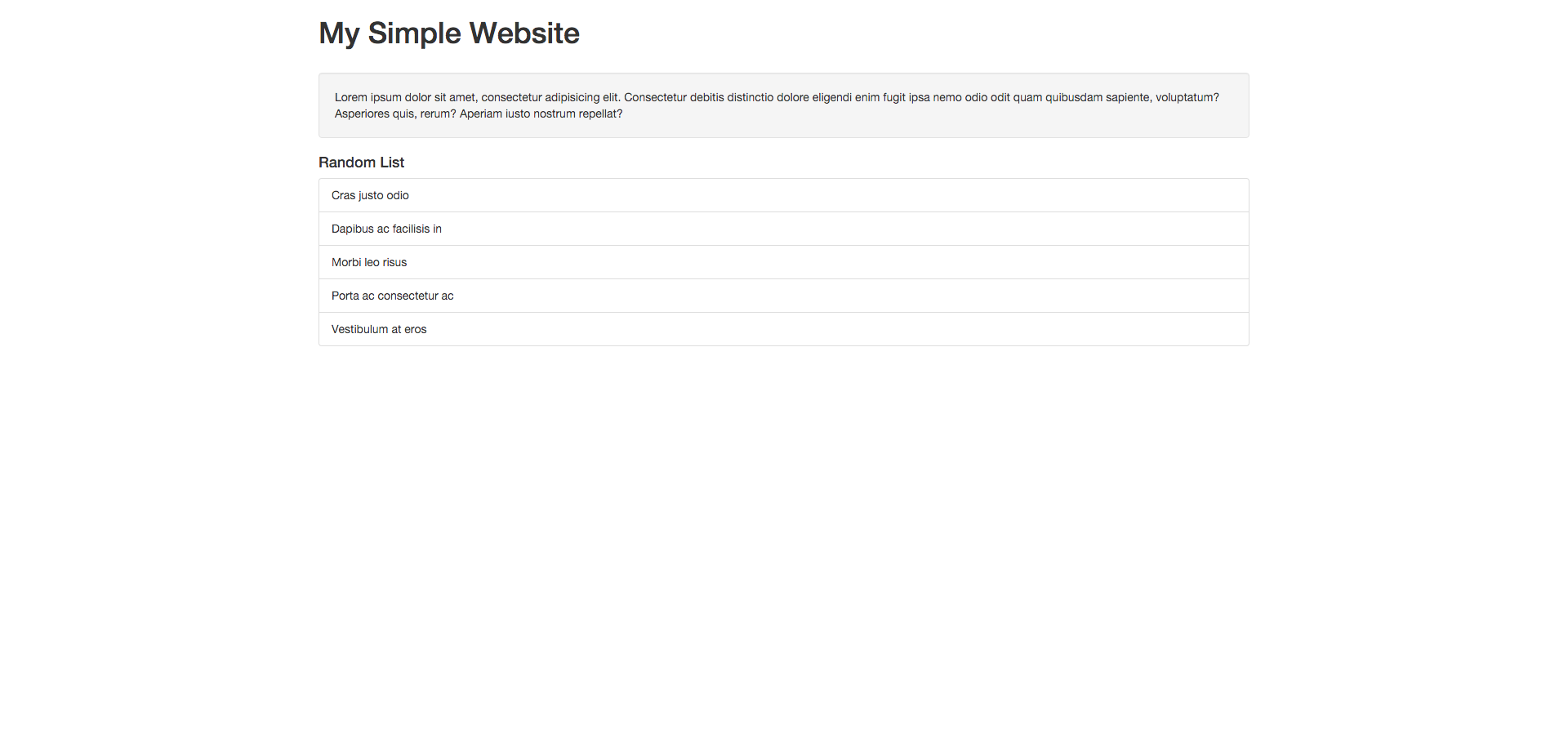
<p>And, this page currently looking like this:</p>
<p><a href="assets/img/examples/simple-website.png"></a></p><p><img src="https://support-hub--assets.s3.eu-west-2.amazonaws.com/assets/1/images/5x6GcdlmPiacjCqCuRuxafZW2I6UNUnMmCd8LVkK.png" alt="5x6GcdlmPiacjCqCuRuxafZW2I6UNUnMmCd8LVkK.png" /><br /></p>
<p><a></a></p>
<h2>Protecting The Website</h2>
<p>In order to protect the website and allow access to authenticated users only, all you have to do is to add following code snippet <strong>at the top of the webpage</strong> you want to protect:</p>
<pre><code><span><span>&lt;?php</span>

<span>// This should be equal to: PATH_TO_VANGUARD_FOLDER/extra/auth.php</span>
<span>require_once</span> <span>__DIR__</span> <span>.</span> <span>'/../extra/auth.php'</span><span>;</span>

<span>// Here we just check if user is not </span>
<span>// logged in, and in that case we redirect</span>
<span>// the user to vanguard login page.</span>
<span>if</span> <span>(</span><span>!</span> <span>Auth<span>::</span></span><span>check</span><span>(</span><span>)</span><span>)</span> <span>{</span>
    <span>redirectTo</span><span>(</span><span>'login'</span><span>)</span><span>;</span>
<span>}</span>

<span>?&gt;</span></span></code></pre> 
<p><strong>Note!</strong> Make sure that you don't have any blank space before open <code>&lt;?php</code> tag, not even a space!</p>

<p>If your Vanguard installation is inside some subfolder, just make sure that you call <code>redirectTo</code> method with correct parameter. For example, if you have installed Vanguard inside <code>vanguard</code> folder that is in your server's root, your <code>redirectTo</code> function call should look like this:</p>
<pre><code><span>//...</span>
    <span>redirectTo</span><span>(</span><span>'vanguard/login'</span><span>)</span><span>;</span>
<span>//...</span></code></pre>
<p><a></a></p>
<h2>Redirecting to Custom Page After Login</h2>
<p>In case you want to redirect users to some custom page after successful authentication, this can be easily achieved with Vanguard as following:</p>
<pre><code><span>//This can be url to any page, it doesn't matter</span>
<span>//if it is on your existing website or not</span>
<span>$to</span> <span>=</span> "http<span>:</span><span>//www.google.com";</span>

<span>if</span> <span>(</span><span>!</span> <span>Auth<span>::</span></span><span>check</span><span>(</span><span>)</span><span>)</span> <span>{</span>
    <span>redirectTo</span><span>(</span><span>'login?to='</span> <span>.</span> <span>$to</span><span>)</span><span>;</span>
<span>}</span> </code></pre>
<p>There are many cases where you want to return user to current page after they successfully log in via Vanguard. Fortunately, previous example does exactly what you need, and the only thing you need to change is redirect page. Here is an example:</p>
<pre><code><span>//Move this to some helper function if you need it more than once</span>
 <span>$currentUrl</span> <span>=</span> <span>(</span><span>empty</span><span>(</span><span>$_SERVER</span><span>[</span><span>"HTTPS"</span><span>]</span><span>)</span> <span>?</span> "http<span>:</span><span>//" : "https://") . $_SERVER["HTTP_HOST"] . $_SERVER["REQUEST_URI"];</span>

 <span>if</span> <span>(</span><span>!</span> <span>Auth<span>::</span></span><span>check</span><span>(</span><span>)</span><span>)</span> <span>{</span>
     <span>redirectTo</span><span>(</span><span>'login?to='</span> <span>.</span> <span>$currentUrl</span><span>)</span><span>;</span>
 <span>}</span> </code></pre>
<p><a></a></p>
<h2>Displaying Content For Authenticated Users Only</h2>
<p>What if you want to still display a page to guest users, but hide some content from them and make it visible to authenticated users only? Luckily, Vanguard makes such task pretty easy.</p>
<p>First, lets modify the content of the website as following:</p>
<pre><code><span><span>&lt;?php</span> <span>require_once</span> <span>__DIR__</span> <span>.</span> <span>'/../extra/auth.php'</span><span>;</span> <span>?&gt;</span></span>
<span><span><span><span>&lt;</span>!doctype</span> <span>html</span><span>&gt;</span></span></span>
<span><span><span><span>&lt;</span>html</span> <span>lang</span><span><span>=</span><span>"</span>en<span>"</span></span><span>&gt;</span></span></span>
<span><span><span><span>&lt;</span>head</span><span>&gt;</span></span></span>
    <span><span><span><span>&lt;</span>meta</span> <span>charset</span><span><span>=</span><span>"</span>UTF-8<span>"</span></span><span>&gt;</span></span></span>
    <span><span><span><span>&lt;</span>title</span><span>&gt;</span></span></span>My Website<span><span><span><span>&lt;/</span>title</span><span>&gt;</span></span></span>

    <span><span><span><span>&lt;</span>link</span> <span>rel</span><span><span>=</span><span>"</span>stylesheet<span>"</span></span> <span>href</span><span><span>=</span><span>"</span>https://maxcdn.bootstrapcdn.com/bootstrap/3.3.6/css/bootstrap.min.css<span>"</span></span><span>&gt;</span></span></span>
<span><span><span><span>&lt;/</span>head</span><span>&gt;</span></span></span>
<span><span><span><span>&lt;</span>body</span><span>&gt;</span></span></span>

<span><span><span><span>&lt;</span>div</span> <span>class</span><span><span>=</span><span>"</span>container<span>"</span></span><span>&gt;</span></span></span>
    <span><span><span><span>&lt;</span>h1</span><span>&gt;</span></span></span>
        My Simple Website
        <span><span>&lt;?php</span> <span>if</span> <span>(</span><span>Auth<span>::</span></span><span>check</span><span>(</span><span>)</span><span>)</span><span>:</span> <span>?&gt;</span></span>
            <span><span><span><span>&lt;</span>a</span> <span>href</span><span><span>=</span><span>"</span>logout<span>"</span></span> <span>class</span><span><span>=</span><span>"</span>btn btn-default pull-right<span>"</span></span><span>&gt;</span></span></span>Logout<span><span><span><span>&lt;/</span>a</span><span>&gt;</span></span></span>
        <span><span>&lt;?php</span> <span>else</span><span>:</span> <span>?&gt;</span></span>
            <span><span><span><span>&lt;</span>a</span> <span>href</span><span><span>=</span><span>"</span>logout<span>"</span></span> <span>class</span><span><span>=</span><span>"</span>btn btn-primary pull-right<span>"</span></span><span>&gt;</span></span></span>Login<span><span><span><span>&lt;/</span>a</span><span>&gt;</span></span></span>
        <span><span>&lt;?php</span> <span>endif</span><span>;</span> <span>?&gt;</span></span>
    <span><span><span><span>&lt;/</span>h1</span><span>&gt;</span></span></span>

    <span><span><span><span>&lt;</span>br</span><span>&gt;</span></span></span>

    <span><span><span><span>&lt;</span>div</span> <span>class</span><span><span>=</span><span>"</span>well<span>"</span></span><span>&gt;</span></span></span>
        Lorem ipsum dolor sit amet<span>,</span> consectetur adipisicing elit<span>.</span> Consectetur debitis distinctio dolore
        eligendi enim fugit ipsa nemo odio odit quam quibusdam sapiente<span>,</span> voluptatum<span>?</span> Asperiores quis<span>,</span> rerum<span>?</span> Aperiam
        iusto nostrum repellat<span>?</span>
    <span><span><span><span>&lt;/</span>div</span><span>&gt;</span></span></span>

    <span><span>&lt;?php</span> <span>if</span> <span>(</span><span>Auth<span>::</span></span><span>check</span><span>(</span><span>)</span><span>)</span><span>:</span> <span>?&gt;</span></span>
        <span><span><span><span>&lt;</span>h4</span><span>&gt;</span></span></span>Random List<span><span><span><span>&lt;/</span>h4</span><span>&gt;</span></span></span>
        <span><span><span><span>&lt;</span>ul</span> <span>class</span><span><span>=</span><span>"</span>list-group<span>"</span></span><span>&gt;</span></span></span>
            <span><span><span><span>&lt;</span>li</span> <span>class</span><span><span>=</span><span>"</span>list-group-item<span>"</span></span><span>&gt;</span></span></span>Cras justo odio<span><span><span><span>&lt;/</span>li</span><span>&gt;</span></span></span>
            <span><span><span><span>&lt;</span>li</span> <span>class</span><span><span>=</span><span>"</span>list-group-item<span>"</span></span><span>&gt;</span></span></span>Dapibus ac facilisis in<span><span><span><span>&lt;/</span>li</span><span>&gt;</span></span></span>
            <span><span><span><span>&lt;</span>li</span> <span>class</span><span><span>=</span><span>"</span>list-group-item<span>"</span></span><span>&gt;</span></span></span>Morbi leo risus<span><span><span><span>&lt;/</span>li</span><span>&gt;</span></span></span>
            <span><span><span><span>&lt;</span>li</span> <span>class</span><span><span>=</span><span>"</span>list-group-item<span>"</span></span><span>&gt;</span></span></span>Porta ac consectetur ac<span><span><span><span>&lt;/</span>li</span><span>&gt;</span></span></span>
            <span><span><span><span>&lt;</span>li</span> <span>class</span><span><span>=</span><span>"</span>list-group-item<span>"</span></span><span>&gt;</span></span></span>Vestibulum at eros<span><span><span><span>&lt;/</span>li</span><span>&gt;</span></span></span>
        <span><span><span><span>&lt;/</span>ul</span><span>&gt;</span></span></span>
    <span><span>&lt;?php</span> <span>endif</span><span>;</span> <span>?&gt;</span></span>
<span><span><span><span>&lt;/</span>div</span><span>&gt;</span></span></span>

<span><span><span><span>&lt;/</span>body</span><span>&gt;</span></span></span>
<span><span><span><span>&lt;/</span>html</span><span>&gt;</span></span></span></code></pre>
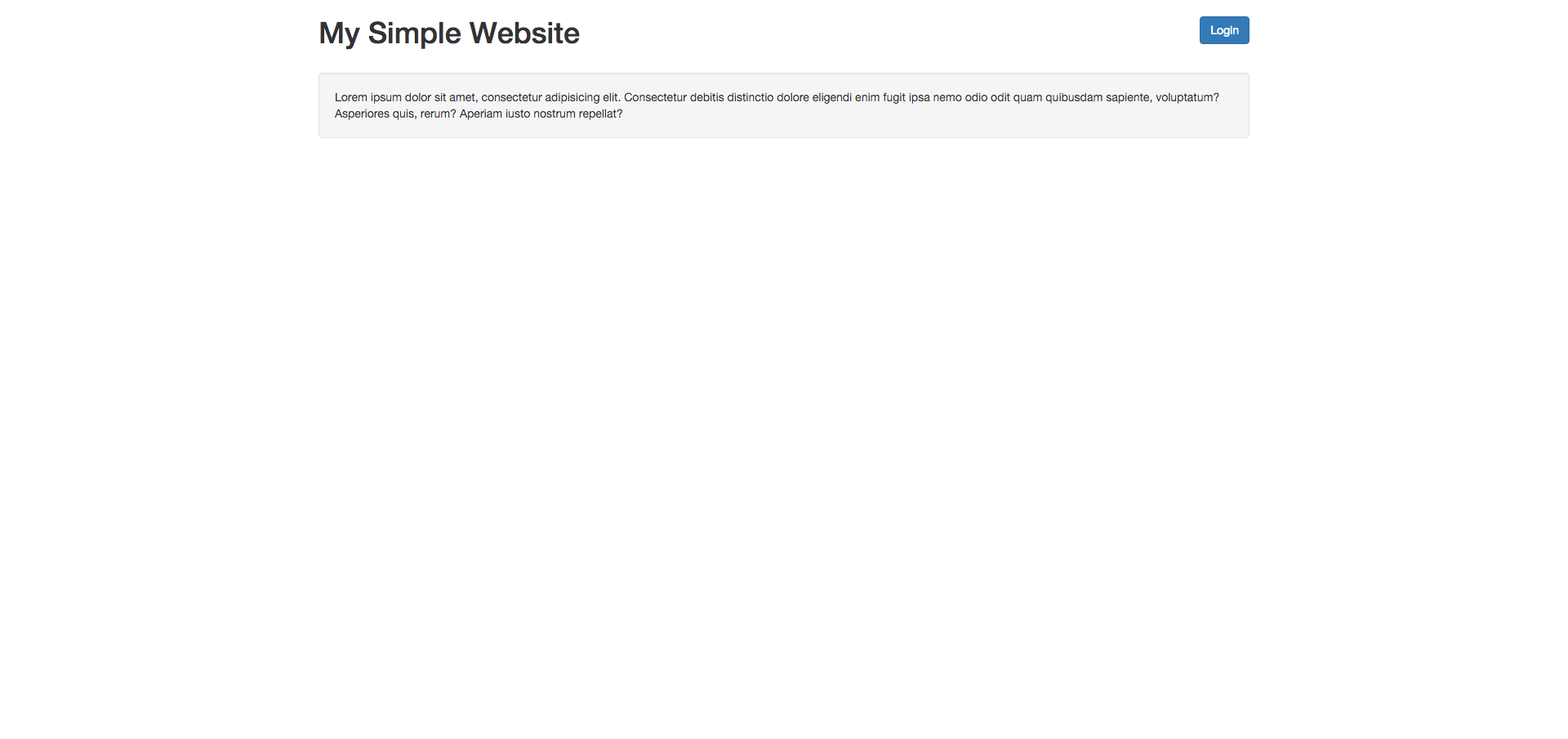
<p>Now, if we access the website as non-authenticated (guest) user, the page will look like following</p>
<p><a href="assets/img/examples/simple-website-guest.png"></a></p><p><img src="https://support-hub--assets.s3.eu-west-2.amazonaws.com/assets/1/images/ewp0FhmV3llh2eSO5Hl9qQSAKgKqJHjUQnwKUAPI.png" alt="ewp0FhmV3llh2eSO5Hl9qQSAKgKqJHjUQnwKUAPI.png" /><br /></p>
<p>So, as you can see, it works like this:</p>
<pre><code><span><span>&lt;?php</span> <span>if</span> <span>(</span><span>Auth<span>::</span></span><span>check</span><span>(</span><span>)</span><span>)</span><span>:</span> <span>?&gt;</span></span>
   <span>// content here will be displayed only if user is authenticated</span>
<span><span>&lt;?php</span> <span>else</span><span>:</span> <span>?&gt;</span></span>
   <span>// content here will be displayed only for guest users</span>
<span><span>&lt;?php</span> <span>endif</span><span>;</span> <span>?&gt;</span></span></code></pre>
<p>This means that, on webiste above, we did the following:</p>
<ol><li>If user is logged in, then we will display logout button. Otherwise, we will display Login button.</li>
<li>We will display Random List element only if user is logged in.</li>
</ol><p><a></a></p>
<h2>Displaying Content Based On User Role</h2>
<p>From outside (and from inside) of Vanguard application, currently logged in user can be fetched using Auth <a href="https://laravel.com/docs/master/facades">Facade</a>, like following:</p>
<pre><code><span>$user</span> <span>=</span> <span>Auth<span>::</span></span><span>user</span><span>(</span><span>)</span><span>;</span></code></pre>
<p>Now, by calling <code>echo $user-&gt;first_name;</code> it will print the value inside <code>first_name</code> database column for that specific user. So, as you can imagine, it work for all db columns, not only for <code>first_name</code>. If you are interested to learn more about models in Laravel, check the <a href="https://laravel.com/docs/master/eloquent">documentation</a>.</p>
<p>If we want to check if user has some role, it can be done like this:</p>
<pre><code><span>$user</span><span>-</span><span>&gt;</span><span>hasRole</span><span>(</span><span>'Admin'</span><span>)</span><span>;</span></code></pre>
<p>The parameter used for <code>hasRole</code> function is role <code>name</code>. Check <a href="roles-and-permissions.html">roles and permissions</a> section for more details about what is <code>name</code> attribute and how you can create/manage roles in Vanguard.</p>
<p>So, since we now know how to check if user has specific role, rendering some content or doing some action based on user's role is almost the same as we did for authenticated/non-authenticated users.</p>
<p>The modified website example will display Random List section only if currently logged in user has <strong>Admin</strong> role:</p>
<pre><code><span>//...</span>

    <span><span>&lt;?php</span> <span>if</span> <span>(</span><span>Auth<span>::</span></span><span>user</span><span>(</span><span>)</span><span>-</span><span>&gt;</span><span>hasRole</span><span>(</span><span>'Admin'</span><span>)</span><span>)</span><span>:</span> <span>?&gt;</span></span>
        <span><span><span><span>&lt;</span>h4</span><span>&gt;</span></span></span>Random List<span><span><span><span>&lt;/</span>h4</span><span>&gt;</span></span></span>
        <span><span><span><span>&lt;</span>ul</span> <span>class</span><span><span>=</span><span>"</span>list-group<span>"</span></span><span>&gt;</span></span></span>
            <span><span><span><span>&lt;</span>li</span> <span>class</span><span><span>=</span><span>"</span>list-group-item<span>"</span></span><span>&gt;</span></span></span>Cras justo odio<span><span><span><span>&lt;/</span>li</span><span>&gt;</span></span></span>
            <span><span><span><span>&lt;</span>li</span> <span>class</span><span><span>=</span><span>"</span>list-group-item<span>"</span></span><span>&gt;</span></span></span>Dapibus ac facilisis in<span><span><span><span>&lt;/</span>li</span><span>&gt;</span></span></span>
            <span><span><span><span>&lt;</span>li</span> <span>class</span><span><span>=</span><span>"</span>list-group-item<span>"</span></span><span>&gt;</span></span></span>Morbi leo risus<span><span><span><span>&lt;/</span>li</span><span>&gt;</span></span></span>
            <span><span><span><span>&lt;</span>li</span> <span>class</span><span><span>=</span><span>"</span>list-group-item<span>"</span></span><span>&gt;</span></span></span>Porta ac consectetur ac<span><span><span><span>&lt;/</span>li</span><span>&gt;</span></span></span>
            <span><span><span><span>&lt;</span>li</span> <span>class</span><span><span>=</span><span>"</span>list-group-item<span>"</span></span><span>&gt;</span></span></span>Vestibulum at eros<span><span><span><span>&lt;/</span>li</span><span>&gt;</span></span></span>
        <span><span><span><span>&lt;/</span>ul</span><span>&gt;</span></span></span>
    <span><span>&lt;?php</span> <span>endif</span><span>;</span> <span>?&gt;</span></span>

<span>//...</span></code></pre>
<p><a></a></p>
<h2>Displaying Content Based On User Permissions</h2>
<p>If we want to check if some user has some permission, we can simply do that by calling <code>hasPermission</code> method on some user instance, with <a href="roles-and-permissions.html#permissions">permission name</a> as parameter, like following:</p>
<pre><code><span>//This function call will return TRUE if </span>
<span>//user has specified permission, and false otherwise</span>
<span>$user</span><span>-</span><span>&gt;</span><span>hasPermission</span><span>(</span><span>'users.manage'</span><span>)</span></code></pre>
<p>Now, if we want to display Random List content from our example website to user with <code>see_random_list</code> permission, we can do it like following:</p>
<pre><code><span>//...</span>

    <span><span>&lt;?php</span> <span>if</span> <span>(</span><span>Auth<span>::</span></span><span>user</span><span>(</span><span>)</span><span>-</span><span>&gt;</span><span>hasPermission</span><span>(</span><span>'see_random_list'</span><span>)</span><span>)</span><span>:</span> <span>?&gt;</span></span>
        <span><span><span><span>&lt;</span>h4</span><span>&gt;</span></span></span>Random List<span><span><span><span>&lt;/</span>h4</span><span>&gt;</span></span></span>
        <span><span><span><span>&lt;</span>ul</span> <span>class</span><span><span>=</span><span>"</span>list-group<span>"</span></span><span>&gt;</span></span></span>
            <span><span><span><span>&lt;</span>li</span> <span>class</span><span><span>=</span><span>"</span>list-group-item<span>"</span></span><span>&gt;</span></span></span>Cras justo odio<span><span><span><span>&lt;/</span>li</span><span>&gt;</span></span></span>
            <span><span><span><span>&lt;</span>li</span> <span>class</span><span><span>=</span><span>"</span>list-group-item<span>"</span></span><span>&gt;</span></span></span>Dapibus ac facilisis in<span><span><span><span>&lt;/</span>li</span><span>&gt;</span></span></span>
            <span><span><span><span>&lt;</span>li</span> <span>class</span><span><span>=</span><span>"</span>list-group-item<span>"</span></span><span>&gt;</span></span></span>Morbi leo risus<span><span><span><span>&lt;/</span>li</span><span>&gt;</span></span></span>
            <span><span><span><span>&lt;</span>li</span> <span>class</span><span><span>=</span><span>"</span>list-group-item<span>"</span></span><span>&gt;</span></span></span>Porta ac consectetur ac<span><span><span><span>&lt;/</span>li</span><span>&gt;</span></span></span>
            <span><span><span><span>&lt;</span>li</span> <span>class</span><span><span>=</span><span>"</span>list-group-item<span>"</span></span><span>&gt;</span></span></span>Vestibulum at eros<span><span><span><span>&lt;/</span>li</span><span>&gt;</span></span></span>
        <span><span><span><span>&lt;/</span>ul</span><span>&gt;</span></span></span>
    <span><span>&lt;?php</span> <span>endif</span><span>;</span> <span>?&gt;</span></span>

<span>//...</span></code></pre>
<p>Of course, since <code>see_random_list</code> permission does not exist, we will have to create it first, as it is explained inside <a href="https://milos.support-hub.io/articles/vanguard-roles-and-permissions">roles and permissions</a> section, and set the <code>name</code> attribute to <code>see_random_list</code> (for Display Name we can use anything we want, ex: See Random List). When such permission is created, we can assign it to any role we want.</p>]]>
            </summary>
                                    <updated>2019-01-16T20:42:02+00:00</updated>
        </entry>
            <entry>
            <title><![CDATA[Customizing Stylesheets]]></title>
            <link rel="alternate" href="https://milos.support-hub.io/articles/customizing-vanguard-stylesheets" />
            <id>https://milos.support-hub.io/64</id>
            <author>
                <name><![CDATA[Milos Stojanovic]]></name>
            </author>
            <summary type="html">
                <![CDATA[<p>Vanguard is based on <a href="http://getbootstrap.com/">Bootstrap 4</a> and it uses <a href="https://sass-lang.com/">SASS</a> pre-processor for generating application stylesheets. This means that the recommended way to modify the stylesheets is to modify the sass files located in <code>resources/assets/sass</code> folder and then to compile them down to a single css file.</p>
<p>Of course, if you want, you can always create your own css file and include after the main application css file in <code>resources/assets/layouts/app.blade.php</code> layout file, but it is much easier to use sass for any styling you want to add or update.</p>
<p><a></a></p>
<h2>Requirements</h2>
<p><a href="https://laravel.com/docs/5.6/mix">Laravel Mix</a>, which is the default way to compile assets for Laravel applications, requires <strong>Node.js</strong> and <strong>NPM</strong> to be installed on your development machine. More info on how to install it is available in <a href="https://laravel.com/docs/5.6/mix#installation">Mix's documentation</a>.</p>
<p><a></a></p>
<h2>Using Laravel Mix</h2>
<p>After you install Node.js and NPM, you need to run the following command from a Vanguard's root directory to install all required packages:</p>
<pre><code>npm install</code></pre>
<p>After the package installation is finished, you can run the following commands to compile (and minify) Vanguard styles:</p>
<pre><code>// Run all Mix tasks...
npm run dev

// Run all Mix tasks and minify output...
npm run production</code></pre>
<p>By running the above commands you will automatically compile everything to plain CSS and put it in <code>public/assets/css/app.css</code> file.</p>
<p>More info about other available Laravel Mix commands can be found in <a href="https://laravel.com/docs/5.6/mix#installation">Mix's documentation</a>.</p>
<p><a></a></p>
<h2>Changing Theme Colors</h2>
<p>As mentioned above, Vanguard's theme is based on Bootstrap 4, which means that you can easily override any SASS variables available inside the bootstrap itself like it's explained in <a href="https://getbootstrap.com/docs/4.0/getting-started/theming/">Bootstrap's documentation</a>.</p>
<p>Vanguard overrides some of Bootstrap's variables in <code>resources/assets/sass/_variables.scss</code> file. So, for example, if you want to change the theme primary color from <code>#179970</code> to <code>#aa0000</code> all you need to do is to update the <code>$primary</code> variable in <code>_variables.scss</code> file like follows</p>
<pre><code>$primary: #aa0000;</code></pre>
<p>and then to run the following command</p>
<pre><code>npm run dev

// or, if you are building for production version of the site
npm run prod</code></pre>]]>
            </summary>
                                    <updated>2019-01-16T20:42:02+00:00</updated>
        </entry>
            <entry>
            <title><![CDATA[Customizing the Registration Form]]></title>
            <link rel="alternate" href="https://milos.support-hub.io/articles/customizing-the-registration-form" />
            <id>https://milos.support-hub.io/18</id>
            <author>
                <name><![CDATA[Milos Stojanovic]]></name>
            </author>
            <summary type="html">
                <![CDATA[<h2>Introduction</h2>
<p>Registration form customization is something that probably no one can avoid if it comes to Vanguard customization. If you are familiar with <a href="https://laravel.com/">Laravel</a> then adding another field into registration form will be an easy task for you.</p>
<p>However, for those who don't have a clue how Laravel is working, this will be a challenging tutorial.</p>
<p>Let us say that we want to add two new fields to the registration form: <strong>Nick Name</strong> and <strong>Country</strong>. Also, we will make Nick Name to be required and minimum 3 characters long.</p>
<p>This is probably the most difficult scenario, so if you understand how this one is working, then you can add any other field into that form.</p>
<p><a></a></p>
<h2>Adding Missing Database Fields</h2>
<p>Since <strong>Nick Name</strong> does not exist into our database schema, we will have to add it. There are many ways to add this field into users table, and we will cover two of them.</p>
<h3>Laravel's Migrations (recommended)</h3>
<p>Creating <a href="https://laravel.com/docs/5.6/migrations" target="_blank" rel="noreferrer noopener">migrations</a> for your database schema is the best way to create and modify your database schema. Also, since migrations are basically PHP files, those files will be stored on your Version Control System (Git, Mercurial, etc.) so any of your coworkers will have access to database schema that is being used for your project, and, the best thing about it, is that you will be able to see full history of changes for any of your database tables.</p>
<p>So, for our tutorial, we will create new database migrations by typing the following command into our terminal:</p>
<pre><code>php artisan make<span>:</span>migration add_nick_name_field_to_users_table</code></pre>
<p>After this command is executed, new file will be created into our <code>database/migrations</code> folder. Since we want to alter the existing <code>users</code> table, the newly created migration class will look like following:</p>
<pre><code><span>use</span> <span>Illuminate<span>\</span>Database<span>\</span>Schema<span>\</span>Blueprint</span><span>;</span>
<span>use</span> <span>Illuminate<span>\</span>Database<span>\</span>Migrations<span>\</span>Migration</span><span>;</span>

<span>class</span> <span>AddNickNameFieldToUsersTable</span> <span>extends</span> <span>Migration</span>
<span>{</span>
    <span>/**
     * Run the migrations.
     *
     * @return void
     */</span>
    <span>public</span> <span>function</span> <span>up</span><span>(</span><span>)</span>
    <span>{</span>
        <span>Schema<span>::</span></span><span>table</span><span>(</span><span>'users'</span><span>,</span> <span>function</span> <span>(</span>Blueprint <span>$table</span><span>)</span> <span>{</span>
            <span>$table</span><span>-</span><span>&gt;</span><span>string</span><span>(</span><span>'nick'</span><span>,</span> <span>20</span><span>)</span><span>;</span>
        <span>}</span><span>)</span><span>;</span>
    <span>}</span>

    <span>/**
     * Reverse the migrations.
     *
     * @return void
     */</span>
    <span>public</span> <span>function</span> <span>down</span><span>(</span><span>)</span>
    <span>{</span>
        <span>Schema<span>::</span></span><span>table</span><span>(</span><span>'users'</span><span>,</span> <span>function</span> <span>(</span>Blueprint <span>$table</span><span>)</span> <span>{</span>
            <span>$table</span><span>-</span><span>&gt;</span><span>dropColumn</span><span>(</span><span>'nick'</span><span>)</span><span>;</span>
        <span>}</span><span>)</span><span>;</span>
    <span>}</span>
<span>}</span>
</code></pre>
<p>When it is executed, this migration will add new column into <code>users</code> database table called <code>nick</code>, and it will be type of <code>VARCHAR(20)</code>. If you want to learn more about Laravel Migrations, check the <a href="https://laravel.com/docs/5.6/migrations#modifying-columns" target="_blank" rel="noreferrer noopener">documentation</a>.</p>
<p>Now, since our migration is ready, we can execute it by typing the following command into our terminal:</p>
<pre><code>php artisan migrate</code></pre>
<p>If you check the database using PHPMyAdmin (or some other similar app) you will see that our <code>nick</code> field is added to <code>users</code> database table.</p>
<h3>Manually Add Missing Field</h3>
<p>If for some reason you decide not to use the migrations for altering the database, you can manually add missing <code>nick</code> field using PHPMyAdmin or similar application. Just make it <code>varchar(20)</code> and we are good to go.</p>

<p><strong>Note!</strong> This maybe looks easier for now, but what if you forgot to tell to your co-workers that you have added that new field? Or even if you tell them, each one of them will have to create it manually.</p>

<p><a></a></p>
<h2>Updating RegisterController</h2>
<p>Since we are going to allow users to select their country on the registration form, we have to fetch all available countries from the database and to pass those countries to our registration <a href="https://laravel.com/docs/5.6/views" target="_blank" rel="noreferrer noopener">view</a>.</p>
<p>In order to do that, we will have to edit <code>app/Http/Controllers/Web/Auth/RegisterController.php</code> file and update it's <code>AuthController::show</code> method as following (pay attention to the <b>use</b> code at the top of the file):</p>
<pre><code><span>namespace Vanguard\Http\Controllers\Web\Auth;

use Vanguard\Repositories\Country\CountryRepository;

//...

/**
 * Show the application registration form.
 *
 * @param CountryRepository $countryRepository
 * @return \Illuminate\Http\Response
 */
</span>public function show(CountryRepository $countryRepository)
{
</code>    <code>return view('auth.register', [
</code>        'socialProviders' =&gt; config('auth.social.providers'),
        'countries' =&gt; $countryRepository-&gt;lists()
    ]);
}</pre>
<p>Now, we have updated our controller method that is responsible for displaying the registration form and provided an array of countries to it in the following format</p>
<pre><code><span>[</span>
    <span>'country1_id'</span> <span>=</span><span>&gt;</span> <span>'country1_name'</span><span>,</span>
    <span>'country2_id'</span> <span>=</span><span>&gt;</span> <span>'country2_name'</span><span>,</span>
    <span>//...</span>
<span>]</span></code></pre>
<p>We are now ready to update the form HTML.</p>
<p><a></a></p>
<h2>Updating Form HTML</h2>
<p>As you can see from the previous code snippet, where we have updated the <code>show</code> method for our <code>RegisterController</code>, there is some <code>view</code> function call that says <code>view('auth.register', ...</code>. This actually means that it Laravel will look for our view into <code>resources/views/auth/</code> directory, it will look for file called <code>register.blade.php</code>. That's the file we need to update.</p>
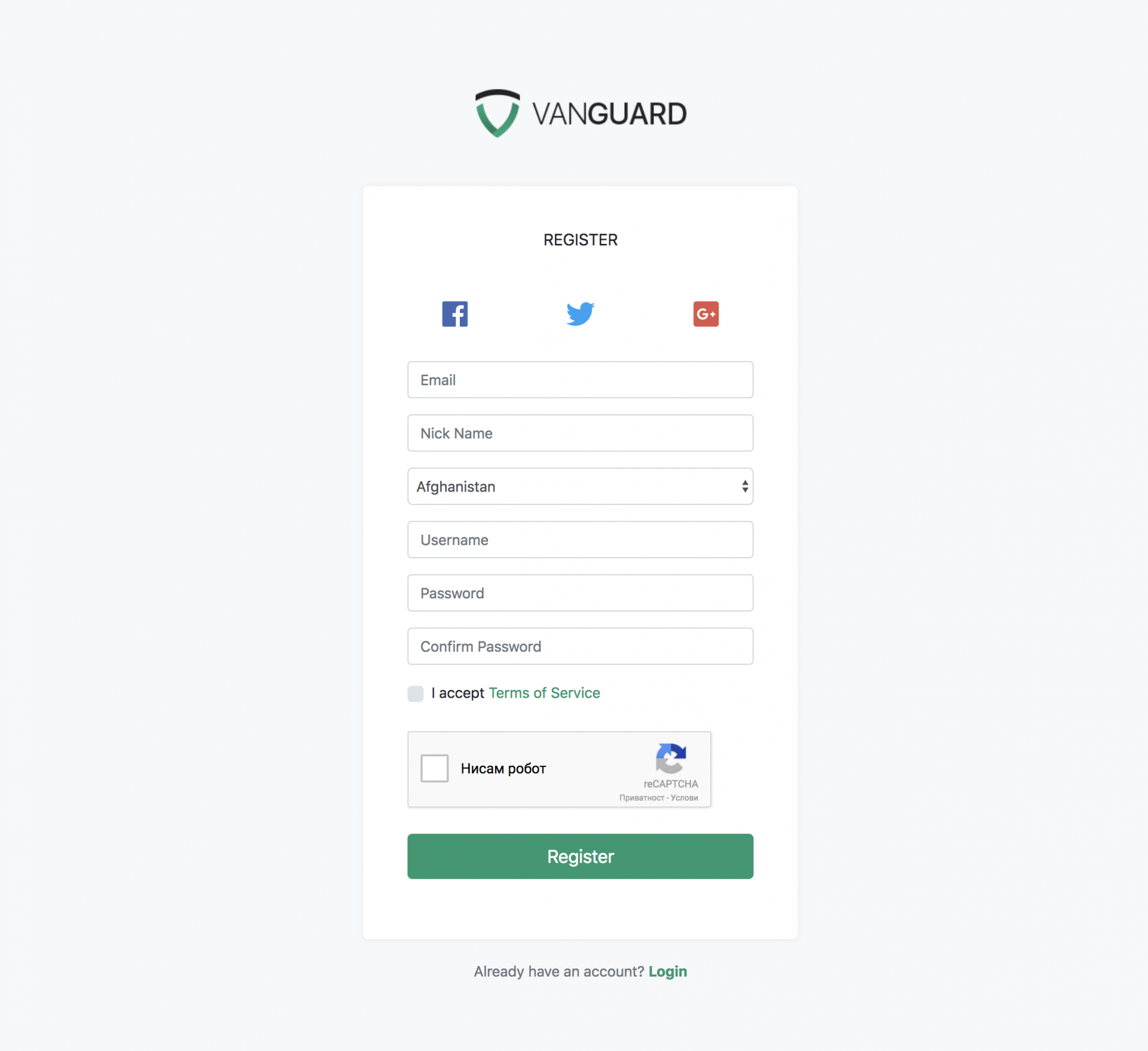
<p>So, we will update <code>resources/views/auth/register.blade.php</code> file and add the following code snippet right after email input field:</p><pre>&lt;div class="form-group"&gt;<br />    &lt;input type="text"<br />           name="nick"<br />           id="nick"<br />           class="form-control input-solid"<br />           placeholder="Nick Name"<br />           value="{{ old('nick') }}"&gt;<br />&lt;/div&gt;<br />&lt;div class="form-group"&gt;<br />    {!!<br />        Form::select(<br />            'country_id',<br />            $countries,<br />            old('country_id'),<br />            ['class' =&gt; 'form-control input-solid', 'id' =&gt; 'country_id']<br />        )<br />    !!}<br />&lt;/div&gt;</pre>
<p>This will render us the following registration form:</p><p><img src="https://support-hub--assets.s3.eu-west-2.amazonaws.com/assets/1/images/hjfVxXuIu03PMpxDZO9y4Egz4Rhomcyb4C2kouBu.png" alt="hjfVxXuIu03PMpxDZO9y4Egz4Rhomcyb4C2kouBu.png" /><br /></p>
<p><a href="assets/img/examples/form-example.png"></a></p><p><strong>Note!</strong> If you curious how <code>Form::select</code> works, check <a href="https://laravelcollective.com/docs/5.3/html">Laravel Collective</a> documentation.<br /></p>

<p><a></a></p>
<h2>Adding Validation</h2>
<p>Since we have defined that Nick Name will be a required field with a minimum length of 3 characters, we have to add one more validation rule inside <code>$rules</code> array available in <code>RegisterRequest::rules</code> method in <code>app/Http/Requests/Auth/RegisterRequest.php</code> file.</p>
<p>So, right after <code>password</code> validation rules, add the following rule</p>
<pre><code><span>$rules</span> <span>=</span> <span>[</span>
    <span>//...</span>
    <span>'nick'</span> <span>=</span><span>&gt;</span> <span>'required|min:3'</span>
<span>]</span><span>;</span></code></pre>
<p>This validation rule will make our Nick Name field required his minimum length must be 3 characters.</p>

<p><strong>Note!</strong> If you want to know more about Laravel validation and available validation rules, check the <a href="https://laravel.com/docs/5.6/validation" target="_blank" rel="noreferrer noopener">validation documentation</a>.</p>

<p><a></a></p>
<h2>Updating the User Model</h2>
<p>Since we have added a new database field inside our users table, we have to update our users model and add that field to your <a href="https://laravel.com/docs/5.6/eloquent#mass-assignment" target="_blank" rel="noreferrer noopener">fillable attributes</a> array.</p>
<p>So, just edit <code>app/User.php</code> and add field <code>nick</code> into <code>$fillable</code> array, right after <code>email_verified_at</code> field.</p>
<p><a></a></p>
<h2>Updating the Register Request</h2>
<p>And the last step is to actually tell our <code>RegisterController</code> that we want him to use two more fields which we have added to our registration form.</p>
<p>To do that, just go to <code>app/Http/Requests/Auth/RegisterRequest.php</code> and inside <code>validFormData</code> method, replace</p>
<pre><code><span>$this</span><span>-</span><span>&gt;</span><span>only</span><span>(</span><span>'email'</span><span>,</span> <span>'username'</span><span>,</span> <span>'password'</span><span>)</span></code></pre>
<p>with</p>
<pre><code><span>$this</span><span>-</span><span>&gt;</span><span>only</span><span>(</span><span>'email'</span><span>,</span> <span>'username'</span><span>,</span> <span>'password'</span><span>,</span> <span>'country_id'</span><span>,</span> <span>'nick'</span><span>)</span></code></pre>
<p>And that's it, your registration form now have two more fields that are automatically validated and stored into the user's table after a successful registration. :)</p>]]>
            </summary>
                                    <updated>2019-09-13T18:37:02+00:00</updated>
        </entry>
            <entry>
            <title><![CDATA[Creating a New Page]]></title>
            <link rel="alternate" href="https://milos.support-hub.io/articles/creating-a-new-page-in-vanguard" />
            <id>https://milos.support-hub.io/19</id>
            <author>
                <name><![CDATA[Milos Stojanovic]]></name>
            </author>
            <summary type="html">
                <![CDATA[<p>Chances are high that you would like to create your own pages inside the Vanguard application. This section will explain in details everything you need to do to add your own page to the system.</p>
<p>The page we are going to add will be a simple page that will display the list of all users with active sessions.</p>
<p><a></a></p>
<h3>Page Route</h3>
<p>The first thing we will have to do is to create a new route for your page. We can do that by simply editing <code>/routes/web.php</code> file and adding the following code anywhere inside the file. I've added it on top.</p>
<pre><code><span>Route<span>::</span></span><span>get</span><span>(</span><span>'active-users'</span><span>,</span> <span>function</span> <span>(</span><span>)</span> <span>{</span>
    <span>return</span> <span>"Active users will be displayed here."</span><span>;</span>
<span>}</span><span>)</span><span>-</span><span>&gt;</span><span>name</span><span>(</span><span>'active-users'</span><span>)</span><span>;</span></code></pre>
<p>To verify that this code is actually working, you should go to <code>yourwebsite.com/active-users</code> and you should see following text on your screen:</p>
<pre><code>Active users will be displayed here.</code></pre>
<p>This means that your route is now working properly, so we can proceed and create a new controller that will handle the actual request, instead of using this <a href="http://php.net/manual/en/class.closure.php">closure</a>, as we did in our example above.</p>
<p>One more thing, as you can see, we assigned a name to this route. This is a very handy feature since we can now reference our route by name, and in case that we want to change the URL to something else in the future, we'll be able to change it only inside our <code>routes/web.php</code> file, and everything will work without any broken links.</p>

<p><strong>Note!</strong> You can find more about routes inside <a href="https://laravel.com/docs/5.3/routing">Laravel's documentation</a>.</p>

<p><a></a></p>
<h3>Creating The Controller</h3>
<p>Creating a new controller in Laravel is pretty easy. If you are familiar with the terminal, you can navigate to Vanguard's root folder and type the following command</p>
<pre><code>php artisan make:controller Web/ActiveUsersController</code></pre>
<p>After you execute this command, the new controller will be automatically created for you and placed inside <code>app/Http/Controllers/Web</code> folder. The file will be named <code>ActiveUsersController.php</code>. You can also create the controller by manually creating a new controller file inside <code>app/Http/Controllers/Web</code> directory, if you are using the controller for Web application, or inside <code>app/Http/Controllers/Api</code> directory if the controller will be used for the API.</p>
<p>Now let's define our constructor and create new <code>index</code> method inside that controller. The controller will now look like following</p>
<pre><code><span>namespace</span> <span>Vanguard<span>\</span>Http<span>\</span>Controllers<span>\</span>Web</span><span>;</span>

<span>use</span> <span>Vanguard<span>\</span>Http<span>\</span>Controllers<span>\</span>Controller</span><span>;</span>

<span>class</span> <span>ActiveUsersController</span> <span>extends</span> <span>Controller</span>
<span>{</span>
    <span>public</span> <span>function</span> <span>__construct</span><span>(</span><span>)</span>
    <span>{</span>
        <span>// Allow access to authenticated users only.</span>
        <span>$this</span><span>-</span><span>&gt;</span><span>middleware</span><span>(</span><span>'auth'</span><span>)</span><span>;</span>

        <span>// Allow access to users with 'users.manage' permission.</span>
        <span>$this</span><span>-</span><span>&gt;</span><span>middleware</span><span>(</span><span>'permission:users.manage'</span><span>)</span><span>;</span>
    <span>}</span>

    <span>public</span> <span>function</span> <span>index</span><span>(</span><span>)</span>
    <span>{</span>
        <span>return</span> <span>"Hello from ActiveUsersController"</span><span>;</span>
    <span>}</span>
<span>}</span></code></pre>
<p>Since we now have the controller that will be responsible for our active users, we are free to update the route we created in the previous chapter to actually point to this <code>index</code> method we just created, instead of using closure:</p>
<pre><code><span>// /routes/web.php</span>

<span>Route<span>::</span></span><span>get</span><span>(</span><span>'active-users'</span><span>,</span> <span>'ActiveUsersController@index'</span><span>)</span><span>-</span><span>&gt;</span><span>name</span><span>(</span><span>'active-users'</span><span>)</span><span>;</span>
<span>//...</span></code></pre>
<p>You can probably see the pattern here. If we translate the route above into a sentence, it basically says something like this:</p>


<p>"When someone tries to access <code>yourdomain.com/active-users</code>, execute code that is located inside <code>index</code> method from <code>ActiveUsersController</code>."</p>


<p>Now, if you access <code>yourdomain.com/active-users</code> from your browser, you will see the following response</p>
<pre><code>Hello from ActiveUsersController</code></pre>
<p>Of course, since we added those two checks inside the controller's constructor, you will have to be logged in and you must have <code>users.manage</code> permission to access this page.</p>

<p><strong>Note!</strong> You can find more about controllers inside <a href="https://laravel.com/docs/5.6/controllers" target="_blank" rel="noreferrer noopener">Laravel's documentation</a>.</p>

<p><a></a></p>
<h3>Fetching Users From DB</h3>
<p>It's time to write the actual query that will fetch all users with active sessions available inside <code>sessions</code> database table. It is a simple join query, and <a href="https://laravel.com/docs/5.6/eloquent" target="_blank" rel="noreferrer noopener">Eloquent</a> makes it even easier.</p>
<p>We will modify our controller to look like the following:</p>
<pre><code><span>namespace</span> <span>Vanguard<span>\</span>Http<span>\</span>Controllers<span>\</span>Web</span><span>;</span>

<span>use</span> <span>Vanguard<span>\</span>Http<span>\</span>Controllers<span>\</span>Controller</span><span>;</span>
<span>use</span> <span>Vanguard<span>\</span>User</span><span>;</span>

<span>class</span> <span>ActiveUsersController</span> <span>extends</span> <span>Controller</span>
<span>{</span>
    <span>public</span> <span>function</span> <span>index</span><span>(</span><span>)</span>
    <span>{</span>
        <span>// Fetch users from database</span>
        <span>$users</span> <span>=</span> <span>User<span>::</span></span><span>join</span><span>(</span><span>'sessions'</span><span>,</span> <span>'users.id'</span><span>,</span> <span>'='</span><span>,</span> <span>'sessions.user_id'</span><span>)</span>
            <span>-</span><span>&gt;</span><span>select</span><span>(</span><span>'users.*'</span><span>)</span>
            <span>-</span><span>&gt;</span><span>distinct</span><span>(</span><span>)</span>
            <span>-</span><span>&gt;</span><span>get</span><span>(</span><span>)</span><span>;</span>

        <span>// Uncomment the following line if you want to see the info you get from the database</span>
        <span>// dd($users);</span>

        <span>// Load appropriate view for displaying the users</span>
        <span>// Note: compact('users') is the same as ['users' =&gt; $users] </span>
        <span>return</span> <span>view</span><span>(</span><span>'user.active-users'</span><span>,</span> <span>compact</span><span>(</span><span>'users'</span><span>)</span><span>)</span><span>;</span>   
    <span>}</span>
<span>}</span></code></pre>
<p>As you can see, our join query is really simple. At the and of the index method, we will render our <a href="https://laravel.com/docs/5.4/views">view</a>, which we are going to create now.</p>
<p><a></a></p>
<h3>Page View</h3>
<p>In Laravel, all views are located inside <code>resources/views</code> folder. You can create an unlimited number of sub-folders there, and group your views however you like it. One great thing is that you can use <strong>dot</strong> notation when you want to render that view. That means that instead of <code>/</code> you can use "." when you want to reference your view from a controller.</p>
<p>In our controller code, we are referencing our view like <code>user.active-users</code> which means that we will create a new file called <code>active-users.blade.php</code> inside <code>resources/views/user</code> folder. As mentioned, you can put your view anywhere inside the <code>resources/views</code> folder, but for what we are building, it looks like <code>user</code> folder is the best place to put it.</p>

<p><strong>Note!</strong> Laravel uses <strong>Blade</strong> templating language which has its own tags and ways of building the templates. It is really simple, and you can learn more about it <a href="https://laravel.com/docs/5.4/blade">here</a>.</p>

<p>Here is the source code of our view file:</p>
<pre><span>@extends('layouts.app')
</span><span><br /></span><span>@section('page-title', 'Active Users')<br /></span><span>@section('page-heading', 'Active Users')
</span><span><br /></span><span>@section('breadcrumbs')<br /></span><span>    &lt;li class="breadcrumb-item active"&gt;<br /></span><span>        Active Users<br /></span><span>    &lt;/li&gt;<br /></span><span>@stop
</span><span><br /></span><span>@section('content')</span><span><br /></span><span>    @include('partials.messages')</span><span><br /></span><span>    @foreach($users as $user)<br /></span><span>        &lt;div class="user media d-flex align-items-center"&gt;<br /></span><span>            &lt;div&gt;<br /></span><span>                &lt;a href="#"&gt;<br /></span><span>                    &lt;img width="64" height="64"<br /></span><span>                        class="media-object mr-3 rounded-circle img-thumbnail img-responsive"<br /></span><span>                        src="{{ $user-&gt;present()-&gt;avatar }}"&gt;<br /></span><span>                &lt;/a&gt;<br /></span><span>            &lt;/div&gt;<br /></span><span>            &lt;div class="d-flex justify-content-center flex-column"&gt;<br /></span><span>                &lt;h5 class="mb-0"&gt;{{ $user-&gt;present()-&gt;name }}&lt;/h5&gt;<br /></span><span>                &lt;small class="text-muted"&gt;{{ $user-&gt;email }}&lt;/small&gt;<br /></span><span>            &lt;/div&gt;<br /></span><span>        &lt;/div&gt;<br /></span><span>    @endforeach<br /></span><span>@stop
</span><span><br /></span><span>@section('styles')<br /></span><span>    &lt;style&gt;<br /></span><span>        .user.media {<br /></span><span>            float: left;<br /></span><span>            border: 1px solid #dfdfdf;<br /></span><span>            background-color: #fff;<br /></span><span>            padding: 15px 20px;<br /></span><span>            border-radius: 4px;<br /></span><span>            margin-right: 15px;<br /></span><span>        }<br /></span><span>    &lt;/style&gt;<br /></span><span>@stop</span></pre>
<p>Let's explain what is happening here:</p>
<p><code>@extends('layouts.app')</code> - means that this file is extending default layout called <strong>app</strong>, which is located inside <code>resources/views/layouts</code> folder.</p>
<p><code>@section('page-title', 'Active Users')</code> - page title. Check <code>&lt;title&gt;&lt;/title&gt;</code> element inside app layout to see where it will be printed out.</p>
<p><code>@section('page-heading', 'Active Users')</code> - page heading. Text to be rendered inside the header.</p>
<p><code>@section('breadcrumbs') ... @stop</code> - page-specific breadcrumbs.</p>
<p><code>@section('content') ... @stop</code> - The actual content section. Everything that is inside those two tags (<code>@section('content')</code> and <code>@stop</code>) will be echoed out on the same place where <code>@yield('content')</code> is located inside the app layout. Inside this section, we are just looping through the passed array of users and printing them out. We are using <a href="http://getbootstrap.com/components/#media">bootstrap media object</a> just to make things a bit prettier. You can also click on the user's avatar and it will take you to the user profile page.</p>
<p><code>@section('styles') ... @stop</code> - Anything that is located inside this section will be automatically placed inside the header (check app layout and search for <code>@yield('styles')</code>) of the page. We are placing this CSS here just to make things easier and have everything in one file, but when you are building something, you will probably put the CSS inside <code>public/assets/css/app.css</code> file, since that's where Vanguard custom CSS is located.</p>
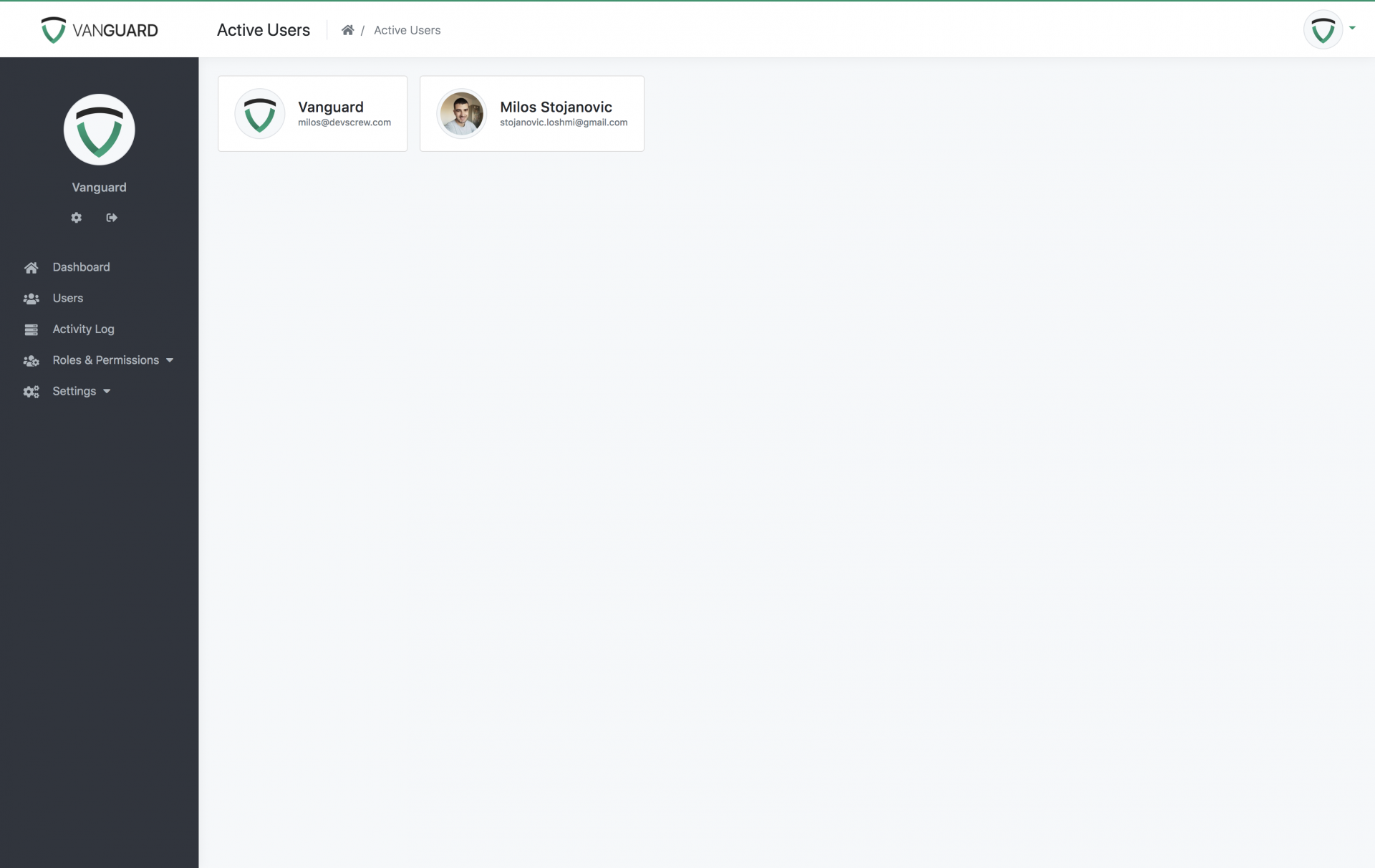
<p>If we open the page now, it will look like the following:</p><p><img src="https://support-hub--assets.s3.eu-west-2.amazonaws.com/assets/1/images/9N3pdVjGOWZojMjMg9hShV64JTj5NnRhhPdBhqQs.png" alt="9N3pdVjGOWZojMjMg9hShV64JTj5NnRhhPdBhqQs.png" /><br /></p>
<p><a href="assets/img/active-users.png"></a></p><p></p><h3>Sidebar Menu</h3><p></p>
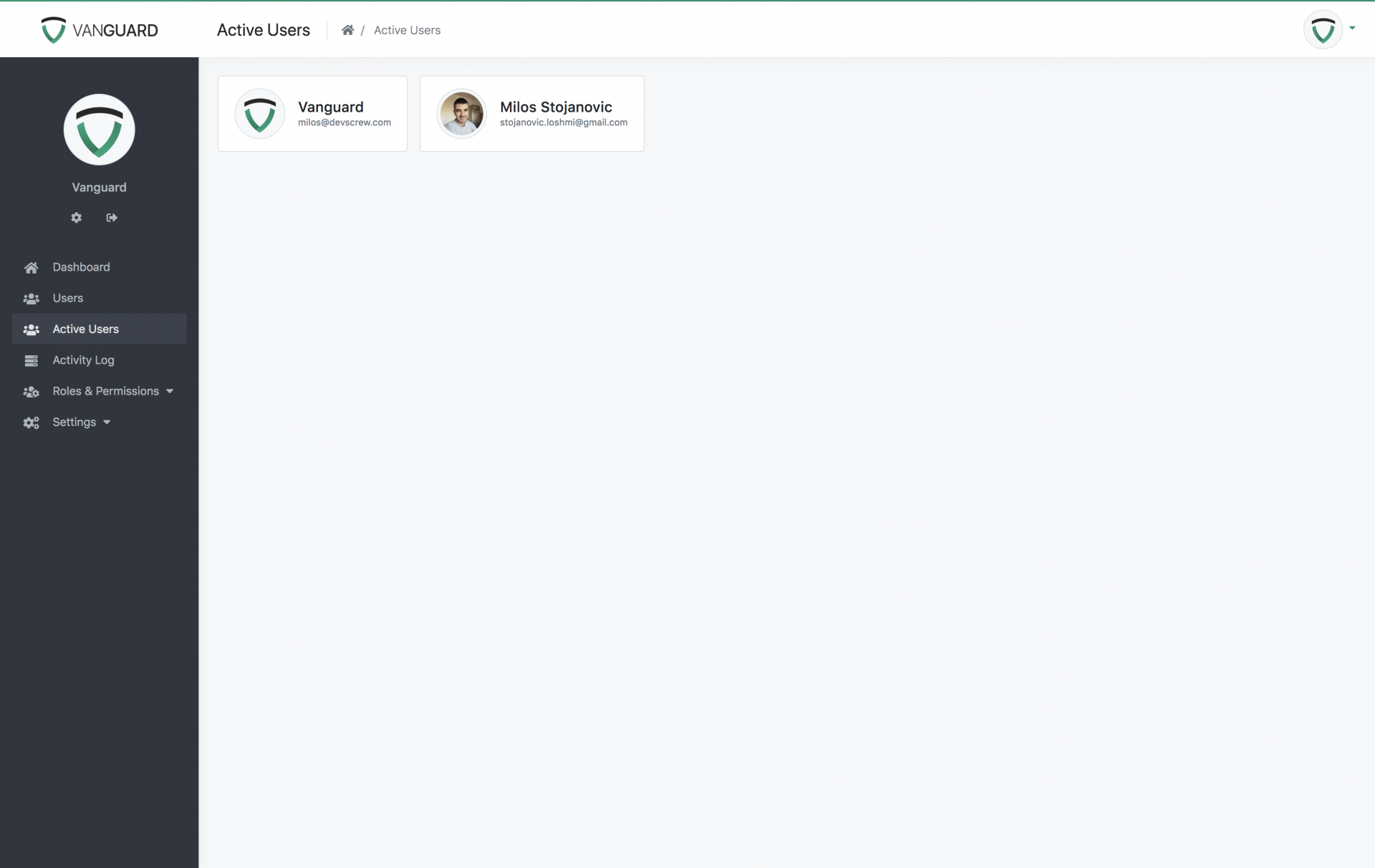
<p>As you can see, we are able to access this page, but only by manually typing the URL inside the browser's address bar. Let's add a new link inside the sidebar menu that will point to our newly created page.</p>
<p>All we have to do is to create a file named ActiveUsers.php inside the app/Support/Plugins folder with the following content:</p><pre>&lt;?php<br />namespace Vanguard\Support\Plugins;
<br />use Vanguard\Plugins\Plugin;<br />use Vanguard\Support\Sidebar\Item;
<br />class ActiveUsers extends Plugin<br />{<br />    public function sidebar()<br />    {<br />        return Item::create(__('Active Users'))<br />            -&gt;route('active-users')<br />            -&gt;icon('fas fa-users')<br />            -&gt;active("active-users*")<br />            -&gt;permissions('users.manage');<br />    }<br />}</pre>
<p>After creating a file, you'll need to update the "plugins" array in VanguardServiceProvider to look like the following:</p><pre>protected function plugins()<br />{<br />    return [<br />        //...<br />        \Vanguard\Support\Plugins\ActiveUsers::class,<br />    ];<br />}</pre><p>By adding <code>\Vanguard\Support\Plugins\ActiveUsers::class,</code> to the list of plugins it will instruct Vanguard to execute the <code>sidebar</code> method from your <code>ActiveUsers</code> class and add the item to the sidebar.</p><p>If you refresh the page now, you will see the newly created sidebar menu item.</p><p><img src="https://support-hub--assets.s3.eu-west-2.amazonaws.com/assets/1/images/T1SlyopNLqDKtysUkHXm1P85Um7uyx3BAtMQ0KIt.png" alt="T1SlyopNLqDKtysUkHXm1P85Um7uyx3BAtMQ0KIt.png" /></p><p>More info about the sidebar item configuration can be found inside <a href="https://milos.support-hub.io/articles/plugin-service-provider-1327#the-sidebar-method" target="_blank" rel="noreferrer noopener">the Plugins documentation</a>.</p>]]>
            </summary>
                                    <updated>2019-09-13T19:04:26+00:00</updated>
        </entry>
            <entry>
            <title><![CDATA[Working with Vanguard Permissions]]></title>
            <link rel="alternate" href="https://milos.support-hub.io/articles/working-with-vanguard-permissions" />
            <id>https://milos.support-hub.io/16</id>
            <author>
                <name><![CDATA[Milos Stojanovic]]></name>
            </author>
            <summary type="html">
                <![CDATA[<p>Vanguard comes with some default permissions but, if some of them does not fit your needs, they can be easily modified. Adding new permissions is a breeze too.</p>
<p>In this example we will add 3 more different permissions: <strong>View User</strong>, <strong>Edit User</strong> and <strong>Remove User</strong>. Those permissions will allow us to have some users be able to access the users section, but some of them won't be able to do anything else than to edit user or view their profiles.</p>
<p><a></a></p>
<h3>Creating Permissions</h3>
<p>All permissions can be created through the UI, like it is explained in <a href="https://milos.support-hub.io/articles/vanguard-roles-and-permissions">roles and permissions section</a>.</p>
<p>Created permissions for this example have have following details:</p>
<table class="table"><tr><th>Display Name</th>
<th>Name</th>
</tr><tr><td>View User</td>
<td>user.view</td>
</tr><tr><td>Edit User</td>
<td>user.edit</td>
</tr><tr><td>Remove User</td>
<td>user.remove</td>
</tr></table><p><a></a></p>
<h3>Updating View Template</h3>
<p>Now, since we have those permissions created, we need to update the view that is used for displaying users list. The HTML used for displaying the list of users is located inside <code>resources/views/user/list.blade.php</code> view file.</p>
<p>Our goal is to display buttons for editing, viewing or removing some user only if currently logged in user has the appropriate permission. In order to display something based on user's permissions, we just have to surround that HTML with following <a href="https://laravel.com/docs/5.4/blade">Blade</a> directives:</p>
<pre><code>@<span>permission</span><span>(</span><span>'user.view'</span><span>)</span>
    <span>// Anything here will be displayed only</span>
    <span>// if currently logged in user has "user.view" permission</span>
@endpermission</code></pre>
<p>So, to apply this to our use-case, we will surround those buttons like following:</p>
<pre><code>@<span>permission</span><span>(</span><span>'user.view'</span><span>)</span>
    <span>&lt;a href="{{ route('user.show', $user-&gt;</span>id<span>)</span> <span>}</span><span>}</span>" 
       <span>class</span><span>=</span><span>"btn btn-success btn-circle"</span>
       title<span>=</span><span>"View User"</span> data<span>-</span>toggle<span>=</span><span>"tooltip"</span> data<span>-</span>placement<span>=</span><span>"top"</span><span>&gt;</span>
       <span><span><span><span>&lt;</span>i</span> <span>class</span><span><span>=</span><span>"</span>glyphicon glyphicon-eye-open<span>"</span></span><span>&gt;</span></span></span><span><span><span><span>&lt;/</span>i</span><span>&gt;</span></span></span>
    <span><span><span><span>&lt;/</span>a</span><span>&gt;</span></span></span>
@endpermission

<span>// Do the same for all 3 buttons</span></code></pre>
<p>Since view is now updated, if you access the <code>yourdomain.com/user</code> URL, you won't see those buttons for viewing, editing and removing users. But, as you probably already guessed, you are still able to edit some user by directly accessing the following URL <code>yourdomain.com/user/USER_ID/edit</code>. That's because the process is not completed yet, and you have to update your routes or controller.</p>
<p><a></a></p>
<h3>Applying the Permissions</h3>
<p>Removing the buttons from users list is not actually protecting the application. If users type a specific URL directly in the browser's address bar, they will be able to access the desired page. In order to protect this, we have to apply permission <a href="https://laravel.com/docs/5.4/middleware">middleware</a>.</p>
<p>This can be done in two ways. We can update the controller and add middleware directly inside the controller's constructor, or we can update <code>routes/web.php</code> file and apply middleware to a specific route.</p><p>In this example, we will add the permission middleware inside the UsersController. If you want to learn more about adding middleware on the route level, please check <a href="https://laravel.com/docs/6.x/middleware#assigning-middleware-to-routes" target="_blank" rel="noreferrer noopener">Laravel's documentation</a>.</p>
<h4>Updating UsersController</h4>
<p>One way to protect our pages and make them available only for users with specific permissions is to add middleware directly to the controller's constructor. For our example, we have to edit <code>app/Http/Controllers/Web/Users/UsersController.php</code> controller and add the following code inside its <code>__construct</code> method:</p>
<pre><code><span>$this</span><span>-</span><span>&gt;</span><span>middleware</span><span>(</span><span>'permission:user.view'</span><span>,</span> <span>[</span><span>'only'</span> <span>=</span><span>&gt;</span> <span>'show'</span><span>]</span><span>)</span><span>;</span>

<span>$this</span><span>-</span><span>&gt;</span><span>middleware</span><span>(</span><span>'permission:user.edit'</span><span>,</span> <span>[</span><span>'only'</span> <span>=</span><span>&gt;</span> 'edit'<span>]</span><span>)</span><span>;</span>

<span>$this</span><span>-</span><span>&gt;</span><span>middleware</span><span>(</span><span>'permission:user.remove'</span><span>,</span> <span>[</span><span>'only'</span> <span>=</span><span>&gt;</span> <span>'destroy'</span><span>]</span><span>)</span><span>;</span></code></pre>
<p>After applying middleware to the controller's methods (the <strong>only</strong> option provided as the second argument means that permission middleware should only be applied to specified methods inside the controller), Vanguard will throw <code>403 Forbidden</code> exceptions whenever someone tries to access the protected URL, and it will make that part of the system available only for users with appropriate permissions.</p><p><b>NOTE: </b>This is just an example. Make sure that you add the permissions to other controllers inside the "app/Http/Controllers/Web/Users" folder to make sure that only users with specific permissions can be able directly send some HTTP requests to the any of the routes tied to those controllers and bypass the permissions check.</p>]]>
            </summary>
                                    <updated>2021-06-21T09:27:11+00:00</updated>
        </entry>
            <entry>
            <title><![CDATA[Adding a Social Auth Provider]]></title>
            <link rel="alternate" href="https://milos.support-hub.io/articles/adding-a-social-auth-provider-to-vanguard" />
            <id>https://milos.support-hub.io/20</id>
            <author>
                <name><![CDATA[Milos Stojanovic]]></name>
            </author>
            <summary type="html">
                <![CDATA[<p>Since Vanguard utilizes <a href="https://github.com/laravel/socialite" target="_blank" rel="noreferrer noopener">Socialite</a> package for social authentication, it's easy to add any social authentication provider that is supported by Socialite.</p>
<p>So, let's proceed and add GitHub authentication driver.</p>
<p><a></a></p>
<h3>The Configuration File</h3>
<p>The first thing we need to do is to edit the <code>config/auth.php</code> configuration file and add <code>github</code> into social providers array, like following:</p>
<pre><code><span>'social'</span> <span>=</span><span>&gt;</span> <span>[</span>
    <span>'providers'</span> <span>=</span><span>&gt;</span> <span>[</span><span>'facebook'</span><span>,</span> <span>'twitter'</span><span>,</span> <span>'google'</span><span>,</span> <span>'github'</span><span>]</span>
<span>]</span><span>,</span></code></pre>
<p><a></a></p>
<h3>Login Page</h3>
<p>Next step is to modify the login page and add GitHub button. The view file we need to modify is <code>resources/views/auth/social/buttons.blade.php</code>. We will add the following code at the end of the list:</p>
<pre><span>@if (in_array('github', $socialProviders))<br /></span><span>    &lt;div class="col-{{ $colSize }} d-flex align-items-center justify-content-center"&gt;<br /></span><span>        &lt;a href="{{ url('auth/github/login') }}" style="color: #24292e;"&gt;<br /></span><span>            &lt;i class="fab fa-github fa-2x"&gt;&lt;/i&gt;<br /></span><span>        &lt;/a&gt;<br /></span><span>    &lt;/div&gt;<br /></span><span>@endif</span></pre>
<p>It will make our login form look like this</p><p><img src="https://support-hub--assets.s3.eu-west-2.amazonaws.com/assets/1/images/3w95l9lN58gXrjXea5vf9opj0xvt82tpMu7XWS30.png" alt="3w95l9lN58gXrjXea5vf9opj0xvt82tpMu7XWS30.png" /><br /></p>
<p><a href="assets/img/social-auth-login-form.png"></a></p><p><br /></p>
<p><a></a></p>
<h3>GitHub Keys</h3>
<p>After modifying our login page, we can now proceed and create <a href="https://github.com/settings/developers" target="_blank" rel="noreferrer noopener">GitHub oAuth application</a>. Creating the application is simple, and you need to provide your application name, website URL as well as callback URL which will be used by Vanguard.</p>
<p>The callback URL should look like</p>
<pre><code>http://yourdomain.com/auth/github/callback</code></pre>
<p>Or, if you haven't removed <code>public</code> from your <a href="installation.html#application-url"></a><a href="https://milos.support-hub.io/articles/vanguard-installation#application-url" target="_blank" rel="noreferrer noopener">app </a><a href="https://milos.support-hub.io/articles/vanguard-installation#application-url" target="_blank" rel="noreferrer noopener">URL</a>, then it should be present in your callback URL too</p>
<pre><code> http://yourdomain.com/public/auth/github/callback</code></pre>
<p>After you create the GitHub application, you should grab your <code>Client ID</code> and <code>Client Secret</code> and create the following variables inside your <code>.env</code> file:</p>
<pre><code>GITHUB_CLIENT_ID=&lt;your_client_id_here&gt;
GITHUB_CLIENT_SECRET=&lt;your_client_secret_here&gt;
GITHUB_CALLBACK_URI=&lt;your_callback_uri_from_above&gt;</code></pre>
<p><a></a></p>
<h3>Socialite Configuration</h3>
<p>The last piece of the puzzle is to let socialite know your GitHub keys and callback URI. To do so, just add the following code to your <code>config/services.php</code> configuration file</p>
<pre><code><span>'github'</span> <span>=</span><span>&gt;</span> <span>[</span>
    <span>'client_id'</span> <span>=</span><span>&gt;</span> <span>env</span><span>(</span><span>'GITHUB_CLIENT_ID'</span><span>)</span><span>,</span>
    <span>'client_secret'</span> <span>=</span><span>&gt;</span> <span>env</span><span>(</span><span>'GITHUB_CLIENT_SECRET'</span><span>)</span><span>,</span>
    <span>'redirect'</span> <span>=</span><span>&gt;</span> <span>env</span><span>(</span><span>'GITHUB_CALLBACK_URI'</span><span>)</span><span>,</span>
<span>]</span><span>,</span></code></pre>
<p>And that's it, you can now go to the login page, click that GitHub button we have created and log in with your GitHub account.</p>]]>
            </summary>
                                    <updated>2019-01-16T20:42:02+00:00</updated>
        </entry>
            <entry>
            <title><![CDATA[Localization]]></title>
            <link rel="alternate" href="https://milos.support-hub.io/articles/vanguard-localization" />
            <id>https://milos.support-hub.io/4</id>
            <author>
                <name><![CDATA[Milos Stojanovic]]></name>
            </author>
            <summary type="html">
                <![CDATA[<p>Vanguard utilizes Laravel's default localization mechanism to allow you to translate it into any language you want. All translation files are located inside <code>resources/lang</code> folder. Within this directory there should be a subdirectory for each language supported by the application:</p>
<pre><code><span>/</span>resources
    <span>/</span>lang
        <span>/</span>en
            app<span>.</span>php
        <span>/</span>es
            app<span>.</span>php</code></pre>
<p><a></a></p>
<h3>Available Locales</h3>
<p>Out of the box, you can switch among the following locales:</p>
<ul><li>English</li>
<li>Serbian Latin</li>
<li>German</li>
</ul><p>More locales will be added in the future.</p>
<p><a></a></p>
<h3>Translating Vanguard</h3>
<p>If you want to translate the Vanguard application, all you need to do is to create a subfolder inside <code>resources/lang</code> directory that matches your locale, copy the files from the existing locale (<code>en</code> for example), and translate them into your language.</p>

<p><strong>Note!</strong> Vanguard specific file is <code>app.php</code>. All other files are Laravel's default localization files, and there is a big chance that someone has already translated those files for you. Check it out <a href="https://github.com/caouecs/Laravel-lang">here</a>.</p>

<p>For example, if we want to translate Vanguard to Russian, we will do the following:</p>
<ol><li>
<p>Create a new folder inside <code>resources/lang</code> called <code>ru</code>.</p>
</li>
<li>
<p>Copy the <code>app.php</code> files from <code>resources/lang/en</code> to your newly created <code>ru</code> folder.</p>
</li>
<li>
<p>Translate the copied file to Russian.</p>
</li>
<li>Download Laravel's default translation files for the Russian language from <a href="https://github.com/caouecs/Laravel-lang">here</a> and put them inside your newly created <code>ru</code> folder.</li>
</ol><p><a></a></p>
<h3>Enabling a New Application Locale</h3>
<p>Now, when you have your translations ready, you just need to update the <b>app/Support/Locale.php</b> file and add the new translation.</p>
<p>For example, if we want to set our language to Russian, we would set that variable as follows:</p><pre>//...
public const AVAILABLE_LOCALES = ['en', 'de', 'sr', 'ru'];
<br />public static function flagUrl(string $locale): ?string<br />{<br />    return match ($locale) {<br />        'en' =&gt; url('/flags/GB.png'),<br />        'de' =&gt; url('/flags/DE.png'),<br />        'sr' =&gt; url('/flags/RS.png'),
        'ru' =&gt; url('/flags/RU.png'),<br />        default =&gt; null,<br />    };<br />}
//...</pre><p>After this, a new locale will show up in the language dropdown and you will be able to switch to it right away.</p>]]>
            </summary>
                                    <updated>2024-03-01T16:18:28+00:00</updated>
        </entry>
            <entry>
            <title><![CDATA[Development Mode]]></title>
            <link rel="alternate" href="https://milos.support-hub.io/articles/vanguard-development-mode" />
            <id>https://milos.support-hub.io/5</id>
            <author>
                <name><![CDATA[Milos Stojanovic]]></name>
            </author>
            <summary type="html">
                <![CDATA[<p>While you are developing new Vanguard features, or you are customizing the existing features, you should definitely enable development mode so you can clearly see all errors on the screen, without constantly having to check your log file.</p>
<p>To enable development mode, all you need to do is to modify your <code>.env</code> file and set <code>APP_ENV</code> and <code>APP_DEBUG</code> to following values:</p>
<pre><code><span>APP_ENV</span><span>=</span>local
<span>APP_DEBUG</span><span>=</span><span>true</span></code></pre>
<p><a></a></p>
<h3>Debug Bar</h3>
<p>Vanguard comes with awesome <a href="https://github.com/barryvdh/laravel-debugbar" target="_blank" rel="noreferrer noopener">Laravel Debugbar</a> package that is automatically enabled for you if you enable development mode like it is described above. The package itself is very helpful during the development process, and you can use it to see which queries are executed during page load, to check the session data etc.</p><p><img src="https://support-hub--assets.s3.eu-west-2.amazonaws.com/assets/1/images/ExfVlcnT2KNgaBuF3oNBZrhQXv6pEg9so7veMC7L.png" alt="ExfVlcnT2KNgaBuF3oNBZrhQXv6pEg9so7veMC7L.png" /><br /></p>
<p><a href="assets/img/debug-bar.png"></a></p>]]>
            </summary>
                                    <updated>2018-10-29T17:43:39+00:00</updated>
        </entry>
            <entry>
            <title><![CDATA[Upgrade Guide]]></title>
            <link rel="alternate" href="https://milos.support-hub.io/articles/vanguard-upgrade-guide" />
            <id>https://milos.support-hub.io/6</id>
            <author>
                <name><![CDATA[Milos Stojanovic]]></name>
            </author>
            <summary type="html">
                <![CDATA[<p>This section contains some info about what's changed in the latest version and how you should update your Vanguard application. You can find the version you are currently using inside <code>config/app.php</code> file. The complete changelog is available in the item description <a href="https://codecanyon.net/item/vanguard-advanced-php-login-and-user-management/14521866">on CodeCanyon</a>.</p><p><b>NOTE: </b>While doing the upgrade, it's always a good idea to have the <span><a href="/articles/vanguard-development-mode" target="_blank" rel="noreferrer noopener">Development Mode</a></span>​ turned on so you can easily see the errors on the screen.</p><h3>To 10.0.3 from 10.0.2</h3><p>Fixed installation wizard issue and issue with sending approval notification email. Affected files:</p><pre> app/Http/Controllers/Web/InstallController.php            |   2 +-<br /> app/Listeners/Approve/SendWaitingApprovalNotification.php |   2 +-</pre><h3>To 10.0.2 from 10.0.1</h3><p>Fixes some glitches reported by the users, mainly caused by changes in the default namespace of the application.</p><p>The fixes are:</p><ul><li>Fix the issue with sending password reset emails</li><li>Fix the `php artisan optimize` command</li><li>Fix the avatar image URL</li><li>Fix the issue with using Vanguard for the existing website</li></ul><p>The list of changed files is available below. Some files are updated just for cleaning up purposes, so make sure that you compare them before updating:</p><pre> app/Http/Controllers/Web/TwoFactorController.php       | 10 ----------<br /> app/Http/Middleware/CheckPermissions.php               |  2 +-<br /> app/Models/User.php                                    |  2 +-<br /> app/Presenters/UserPresenter.php                       |  2 +-<br /> bootstrap/app.php                                      |  1 +<br /> config/app.php                                         |  2 +-<br /> config/cache.php                                       |  2 +-<br /> database/factories/UserFactory.php                     |  4 +---<br /> extra/auth.php                                         |  2 +-<br /> phpunit.xml                                            | 50 ++++++++++++++++++++++++++------------------------<br /> resources/views/user/partials/two-factor.blade.php     |  2 +-<br /> resources/views/user/two-factor-verification.blade.php | 73 -------------------------------------------------------------------------<br /> routes/web.php                                         | 12 ++++--------<br /> storage/settings.json                                  |  2 +-<br /> tests/CreatesApplication.php                           | 24 ------------------------<br /> tests/Feature/Api/Profile/AvatarControllerTest.php     | 14 +++++++-------<br /> tests/Feature/Api/SessionsControllerTest.php           | 12 ++++++------<br /> tests/Feature/Api/Users/AvatarControllerTest.php       | 16 ++++++++--------<br /> tests/Feature/Api/Users/SessionsControllerTest.php     |  7 +++----<br /> tests/Feature/Web/LoginTest.php                        | 30 +++++++++++++-----------------<br /> tests/Feature/Web/RegistrationTest.php                 | 25 +++++++++----------------<br /> tests/Feature/Web/Settings/AuthSettingsTest.php        | 45 +++++++++++++++++----------------------------<br /> tests/Feature/Web/SettingsTest.php                     | 24 +++++-------------------<br /> tests/TestCase.php                                     |  2 --<br /> tests/Unit/Presenters/UserPresenterTest.php            | 14 +++++++-------<br /> 25 files changed, 115 insertions(+), 264 deletions(-)</pre><p><br /></p><h3>To 10.0.1 from 10.0.0</h3><p>This version contains just a fix in the installation wizard. If you are already using Vanguard, there is no need to update any of the files. </p><p>If you are installing it from scratch, just download the latest version from CodeCanyon, and you should be good to go.</p><p>The list of changed files is available below:</p><pre> .env.example                                   | 46 +-<br /> app/Http/Controllers/Web/InstallController.php | 47 +--<br /> bootstrap/app.php                              |  5 ++++-<br /> config/app.php                                 |  2 +-<br /> config/session.php                             |  2 +-
composer.lock                                   | 42 +- // updated composer packages to latest versions</pre><p><br /></p><h3>To 10.0.0 from 9.1.0</h3><p>Laravel 12 upgrade.</p><p>Along with the Laravel 12 upgrade, which comes with a bit reorganized folder structure, the default namespace is changed to "App" instead of "Vanguard". This change was not required by Laravel 12, however, we made the decision to keep it consistent with Laravel's defaults, instead of having a custom namespace.</p><p>The list of changed files is available below. Keep in mind that in the majority of files the only change is the namespace change at the top of the file:</p><pre> app/Console/Kernel.php                                                      |    27 -<br /> app/Events/Event.php                                                        |     2 +-<br /> app/Events/Permission/Created.php                                           |     2 +-<br /> app/Events/Permission/Deleted.php                                           |     2 +-<br /> app/Events/Permission/PermissionEvent.php                                   |     4 +-<br /> app/Events/Permission/Updated.php                                           |     2 +-<br /> app/Events/Role/Created.php                                                 |     2 +-<br /> app/Events/Role/Deleted.php                                                 |     2 +-<br /> app/Events/Role/PermissionsUpdated.php                                      |     2 +-<br /> app/Events/Role/RoleEvent.php                                               |     4 +-<br /> app/Events/Role/Updated.php                                                 |     2 +-<br /> app/Events/Settings/Updated.php                                             |     2 +-<br /> app/Events/User/Approved.php                                                |     4 +-<br /> app/Events/User/Banned.php                                                  |     4 +-<br /> app/Events/User/ChangedAvatar.php                                           |     2 +-<br /> app/Events/User/Created.php                                                 |     4 +-<br /> app/Events/User/Deleted.php                                                 |     4 +-<br /> app/Events/User/LoggedIn.php                                                |     2 +-<br /> app/Events/User/LoggedOut.php                                               |     2 +-<br /> app/Events/User/RequestedPasswordResetEmail.php                             |     4 +-<br /> app/Events/User/TwoFactorDisabled.php                                       |     2 +-<br /> app/Events/User/TwoFactorDisabledByAdmin.php                                |     4 +-<br /> app/Events/User/TwoFactorEnabled.php                                        |     2 +-<br /> app/Events/User/TwoFactorEnabledByAdmin.php                                 |     4 +-<br /> app/Events/User/UpdatedByAdmin.php                                          |     4 +-<br /> app/Events/User/UpdatedProfileDetails.php                                   |     2 +-<br /> app/Exceptions/Handler.php                                                  |    40 -<br /> app/Http/Controllers/Api/ApiController.php                                  |     4 +-<br /> app/Http/Controllers/Api/Auth/AuthController.php                            |    12 +-<br /> app/Http/Controllers/Api/Auth/Password/RemindController.php                 |    12 +-<br /> app/Http/Controllers/Api/Auth/Password/ResetController.php                  |     6 +-<br /> app/Http/Controllers/Api/Auth/RegistrationController.php                    |    14 +-<br /> app/Http/Controllers/Api/Auth/SocialLoginController.php                     |    12 +-<br /> app/Http/Controllers/Api/Auth/VerificationController.php                    |     6 +-<br /> app/Http/Controllers/Api/Authorization/PermissionsController.php            |    16 +-<br /> app/Http/Controllers/Api/Authorization/RolePermissionsController.php        |    14 +-<br /> app/Http/Controllers/Api/Authorization/RolesController.php                  |    18 +-<br /> app/Http/Controllers/Api/CountriesController.php                            |     6 +-<br /> app/Http/Controllers/Api/Profile/AuthDetailsController.php                  |    10 +-<br /> app/Http/Controllers/Api/Profile/AvatarController.php                       |    14 +-<br /> app/Http/Controllers/Api/Profile/DetailsController.php                      |    12 +-<br /> app/Http/Controllers/Api/Profile/SessionsController.php                     |     8 +-<br /> app/Http/Controllers/Api/Profile/TwoFactorController.php                    |    12 +-<br /> app/Http/Controllers/Api/SessionsController.php                             |     6 +-<br /> app/Http/Controllers/Api/SettingsController.php                             |     2 +-<br /> app/Http/Controllers/Api/StatsController.php                                |     8 +-<br /> app/Http/Controllers/Api/Users/AvatarController.php                         |    16 +-<br /> app/Http/Controllers/Api/Users/SessionsController.php                       |    10 +-<br /> app/Http/Controllers/Api/Users/TwoFactorController.php                      |    14 +-<br /> app/Http/Controllers/Api/Users/UsersController.php                          |    24 +-<br /> app/Http/Controllers/Controller.php                                         |     2 +-<br /> app/Http/Controllers/Web/Auth/ForgotPasswordController.php                  |     4 +-<br /> app/Http/Controllers/Web/Auth/LoginController.php                           |    20 +-<br /> app/Http/Controllers/Web/Auth/RegisterController.php                        |    12 +-<br /> app/Http/Controllers/Web/Auth/ResetPasswordController.php                   |     4 +-<br /> app/Http/Controllers/Web/Auth/SocialAuthController.php                      |    12 +-<br /> app/Http/Controllers/Web/Auth/TwoFactorTokenController.php                  |    12 +-<br /> app/Http/Controllers/Web/Auth/VerificationController.php                    |     4 +-<br /> app/Http/Controllers/Web/Authorization/PermissionsController.php            |    14 +-<br /> app/Http/Controllers/Web/Authorization/RolePermissionsController.php        |     8 +-<br /> app/Http/Controllers/Web/Authorization/RolesController.php                  |    14 +-<br /> app/Http/Controllers/Web/DashboardController.php                            |     4 +-<br /> app/Http/Controllers/Web/InstallController.php                              |     4 +-<br /> app/Http/Controllers/Web/Profile/AvatarController.php                       |    10 +-<br /> app/Http/Controllers/Web/Profile/DetailsController.php                      |    10 +-<br /> app/Http/Controllers/Web/Profile/LoginDetailsController.php                 |    10 +-<br /> app/Http/Controllers/Web/Profile/ProfileController.php                      |    12 +-<br /> app/Http/Controllers/Web/Profile/SessionsController.php                     |     6 +-<br /> app/Http/Controllers/Web/SettingsController.php                             |     6 +-<br /> app/Http/Controllers/Web/TwoFactorController.php                            |    18 +-<br /> app/Http/Controllers/Web/Users/AvatarController.php                         |    12 +-<br /> app/Http/Controllers/Web/Users/DetailsController.php                        |    18 +-<br /> app/Http/Controllers/Web/Users/LoginDetailsController.php                   |    12 +-<br /> app/Http/Controllers/Web/Users/SessionsController.php                       |     8 +-<br /> app/Http/Controllers/Web/Users/UsersController.php                          |    18 +-<br /> app/Http/Filters/UserKeywordSearch.php                                      |     2 +-<br /> app/Http/Kernel.php                                                         |    98 -<br /> app/Http/Middleware/Authenticate.php                                        |     2 +-<br /> app/Http/Middleware/CheckIfBanned.php                                       |     2 +-<br /> app/Http/Middleware/CheckPermissions.php                                    |     2 +-<br /> app/Http/Middleware/CheckRole.php                                           |     2 +-<br /> app/Http/Middleware/DatabaseSession.php                                     |     2 +-<br /> app/Http/Middleware/EncryptCookies.php                                      |     2 +-<br /> app/Http/Middleware/EnsureUserIsApproved.php                                |     2 +-<br /> app/Http/Middleware/ForcePasswordChange.php                                 |     4 +-<br /> app/Http/Middleware/PasswordResetEnabled.php                                |     2 +-<br /> app/Http/Middleware/PreventRequestsDuringMaintenance.php                    |     2 +-<br /> app/Http/Middleware/RedirectIfAuthenticated.php                             |     4 +-<br /> app/Http/Middleware/RegistrationEnabled.php                                 |     2 +-<br /> app/Http/Middleware/SetLocale.php                                           |     4 +-<br /> app/Http/Middleware/SocialLogin.php                                         |     2 +-<br /> app/Http/Middleware/TrimStrings.php                                         |     2 +-<br /> app/Http/Middleware/TrustHosts.php                                          |     2 +-<br /> app/Http/Middleware/TrustProxies.php                                        |     2 +-<br /> app/Http/Middleware/TwoFactorEnabled.php                                    |     2 +-<br /> app/Http/Middleware/UseApiGuard.php                                         |     2 +-<br /> app/Http/Middleware/VerifyCsrfToken.php                                     |     2 +-<br /> app/Http/Middleware/VerifyInstallation.php                                  |     4 +-<br /> app/Http/Middleware/VerifyTwoFactorCode.php                                 |     4 +-<br /> app/Http/Requests/Auth/ApiLoginRequest.php                                  |     2 +-<br /> app/Http/Requests/Auth/ApiVerifyEmailRequest.php                            |     2 +-<br /> app/Http/Requests/Auth/LoginRequest.php                                     |     4 +-<br /> app/Http/Requests/Auth/PasswordRemindRequest.php                            |     4 +-<br /> app/Http/Requests/Auth/PasswordResetRequest.php                             |     4 +-<br /> app/Http/Requests/Auth/RegisterRequest.php                                  |     6 +-<br /> app/Http/Requests/Auth/Social/ApiAuthenticateRequest.php                    |     4 +-<br /> app/Http/Requests/Auth/Social/SaveEmailRequest.php                          |     4 +-<br /> app/Http/Requests/Permission/BasePermissionRequest.php                      |     2 +-<br /> app/Http/Requests/Permission/CreatePermissionRequest.php                    |     4 +-<br /> app/Http/Requests/Permission/RemovePermissionRequest.php                    |     4 +-<br /> app/Http/Requests/Permission/UpdatePermissionRequest.php                    |     4 +-<br /> app/Http/Requests/Request.php                                               |     2 +-<br /> app/Http/Requests/Role/CreateRoleRequest.php                                |     4 +-<br /> app/Http/Requests/Role/RemoveRoleRequest.php                                |     4 +-<br /> app/Http/Requests/Role/UpdateRolePermissionsRequest.php                     |     6 +-<br /> app/Http/Requests/Role/UpdateRoleRequest.php                                |     4 +-<br /> app/Http/Requests/TwoFactor/DisableTwoFactorRequest.php                     |     2 +-<br /> app/Http/Requests/TwoFactor/EnableTwoFactorRequest.php                      |     2 +-<br /> app/Http/Requests/TwoFactor/ReSendTwoFactorTokenRequest.php                 |     2 +-<br /> app/Http/Requests/TwoFactor/TwoFactorLoginRequest.php                       |     4 +-<br /> app/Http/Requests/TwoFactor/TwoFactorRequest.php                            |     8 +-<br /> app/Http/Requests/TwoFactor/VerifyTwoFactorTokenRequest.php                 |     2 +-<br /> app/Http/Requests/User/CreateUserRequest.php                                |     4 +-<br /> app/Http/Requests/User/UpdateDetailsRequest.php                             |     4 +-<br /> app/Http/Requests/User/UpdateLoginDetailsRequest.php                        |     6 +-<br /> app/Http/Requests/User/UpdateProfileDetailsRequest.php                      |     4 +-<br /> app/Http/Requests/User/UpdateProfileLoginDetailsRequest.php                 |     4 +-<br /> app/Http/Requests/User/UpdateUserRequest.php                                |     6 +-<br /> app/Http/Requests/User/UploadAvatarRawRequest.php                           |     4 +-<br /> app/Http/Resources/CountryResource.php                                      |     2 +-<br /> app/Http/Resources/PermissionResource.php                                   |     2 +-<br /> app/Http/Resources/RoleResource.php                                         |     2 +-<br /> app/Http/Resources/SessionResource.php                                      |     2 +-<br /> app/Http/Resources/UserResource.php                                         |     2 +-<br /> app/Listeners/Approve/SendApprovedNotification.php                          |     4 +-<br /> app/Listeners/Approve/SendWaitingApprovalNotification.php                   |     6 +-<br /> app/Listeners/Login/UpdateLastLoginTimestamp.php                            |     6 +-<br /> app/Listeners/Registration/SendSignUpNotification.php                       |    10 +-<br /> app/Listeners/Users/ActivateUser.php                                        |     6 +-<br /> app/Listeners/Users/InvalidateSessions.php                                  |     6 +-<br /> app/Mail/ResetPassword.php                                                  |     2 +-<br /> app/Mail/UserApproved.php                                                   |     2 +-<br /> app/Mail/UserRegistered.php                                                 |     4 +-<br /> app/Mail/WaitingApproval.php                                                |     4 +-<br /> app/{ =&gt; Models}/Country.php                                                |     2 +-<br /> app/{ =&gt; Models}/Permission.php                                             |     2 +-<br /> app/{ =&gt; Models}/Role.php                                                   |     4 +-<br /> app/{ =&gt; Models}/User.php                                                   |    14 +-<br /> app/Presenters/Presenter.php                                                |     2 +-<br /> app/Presenters/Traits/Presentable.php                                       |     4 +-<br /> app/Presenters/UserPresenter.php                                            |     4 +-<br /> app/Providers/AppServiceProvider.php                                        |    60 +-<br /> app/Providers/AuthServiceProvider.php                                       |     6 +-<br /> app/Providers/BroadcastServiceProvider.php                                  |    34 -<br /> app/Providers/EventServiceProvider.php                                      |    63 -<br /> app/Providers/FortifyServiceProvider.php                                    |     2 +-<br /> app/Providers/RouteServiceProvider.php                                      |   114 -<br /> app/Providers/VanguardServiceProvider.php                                   |    26 +-<br /> app/Repositories/Country/CountryRepository.php                              |     4 +-<br /> app/Repositories/Country/EloquentCountry.php                                |     4 +-<br /> app/Repositories/Permission/EloquentPermission.php                          |    10 +-<br /> app/Repositories/Permission/PermissionRepository.php                        |     4 +-<br /> app/Repositories/Role/EloquentRole.php                                      |    10 +-<br /> app/Repositories/Role/RoleRepository.php                                    |     4 +-<br /> app/Repositories/Session/DbSession.php                                      |     4 +-<br /> app/Repositories/Session/SessionRepository.php                              |     2 +-<br /> app/Repositories/User/EloquentUser.php                                      |    16 +-<br /> app/Repositories/User/UserRepository.php                                    |     6 +-<br /> app/Rules/ValidPermissionName.php                                           |     2 +-<br /> app/Services/Auth/Social/ManagesSocialAvatarSize.php                        |     2 +-<br /> app/Services/Auth/Social/SocialManager.php                                  |    12 +-<br /> app/Services/Auth/ThrottlesLogins.php                                       |     2 +-<br /> app/Services/Auth/TwoFactor/Authenticatable.php                             |     2 +-<br /> app/Services/Auth/TwoFactor/Contracts/Authenticatable.php                   |     2 +-<br /> app/Services/Auth/TwoFactor/Contracts/Provider.php                          |     4 +-<br /> app/Services/Auth/TwoFactor/Facade.php                                      |     2 +-<br /> app/Services/Upload/UserAvatarManager.php                                   |    10 +-<br /> app/Support/Authorization/AuthorizationRoleTrait.php                        |     4 +-<br /> app/Support/Authorization/AuthorizationUserTrait.php                        |     4 +-<br /> app/Support/Authorization/PasswordChangeManager.php                         |     2 +-<br /> app/Support/CanImpersonateUsers.php                                         |     4 +-<br /> app/Support/Enum/UserStatus.php                                             |     2 +-<br /> app/Support/Locale.php                                                      |     2 +-<br /> app/Support/Plugins/Dashboard/Dashboard.php                                 |     4 +-<br /> app/Support/Plugins/Dashboard/Widgets/BannedUsers.php                       |     6 +-<br /> app/Support/Plugins/Dashboard/Widgets/LatestRegistrations.php               |     4 +-<br /> app/Support/Plugins/Dashboard/Widgets/NewUsers.php                          |     4 +-<br /> app/Support/Plugins/Dashboard/Widgets/RegistrationHistory.php               |     4 +-<br /> app/Support/Plugins/Dashboard/Widgets/TotalUsers.php                        |     4 +-<br /> app/Support/Plugins/Dashboard/Widgets/UnconfirmedUsers.php                  |     6 +-<br /> app/Support/Plugins/Dashboard/Widgets/UserActions.php                       |     4 +-<br /> app/Support/Plugins/Dashboard/Widgets/UsersAwaitingApproval.php             |     6 +-<br /> app/Support/Plugins/RolesAndPermissions.php                                 |     4 +-<br /> app/Support/Plugins/Settings.php                                            |     6 +-<br /> app/Support/Plugins/Users.php                                               |     4 +-<br /> app/Support/Sidebar/Item.php                                                |     4 +-<br /> app/View/Components/Logo.php                                                |     2 +-<br /> bootstrap/app.php                                                           |   106 +-<br /> bootstrap/providers.php                                                     |     8 +<br /> composer.json                                                               |    59 +-<br /> composer.lock                                                               |  2289 ++++++++++-------<br /> config/app.php                                                              |    88 +-<br /> config/auth.php                                                             |     8 +-<br /> config/broadcasting.php                                                     |    67 -<br /> config/cache.php                                                            |    36 +-<br /> config/cors.php                                                             |    34 -<br /> config/database.php                                                         |    31 +-<br /> config/filesystems.php                                                      |    16 +-<br /> config/hashing.php                                                          |    52 -<br /> config/logging.php                                                          |    51 +-<br /> config/mail.php                                                             |    51 +-<br /> config/queue.php                                                            |    39 +-<br /> config/sanctum.php                                                          |    23 +-<br /> config/services.php                                                         |     2 +-<br /> config/session.php                                                          |    86 +-<br /> config/view.php                                                             |    36 -<br /> database/factories/CountryFactory.php                                       |     2 +-<br /> database/factories/PermissionFactory.php                                    |     2 +-<br /> database/factories/RoleFactory.php                                          |     2 +-<br /> database/factories/UserFactory.php                                          |     8 +-<br /> database/seeders/PermissionsSeeder.php                                      |     4 +-<br /> database/seeders/RolesSeeder.php                                            |     2 +-<br /> database/seeders/UserSeeder.php                                             |     6 +-<br /> resources/views/auth/login.blade.php                                        |     2 +-<br /> resources/views/auth/passwords/email.blade.php                              |     2 +-<br /> resources/views/auth/passwords/reset.blade.php                              |     2 +-<br /> resources/views/auth/register.blade.php                                     |     2 +-<br /> resources/views/partials/locale-dropdown.blade.php                          |     2 +-<br /> resources/views/permission/add-edit.blade.php                               |     4 +-<br /> resources/views/plugins/dashboard/widgets/users-awaiting-approval.blade.php |     2 +-<br /> resources/views/role/add-edit.blade.php                                     |     4 +-<br /> resources/views/user/add.blade.php                                          |     2 +-<br /> resources/views/user/edit.blade.php                                         |     6 +-<br /> resources/views/user/partials/details.blade.php                             |     4 +-<br /> resources/views/user/profile.blade.php                                      |     8 +-<br /> routes/api.php                                                              |    99 +-<br /> routes/web.php                                                              |   164 +-<br /> tests/Feature/Api/Auth/AuthControllerTest.php                               |    36 +-<br /> tests/Feature/Api/Auth/Password/RemindControllerTest.php                    |    12 +-<br /> tests/Feature/Api/Auth/Password/ResetControllerTest.php                     |    14 +-<br /> tests/Feature/Api/Auth/RegistrationControllerTest.php                       |    18 +-<br /> tests/Feature/Api/Auth/SocialLoginControllerTest.php                        |    26 +-<br /> tests/Feature/Api/Authorization/PermissionsControllerTest.php               |    46 +-<br /> tests/Feature/Api/Authorization/RolePermissionsControllerTest.php           |    24 +-<br /> tests/Feature/Api/Authorization/RolesControllerTest.php                     |    46 +-<br /> tests/Feature/Api/CountriesControllerTest.php                               |    12 +-<br /> tests/Feature/Api/Profile/AuthDetailsControllerTest.php                     |    24 +-<br /> tests/Feature/Api/Profile/AvatarControllerTest.php                          |    24 +-<br /> tests/Feature/Api/Profile/DetailsControllerTest.php                         |    30 +-<br /> tests/Feature/Api/Profile/SessionsControllerTest.php                        |    18 +-<br /> tests/Feature/Api/Profile/TwoFactorControllerTest.php                       |    34 +-<br /> tests/Feature/Api/SessionsControllerTest.php                                |    30 +-<br /> tests/Feature/Api/SettingsControllerTest.php                                |    14 +-<br /> tests/Feature/Api/StatsControllerTest.php                                   |    22 +-<br /> tests/Feature/Api/Users/AvatarControllerTest.php                            |    32 +-<br /> tests/Feature/Api/Users/SessionsControllerTest.php                          |    18 +-<br /> tests/Feature/Api/Users/TwoFactorControllerTest.php                         |    40 +-<br /> tests/Feature/Api/Users/UsersControllerTest.php                             |    66 +-<br /> tests/Feature/ApiTestCase.php                                               |     2 +-<br /> tests/Feature/Web/ImpersonateUsersTest.php                                  |    26 +-<br /> tests/Feature/Web/LoginTest.php                                             |    56 +-<br /> tests/Feature/Web/PermissionsTest.php                                       |    76 +-<br /> tests/Feature/Web/RegistrationTest.php                                      |    40 +-<br /> tests/Feature/Web/RolesTest.php                                             |    50 +-<br /> tests/Feature/Web/Settings/ApprovalSettingsTest.php                         |     8 +-<br /> tests/Feature/Web/Settings/AuthSettingsTest.php                             |     8 +-<br /> tests/Feature/Web/Settings/CaptchaSettingsTest.php                          |     8 +-<br /> tests/Feature/Web/Settings/GeneralSettingsTest.php                          |     8 +-<br /> tests/Feature/Web/Settings/TwoFactorSettingsTest.php                        |     8 +-<br /> tests/Feature/Web/SettingsTest.php                                          |    16 +-<br /> tests/Feature/Web/SocialAuthenticationTest.php                              |    28 +-<br /> tests/Feature/Web/TwoFactorAuthTest.php                                     |    56 +-<br /> tests/Feature/Web/UpdateProfileTest.php                                     |    48 +-<br /> tests/Feature/Web/UsersTest.php                                             |   156 +-<br /> tests/Setup/RoleFactory.php                                                 |     4 +-<br /> tests/Setup/UserFactory.php                                                 |     6 +-<br /> tests/Unit/Presenters/UserPresenterTest.php                                 |    32 +-<br /> tests/Unit/Repositories/Country/EloquentCountryTest.php                     |     8 +-<br /> tests/Unit/Repositories/Permission/EloquentPermissionTest.php               |    30 +-<br /> tests/Unit/Repositories/Role/EloquentRoleTest.php                           |    37 +-<br /> tests/Unit/Repositories/Session/DbSessionTest.php                           |    20 +-<br /> tests/Unit/Repositories/User/EloquentUserTest.php                           |    96 +-<br /> 283 files changed, 10865 insertions(+), 10867 deletions(-)</pre><p><br /></p><h3>To 9.1.0 from 9.0.0</h3><p>Two new features added!</p><p>We've added support for "Pending" users, meaning that, if the feature is enabled, users will have to be approved by an admin to be able to log in to Vanguard. After a user is approved by the admin, they'll get an email notification that their account is approved and that he is able to log in.</p><p>Another new feature is the ability to force a password reset on the next login. When this feature is enabled, all users created by the admin will be requested to reset their password on their next login. Admins can also request a password reset for any user who's currently in the system.</p><p>The list of changed files is available below:</p><pre> app/Events/User/Approved.php                                                |   17 +<br /> app/Http/Controllers/Api/Auth/AuthController.php                            |    4 +<br /> app/Http/Controllers/Api/Auth/RegistrationController.php                    |    2 +-<br /> app/Http/Controllers/Api/Auth/SocialLoginController.php                     |    4 +<br /> app/Http/Controllers/Api/Users/UsersController.php                          |    2 +-<br /> app/Http/Controllers/Web/Auth/LoginController.php                           |   16 +-<br /> app/Http/Controllers/Web/Auth/RegisterController.php                        |    9 +-<br /> app/Http/Controllers/Web/Auth/SocialAuthController.php                      |   20 +-<br /> app/Http/Controllers/Web/Profile/LoginDetailsController.php                 |    7 +-<br /> app/Http/Controllers/Web/SettingsController.php                             |   29 ++<br /> app/Http/Controllers/Web/Users/DetailsController.php                        |   27 ++<br /> app/Http/Controllers/Web/Users/LoginDetailsController.php                   |    1 +<br /> app/Http/Controllers/Web/Users/UsersController.php                          |    2 +<br /> app/Http/Kernel.php                                                         |    2 +<br /> app/Http/Middleware/EnsureUserIsApproved.php                                |   27 ++<br /> app/Http/Middleware/ForcePasswordChange.php                                 |   34 ++<br /> app/Http/Requests/Auth/RegisterRequest.php                                  |   11 +-<br /> app/Listeners/Approve/SendApprovedNotification.php                          |   22 ++<br /> app/Listeners/Approve/SendWaitingApprovalNotification.php                   |   26 ++<br /> app/Listeners/Users/ActivateUser.php                                        |    2 +-<br /> app/Mail/UserApproved.php                                                   |   24 ++<br /> app/Mail/WaitingApproval.php                                                |   25 ++<br /> app/Providers/EventServiceProvider.php                                      |    7 +<br /> app/Providers/VanguardServiceProvider.php                                   |    2 +<br /> app/Services/Auth/Social/SocialManager.php                                  |    2 +-<br /> app/Support/Authorization/PasswordChangeManager.php                         |   44 +++<br /> app/Support/Enum/UserStatus.php                                             |    9 +-<br /> app/Support/Plugins/Dashboard/Widgets/UsersAwaitingApproval.php             |   42 ++<br /> app/User.php                                                                |    7 +-<br /> composer.json                                                               |    2 +-<br /> composer.lock                                                               | 2440 +-<br /> database/migrations/2024_07_24_113901_add_force_password_change_column.php  |   29 ++<br /> public/assets/css/app.css                                                   |    2 +-<br /> public/assets/js/delete.handler.js                                          |    2 +-<br /> public/assets/js/vendor.js                                                  |    2 +-<br /> public/mix-manifest.json                                                    |    6 +-<br /> resources/lang/de.json                                                      |   20 +-<br /> resources/lang/de/app.php                                                   |    1 +<br /> resources/lang/de/auth.php                                                  |    1 +<br /> resources/lang/en/app.php                                                   |    1 +<br /> resources/lang/en/auth.php                                                  |    1 +<br /> resources/lang/sr.json                                                      |   20 +-<br /> resources/lang/sr/app.php                                                   |    1 +<br /> resources/lang/sr/auth.php                                                  |    1 +<br /> resources/views/auth/approval.blade.php                                     |   17 +<br /> resources/views/auth/social/buttons.blade.php                               |    8 +-<br /> resources/views/mail/user-approved.blade.php                                |   12 +<br /> resources/views/mail/waiting-approval.blade.php                             |   18 +<br /> resources/views/plugins/dashboard/widgets/users-awaiting-approval.blade.php |    8 +<br /> resources/views/settings/auth.blade.php                                     |    4 +-<br /> resources/views/settings/partials/confirm-flow.blade.php                    |   31 ++<br /> resources/views/settings/partials/password-change.blade.php                 |   31 ++<br /> resources/views/user/add.blade.php                                          |    2 +-<br /> resources/views/user/edit.blade.php                                         |   19 +-<br /> resources/views/user/list.blade.php                                         |    2 +-<br /> resources/views/user/partials/auth.blade.php                                |   20 +-<br /> resources/views/user/partials/details.blade.php                             |    2 +-<br /> resources/views/user/partials/row.blade.php                                 |   22 +-<br /> resources/views/user/profile.blade.php                                      |   17 +-<br /> routes/api.php                                                              |    2 +-<br /> routes/web.php                                                              |   24 +-<br /> storage/settings.json                                                       |    2 +-<br /> tests/Feature/Web/LoginTest.php                                             |   36 ++<br /> tests/Feature/Web/RegistrationTest.php                                      |   45 +++<br /> tests/Feature/Web/Settings/ApprovalSettingsTest.php                         |   49 +++<br /> 65 files changed, 2016 insertions(+), 1310 deletions(-)</pre><h3>To 9.0.0 from 8.1.1</h3><p>Laravel 11 and Two Factor update.</p><p>We've updated Vanguard to the most recent version of Laravel in this version. That means that the Laravel version in the composer.json file has been updated along with versions for some third-party packages, so the first thing to do is to make sure that you update that one as well.</p><p>A second big change is that we've removed the<b> laravelcollective/html</b> package which means that the majority of blade files have been updated since it changed the way how we rendered the forms, form inputs, style, and script tags. </p><p>The third important update is that we've replaced Authy two-factor authentication with a QR code one, so Authy-related classes and methods are no longer part of the project. If you are already using Authy for 2FA, there is no need to change anything or remove those files. If you are not using it, feel free to remove the files and add the newly added files for the new 2FA implementation.</p><p>The logo file has been renamed and we've introduced a new logo blade component. The purpose of this is to make logo customization much easier and to keep everything in one place.</p><p>The list of changed files is available below:</p><pre> app/Http/Controllers/Api/Profile/TwoFactorController.php                         |   57 +--<br /> app/Http/Controllers/Api/Users/TwoFactorController.php                           |   41 +-<br /> app/Http/Controllers/Web/Auth/LoginController.php                                |    7 +-<br /> app/Http/Controllers/Web/Auth/SocialAuthController.php                           |    3 +-<br /> app/Http/Controllers/Web/Auth/TwoFactorTokenController.php                       |   13 +-<br /> app/Http/Controllers/Web/InstallController.php                                   |    2 +-<br /> app/Http/Controllers/Web/Profile/AvatarController.php                            |    2 +-<br /> app/Http/Controllers/Web/Profile/ProfileController.php                           |    2 +-<br /> app/Http/Controllers/Web/TwoFactorController.php                                 |   70 +--<br /> app/Http/Kernel.php                                                              |    2 +-<br /> app/Http/Middleware/{VerifyTwoFactorPhone.php =&gt; VerifyTwoFactorCode.php}        |    4 +-<br /> app/Http/Requests/TwoFactor/EnableTwoFactorRequest.php                           |    5 +-<br /> app/Http/Requests/TwoFactor/TwoFactorLoginRequest.php                            |   61 +++<br /> app/Http/Requests/TwoFactor/VerifyTwoFactorTokenRequest.php                      |    2 +-<br /> app/Providers/FortifyServiceProvider.php                                         |   24 +<br /> app/Providers/HtmlServiceProvider.php                                            |   34 --<br /> app/Repositories/Role/EloquentRole.php                                           |    2 +-<br /> app/Repositories/Role/RoleRepository.php                                         |    2 +-<br /> app/Services/Auth/TwoFactor/Authy.php                                            |   95 ----<br /> app/Services/Auth/TwoFactor/AuthyServiceProvider.php                             |   21 -<br /> app/User.php                                                                     |   15 +-<br /> app/View/Components/Logo.php                                                     |   40 ++<br /> composer.json                                                                    |   24 +-<br /> config/app.php                                                                   |   14 +-<br /> config/cache.php                                                                 |    3 +<br /> config/database.php                                                              |   25 +-<br /> config/filesystems.php                                                           |    5 +<br /> config/fortify.php                                                               |  159 ++++++<br /> config/mail.php                                                                  |   17 +-<br /> config/queue.php                                                                 |   17 +<br /> config/services.php                                                              |   11 +<br /> config/session.php                                                               |   14 +-<br /> database/migrations/2024_07_10_131649_add_two_factor_columns_to_users_table.php  |   46 ++<br /> public/assets/img/{vanguard-logo-no-text.png =&gt; logo-no-text.png}                |  Bin<br /> public/assets/img/{vanguard-logo.png =&gt; logo.png}                                |  Bin<br /> resources/lang/de.json                                                           |   10 +-<br /> resources/lang/sr.json                                                           |   12 +-<br /> resources/views/auth/login.blade.php                                             |    4 +-<br /> resources/views/auth/passwords/email.blade.php                                   |    2 +-<br /> resources/views/auth/passwords/reset.blade.php                                   |    2 +-<br /> resources/views/auth/register.blade.php                                          |    2 +-<br /> resources/views/auth/token.blade.php                                             |    8 +-<br /> resources/views/components/logo.blade.php                                        |    4 +<br /> resources/views/install/database.blade.php                                       |    7 +-<br /> resources/views/install/installation.blade.php                                   |    7 +-<br /> resources/views/layouts/auth.blade.php                                           |   10 +-<br /> resources/views/layouts/install.blade.php                                        |    8 +-<br /> resources/views/partials/navbar.blade.php                                        |    4 +-<br /> resources/views/permission/add-edit.blade.php                                    |    8 +-<br /> resources/views/permission/index.blade.php                                       |   25 +-<br /> resources/views/plugins/dashboard/widgets/registration-history-scripts.blade.php |    5 +-<br /> resources/views/role/add-edit.blade.php                                          |    7 +-<br /> resources/views/settings/general.blade.php                                       |    5 +-<br /> resources/views/settings/notifications.blade.php                                 |    5 +-<br /> resources/views/settings/partials/auth.blade.php                                 |   12 +-<br /> resources/views/settings/partials/recaptcha.blade.php                            |   22 +-<br /> resources/views/settings/partials/registration.blade.php                         |   22 +-<br /> resources/views/settings/partials/throttling.blade.php                           |   13 +-<br /> resources/views/settings/partials/two-factor.blade.php                           |   23 +-<br /> resources/views/user/add.blade.php                                               |    9 +-<br /> resources/views/user/edit.blade.php                                              |   24 +-<br /> resources/views/user/list.blade.php                                              |   15 +-<br /> resources/views/user/partials/details.blade.php                                  |   30 +-<br /> resources/views/user/partials/two-factor.blade.php                               |  101 ++--<br /> resources/views/user/profile.blade.php                                           |   27 +-<br /> resources/views/user/two-factor-verification.blade.php                           |   11 +-<br /> resources/views/vendor/mail/html/message.blade.php                               |    2 +-<br /> resources/views/vendor/notifications/email.blade.php                             |    2 +-<br /> routes/web.php                                                                   |   22 +-<br /> storage/settings.json                                                            |    2 +-<br /> tests/Feature/Api/Profile/TwoFactorControllerTest.php                            |   94 ++--<br /> tests/Feature/Api/Users/TwoFactorControllerTest.php                              |   85 ++--<br /> tests/Feature/Web/LoginTest.php                                                  |   48 +-<br /> tests/Feature/Web/TwoFactorAuthTest.php                                          |  333 +++----------<br /> tests/Setup/UserFactory.php                                                      |    8 -<br /> tests/Unit/Repositories/Role/EloquentRoleTest.php                                |    2 +-</pre><h3>To 8.1.1 from 8.1.0</h3><p>This version contains just a fix in the installation wizard. If you are already using Vanguard, there is no need to update any of the files. </p><p>If you are installing it from scratch, just download the latest version from CodeCanyon and you should be good to go.</p><p>The list of changed files is available below:</p><pre>app/Http/Middleware/VerifyInstallation.php<br />app/Http/Controllers/Web/InstallController.php<br />config/app.php // just a version update</pre><h3>To 8.1.0 from 8.0.0</h3><p>This upgrade brings a couple of new features and fixes some small bugs. </p><p>This version also comes with <a href="https://laravel.com/docs/10.x/pint" target="_blank" rel="noreferrer noopener">Larvel Pint</a> so there are a lot of changed files, however, the majority of the changes are caused by Pint or by some cleanup that we performed manually, so you don't have to update them if you don't want to.</p><p>Below is the list of <b>new files</b> that you should copy to the appropriate directories:</p><pre>app/Http/Middleware/SetLocale.php<br />app/Support/Locale.php<br />public/flags/RS.png<br />resources/views/partials/locale-dropdown.blade.php</pre><p>Below is the list of <b>updated files</b> that you should check since they either contain some new code or are affected by the refactoring. Please check files <b>one by one</b> instead of just overwriting them since this upgrade brings some things like function return types and so on, so if you overwrite the file things might stop working.</p><pre>app/Http/Controllers/Api/Auth/AuthController.php<br />app/Http/Controllers/Api/Auth/RegistrationController.php<br />app/Http/Controllers/Api/Authorization/RolesController.php<br />app/Http/Controllers/Api/Profile/TwoFactorController.php<br />app/Http/Controllers/Api/Users/TwoFactorController.php<br />app/Http/Controllers/Web/Auth/ForgotPasswordController.php<br />app/Http/Controllers/Web/Auth/LoginController.php<br />app/Http/Controllers/Web/Auth/RegisterController.php<br />app/Http/Controllers/Web/Auth/TwoFactorTokenController.php<br />app/Http/Controllers/Web/Authorization/RolesController.php<br />app/Http/Controllers/Web/TwoFactorController.php<br />app/Http/Controllers/Web/Users/DetailsController.php<br />app/Http/Kernel.php<br />app/Http/Resources/UserResource.php<br />app/Listeners/Registration/SendSignUpNotification.php<br />app/Providers/HtmlServiceProvider.php<br />app/Repositories/Session/DbSession.php<br />app/Repositories/User/UserRepository.php<br />app/Repositories/User/EloquentUser.php<br />app/Role.php<br />app/Rules/ValidPermissionName.php<br />app/Services/Auth/Social/SocialManager.php<br />app/Support/Enum/UserStatus.php<br />app/User.php<br />config/app.php<br />resources/lang/en/auth.php<br />resources/lang/en/passwords.php<br />resources/views/layouts/auth.blade.php<br />resources/views/partials/navbar.blade.php<br />resources/views/settings/partials/auth.blade.php<br />resources/views/user/partials/details.blade.php<br />resources/views/user/partials/row.blade.php</pre><h3><b>To 8.0.0 from 7.0.0</b></h3><p>Laravel 10 upgrade.</p><p>There is a new migration file added for Laravel sanctum named 2023_03_16_151533_add_expires_at_to_personal_access_tokens_table.php, so make sure that you add that migration file to your project and run the `php artisan migrate` command.</p><p>If you've changed the applications public directory as it's explained <a href="https://milos.support-hub.io/articles/vanguard-installation#changing-applications-public-directory" target="_blank" rel="noreferrer noopener">here</a>, make sure that you replace </p><pre>$app-&gt;instance('path.public', __DIR__);</pre><p>with</p><pre>$app-&gt;usePublicPath(__DIR__);</pre><p>The list of modified and removed files is available below. It's highly recommended to check each file and update it if necessary. Some files just contain cosmetic changes, so you don't have to update those files if you don't want to.</p><pre> .editorconfig                                                                            |    11 +-<br /> .gitattributes                                                                           |    15 +-<br /> .gitignore                                                                               |     6 +<br /> .styleci.yml                                                                             |     9 +<br /> app/Http/Controllers/Web/InstallController.php                                           |    35 +-<br /> app/Support/Plugins/Settings.php                                                         |     7 +-<br /> app/User.php                                                                             |     5 +-<br /> composer.json                                                                            |    27 +-<br /> composer.lock                                                                            |  3515 ++++++-------<br /> config/app.php                                                                           |    66 +-<br /> config/broadcasting.php                                                                  |    17 +-<br /> config/cache.php                                                                         |    12 +-<br /> config/database.php                                                                      |    16 +-<br /> config/filesystems.php                                                                   |    15 +<br /> config/hashing.php                                                                       |     6 +-<br /> config/logging.php                                                                       |    59 +-<br /> config/mail.php                                                                          |    15 +-<br /> config/queue.php                                                                         |     9 +-<br /> config/sanctum.php                                                                       |    27 +-<br /> config/session.php                                                                       |     7 +-<br /> database/migrations/2023_03_16_151533_add_expires_at_to_personal_access_tokens_table.php |    29 +<br /> package-lock.json                                                                        |  9557 ++++++++++++++++++++++++++++++++++-<br /> package.json                                                                             |     9 +-<br /> phpunit.xml                                                                              |     2 +-<br /> public/assets/css/app.css                                                                |    11 +-<br /> public/assets/css/vendor.css                                                             |     2 +-<br /> public/assets/js/vendor.js                                                               |     2 +-<br /> public/mix-manifest.json                                                                 |     2 +-<br /> storage/settings.json                                                                    |     2 +-<br /> tests/Feature/Api/Profile/TwoFactorControllerTest.php                                    |    13 +-<br /> tests/Feature/Api/Users/AvatarControllerTest.php                                         |    13 +-<br /> tests/Feature/Api/Users/TwoFactorControllerTest.php                                      |    12 +-<br /> tests/Feature/Api/Users/UsersControllerTest.php                                          |    13 +-<br /> tests/Feature/Web/LoginTest.php                                                          |     7 +-<br /> tests/Feature/Web/PermissionsTest.php                                                    |    36 +-<br /> tests/Feature/Web/TwoFactorAuthTest.php                                                  |    25 +-<br /> tests/Feature/Web/UpdateProfileTest.php                                                  |    26 +-<br /> tests/Feature/Web/UsersTest.php                                                          |     7 +-<br /> tests/Unit/Presenters/UserPresenterTest.php                                              |     3 +-<br /> tests/Unit/Repositories/Permission/EloquentPermissionTest.php                            |    24 +-<br /> tests/Unit/Repositories/Role/EloquentRoleTest.php                                        |    19 +-<br /></pre><p><br /></p><h3>To 7.0.0 from 6.1.0</h3><p>Added support for PHP 8.1 and upgraded to Laravel 9.</p><p>The list of modified and removed files is available below. It's highly recommended to check each file and update it if necessary. Some files just contain cosmetic changes, so you don't have to update those files if you don't want to.</p><pre> .env.example                                                         |    2 +-<br /> app/Console/Kernel.php                                               |   12 +-<br /> app/Exceptions/Handler.php                                           |   24 +-<br /> app/Http/Controllers/Api/Auth/RegistrationController.php             |   19 +-<br /> app/Http/Controllers/Api/Auth/SocialLoginController.php              |   18 +-<br /> app/Http/Controllers/Api/Authorization/PermissionsController.php     |    8 +-<br /> app/Http/Controllers/Api/Authorization/RolePermissionsController.php |    8 +-<br /> app/Http/Controllers/Api/Authorization/RolesController.php           |    8 +-<br /> app/Http/Controllers/Api/Profile/AvatarController.php                |   14 +-<br /> app/Http/Controllers/Api/SessionsController.php                      |    8 +-<br /> app/Http/Controllers/Api/StatsController.php                         |    9 +-<br /> app/Http/Controllers/Api/Users/AvatarController.php                  |   15 +-<br /> app/Http/Controllers/Api/Users/UsersController.php                   |    9 +-<br /> app/Http/Controllers/Web/Auth/LoginController.php                    |   13 +-<br /> app/Http/Controllers/Web/Auth/RegisterController.php                 |   13 +-<br /> app/Http/Controllers/Web/Auth/SocialAuthController.php               |   15 +-<br /> app/Http/Controllers/Web/Auth/TwoFactorTokenController.php           |   12 +-<br /> app/Http/Controllers/Web/Authorization/PermissionsController.php     |   18 +-<br /> app/Http/Controllers/Web/Authorization/RolePermissionsController.php |   12 +-<br /> app/Http/Controllers/Web/Authorization/RolesController.php           |   12 +-<br /> app/Http/Controllers/Web/InstallController.php                       |    2 +-<br /> app/Http/Controllers/Web/Profile/AvatarController.php                |   12 +-<br /> app/Http/Controllers/Web/Profile/DetailsController.php               |   12 +-<br /> app/Http/Controllers/Web/Profile/LoginDetailsController.php          |   12 +-<br /> app/Http/Controllers/Web/Profile/ProfileController.php               |   27 +-<br /> app/Http/Controllers/Web/Profile/SessionsController.php              |   11 +-<br /> app/Http/Controllers/Web/Users/AvatarController.php                  |   14 +-<br /> app/Http/Controllers/Web/Users/DetailsController.php                 |   12 +-<br /> app/Http/Controllers/Web/Users/LoginDetailsController.php            |   12 +-<br /> app/Http/Controllers/Web/Users/SessionsController.php                |   13 +-<br /> app/Http/Controllers/Web/Users/UsersController.php                   |   12 +-<br /> app/Http/Kernel.php                                                  |   14 +-<br /> app/Http/Middleware/Authenticate.php                                 |   16 +-<br /> app/Http/Middleware/CheckPermissions.php                             |    9 +-<br /> app/Http/Middleware/CheckRole.php                                    |    9 +-<br /> app/Http/Middleware/EncryptCookies.php                               |    6 +-<br /> app/Http/Middleware/PreventRequestsDuringMaintenance.php             |   17 +<br /> app/Http/Middleware/RedirectIfAuthenticated.php                      |   41 +-<br /> app/Http/Middleware/TrimStrings.php                                  |    3 +-<br /> app/Http/Middleware/TrustHosts.php                                   |   20 +<br /> app/Http/Middleware/TrustProxies.php                                 |   15 +-<br /> app/Http/Middleware/UseApiGuard.php                                  |   15 +-<br /> app/Http/Middleware/VerifyCsrfToken.php                              |    2 +-<br /> app/Http/Middleware/VerifyInstallation.php                           |    4 +<br /> app/Listeners/Login/UpdateLastLoginTimestamp.php                     |   13 +-<br /> app/Listeners/Registration/SendSignUpNotification.php                |    8 +-<br /> app/Listeners/Users/ActivateUser.php                                 |    8 +-<br /> app/Listeners/Users/InvalidateSessions.php                           |    8 +-<br /> app/Mail/UserRegistered.php                                          |   13 +-<br /> app/Presenters/Presenter.php                                         |   11 +-<br /> app/Providers/EventServiceProvider.php                               |   21 +-<br /> app/Providers/RouteServiceProvider.php                               |   15 +-<br /> app/Services/Auth/Social/SocialManager.php                           |   20 +-<br /> app/Support/Sidebar/Item.php                                         |    2 +-<br /> composer.json                                                        |   36 +-<br /> config/app.php                                                       |    2 +-<br /> tests/Feature/Web/SocialAuthenticationTest.php                       |    3 +-</pre><p><br /></p><h3>To 6.1.0 from 6.0.0</h3><p>Added support for PHP 8 and fixed a few minor issues.</p><p>The list of modified and removed files is available below:</p><pre> app/Http/Controllers/Web/Auth/SocialAuthController.php |     2 +<br /> app/Http/Controllers/Web/Users/SessionsController.php  |     2 +-<br /> app/Http/Middleware/RedirectIfAuthenticated.php        |     4 +-<br /> app/Providers/AppServiceProvider.php                   |     2 +<br /> composer.json                                          |    26 +-<br /> config/app.php                                         |     2 +-<br /> package.json                                           |    39 +-<br /> public/assets/css/app.css                              |     2 +-<br /> public/assets/js/vendor.js                             |     2 +-<br /> public/mix-manifest.json                               |     4 +-<br /> resources/js/app.js                                    |    21 -<br /> resources/js/bootstrap.js                              |    34 +-<br /> resources/js/components/Example.vue                    |    23 -<br /> resources/lang/de.json                                 |     2 +-<br /> resources/lang/sr.json                                 |     2 +-<br /> resources/sass/components/switch.scss                  |     4 +-</pre><h3>To 6.0.0 from 5.0.1</h3><p>Upgraded to Laravel 8 and fixed a few minor issues.</p><p>The list of modified and removed files is available below (test files are omitted for readability):</p><pre> app/Country.php                                                   |    3 +<br /> app/Http/Controllers/Api/Auth/RegistrationController.php          |    2 +-<br /> app/Http/Controllers/Web/Users/AvatarController.php               |    2 +-<br /> app/Permission.php                                                |    3 +<br /> app/Providers/AppServiceProvider.php                              |    5 +<br /> app/Role.php                                                      |   14 +-<br /> app/Services/Auth/Social/SocialManager.php                        |    3 +-<br /> app/Support/DataArraySerializer.php                               |  100 ----<br /> app/User.php                                                      |    4 +-<br /> composer.json                                                     |   50 +-<br /> config/app.php                                                    |    3 +-<br /> database/factories/CountryFactory.php                             |   40 +-<br /> database/factories/PermissionFactory.php                          |   36 +-<br /> database/factories/RoleFactory.php                                |   36 +-<br /> database/factories/TokenFactory.php                               |   16 -<br /> database/factories/UserFactory.php                                |   63 ++-<br /> database/migrations/2015_10_10_170827_create_users_table.php      |    2 +-<br /> database/{seeds =&gt; seeders}/.gitkeep                              |    0<br /> database/{seeds =&gt; seeders}/CountriesSeeder.php                   |    6 +-<br /> database/{seeds =&gt; seeders}/DatabaseSeeder.php                    |   10 +-<br /> database/{seeds =&gt; seeders}/PermissionsSeeder.php                 |    2 +<br /> database/{seeds =&gt; seeders}/RolesSeeder.php                       |    2 +<br /> database/{seeds =&gt; seeders}/UserSeeder.php                        |    2 +<br /> phpunit.xml                                                       |   66 ++-<br /> resources/views/user/edit.blade.php                               |    1 -<br /> routes/api.php                                                    |   11 +-<br /> routes/web.php                                                    |   12 +-</pre><h3>To 5.0.1 from 4.0.1</h3><p>Bugfix release to fix the installation wizard. The only file that has been updated is </p><pre>app/Http/Controllers/Web/InstallController.php</pre><h3>To 5.0.0 from 4.0.1</h3><p>Upgraded to Laravel 7 and fixed a few reported issues. API responses and authentication are completely changed in this version and Vanguard is now using Laravel's first-party packages for this.</p><p>The list of modified and removed files is available below (test files are omitted for readability):</p><pre> app/Exceptions/Handler.php                                                      |    22 +-<br /> app/Http/Controllers/Api/ApiController.php                                      |   122 +-<br /> app/Http/Controllers/Api/Auth/AuthController.php                                |    60 +-<br /> app/Http/Controllers/Api/Auth/Password/RemindController.php                     |    12 +-<br /> app/Http/Controllers/Api/Auth/Password/ResetController.php                      |    10 +-<br /> app/Http/Controllers/Api/Auth/RegistrationController.php                        |     4 +-<br /> app/Http/Controllers/Api/Auth/SocialLoginController.php                         |     6 +-<br /> app/Http/Controllers/Api/Auth/VerificationController.php                        |   104 +<br /> app/Http/Controllers/Api/Authorization/PermissionsController.php                |    35 +-<br /> app/Http/Controllers/Api/Authorization/RolePermissionsController.php            |    23 +-<br /> app/Http/Controllers/Api/Authorization/RolesController.php                      |    40 +-<br /> app/Http/Controllers/Api/CountriesController.php                                |    11 +-<br /> app/Http/Controllers/Api/Profile/AuthDetailsController.php                      |    15 +-<br /> app/Http/Controllers/Api/Profile/AvatarController.php                           |    23 +-<br /> app/Http/Controllers/Api/Profile/DetailsController.php                          |    19 +-<br /> app/Http/Controllers/Api/Profile/SessionsController.php                         |    10 +-<br /> app/Http/Controllers/Api/Profile/TwoFactorController.php                        |    16 +-<br /> app/Http/Controllers/Api/SessionsController.php                                 |    10 +-<br /> app/Http/Controllers/Api/SettingsController.php                                 |     2 -<br /> app/Http/Controllers/Api/StatsController.php                                    |    13 +-<br /> app/Http/Controllers/Api/Users/ActivityController.php                           |    49 -<br /> app/Http/Controllers/Api/Users/AvatarController.php                             |    16 +-<br /> app/Http/Controllers/Api/Users/SessionsController.php                           |    11 +-<br /> app/Http/Controllers/Api/Users/TwoFactorController.php                          |    13 +-<br /> app/Http/Controllers/Api/Users/UsersController.php                              |    59 +-<br /> app/Http/Controllers/Web/Auth/LoginController.php                               |     4 +-<br /> app/Http/Controllers/Web/InstallController.php                                  |    21 +-<br /> app/Http/Filters/UserKeywordSearch.php                                          |    19 +<br /> app/Http/Kernel.php                                                             |     9 +-<br /> app/Http/Middleware/Authenticate.php                                            |     8 +-<br /> app/Http/Middleware/CheckIfBanned.php                                           |    24 +<br /> app/Http/Middleware/UseApiGuard.php                                             |     3 +-<br /> app/Http/Requests/Auth/ApiLoginRequest.php                                      |    33 +<br /> app/Http/Requests/Auth/ApiVerifyEmailRequest.php                                |    21 +<br /> app/Http/Requests/Auth/Social/ApiAuthenticateRequest.php                        |     1 +<br /> app/Http/Requests/BinaryFileUploadRequest.php                                   |    76 -<br /> app/Http/Requests/User/UploadAvatarRawRequest.php                               |    11 +-<br /> app/Http/Resources/CountryResource.php                                          |    37 +<br /> app/Http/Resources/PermissionResource.php                                       |    27 +<br /> app/Http/Resources/RoleResource.php                                             |    38 +<br /> app/Http/Resources/SessionResource.php                                          |    28 +<br /> app/Http/Resources/UserResource.php                                             |    54 +<br /> app/Listeners/Users/{InvalidateSessionsAndTokens.php =&gt; InvalidateSessions.php} |     9 +-<br /> app/Providers/EventServiceProvider.php                                          |     4 +-<br /> app/Repositories/User/EloquentUser.php                                          |     8 +-<br /> app/Services/Auth/Api/ExtendsJwtValidation.php                                  |    69 -<br /> app/Services/Auth/Api/JWT.php                                                   |     8 -<br /> app/Services/Auth/Api/JWTAuth.php                                               |     8 -<br /> app/Services/Auth/Api/JWTServiceProvider.php                                    |    39 -<br /> app/Services/Auth/Api/Token.php                                                 |    12 -<br /> app/Services/Auth/Api/TokenFactory.php                                          |    82 -<br /> app/Transformers/CountryTransformer.php                                         |    32 -<br /> app/Transformers/PermissionTransformer.php                                      |    22 -<br /> app/Transformers/RoleTransformer.php                                            |    33 -<br /> app/Transformers/SessionTransformer.php                                         |    24 -<br /> app/Transformers/UserTransformer.php                                            |    54 -<br /> app/User.php                                                                    |    30 +-<br /> composer.json                                                                   |    33 +-<br /> composer.lock                                                                   |  3055 ++++++++++++++----------<br /> config/app.php                                                                  |     7 +-<br /> config/auth.php                                                                 |    22 +-<br /> config/cache.php                                                                |     1 +<br /> config/cors.php                                                                 |    34 +<br /> config/database.php                                                             |     7 +<br /> config/jwt.php                                                                  |   262 ---<br /> config/logging.php                                                              |    12 +-<br /> config/mail.php                                                                 |   139 +-<br /> config/queue.php                                                                |     1 +<br /> config/sanctum.php                                                              |    46 +<br /> config/services.php                                                             |     1 +<br /> config/session.php                                                              |     2 +-<br /> config/view.php                                                                 |     5 +-<br /> database/migrations/2015_10_10_171049_create_social_login_table.php             |     2 +-<br /> database/migrations/2015_12_29_224252_create_user_activity_table.php            |     2 +-<br /> database/migrations/2017_04_13_200254_create_api_tokens_table.php               |    51 -<br /> database/migrations/2019_12_14_000001_create_personal_access_tokens_table.php   |    36 +<br /> package.json                                                                    |    17 +-<br /> public/assets/css/app.css                                                       |     8 +-<br /> public/assets/css/vendor.css                                                    |     2 +-<br /> public/assets/js/vendor.js                                                      |    12 +-<br /> public/mix-manifest.json                                                        |     6 +-<br /> readme.md                                                                       |     2 +-<br /> resources/views/auth/login.blade.php                                            |     2 +-<br /> resources/views/user/profile.blade.php                                          |     1 -<br /> routes/api.php                                                                  |    89 +-</pre><p><br /></p><h3>To 4.0.1 from 4.0.0</h3><p>Fixed a few small bugs and slightly updated the registration flow. From this release on the `/Documentation/Patches` folder will be removed from the ZIP archive since Git patches are being detected as a virus by some anti-virus applications.</p><p> The list of modified files is available below</p><pre> app/Http/Controllers/Web/Auth/RegisterController.php           |  6 ++++--<br /> app/Http/Controllers/Web/DashboardController.php               |  6 +++++-<br /> app/Listeners/Users/ActivateUser.php                           | 33 +++++++++++++++++++++++++++++++++<br /> app/Providers/EventServiceProvider.php                         |  5 +++++<br /> app/User.php                                                   |  2 +-<br /> config/app.php                                                 |  2 +-<br /> config/filesystems.php                                         |  2 +-<br /> resources/lang/de.json                                         |  5 +++--<br /> resources/lang/sr.json                                         |  3 ++-<br /> resources/views/dashboard/{admin.blade.php =&gt; index.blade.php} |  1 +<br /> tests/Feature/Web/RegistrationTest.php                         |  4 ++--<br /> 11 files changed, 58 insertions(+), 11 deletions(-)</pre><p><br /></p><h3>To 4.0.0 from 3.2.1</h3><p>Version 4 of Vanguard, which runs on Laravel 6, comes with a lot of improvements and, if you have any projects created using the previous versions of Vanguard, it's recommended to move all your modifications to a clean Vanguard 4 installation than to upgrade your existing Vanguard version.</p><p>The reason for this is because there are a lot of changed files between Vanguard 3.2.1 and Vanguard 4, and it can take pretty long to update all the files to their latest versions.<br /></p><p>Anyways, if you decide to upgrade the Vanguard manually since there are a lot of the changes files, you will need to go through each file from the list of modified files available below and compare it with the one from version 4. It's highly recommended to check the Git patch file that contains all the differences between those two versions. The patch file is located inside the <b>Documentation/Patches</b> directory and you can use any text editor to open it (something like <a href="https://chrome.google.com/webstore/detail/git-patch-viewer/hkoggakcdopbgnaeeidcmopfekipkleg" target="_blank" rel="noreferrer noopener">this Chrome plugin</a> will also be a good option).</p><p>Modified files:</p> <pre><code> .gitignore                                                                                                 |    1 +
 app/Events/User/Registered.php                                                                             |   30 -
 app/Events/User/ResetedPasswordViaEmail.php                                                                |   26 -
 app/Exceptions/Handler.php                                                                                 |    8 -
 app/Http/Controllers/Api/ActivityController.php                                                            |   39 -
 app/Http/Controllers/Api/Auth/AuthController.php                                                           |   10 +-
 app/Http/Controllers/Api/Auth/Password/RemindController.php                                                |    4 +-
 app/Http/Controllers/Api/Auth/Password/ResetController.php                                                 |   10 +-
 app/Http/Controllers/Api/Auth/RegistrationController.php                                                   |   19 +-
 app/Http/Controllers/Api/Auth/SocialLoginController.php                                                    |    2 +-
 app/Http/Controllers/Api/Profile/AvatarController.php                                                      |    1 -
 app/Http/Controllers/Api/SessionsController.php                                                            |    2 +
 app/Http/Controllers/Api/SettingsController.php                                                            |    4 +-
 app/Http/Controllers/Api/StatsController.php                                                               |   43 +-
 app/Http/Controllers/Api/Users/AvatarController.php                                                        |   30 +-
 app/Http/Controllers/Api/Users/UsersController.php                                                         |    7 +-
 app/Http/Controllers/Web/ActivityController.php                                                            |   68 --
 app/Http/Controllers/Web/Auth/AuthController.php                                                           |  374 -------
 app/Http/Controllers/Web/Auth/ForgotPasswordController.php                                                 |   45 +
 app/Http/Controllers/Web/Auth/LoginController.php                                                          |  150 +++
 app/Http/Controllers/Web/Auth/PasswordController.php                                                       |  113 --
 app/Http/Controllers/Web/Auth/RegisterController.php                                                       |   63 ++
 app/Http/Controllers/Web/Auth/ResetPasswordController.php                                                  |   61 +
 app/Http/Controllers/Web/Auth/SocialAuthController.php                                                     |   25 +-
 app/Http/Controllers/Web/Auth/TwoFactorTokenController.php                                                 |   75 ++
 app/Http/Controllers/Web/Auth/VerificationController.php                                                   |   41 +
 app/Http/Controllers/Web/{ =&gt; Authorization}/PermissionsController.php                                     |   74 +-
 app/Http/Controllers/Web/Authorization/RolePermissionsController.php                                       |   53 +
 app/Http/Controllers/Web/{ =&gt; Authorization}/RolesController.php                                           |   43 +-
 app/Http/Controllers/Web/DashboardController.php                                                           |   78 +-
 app/Http/Controllers/Web/InstallController.php                                                             |   14 +-
 app/Http/Controllers/Web/Profile/AvatarController.php                                                      |   85 ++
 app/Http/Controllers/Web/Profile/DetailsController.php                                                     |   45 +
 app/Http/Controllers/Web/Profile/LoginDetailsController.php                                                |   51 +
 app/Http/Controllers/Web/Profile/ProfileController.php                                                     |   64 ++
 app/Http/Controllers/Web/Profile/SessionsController.php                                                    |   52 +
 app/Http/Controllers/Web/ProfileController.php                                                             |  224 ----
 app/Http/Controllers/Web/SettingsController.php                                                            |   36 +-
 app/Http/Controllers/Web/TwoFactorController.php                                                           |   10 +-
 app/Http/Controllers/Web/Users/AvatarController.php                                                        |   83 ++
 app/Http/Controllers/Web/Users/DetailsController.php                                                       |   76 ++
 app/Http/Controllers/Web/Users/LoginDetailsController.php                                                  |   54 +
 app/Http/Controllers/Web/Users/SessionsController.php                                                      |   62 +
 app/Http/Controllers/Web/Users/UsersController.php                                                         |  163 +++
 app/Http/Controllers/Web/UsersController.php                                                               |  326 ------
 app/Http/Kernel.php                                                                                        |   34 +-
 app/Http/Middleware/EncryptCookies.php                                                                     |    2 +-
 app/Http/Middleware/{Registration.php =&gt; PasswordResetEnabled.php}                                         |    6 +-
 app/Http/Middleware/RegistrationEnabled.php                                                                |   25 +
 app/Http/Middleware/TwoFactorEnabled.php                                                                   |   25 +
 app/Http/Requests/Activity/GetActivitiesRequest.php                                                        |   28 -
 app/Http/Requests/Auth/PasswordResetRequest.php                                                            |   10 +
 app/Http/Requests/Auth/RegisterRequest.php                                                                 |   31 +-
 app/Http/Requests/Permission/BasePermissionRequest.php                                                     |    8 +-
 app/Http/Requests/Permission/CreatePermissionRequest.php                                                   |    9 +-
 app/Http/Requests/Permission/RemovePermissionRequest.php                                                   |    3 +
 app/Http/Requests/Permission/UpdatePermissionRequest.php                                                   |   11 +-
 app/Http/Requests/User/CreateUserRequest.php                                                               |    1 +
 app/Listeners/PermissionEventsSubscriber.php                                                               |   66 --
 app/Listeners/Registration/SendConfirmationEmail.php                                                       |   43 -
 app/Listeners/Registration/SendSignUpNotification.php                                                      |    8 +-
 app/Listeners/RoleEventsSubscriber.php                                                                     |   72 --
 app/Listeners/UserEventsSubscriber.php                                                                     |  204 ----
 app/Mail/ResetPassword.php                                                                                 |   37 +
 app/Mail/UserRegistered.php                                                                                |   41 +
 app/Notifications/EmailConfirmation.php                                                                    |   54 -
 app/Notifications/ResetPassword.php                                                                        |   53 -
 app/Notifications/UserRegistered.php                                                                       |   70 --
 app/Presenters/Presenter.php                                                                               |   46 +
 app/Presenters/Traits/Presentable.php                                                                      |   26 +
 app/Presenters/UserPresenter.php                                                                           |   25 +-
 app/Providers/AppServiceProvider.php                                                                       |    5 +-
 app/Providers/EventServiceProvider.php                                                                     |   13 +-
 app/Providers/VanguardServiceProvider.php                                                                  |   52 +
 app/Repositories/Activity/ActivityRepository.php                                                           |   59 -
 app/Repositories/Activity/EloquentActivity.php                                                             |   98 --
 app/Rules/ValidPermissionName.php                                                                          |   44 +
 app/Services/Auth/Api/TokenFactory.php                                                                     |    2 +
 app/Services/Auth/ThrottlesLogins.php                                                                      |   81 ++
 app/Services/Logging/UserActivity/Activity.php                                                             |   20 -
 app/Services/Logging/UserActivity/Logger.php                                                               |   86 --
 app/Services/Upload/UserAvatarManager.php                                                                  |   89 +-
 app/Support/Enum/UserStatus.php                                                                            |    6 +-
 app/Support/Plugins/Dashboard/Dashboard.php                                                                |   17 +
 app/Support/Plugins/Dashboard/Widgets/BannedUsers.php                                                      |   44 +
 app/Support/Plugins/Dashboard/Widgets/LatestRegistrations.php                                              |   43 +
 app/Support/Plugins/Dashboard/Widgets/NewUsers.php                                                         |   43 +
 app/Support/Plugins/Dashboard/Widgets/RegistrationHistory.php                                              |   71 ++
 app/Support/Plugins/Dashboard/Widgets/TotalUsers.php                                                       |   43 +
 app/Support/Plugins/Dashboard/Widgets/UnconfirmedUsers.php                                                 |   44 +
 app/Support/Plugins/Dashboard/Widgets/UserActions.php                                                      |   27 +
 app/Support/Plugins/RolesAndPermissions.php                                                                |   31 +
 app/Support/Plugins/Settings.php                                                                           |   40 +
 app/Support/Plugins/Users.php                                                                              |   18 +
 app/Support/Sidebar/Item.php                                                                               |  249 +++++
 app/Support/helpers.php                                                                                    |   21 -
 app/Transformers/ActivityTransformer.php                                                                   |   36 -
 app/Transformers/UserTransformer.php                                                                       |    3 +-
 app/User.php                                                                                               |   38 +-
 composer.json                                                                                              |   56 +-
 composer.lock                                                                                              | 2847 +-
 config/app.php                                                                                             |   19 +-
 config/broadcasting.php                                                                                    |    3 +-
 config/cache.php                                                                                           |   13 +-
 config/database.php                                                                                        |   48 +-
 config/logging.php                                                                                         |   17 +-
 config/mail.php                                                                                            |   11 +
 config/plugins.php                                                                                         |   21 +
 config/queue.php                                                                                           |   10 +-
 config/services.php                                                                                        |   10 +-
 config/session.php                                                                                         |    4 +-
 config/setting.php                                                                                         |   85 ++
 config/settings.php                                                                                        |   17 -
 database/factories/ActivityFactory.php                                                                     |   15 -
 database/factories/RoleFactory.php                                                                         |    2 +-
 database/factories/UserFactory.php                                                                         |    5 +-
 database/migrations/2014_10_12_100000_create_password_resets_table.php                                     |    4 +-
 database/migrations/2015_08_25_172600_create_settings_table.php                                            |   42 -
 database/migrations/2015_10_10_170827_create_users_table.php                                               |    2 +-
 database/migrations/2015_12_29_224252_create_user_activity_table.php                                       |    2 +
 database/migrations/2017_08_24_000000_create_settings_table.php                                            |   41 +
 database/migrations/2019_08_22_140712_create_announcements_table.php                                       |   50 +
 database/seeds/UserSeeder.php                                                                              |    3 +-
 package-lock.json                                                                                          | 5165 +-
 phpunit.xml                                                                                                |    3 +
 public/assets/css/app.css                                                                                  |    2 +-
 public/assets/js/as/app.js                                                                                 |   14 +-
 public/mix-manifest.json                                                                                   |    2 +-
 public/vendor/plugins/announcements/css/announcements.css                                                  |    1 +
 public/vendor/plugins/announcements/js/announcements.js                                                    |    1 +
 public/vendor/plugins/announcements/mix-manifest.json                                                      |    4 +
 resources/lang/de.json                                                                                     |  242 ++++
 resources/lang/de/app.php                                                                                  |  328 +-----
 resources/lang/de/log.php                                                                                  |   32 -
 resources/lang/en/app.php                                                                                  |  331 +-----
 resources/lang/en/log.php                                                                                  |   32 -
 resources/lang/sr.json                                                                                     |  242 ++++
 resources/lang/sr/app.php                                                                                  |  335 +-----
 resources/lang/sr/log.php                                                                                  |   32 -
 resources/sass/_variables.scss                                                                             |   12 +-
 resources/sass/app.scss                                                                                    |    2 +-
 resources/sass/components/card.scss                                                                        |   29 +-
 resources/sass/components/general.scss                                                                     |   12 +-
 resources/sass/components/input.scss                                                                       |    9 +-
 resources/sass/components/navbar.scss                                                                      |   98 +-
 resources/sass/components/sidebar.scss                                                                     |  279 +++--
 resources/sass/components/util.scss                                                                        |   16 +
 resources/views/activity/index.blade.php                                                                   |  100 --
 resources/views/auth/login.blade.php                                                                       |   40 +-
 resources/views/auth/{password/remind.blade.php =&gt; passwords/email.blade.php}                              |   26 +-
 resources/views/auth/{password =&gt; passwords}/reset.blade.php                                               |   43 +-
 resources/views/auth/register.blade.php                                                                    |   90 +-
 resources/views/auth/token.blade.php                                                                       |   18 +-
 resources/views/auth/tos.blade.php                                                                         |   24 +
 resources/views/auth/verify.blade.php                                                                      |   30 +
 resources/views/dashboard/admin.blade.php                                                                  |  147 +--
 resources/views/dashboard/default.blade.php                                                                |  102 --
 resources/views/emails/notifications/new-registration.blade.php                                            |   10 -
 resources/views/emails/password/remind.blade.php                                                           |   12 -
 resources/views/emails/registration/confirmation.blade.php                                                 |   13 -
 resources/views/errors/403.blade.php                                                                       |    8 -
 resources/views/errors/404.blade.php                                                                       |   12 -
 resources/views/errors/500.blade.php                                                                       |   10 -
 resources/views/errors/503.blade.php                                                                       |    8 -
 resources/views/layouts/app.blade.php                                                                      |   10 +-
 resources/views/layouts/auth.blade.php                                                                     |    5 +-
 resources/views/layouts/errors.blade.php                                                                   |   35 -
 resources/views/layouts/install.blade.php                                                                  |    2 +-
 resources/views/mail/reset-password.blade.php                                                              |   22 +
 resources/views/mail/user-registered.blade.php                                                             |   19 +
 resources/views/partials/navbar.blade.php                                                                  |   33 +-
 resources/views/partials/sidebar.blade.php                                                                 |  122 --
 resources/views/partials/sidebar/items.blade.php                                                           |   26 +
 resources/views/partials/sidebar/main.blade.php                                                            |   37 +
 resources/views/permission/add-edit.blade.php                                                              |   46 +-
 resources/views/permission/index.blade.php                                                                 |   34 +-
 resources/views/plugins/dashboard/widgets/banned-users.blade.php                                           |   14 +
 resources/views/plugins/dashboard/widgets/latest-registrations.blade.php                                   |   31 +
 resources/views/plugins/dashboard/widgets/new-users.blade.php                                              |   14 +
 resources/views/plugins/dashboard/widgets/registration-history-scripts.blade.php                           |   12 +
 resources/views/plugins/dashboard/widgets/registration-history.blade.php                                   |   11 +
 resources/views/plugins/dashboard/widgets/total-users.blade.php                                            |   14 +
 resources/views/plugins/dashboard/widgets/unconfirmed-users.blade.php                                      |   14 +
 resources/views/plugins/dashboard/widgets/user-actions.blade.php                                           |   53 +
 resources/views/role/add-edit.blade.php                                                                    |   46 +-
 resources/views/role/index.blade.php                                                                       |   34 +-
 resources/views/settings/auth.blade.php                                                                    |   12 +-
 resources/views/settings/general.blade.php                                                                 |   18 +-
 resources/views/settings/notifications.blade.php                                                           |   30 +-
 resources/views/settings/partials/auth.blade.php                                                           |   35 +-
 resources/views/settings/partials/recaptcha.blade.php                                                      |   24 +-
 resources/views/settings/partials/registration.blade.php                                                   |   31 +-
 resources/views/settings/partials/throttling.blade.php                                                     |   39 +-
 resources/views/settings/partials/two-factor.blade.php                                                     |   29 +-
 resources/views/user/add.blade.php                                                                         |   20 +-
 resources/views/user/edit.blade.php                                                                        |   60 +-
 resources/views/user/list.blade.php                                                                        |   41 +-
 resources/views/user/partials/auth.blade.php                                                               |   46 +-
 resources/views/user/partials/avatar.blade.php                                                             |   31 +-
 resources/views/user/partials/details.blade.php                                                            |   42 +-
 resources/views/user/partials/row.blade.php                                                                |   35 +-
 resources/views/user/partials/two-factor.blade.php                                                         |   40 +-
 resources/views/user/profile.blade.php                                                                     |   58 +-
 resources/views/user/sessions.blade.php                                                                    |   34 +-
 resources/views/user/two-factor-verification.blade.php                                                     |   25 +-
 resources/views/user/view.blade.php                                                                        |   99 +-
 resources/views/vendor/mail/html/button.blade.php                                                          |   19 +
 resources/views/vendor/mail/html/footer.blade.php                                                          |   11 +
 resources/views/vendor/mail/html/header.blade.php                                                          |    7 +
 resources/views/vendor/mail/html/layout.blade.php                                                          |   54 +
 resources/views/vendor/mail/html/message.blade.php                                                         |   27 +
 resources/views/vendor/mail/html/panel.blade.php                                                           |   13 +
 resources/views/vendor/mail/html/promotion.blade.php                                                       |    7 +
 resources/views/vendor/mail/html/promotion/button.blade.php                                                |   13 +
 resources/views/vendor/mail/html/subcopy.blade.php                                                         |    7 +
 resources/views/vendor/mail/html/table.blade.php                                                           |    3 +
 resources/views/vendor/mail/html/themes/default.css                                                        |  307 +++++
 resources/views/vendor/mail/text/button.blade.php                                                          |    1 +
 resources/views/vendor/mail/text/footer.blade.php                                                          |    1 +
 resources/views/vendor/mail/text/header.blade.php                                                          |    1 +
 resources/views/vendor/mail/text/layout.blade.php                                                          |    9 +
 resources/views/vendor/mail/text/message.blade.php                                                         |   27 +
 resources/views/vendor/mail/text/panel.blade.php                                                           |    1 +
 resources/views/vendor/mail/text/promotion.blade.php                                                       |    1 +
 resources/views/vendor/mail/text/promotion/button.blade.php                                                |    1 +
 resources/views/vendor/mail/text/subcopy.blade.php                                                         |    1 +
 resources/views/vendor/mail/text/table.blade.php                                                           |    1 +
 resources/views/vendor/notifications/email.blade.php                                                       |    6 +-
 routes/api.php                                                                                             |   16 +-
 routes/web.php                                                                                             |  458 +++-----
 storage/app/.gitignore                                                                                     |    0
 storage/framework/.gitignore                                                                               |    1 +
 storage/settings.json                                                                                      |    2 +-
 tests/CreatesApplication.php                                                                               |   24 +
 tests/Feature/Api/Auth/AuthControllerTest.php                                                              |  162 +++
 tests/Feature/Api/Auth/Password/RemindControllerTest.php                                                   |   38 +
 tests/Feature/{Http/Controllers =&gt; }/Api/Auth/Password/ResetControllerTest.php                             |   46 +-
 tests/Feature/Api/Auth/RegistrationControllerTest.php                                                      |  104 ++
 tests/Feature/{Http/Controllers =&gt; }/Api/Auth/SocialLoginControllerTest.php                                |   69 +-
 tests/Feature/Api/Authorization/PermissionsControllerTest.php                                              |  161 +++
 tests/Feature/{Http/Controllers =&gt; }/Api/Authorization/RolePermissionsControllerTest.php                   |   56 +-
 tests/Feature/Api/Authorization/RolesControllerTest.php                                                    |  176 +++
 tests/Feature/{Http/Controllers =&gt; }/Api/CountriesControllerTest.php                                       |   16 +-
 tests/Feature/Api/Profile/AuthDetailsControllerTest.php                                                    |   83 ++
 tests/Feature/{Http/Controllers =&gt; }/Api/Profile/AvatarControllerTest.php                                  |   74 +-
 tests/Feature/Api/Profile/DetailsControllerTest.php                                                        |  123 ++
 tests/Feature/{Http/Controllers =&gt; }/Api/Profile/SessionsControllerTest.php                                |   19 +-
 tests/Feature/{Http/Controllers =&gt; }/Api/Profile/TwoFactorControllerTest.php                               |  119 +-
 tests/Feature/{Http/Controllers =&gt; }/Api/SessionsControllerTest.php                                        |   61 +-
 tests/Feature/Api/SettingsControllerTest.php                                                               |   38 +
 tests/Feature/{Http/Controllers =&gt; }/Api/StatsControllerTest.php                                           |   53 +-
 tests/Feature/Api/Users/AvatarControllerTest.php                                                           |  147 +++
 tests/Feature/{Http/Controllers =&gt; }/Api/Users/SessionsControllerTest.php                                  |   26 +-
 tests/Feature/Api/Users/TwoFactorControllerTest.php                                                        |  170 +++
 tests/Feature/{Http/Controllers =&gt; }/Api/Users/UsersControllerTest.php                                     |  127 ++-
 tests/Feature/ApiTestCase.php                                                                              |   22 +-
 tests/Feature/FunctionalTestCase.php                                                                       |  203 ----
 tests/Feature/Http/Controllers/Api/ActivityControllerTest.php                                              |  118 --
 tests/Feature/Http/Controllers/Api/Auth/AuthControllerTest.php                                             |  163 ---
 tests/Feature/Http/Controllers/Api/Auth/Password/RemindControllerTest.php                                  |   44 -
 tests/Feature/Http/Controllers/Api/Auth/RegistrationControllerTest.php                                     |  122 --
 tests/Feature/Http/Controllers/Api/Authorization/PermissionsControllerTest.php                             |  190 ----
 tests/Feature/Http/Controllers/Api/Authorization/RolesControllerTest.php                                   |  203 ----
 tests/Feature/Http/Controllers/Api/Profile/AuthDetailsControllerTest.php                                   |   88 --
 tests/Feature/Http/Controllers/Api/Profile/DetailsControllerTest.php                                       |  125 ---
 tests/Feature/Http/Controllers/Api/SettingsControllerTest.php                                              |   37 -
 tests/Feature/Http/Controllers/Api/Users/ActivityControllerTest.php                                        |  109 --
 tests/Feature/Http/Controllers/Api/Users/AvatarControllerTest.php                                          |  154 ---
 tests/Feature/Http/Controllers/Api/Users/TwoFactorControllerTest.php                                       |  196 ----
 tests/Feature/Http/Controllers/Web/ActivityControllerTest.php                                              |   83 --
 tests/Feature/Http/Controllers/Web/Auth/AuthControllerTest.php                                             |  438 --------
 tests/Feature/Http/Controllers/Web/Auth/PasswordControllerTest.php                                         |  159 ---
 tests/Feature/Http/Controllers/Web/PermissionsControllerTest.php                                           |  181 ---
 tests/Feature/Http/Controllers/Web/ProfileControllerTest.php                                               |  266 -----
 tests/Feature/Http/Controllers/Web/RolesControllerTest.php                                                 |  138 ---
 tests/Feature/Http/Controllers/Web/SettingsControllerTest.php                                              |   34 -
 tests/Feature/Http/Controllers/Web/UsersControllerTest.php                                                 |  464 --------
 tests/Feature/ImpersonateUsersTest.php                                                                     |   96 --
 tests/Feature/Listeners/BaseListenerTestCase.php                                                           |   29 -
 tests/Feature/Listeners/PermissionEventsSubscriberTest.php                                                 |   38 -
 tests/Feature/Listeners/RoleEventsSubscriberTest.php                                                       |   44 -
 tests/Feature/Listeners/UserEventsSubscriberTest.php                                                       |  178 ---
 tests/Feature/Repositories/Activity/EloquentActivityTest.php                                               |  128 ---
 tests/Feature/Repositories/Role/EloquentRoleTest.php                                                       |  108 --
 tests/Feature/Web/ImpersonateUsersTest.php                                                                 |   91 ++
 tests/Feature/Web/LoginTest.php                                                                            |  177 +++
 tests/Feature/Web/PermissionsTest.php                                                                      |  348 ++++++
 tests/Feature/Web/RegistrationTest.php                                                                     |  172 +++
 tests/Feature/Web/RolesTest.php                                                                            |  234 ++++
 tests/Feature/Web/Settings/AuthSettingsTest.php                                                            |  105 ++
 tests/Feature/Web/Settings/CaptchaSettingsTest.php                                                         |   49 +
 tests/Feature/Web/Settings/GeneralSettingsTest.php                                                         |   62 +
 tests/Feature/Web/Settings/TwoFactorSettingsTest.php                                                       |   49 +
 tests/Feature/Web/SettingsTest.php                                                                         |  137 +++
 tests/Feature/{Http/Controllers/Web/Auth/SocialAuthControllerTest.php =&gt; Web/SocialAuthenticationTest.php} |  141 +--
 tests/Feature/{Http/Controllers/Web/TwoFactorControllerTest.php =&gt; Web/TwoFactorAuthTest.php}              |  276 ++---
 tests/Feature/Web/UpdateProfileTest.php                                                                    |  251 +++++
 tests/Feature/Web/UsersTest.php                                                                            |  710 ++++++++++++
 tests/Setup/RoleFactory.php                                                                                |   47 +
 tests/Setup/UserFactory.php                                                                                |   95 ++
 tests/TestCase.php                                                                                         |   65 +-
 tests/{unit =&gt; Unit}/Presenters/UserPresenterTest.php                                                      |   31 +-
 tests/{Feature =&gt; Unit}/Repositories/Country/EloquentCountryTest.php                                       |   15 +-
 tests/{Feature =&gt; Unit}/Repositories/Permission/EloquentPermissionTest.php                                 |   29 +-
 tests/Unit/Repositories/Role/EloquentRoleTest.php                                                          |  117 ++
 tests/{Feature =&gt; Unit}/Repositories/Session/DbSessionTest.php                                             |   32 +-
 tests/{Feature =&gt; Unit}/Repositories/User/EloquentUserTest.php                                             |  195 ++--
 tests/{Feature =&gt; Unit}/Services/Auth/Api/TokenFactoryTest.php                                             |   37 +-
 tests/UpdatesSettings.php                                                                                  |   22 +
 tests/files/.DS_Store                                                                                      |  Bin 6148 -&gt; 0 bytes
 tests/files/image.png                                                                                      |  Bin 38306 -&gt; 0 bytes
 312 files changed, 15667 insertions(+), 16557 deletions(-)</code></pre>]]>
            </summary>
                                    <updated>2025-12-29T14:31:10+00:00</updated>
        </entry>
            <entry>
            <title><![CDATA[Authentication and Registration]]></title>
            <link rel="alternate" href="https://milos.support-hub.io/articles/vanguard-authentication-and-registration" />
            <id>https://milos.support-hub.io/7</id>
            <author>
                <name><![CDATA[Milos Stojanovic]]></name>
            </author>
            <summary type="html">
                <![CDATA[<h3>Logging In</h3>
<p>After accessing any Vanguard-protected URL, a user will automatically be redirected to the Login Page. Users are able to log in by typing their username (or email) and password, or by using some of Social Authentication options (if enabled). The login form is displayed below:</p><p><img src="https://support-hub--assets.s3.eu-west-2.amazonaws.com/assets/1/images/BN0t65FLffA2LnWK1SAN2RdObVuRDud7atH1dP3J.png" alt="BN0t65FLffA2LnWK1SAN2RdObVuRDud7atH1dP3J.png" /><br /></p>
<p><a></a></p>
<h3>Two-Factor Token</h3>
<p>If Two-Factor Authentication is enabled for a specific user, after entering correct username/email and password combination, he will be redirected to Two-Factor Token page displayed below, to enter <a href="https://www.authy.com/">Authy</a> 2FA token. This means that user has to download the secure <a href="https://www.authy.com/app/">Authy app</a> on his mobile phone and use the token value available upon application installation.</p><p><img src="https://support-hub--assets.s3.eu-west-2.amazonaws.com/assets/1/images/viaC8uUNd815qSgNK0a1MPHuoo9kz0IPHCPAhkEi.png" alt="viaC8uUNd815qSgNK0a1MPHuoo9kz0IPHCPAhkEi.png" /><br /></p>
<p><a href="assets/img/2fa-token.png"></a></p><p>After entering the 2FA token, Vanguard will contact Authy servers to check the token value, and, <strong>only</strong> if the token is correct, a user will be logged in.<br /></p>
<p><a></a></p>
<h3>Registration</h3>
<p>Since registration can be completely disabled inside <a href="settings.html#auth">application settings</a>, the registration form is only accessible if registration is enabled.</p>
<p>Users are able to access the registration form and create a new account by clicking the <strong>Sign Up</strong> link on the login page and fill up the registration form.</p><p><img src="https://support-hub--assets.s3.eu-west-2.amazonaws.com/assets/1/images/Y4LcSrf8PWejFrADVr7Fan9Kb5PLu1muuranXFo2.png" alt="Y4LcSrf8PWejFrADVr7Fan9Kb5PLu1muuranXFo2.png" /><br /></p>
<p><a href="assets/img/registration.png"></a></p><p>If it is enabled inside application settings, a user also has to confirm that they are humans by passing Google reCAPTCHA test.<br /></p>
<p>After successful registration, depending on application settings, a user has to confirm their email address if they want to log in for the first time. If email confirmation is disabled by the system administrator, users will be able to log in right after successful registration.</p>
<p><a></a></p>
<h3>Password Reset</h3>
<p>In case that some user forgot his password, he will be able to reset it from Forgot Password form available, after clicking <strong>I forgot my password</strong> link on a login page.</p><p><img src="https://support-hub--assets.s3.eu-west-2.amazonaws.com/assets/1/images/iqTFYw8pkUmhnVe29KNsNMsP4ORf1EsWKpliMlyQ.png" alt="iqTFYw8pkUmhnVe29KNsNMsP4ORf1EsWKpliMlyQ.png" /><br /></p>
<p><a href="assets/img/login-password-remind.png"></a></p><p><img src="https://support-hub--assets.s3.eu-west-2.amazonaws.com/assets/1/images/wASmFuFWzOD23tfhnm4GyfyNah3gr95Fd61WCUGY.png" alt="wASmFuFWzOD23tfhnm4GyfyNah3gr95Fd61WCUGY.png" /><br /></p>
<p><a href="assets/img/password-remind.png"></a></p><p><strong>Note!</strong> Password reset page is accessible only if that option is enabled by the system administrator.<br /></p>

<p>After filling in the email used for that account, a user will receive a password reset email with a password reset link. That link will be available for a predefined period of time, which is, again, defined by system administrators inside application settings.</p>
<p>When a user clicks on received password reset link, password reset form will be displayed and it will allow them to enter their new password.</p><p><img src="https://support-hub--assets.s3.eu-west-2.amazonaws.com/assets/1/images/NbludkxxP28CUUuqzRXC4BWEt7xosnshlDeH8kx7.png" alt="NbludkxxP28CUUuqzRXC4BWEt7xosnshlDeH8kx7.png" /><br /></p>
<p><a href="assets/img/password-reset.png"></a></p><p><br /></p>]]>
            </summary>
                                    <updated>2019-01-16T20:40:29+00:00</updated>
        </entry>
            <entry>
            <title><![CDATA[The Dashboard]]></title>
            <link rel="alternate" href="https://milos.support-hub.io/articles/vanguard-dashboard" />
            <id>https://milos.support-hub.io/8</id>
            <author>
                <name><![CDATA[Milos Stojanovic]]></name>
            </author>
            <summary type="html">
                <![CDATA[<h3>Administrator Dashboard</h3>
<p>Administrators are able to see some system stats on their dashboard page. They can see how many new users are registered for the current month, number of total users, number of banned users and number of users who still have to confirm their email address.</p><p><img src="https://support-hub--assets.s3.eu-west-2.amazonaws.com/assets/1/images/J5PxlZ2pfMjXJ1Vr1NUNGW3AdyJsjQ7olMv17jug.png" alt="J5PxlZ2pfMjXJ1Vr1NUNGW3AdyJsjQ7olMv17jug.png" /><br /></p>
<p><a href="assets/img/dashboard-admin.png"></a> </p><p>They can see the latest registration and registration history graph for the current year.<br /></p>
<p><a></a></p>
<h3>User Dashboard</h3>
<p>Users also have their dashboard where they can quickly navigate to some parts of the system, and where they can see their activity graph for last two weeks.</p><p><img src="https://support-hub--assets.s3.eu-west-2.amazonaws.com/assets/1/images/jwpquzsOzQr2bt4bVnCN3ZjUQCsGg0FpavU3L35O.png" alt="jwpquzsOzQr2bt4bVnCN3ZjUQCsGg0FpavU3L35O.png" /><br /></p>
<p><a href="assets/img/dashboard-user.png"></a> </p>
<p>The activity graph is based on their <a href="activity-log.html">Activity Log</a>, and represent a number of actions for each day in last two weeks.</p>]]>
            </summary>
                                    <updated>2019-01-16T20:40:29+00:00</updated>
        </entry>
            <entry>
            <title><![CDATA[User Profile]]></title>
            <link rel="alternate" href="https://milos.support-hub.io/articles/vanguard-user-profile" />
            <id>https://milos.support-hub.io/9</id>
            <author>
                <name><![CDATA[Milos Stojanovic]]></name>
            </author>
            <summary type="html">
                <![CDATA[<p>Every user of the system, no matter what his role is, is able to update his profile. Link to user's profile is available at the top right corner like it is displayed below:</p><p><img src="https://support-hub--assets.s3.eu-west-2.amazonaws.com/assets/1/images/UWeivq7esFVhqeXh5W4muzHvKbqZdazthfObYXRp.png" alt="UWeivq7esFVhqeXh5W4muzHvKbqZdazthfObYXRp.png" /><br /></p>
<p><a></a></p>
<h3>Details</h3>
<p>On Profile Details page, users can update their basic information like First Name, Last Name etc. Also, they are able to update they country from a list of available countries or to update their birthday using easy bootstrap calendar plugin.</p><p><img src="https://support-hub--assets.s3.eu-west-2.amazonaws.com/assets/1/images/caA4l42SruIOYr3GiVoez4VrkOt1SOxapifWkvZq.png" alt="caA4l42SruIOYr3GiVoez4VrkOt1SOxapifWkvZq.png" /><br /></p>
<p><a></a></p>
<h3>Avatar</h3>
<p>Every user is able to set his avatar photo. By clicking "Change Photo" button below his current avatar, he is able to remove current avatar by clicking <em>No Photo</em>, to upload avatar image or to use his <a href="https://en.gravatar.com/">Gravatar</a> (if there is no Gravatar account attached to his email address, default Gravatar image will be displayed).</p><p><img src="https://support-hub--assets.s3.eu-west-2.amazonaws.com/assets/1/images/x8BIHcytSa9zDXUUZekUmzxcoLsoBiQagMB0lBxG.png" alt="x8BIHcytSa9zDXUUZekUmzxcoLsoBiQagMB0lBxG.png" /><br /></p>
<p><a href="assets/img/profile-avatar-modal.png"></a></p><p>If use is authenticated with some social network (like Facebook, for example) he will be able to select avatars from the social network he is authenticated with. In this case, the user was authenticated with Facebook, so he is able to select a Facebook avatar and use it within the Vanguard application.<br /></p>
<h4>Uploading Avatar</h4>
<p>Uploading avatar is ridiculously easy. After selecting <strong>Upload Avatar</strong> option on modal dialog from above, and selecting the avatar photo, you are able to zoom the selected photo in and out and move it around until you are happy with how it looks. After putting the image to the desired position, and clicking the <strong>Save</strong> button, the avatar will be automatically cropped and uploaded to the server, and user's avatar will be updated.</p><p><img src="https://support-hub--assets.s3.eu-west-2.amazonaws.com/assets/1/images/zMSTMM7VMC2587b7nFcibeVbs4nZCS4tvhVCU5JK.png" alt="zMSTMM7VMC2587b7nFcibeVbs4nZCS4tvhVCU5JK.png" /><br /></p>
<p><a></a></p>
<h3>Authentication</h3>
<p>On Authentications tab, under Profile section, every user is able to update his login details including email, username, and password. If the password field is empty when users click "Update Details" button, the password will not be updated.</p><p><img src="https://support-hub--assets.s3.eu-west-2.amazonaws.com/assets/1/images/NYBOWvXAcaaNTKx3alx48bOvLo0pKZzGbkXD54rs.png" alt="NYBOWvXAcaaNTKx3alx48bOvLo0pKZzGbkXD54rs.png" /><br /></p>
<p><a href="assets/img/profile-auth.png"></a></p><p>Users are also able to enable or disable Two-Factor Authentication (2FA) for their account (of course, if it is enabled globally by administrators). And, as it already mentioned in <a href="https://milos.support-hub.io/articles/vanguard-authentication-and-registration#two-factor-token">authentication section</a>, in order to use two-factor authentication, a user has to install Authy application on his phone.<br /></p>
<p>To enable 2FA, a user has to provide his Country Code and Cell Phone number, without country code prefix. For example, if your cell phone number is +12345678, and you are from USA, then your Country Code will be <code>1</code> and your Cell Phone Number will be <code>2345678</code>.</p>
<p>If you are not sure what your country code is, list of all country codes can be found <a href="https://countrycode.org/">here</a>.</p>]]>
            </summary>
                                    <updated>2019-01-16T20:40:29+00:00</updated>
        </entry>
            <entry>
            <title><![CDATA[User Management]]></title>
            <link rel="alternate" href="https://milos.support-hub.io/articles/vanguard-user-management" />
            <id>https://milos.support-hub.io/10</id>
            <author>
                <name><![CDATA[Milos Stojanovic]]></name>
            </author>
            <summary type="html">
                <![CDATA[<p>Since user registration is completely optional, and it can be disabled inside <a href="settings.html#auth">system settings</a>, administrators (or users with appropriate permissions) can manually add, edit and remove system users.</p>
<p><a></a></p>
<h3>Users List</h3>
<p>Users list page represent a list of all system users. Users are searchable by almost all attributes and can be filtered by their status.</p><p><img src="https://support-hub--assets.s3.eu-west-2.amazonaws.com/assets/1/images/qiDr29rIi6tsXzZOAKvGeSdYXn07OVdS0YxBJZV0.png" alt="qiDr29rIi6tsXzZOAKvGeSdYXn07OVdS0YxBJZV0.png" /><br /></p>
<p><a></a></p>
<h3>User Details</h3>
<p>Administrators can view user profile by clicking "green eye" icon for specific users on users list page. This page represents brief user info, where administrators can quickly see some basic user details.</p><p><img src="https://support-hub--assets.s3.eu-west-2.amazonaws.com/assets/1/images/IeMeBGBNRLO2S1dlVh3UD4MTEXX3msOdI0vFyNAK.png" alt="IeMeBGBNRLO2S1dlVh3UD4MTEXX3msOdI0vFyNAK.png" /><br /></p>
<p><a></a></p>
<h3>Creating New User</h3>
<p>As it is already mentioned above, users can be added to the system manually from users with appropriate permissions. The form for adding a new user is displayed below.</p><p><img src="https://support-hub--assets.s3.eu-west-2.amazonaws.com/assets/1/images/DkonoLo9xCWhNxKtnanPWyVtg6YrkJ0BiXQl1Fyu.png" alt="DkonoLo9xCWhNxKtnanPWyVtg6YrkJ0BiXQl1Fyu.png" /><br /></p>
<p><a></a></p>
<h3>Updating User</h3>
<p>Administrators can edit all user details, update their avatar and invalidate their active sessions. The form for editing user details is the same form that every user see when he edits his <a href="https://milos.support-hub.io/articles/vanguard-user-profile">Profile</a>, and the only difference is that user role and status can now be changed by the administrator.</p>]]>
            </summary>
                                    <updated>2018-10-29T17:43:39+00:00</updated>
        </entry>
            <entry>
            <title><![CDATA[Impersonating Users]]></title>
            <link rel="alternate" href="https://milos.support-hub.io/articles/impersonating-vanguard-users" />
            <id>https://milos.support-hub.io/119</id>
            <author>
                <name><![CDATA[Milos Stojanovic]]></name>
            </author>
            <summary type="html">
                <![CDATA[<p>All Vanguard users with <code>users.manage</code> permission can impersonate other system users. This is a very handy feature when your users report some bugs and when you need to see the application exactly how they can see it. Instead of asking them for their credentials you can simply impersonate them.</p>
<p><a></a></p>
<h3>How to impersonate a user?</h3>
<p>One way to impersonate a user is from a user list page, as displayed on the image below:</p><p><img src="https://support-hub--assets.s3.eu-west-2.amazonaws.com/assets/1/images/kvcTgLHN3knwfMSv7z32gvepvMkQhek76pPN9740.png" alt="kvcTgLHN3knwfMSv7z32gvepvMkQhek76pPN9740.png" /><br /></p>
<p><a href="assets/img/impersonate-user-list.png"></a></p>
<p>Users can also be impersonated from their profile page:</p><p><img src="https://support-hub--assets.s3.eu-west-2.amazonaws.com/assets/1/images/pTeolwM5dGByZfRbOxxQ7oS1PTVdu4GRk3yUtSyD.png" alt="pTeolwM5dGByZfRbOxxQ7oS1PTVdu4GRk3yUtSyD.png" /><br /></p>
<p><a href="assets/img/impersonate-user-profile.png"></a></p>
<p><a></a></p>
<h2>Stop Impersonating</h2>
<p>While you are impersonating a user, you can do everything that the user can do himself. Once you are done and you want to return to your account and stop impersonating the user, just click on the "Stop Impersonating" button inside the header.</p><p><img src="https://support-hub--assets.s3.eu-west-2.amazonaws.com/assets/1/images/6d66v1s034bON872PgqUeMEx9Z0YWOv92P3Sn3Jz.png" alt="6d66v1s034bON872PgqUeMEx9Z0YWOv92P3Sn3Jz.png" /><br /></p>
<p><a href="assets/img/stop-impersonating.png"></a></p>
<p><a></a></p>
<h2>Changing Permissions</h2>
<p>If you want to customize who can impersonate other users or which users can be impersonated, you can do that by updating appropriate methods inside <code>app/Support/CanImpersonateUsers.php</code> file.</p>]]>
            </summary>
                                    <updated>2019-01-16T20:40:29+00:00</updated>
        </entry>
            <entry>
            <title><![CDATA[Session Management]]></title>
            <link rel="alternate" href="https://milos.support-hub.io/articles/vanguard-session-management" />
            <id>https://milos.support-hub.io/11</id>
            <author>
                <name><![CDATA[Milos Stojanovic]]></name>
            </author>
            <summary type="html">
                <![CDATA[<h3>Active Sessions</h3>
<p>Every system user is able to see his active sessions, as well as IP address from which he is logged in, the <a href="https://en.wikipedia.org/wiki/User_agent">user agent</a> and time of his last activity for that session.</p><p><img src="https://support-hub--assets.s3.eu-west-2.amazonaws.com/assets/1/images/xEc8r0wc8MFXe7FrZmIGXtJzzzuk5tlgQNbGLz2C.png" alt="xEc8r0wc8MFXe7FrZmIGXtJzzzuk5tlgQNbGLz2C.png" /><br /></p>
<p>By clicking the red "x" button, a user can invalidate the selected session, which means that he will be automatically logged out from that device.</p>

<p><strong>Note!</strong> Session Management is available <strong>only if</strong> <code>database</code> session driver is used by Vanguard. More about sessions drivers can be found <a href="https://milos.support-hub.io/articles/vanguard-configuration" target="_blank" rel="noreferrer noopener">here</a>.</p>]]>
            </summary>
                                    <updated>2018-10-29T17:43:39+00:00</updated>
        </entry>
            <entry>
            <title><![CDATA[Activity Log]]></title>
            <link rel="alternate" href="https://milos.support-hub.io/articles/vanguard-activity-log" />
            <id>https://milos.support-hub.io/12</id>
            <author>
                <name><![CDATA[Milos Stojanovic]]></name>
            </author>
            <summary type="html">
                <![CDATA[<p><b>---</b></p><p><b>NOTE: </b>Starting from version 4, User Activity Log is now available as <a href="https://github.com/vanguardapp/activity-log" target="_blank" rel="noreferrer noopener">a free plugin</a> but it still comes included in the version that can be downloaded from CodeCanyon. Of course, you can completely remove it if you want to, just like any other plugin.</p><p><b>---</b></p><p>User activity log User activity is recorded for every system user. Every time when someone updates his profile information, upload an avatar or maybe even make a password reset email request, system store that activity into the database and so system administrators can see what their users are doing.</p>
<p>The list of available activities and appropriate messages is provided below:</p>
<table class="table"><tr><th><b>Actions</b></th>
</tr><tr><td>User was logged in.</td>
</tr><tr><td>User was logged out.</td>
</tr><tr><td>User created an account.</td>
</tr><tr><td>User updated profile avatar.</td>
</tr><tr><td>User updated profile details.</td>
</tr><tr><td>User was deleted by administrator.</td>
</tr><tr><td>User was banned by administrator.</td>
</tr><tr><td>User's profile details were updated by administrator</td>
</tr><tr><td>Administrator created a user.</td>
</tr><tr><td>User updated website settings.</td>
</tr><tr><td>User enabled 2FA for his account.</td>
</tr><tr><td>User disabled 2FA for his account.</td>
</tr><tr><td>Administrator enabled 2FA for user.</td>
</tr><tr><td>Administrator disabled 2FA for user.</td>
</tr><tr><td>User requested password reset email.</td>
</tr><tr><td>User updated his password via password reset form.</td>
</tr><tr><td>User created new system role.</td>
</tr><tr><td>User updated system role.</td>
</tr><tr><td>User delete system role.</td>
</tr><tr><td>User updated permissions for role.</td>
</tr><tr><td>User created new system permission.</td>
</tr><tr><td>User updated the permission.</td>
</tr><tr><td>User deleted permission.</td>
</tr></table><p><a></a></p>
<h3>System Activity Log</h3>
<p>Administrators are able to see activity logs for all system users, as well as search for specific log messages only, as it is displayed on image below.</p><p><img src="https://support-hub--assets.s3.eu-west-2.amazonaws.com/assets/1/images/VWiPD8r5PKXVODyZrmIA8RysnCGbh0LVP2hYvdzz.png" alt="VWiPD8r5PKXVODyZrmIA8RysnCGbh0LVP2hYvdzz.png" /><br /></p>
<p><a href="assets/img/activity-system.png"></a></p><p>Also, if an administrator is interested in the activity log of the particular user, simply by clicking on user's name he can view the entire log for that specific user.<br /></p>
<p><a></a></p>
<h3>User Activity Log</h3>
<p>Non-administrator users can see only their own activity log and search through it if they see some suspicious activity.</p><p><img src="https://support-hub--assets.s3.eu-west-2.amazonaws.com/assets/1/images/dU4yJRHy6rrhTC3WFltPdfM8TYjKmPW2Rzzfg9ef.png" alt="dU4yJRHy6rrhTC3WFltPdfM8TYjKmPW2Rzzfg9ef.png" /><br /></p>]]>
            </summary>
                                    <updated>2019-09-13T18:19:32+00:00</updated>
        </entry>
            <entry>
            <title><![CDATA[Roles and Permissions]]></title>
            <link rel="alternate" href="https://milos.support-hub.io/articles/vanguard-roles-and-permissions" />
            <id>https://milos.support-hub.io/13</id>
            <author>
                <name><![CDATA[Milos Stojanovic]]></name>
            </author>
            <summary type="html">
                <![CDATA[<p>Vanguard comes with advanced roles and permissions mechanism which allows you to easily manage your available roles and permissions via Web UI. The system is created to allow users to have <strong>only one</strong> role, and to allow different permissions for each role.</p>
<p><a></a></p>
<h3>Available System Roles</h3>
<p>On roles section of the website administrators (or other users with appropriate permissions) can see and manage available system roles, as well as add an unlimited number of new roles. Page with default system roles (<strong>Admin</strong> and <strong>User</strong>) is provided below.</p><p><img src="https://support-hub--assets.s3.eu-west-2.amazonaws.com/assets/1/images/KyhvVOsSl8FvTEPuUFyYAQ2IpiX4DlC5cWjZeI6b.png" alt="KyhvVOsSl8FvTEPuUFyYAQ2IpiX4DlC5cWjZeI6b.png" /><br /></p>
<p><a></a></p>
<h3>Managing Roles</h3>
<p>As it was already mentioned, users with appropriate permissions can add an unlimited number of roles, and use them to customize the application. More on that can be found in <a href="https://milos.support-hub.io/articles/working-with-vanguard-permissions">working with permissions</a> section.</p>
<p>Form for adding a new role, and editing existing roles, is provided below.</p><p><img src="https://support-hub--assets.s3.eu-west-2.amazonaws.com/assets/1/images/OfdFH7C303e0EJg0fpgTq1ru0pzWhCpCxY4EGtme.png" alt="OfdFH7C303e0EJg0fpgTq1ru0pzWhCpCxY4EGtme.png" /><br /></p>
<p>Every role has <strong>a name</strong>, that is used as a key inside the source code of the application. The display name is used inside the UI to better explain who is this role referring to.</p>
<p><a></a></p>
<h3>System Permissions</h3>
<p>Permissions represent some concrete actions that specific role can perform. For example, one of the default permissions is <code>users.manage</code>, and every user with a role which has this permission can manage system users.</p>
<p>This means that, for example, you can create new system role called <code>Manager</code>, and allow managers to only edit system users, without them being able to update system settings etc.</p>

<p><strong>Note!</strong> Default system permissions cannot be deleted from UI. Custom created permissions can be deleted without any problem.</p>

<p><a></a></p>
<h3>Managing Permissions</h3>
<p>List of available permissions, including available system roles and their permissions, is provided below.</p><p><img src="https://support-hub--assets.s3.eu-west-2.amazonaws.com/assets/1/images/RPcyT7Z4nGappjOLxXSqS3Y4S1b0N8Txbebppkal.png" alt="RPcyT7Z4nGappjOLxXSqS3Y4S1b0N8Txbebppkal.png" /><br /></p>
<p>If we want, for example, to allow system users with role <code>User</code> to be able to View System Activity Log, all we have to do is to check the corresponding checkbox for that role, and click <strong>Save Permissions</strong> button at the bottom of the page. After that, all users will be able to see Activity Log in sidebar menu as well as to access the activity log for all system users.</p>
<p>Vanguard supports the unlimited number of permissions, and they can be added via the form provided below.</p><p><img src="https://support-hub--assets.s3.eu-west-2.amazonaws.com/assets/1/images/58v4jXAQdNincFV1WczthLwTZv9j9KY7s8yEI7wE.png" alt="58v4jXAQdNincFV1WczthLwTZv9j9KY7s8yEI7wE.png" /><br /></p>
<p>Permission <strong>name</strong> is used as key/constant inside the source code to check if the user has permissions to perform some action (more on that inside <a href="https://milos.support-hub.io/articles/customizing-the-registration-form">custom registration form example</a>), and <strong>display name</strong> is used inside the UI, to better explain what the permission is used for.</p>]]>
            </summary>
                                    <updated>2019-01-16T20:40:29+00:00</updated>
        </entry>
            <entry>
            <title><![CDATA[System Settings]]></title>
            <link rel="alternate" href="https://milos.support-hub.io/articles/vanguard-system-settings" />
            <id>https://milos.support-hub.io/14</id>
            <author>
                <name><![CDATA[Milos Stojanovic]]></name>
            </author>
            <summary type="html">
                <![CDATA[<p>Vanguard provides a simple but powerful interface for managing global application settings. It allows administrators (or any other users with appropriate permission) to easily enable/disable registration, Two-Factor Authentication, Authentication Throttling and more.</p>
<p><a></a></p>
<h3>General Settings</h3>
<p>General settings section is used for updating the application name. Once application name has been updated, it will change the entire system, so you don't have to edit any code at all.</p><p><img src="https://support-hub--assets.s3.eu-west-2.amazonaws.com/assets/1/images/uqQD6vOoDQ0TgsyoShfBqzkX5K3AMjhmiPAFJl33.png" alt="uqQD6vOoDQ0TgsyoShfBqzkX5K3AMjhmiPAFJl33.png" /><br /></p>
<p><a></a></p>
<h3>Authentication Settings</h3>
<p>Authentication settings section contains everything that will allow easy authentication configuration.</p><p><img src="https://support-hub--assets.s3.eu-west-2.amazonaws.com/assets/1/images/HbJphvum2TvzDrJsCFHOIRhUjjMbiwx6oCileSBr.png" alt="HbJphvum2TvzDrJsCFHOIRhUjjMbiwx6oCileSBr.png" /><br /></p>
<h4>General Auth Settings</h4>
<ul><li>
<p><strong>Allow "Remember Me"?</strong> - used to enable/disable the checkbox for remembering the user, that is available on the login page. If this option is set to OFF, users will be automatically logged out once their session expires.</p>
</li>
<li>
<p><strong>Forgot Password</strong> - used for enabling/disabling reset password feature. If it is set to OFF, users won't be able to reset their password if they forget it.</p>
</li>
<li><strong>Reset Token Lifetime</strong> - integer variable that represents a lifetime of password reset token (in <strong>minutes</strong>).</li>
</ul><h4>Authentication Throttling</h4>
<p>Authentication Throttling is a security feature that will prevent brute force attacks. If it is enabled and user enter the wrong password for a specific number of times (check "Maximum Number of Attempts" option below), his account will be locked for a predefined period of time.</p>
<p>Available options are:</p>
<ul><li>
<p><strong>Throttle Authentication</strong> - used to enable/disable authentication throttling</p>
</li>
<li>
<p><strong>Maximum Number of Attempts</strong> - maximum number of times that user can enter wrong credentials before his account is locked for some period of time</p>
</li>
<li><strong>Lockout Time</strong> - the number of <strong>minutes</strong> that represent how long user account will be locked. For example, if this parameter is set to 2 and Maximum Number of Attempts parameter from above is set to 5, this means that after some user enter wrong credentials for <strong>5</strong> times, his account will be locked down for <strong>2</strong> minutes.</li>
</ul><h4>Two-Factor Authentication (2FA)</h4>
<p>If this option is enabled, users will be able to enable/disable 2FA from their Profile page. </p>
<h3>Registration Settings</h3>
<p>Registration settings are used to quickly configure registration process or to disable it completely. Page with self-explanatory options is provided below.</p><p><img src="https://support-hub--assets.s3.eu-west-2.amazonaws.com/assets/1/images/Y6Rjrx3tiepLcMNIUzZ5uKmT7F1kXNfEhvdHSkaf.png" alt="Y6Rjrx3tiepLcMNIUzZ5uKmT7F1kXNfEhvdHSkaf.png" /><br /></p>
<p><a></a></p>
<h3>Notifications Settings</h3>
<p>Notifications settings contain an option for enabling or disabling email notifications when a new user signs up. If it's enabled, all users with Amin role will receive a notification when a new user signs up.</p><p><img src="https://support-hub--assets.s3.eu-west-2.amazonaws.com/assets/1/images/xDml0awxIN5JR8IQQpUQoVWirae0LOQtlWz8rgQy.png" alt="xDml0awxIN5JR8IQQpUQoVWirae0LOQtlWz8rgQy.png" /><br /></p>]]>
            </summary>
                                    <updated>2024-11-29T09:58:41+00:00</updated>
        </entry>
            <entry>
            <title><![CDATA[Automated Testing]]></title>
            <link rel="alternate" href="https://milos.support-hub.io/articles/vanguard-automated-testing" />
            <id>https://milos.support-hub.io/15</id>
            <author>
                <name><![CDATA[Milos Stojanovic]]></name>
            </author>
            <summary type="html">
                <![CDATA[<p>Vanguard comes with more than <strong>three hundred</strong> automated test. Most of them are functional tests that are using to verify all vital parts of Vanguard application, but there are also unit tests for some parts of the system. If you want to, you can run those automated tests by following steps below and use them as a starting point and continue adding tests for everything you change inside the application.</p>
<p><a></a></p>
<h3>Running Tests<br /></h3>
<p>You can start your tests just by typing</p>
<pre><code>phpunit</code></pre>
<p>or, if you don't have the phpunit in your PATH, then do it like following from Vanguard's root folder</p><pre>./vendor/bin/phpunit</pre><p>PHP unit will then execute your tests and you will be sure that your application is working as you expect.</p>
<p>Vanguard is fully tested and working on PHP 7.1.3+.</p><p><img src="https://support-hub--assets.s3.eu-west-2.amazonaws.com/assets/1/images/cUpkHVvLErHSAsMHNLgTeuni3AY6xIn0cQ7xaqNM.png" alt="cUpkHVvLErHSAsMHNLgTeuni3AY6xIn0cQ7xaqNM.png" /><br /></p>
<h3>Different Databases</h3>
<p>By default, Vanguard is configured to use SQLite in Memory database to perform tests. However, if you would like to test it on some other databases like MySQL, then you will have to modify <code>DB_CONNECTION</code> environment variable inside <code>phpunit.xml</code> file and set it to <code>mysql</code> (or you can just completely remove it, since MySQL driver is default) and you have to add the name for test database by defining <code>DB_DATABASE</code> variable like following:</p>
<pre><code><span><span><span>&lt;</span>php</span><span>&gt;</span></span>
    <span><span><span>&lt;</span>env</span> <span>name</span><span><span>=</span><span>"</span>APP_ENV<span>"</span></span> <span>value</span><span><span>=</span><span>"</span>testing<span>"</span></span><span>/&gt;</span></span>
    <span><span><span>&lt;</span>env</span> <span>name</span><span><span>=</span><span>"</span>CACHE_DRIVER<span>"</span></span> <span>value</span><span><span>=</span><span>"</span>array<span>"</span></span><span>/&gt;</span></span>
    <span><span><span>&lt;</span>env</span> <span>name</span><span><span>=</span><span>"</span>SESSION_DRIVER<span>"</span></span> <span>value</span><span><span>=</span><span>"</span>array<span>"</span></span><span>/&gt;</span></span>
    <span><span><span>&lt;</span>env</span> <span>name</span><span><span>=</span><span>"</span>QUEUE_DRIVER<span>"</span></span> <span>value</span><span><span>=</span><span>"</span>sync<span>"</span></span><span>/&gt;</span></span>
    <span><span><span>&lt;</span>env</span> <span>name</span><span><span>=</span><span>"</span>DB_CONNECTION<span>"</span></span> <span>value</span><span><span>=</span><span>"</span>mysql<span>"</span></span><span>/&gt;</span></span> <span>&lt;!-- database connection --&gt;</span>
    <span><span><span>&lt;</span>env</span> <span>name</span><span><span>=</span><span>"</span>DB_DATABASE<span>"</span></span> <span>value</span><span><span>=</span><span>"</span>vanguard_test<span>"</span></span><span>/&gt;</span></span> <span>&lt;!-- test db name --&gt;</span>
    <span><span><span>&lt;</span>env</span> <span>name</span><span><span>=</span><span>"</span>MAIL_DRIVER<span>"</span></span> <span>value</span><span><span>=</span><span>"</span>log<span>"</span></span><span>/&gt;</span></span>
<span><span><span>&lt;/</span>php</span><span>&gt;</span></span></code></pre>
<p>You can modify any other environment variables here if necessary.</p>]]>
            </summary>
                                    <updated>2023-08-11T15:12:46+00:00</updated>
        </entry>
            <entry>
            <title><![CDATA[JSON API]]></title>
            <link rel="alternate" href="https://milos.support-hub.io/articles/vanguard-json-api" />
            <id>https://milos.support-hub.io/42</id>
            <author>
                <name><![CDATA[Milos Stojanovic]]></name>
            </author>
            <summary type="html">
                <![CDATA[<p>Vanguard comes with a JSON API which you can use to build your mobile, desktop, or web applications around Vanguard, from simple username/password authentication to user management.</p><p>Keep in mind that you will need to enable the API itself (which is disabled by default) as explained in the <a href="https://milos.support-hub.io/articles/vanguard-configuration#json-api" target="_blank" rel="noreferrer noopener">configuration section</a>.</p><p>The complete API documentation is available at the following URL: <a href="https://api-docs.vanguardapp.io/" target="_blank" rel="noreferrer noopener">https://api-docs.vanguardapp.io/</a> </p>]]>
            </summary>
                                    <updated>2023-06-05T07:12:57+00:00</updated>
        </entry>
            <entry>
            <title><![CDATA[HTTP 500 Error: Request cannot be processed]]></title>
            <link rel="alternate" href="https://milos.support-hub.io/articles/http-500-error-request-cannot-be-processed" />
            <id>https://milos.support-hub.io/222</id>
            <author>
                <name><![CDATA[Milos Stojanovic]]></name>
            </author>
            <summary type="html">
                <![CDATA[<p>Make sure that you have <b>PHP &gt;= 7.2.0</b>, since that's minimum PHP version required to use Vanguard.</p>]]>
            </summary>
                                    <updated>2019-09-13T19:29:01+00:00</updated>
        </entry>
            <entry>
            <title><![CDATA[The requested URL "/install" was not found on this server]]></title>
            <link rel="alternate" href="https://milos.support-hub.io/articles/the-requested-url-install-was-not-found-on-this-server" />
            <id>https://milos.support-hub.io/223</id>
            <author>
                <name><![CDATA[Milos Stojanovic]]></name>
            </author>
            <summary type="html">
                <![CDATA[<p>Of course that all files are there and the reason why you don't see that "install" folder at all is because Vanguard, as Laravel application, does not work like that.</p>
<p>All requests are routed through <code>index.php</code> file (it utilizes <a href="http://martinfowler.com/eaaCatalog/frontController.html" target="_blank" rel="noreferrer noopener">front controller pattern</a>) and then routes are responsible for routing your request to appropriate controller and method.</p>
<p>Now, the reason you get such message is probably because you most likely use Apache Web Server which does not have <code>mod_rewrite</code> installed and enabled. This means that you will have to enable Apache <code>mod_rewrite</code>, and you can do it by typing the following command into the terminal (after you login to your server via SSH):</p>
<pre><code>a2enmod rewrite</code></pre>
<p>This command will enable Apache rewrite module. If you get some message like "Module rewrite already enabled", this means that module is already enabled and you can proceed to next step, which is updating Apache configuration file.</p>
<p>After you are sure that you have your module enabled, next thing to do is to make sure that you have added <code>allow from all</code> for Apache 2.2 or <code>AllowOverride All</code> for Apache 2.4 inside your Vanguard's Apache virtual host configuration, like following:</p><p><b>Apache 2.2:</b></p>
<pre><code><span><span><span>&lt;</span>VirtualHost</span> <span><span>*:</span>80</span><span>&gt;</span></span> 
    DocumentRoot /var/www/vanguard/public 
    ServerName mydomain.com 
    &lt;Directory "/var/www/vanguard/public"&gt; 
        allow from all <span>&lt;!-- add this line --&gt;</span>
        Options FollowSymLinks 
    <span><span><span>&lt;/</span>Directory</span><span>&gt;</span></span> 
<span><span><span>&lt;/</span>VirtualHost</span><span>&gt;</span></span></code></pre><p><b>Apache 2.4:</b></p><pre>&lt;VirtualHost *:80&gt; <br />    DocumentRoot /var/www/vanguard/public <br />    ServerName mydomain.com <br />    &lt;Directory "/var/www/vanguard/public"&gt; <br />        AllowOverride All &lt;!-- add this line --&gt;<br />        Options FollowSymLinks <br />    &lt;/Directory&gt; <br />&lt;/VirtualHost&gt;</pre><p>Of course, your VirtualHost configuration will probably be different, but you must allow Vanguard's <code>.htaccess</code><span> file to actually do some work by defining this </span><code>allow</code><span> rule.</span></p>

<p><strong>Note!</strong> If you don't have SSH access to your server, or you are using cPanel (or any similar software) you should probably enable Apache rewrite module from there. If not, you will have to contact your support to do that for you.</p>]]>
            </summary>
                                    <updated>2019-03-28T11:25:24+00:00</updated>
        </entry>
            <entry>
            <title><![CDATA[How to change the redirect page after login?]]></title>
            <link rel="alternate" href="https://milos.support-hub.io/articles/how-to-change-the-redirect-page-after-login" />
            <id>https://milos.support-hub.io/224</id>
            <author>
                <name><![CDATA[Milos Stojanovic]]></name>
            </author>
            <summary type="html">
                <![CDATA[<p>Modifying the redirect page after login is simple. Just check <code>authenticated</code> method available inside <code>app/Http/Controllers/Web/Auth/LoginController</code> and replace <code>return redirect()-&gt;intended();</code> line with <strong>one</strong> of the following:</p>
<pre><code><span>// to redirect to custom url (can be any url)</span>
<span>return</span> <span>redirect</span><span>(</span><span>)</span><span>-</span><span>&gt;</span><span>to</span><span>(</span><span>"your url here"</span><span>)</span><span>;</span>

<span>//or</span>

<span>// to redirect to specific Vanguard route</span>
<span>// with name that is already defined for that route</span>
<span>return</span> <span>redirect</span><span>(</span><span>)</span><span>-</span><span>&gt;</span><span>route</span><span>(</span><span>"route_name_here"</span><span>)</span><span>;</span></code></pre>]]>
            </summary>
                                    <updated>2020-02-19T16:03:39+00:00</updated>
        </entry>
            <entry>
            <title><![CDATA[Maximum execution time of 30 seconds exceeded. What should I do?]]></title>
            <link rel="alternate" href="https://milos.support-hub.io/articles/maximum-execution-time-of-30-seconds-exceeded-what-should-i-do" />
            <id>https://milos.support-hub.io/225</id>
            <author>
                <name><![CDATA[Milos Stojanovic]]></name>
            </author>
            <summary type="html">
                <![CDATA[<p>Apache on XAMPP (especially on Windows) is slower than Apache on most other platforms. This means that you should increase <code>max_execution_time</code> configuration parameter in <code>php.ini</code> from default value of <code>30</code> to any reasonably higher value (like <code>240</code> for example). After you do that, just restart Apache and everything should work without any problems.</p>]]>
            </summary>
                                    <updated>2019-01-16T20:47:39+00:00</updated>
        </entry>
            <entry>
            <title><![CDATA[How to modify session expiration parameters?]]></title>
            <link rel="alternate" href="https://milos.support-hub.io/articles/how-to-modify-session-expiration-parameters" />
            <id>https://milos.support-hub.io/226</id>
            <author>
                <name><![CDATA[Milos Stojanovic]]></name>
            </author>
            <summary type="html">
                <![CDATA[<p>Check the <a href="https://milos.support-hub.io/articles/vanguard-configuration#session-configuration" target="_blank" rel="noreferrer noopener">session configuration section</a> for all the details about session configuration.</p>]]>
            </summary>
                                    <updated>2019-01-16T20:48:19+00:00</updated>
        </entry>
            <entry>
            <title><![CDATA[I cannot use the API to authenticate users]]></title>
            <link rel="alternate" href="https://milos.support-hub.io/articles/i-cannot-use-the-api-to-authenticate-users" />
            <id>https://milos.support-hub.io/227</id>
            <author>
                <name><![CDATA[Milos Stojanovic]]></name>
            </author>
            <summary type="html">
                <![CDATA[<p>Make sure that you have enabled the API like it is described in <a href="https://milos.support-hub.io/articles/vanguard-configuration#json-api" target="_blank" rel="noreferrer noopener">JSON API configuration section</a>.</p>]]>
            </summary>
                                    <updated>2019-01-16T20:49:27+00:00</updated>
        </entry>
            <entry>
            <title><![CDATA[Error 403 – Forbidden The request was a legal request, but the server is refusing to respond to it]]></title>
            <link rel="alternate" href="https://milos.support-hub.io/articles/error-403-forbidden-the-request-was-a-legal-request-but-the-server-is-refusing-to-respond-to-it" />
            <id>https://milos.support-hub.io/228</id>
            <author>
                <name><![CDATA[Milos Stojanovic]]></name>
            </author>
            <summary type="html">
                <![CDATA[<p>If you are using the Apache web server and you are getting this error, it might be related to the <code>Options -MultiViews</code> Apache configuration parameter. In that case, I would recommend you to edit <code>public/.htaccess</code> file and uncomment the following code by removing <code>#</code> in front of it:</p>

<pre><code>&lt;IfModule mod_negotiation.c&gt;
    Options -MultiViews
&lt;/IfModule&gt;</code></pre>]]>
            </summary>
                                    <updated>2019-01-16T20:50:15+00:00</updated>
        </entry>
            <entry>
            <title><![CDATA[What are plugins?]]></title>
            <link rel="alternate" href="https://milos.support-hub.io/articles/what-are-plugins-1323" />
            <id>https://milos.support-hub.io/1323</id>
            <author>
                <name><![CDATA[Milos Stojanovic]]></name>
            </author>
            <summary type="html">
                <![CDATA[<p>Vanguard can be easily extended with different kinds of plugins.
Each plugin is basically a Laravel package that extends some Vanguard
classes and integrates into the application.</p>
<p>Each plugin can have its own API or Web routes, migrations and it's
own views and controllers, just like any other Laravel package.
This is why it is <strong>highly recommended</strong> to check the documentation
for <a href="https://laravel.com/docs/6.0/packages">creating Laravel packages</a> before
you proceed with creating a Vanguard plugin.</p>
<strong>NOTE!</strong> Using plugins to extend the Vanguard application is highly
recommended but it is completely optional. If you don't want to use
plugins, you can modify the original Vanguard source files and implement
any features you want.]]>
            </summary>
                                    <updated>2019-09-13T12:54:32+00:00</updated>
        </entry>
            <entry>
            <title><![CDATA[Creating a Plugin]]></title>
            <link rel="alternate" href="https://milos.support-hub.io/articles/creating-a-plugin-1324" />
            <id>https://milos.support-hub.io/1324</id>
            <author>
                <name><![CDATA[Milos Stojanovic]]></name>
            </author>
            <summary type="html">
                <![CDATA[<p>When you are building a new plugin, you can either do everything from
scratch or you can use the following command which will scaffold the
base files for the plugin for you:</p>
<pre><code>php artisan vanguard:make-plugin Foo</code></pre>
<p>The command from above will generate a new folder called <code>Foo</code> inside the
Vanguard's <code>/plugins</code> directory, which is the default location for all
Vanguard plugins and it will update your main <code>composer.json</code> file to
reference the newly installed plugin.
The root namespace for all plugin classes created in this case will
be <code>Vanguard\Foo</code>.</p>
<p>Each plugin has one main class which basically serves
as a <a href="https://laravel.com/docs/6.0/providers">service provider</a> for the plugin.
In our case, the main plugin service provider is defined inside
the <code>plugins/Foo/src/Foo.php</code> file (it will always have the same name as the plugin itself if you scaffold the plugin using <code>vanguard:make-plugin</code> command).</p>
<p>The generated plugins' top-level structure will look like the following:</p>
<pre><code>plugins
-- Foo
---- config
---- database
---- resources
---- routes
---- src
---- tests
---- .gitignore
---- composer.json
---- package.json
---- webpack.mix.js</code></pre>
<p>Since not all plugins will have all the above, you are free to customize
the directory structure however you want.</p>]]>
            </summary>
                                    <updated>2019-09-13T12:54:32+00:00</updated>
        </entry>
            <entry>
            <title><![CDATA[Removing a Plugin]]></title>
            <link rel="alternate" href="https://milos.support-hub.io/articles/removing-a-plugin-1325" />
            <id>https://milos.support-hub.io/1325</id>
            <author>
                <name><![CDATA[Milos Stojanovic]]></name>
            </author>
            <summary type="html">
                <![CDATA[<p>You can always manually delete a plugin from the <code>/plugins</code> directory or,
if you want, you can use the <code>php artisan vanguard:remove-plugin Foo</code> command
and let the system delete it for you and take care of updating the main
<code>composer.json</code> file.</p>
<p>If you have installed the plugin via Composer and you want to remove it,
the procedure is as easy as above. For example, if you want to remove the
Vanguard official Announcements plugin that comes with Vanguard out of the box,
you'll need to do the following two things:</p>
<p>1) Remove the <code>\Vanguard\Announcements\Announcements::class,</code> line from the array of active plugins in <code>VanguardServiceProvider</code>. This will make the plugin
inactive and it won't appear inside the Vanguard at all.</p>
<p>2) Run <code>composer remove vanguardapp/announcements</code> to completely remove the plugin
from the system.</p>]]>
            </summary>
                                    <updated>2019-11-14T15:20:34+00:00</updated>
        </entry>
            <entry>
            <title><![CDATA[Activating a Plugin]]></title>
            <link rel="alternate" href="https://milos.support-hub.io/articles/activating-a-plugin-1326" />
            <id>https://milos.support-hub.io/1326</id>
            <author>
                <name><![CDATA[Milos Stojanovic]]></name>
            </author>
            <summary type="html">
                <![CDATA[<p>Every Vanguard plugins need to be activated after the installation.
All you need to do in order to enable the plugin is to reference it's
service provider class inside the array that is being returned from
the <code>plugins()</code> method in <code>app/Providers/VanguardServiceProvider.php</code>.</p>
<p>In our case, it will look something like following (pay attention to
the <code>use</code> line at the top of the file):</p>
<pre><code>use Vanguard\Foo\Foo;

//...

protected function plugins()
{
    return [
        Dashboard::class,
        Users::class,
        UserActivity::class,
        RolesAndPermissions::class,
        Settings::class,
        Foo::class, // or you can add it as a string, like '\Vanguard\Foo\Foo'
    ];
}</code></pre>
<p>As soon as the plugin is activated it will automatically register a new route
for you, which you can use to test if the plugin is installed properly.
In our example from above, you should be able to navigate to "/foo" page
and it will show something like the following:</p>
<p><img src="https://support-hub--assets.s3.eu-west-2.amazonaws.com/assets/1/images/7gg28OnTw4OqzsK2QgdWn9ZwCqe1vDhz03RIBR0b.png" alt="7gg28OnTw4OqzsK2QgdWn9ZwCqe1vDhz03RIBR0b.png" /><br /></p>]]>
            </summary>
                                    <updated>2019-09-13T12:54:32+00:00</updated>
        </entry>
            <entry>
            <title><![CDATA[Plugin Service Provider]]></title>
            <link rel="alternate" href="https://milos.support-hub.io/articles/plugin-service-provider-1327" />
            <id>https://milos.support-hub.io/1327</id>
            <author>
                <name><![CDATA[Milos Stojanovic]]></name>
            </author>
            <summary type="html">
                <![CDATA[<p>As mentioned in <a href="creating-a-plugin.html">creating a plugin section</a>, each plugin
has one main class which basically serves
as a <a href="https://laravel.com/docs/6.0/providers">service provider</a> for the plugin.
Like any other service provider, it has two default methods that you can use
for registering plugin related stuff:  <strong>register</strong> and <strong>boot</strong>.</p>
<p>Vanguard plugins have one more default method called <strong>sidebar</strong>, and its purpose is to allow you to easily put the navigation items to Vanguard's
sidebar navigation.</p>
<h3>The Register Method</h3>
<p>As per <a href="https://laravel.com/docs/6.0/providers#the-register-method">Laravel docs</a>,
within the <code>register</code> method, you should only bind things into
the <a href="https://laravel.com/docs/6.0/container">service container</a>. For example,
this is a perfect place to bind some concrete repository classes to a specific
interface.</p>
<h3>The Boot Method</h3>
<p>This method is called after all other service providers have been registered,
meaning you have access to all other services that have been registered by
the framework. Inside this method, you will bind your plugin routes, register
views, etc. </p>
<h3>The Sidebar Method</h3>
<p>If your plugin needs to add an item to the sidebar, this is the method where
you will define how this sidebar item will look like and who should be able
to see it.</p>
<p>The method returns an instance of the <code>Vanguard\Support\Sidebar\Item</code> class
and it's recommended to open the class definition itself and go through all
the documented methods to see everything that this class can do. Here is an
example on how to define a sidebar item for our "Foo" plugin created above:</p>
<pre><code><span>public</span> <span>function</span> <span>sidebar</span><span>(</span><span>)</span>
<span>{</span>
    <span>return</span> <span>Item<span>::</span></span><span>create</span><span>(</span><span>'Foo'</span><span>)</span>
        <span>-</span><span>&gt;</span><span>icon</span><span>(</span><span>'fas fa-bullhorn'</span><span>)</span>
        <span>-</span><span>&gt;</span><span>route</span><span>(</span><span>'foo.index'</span><span>)</span>
        <span>-</span><span>&gt;</span><span>permissions</span><span>(</span><span>'foo.manage'</span><span>)</span>
        <span>-</span><span>&gt;</span><span>active</span><span>(</span><span>'foo*'</span><span>)</span><span>;</span>
<span>}</span></code></pre>
<p>The <code>create</code> factory method from above accepts a string which is basically
the title of the navigation item printed inside the sidebar.</p>
<p>The <code>icon</code> method is actually the FontAwesome icon class that should be used for
the item.</p>
<p>The <code>route</code> method is a named route to which this navigation item should
point to. If you don't have a named route for this navigation item, or you
simply want to point to some external URL, you can use the <code>href</code> method
that accepts any string that will be used for a <code>href</code> attribute for a navigation link.</p>
<p>The <code>permissions</code> method is where you define permissions required for viewing
the sidebar item. It accepts either single permission as a string, array of
permissions or even a callback that you can use if you have some complex
authorization logic. </p>
<p>If a callback provided here returns <code>true</code> then currently authenticated user
will be able to see the navigation item. Otherwise, it won't be rendered. Here is an
example:</p>
<pre><code><span>Item<span>::</span></span><span>create</span><span>(</span><span>'Foo'</span><span>)</span>
    <span>-</span><span>&gt;</span><span>permissions</span><span>(</span><span>function</span> <span>(</span><span>$user</span><span>)</span> <span>{</span>
        <span>return</span> <span>$user</span><span>-</span><span>&gt;</span><span>status</span> <span>===</span> <span>'Foo'</span><span>;</span>
    <span>}</span><span>)</span>
<span>//...</span></code></pre>
<p>The <code>active</code> method is where you define when this navigation item should be
active according to the current URL path. In our case from above, this item
will be active whenever there is an URL that <strong>starts with</strong> <code>foo</code>.</p>]]>
            </summary>
                                    <updated>2019-09-13T12:54:32+00:00</updated>
        </entry>
            <entry>
            <title><![CDATA[Installing an Existing Plugin]]></title>
            <link rel="alternate" href="https://milos.support-hub.io/articles/installing-an-existing-plugin-1328" />
            <id>https://milos.support-hub.io/1328</id>
            <author>
                <name><![CDATA[Milos Stojanovic]]></name>
            </author>
            <summary type="html">
                <![CDATA[<p>Vanguard plugins can be distributed in multiple ways, either via composer or
as a ZIP archive. </p>
<p><strong>NOTE!</strong> Use only plugins from the trusted sources. Plugins have access to
all application files, as well as your database and some malicious plugins, can
take all the data and the files from your application.</p>
<h3>Installing a Plugin via Composer</h3>
<p>You can install Vanguard plugins via composer, just like any other composer package.
Each plugin can have different necessary steps that you should perform during the
installation, so make sure that you have followed the plugin installation guide.</p>
<p>After the successful installation, you just need to register the plugin inside
the <code>VanguardServiceProvider</code> and you are good too. </p>
<p>Keep in mind though that you won't be able to edit the plugin files in this case
since they will be inside the <code>/vendor</code> folder. If you want to be able to edit the
plugin files, you will need to install it inside the <code>/plugins</code> folder, as it is
described below.</p>
<h3>Installing a Plugin Manually</h3>
<p>Let's say that we have a plugin named <code>Foo</code> that you have purchased from a trusted
source and it was sent to you as a ZIP archive.</p>
<p>To install this plugin manually, you need to perform the following steps:</p>
<p>1) Extract the plugin zip archive to the <code>/plugins</code> folder located inside the
Vanguard's root folder.</p>
<p>2) Update the <code>repositories</code> section in your <strong>main</strong> composer.json file by
adding one more item as the following:</p>
<pre><code>{
    "type": "path",
    "url": "./plugins/Foo"
}</code></pre>
<p>3) Add the following line to the <code>require</code> section in your <strong>main</strong> composer.json file:</p>
<pre><code>"vanguardapp/foo": "*"</code></pre>
<p>In our case, the full name of the package is <code>vanguardapp/foo</code>, but some real
package will probably have a different name, so make sure that you find the
name of the package/plugin by checking the <code>name</code> property in plugin's <code>composer.json</code>
file (in our case the path to plugin's composer.json file
is <code>/plugins/Foo/composer.json</code>).</p>
<p>4) Follow the plugin installation guide and run all the commands required for
the plugin to be installed properly.</p>
<p>After the successful installation, you just need to register the plugin inside
the <code>VanguardServiceProvider</code> and you are good too.</p>]]>
            </summary>
                                    <updated>2019-09-13T12:54:32+00:00</updated>
        </entry>
            <entry>
            <title><![CDATA[Template Hooks]]></title>
            <link rel="alternate" href="https://milos.support-hub.io/articles/template-hooks-1329" />
            <id>https://milos.support-hub.io/1329</id>
            <author>
                <name><![CDATA[Milos Stojanovic]]></name>
            </author>
            <summary type="html">
                <![CDATA[<p>Vanguard provides a convenient way to hook into the Blade template rendering
process and add any custom HTML you want at a specific place on the page.
This will allow your plugins to add some plugin-related HTML at the specific
place on the page and have it be rendered on every request.</p>
<h2>Template Hooks Placeholders</h2>
<p>If you want to define a hook placeholder somewhere inside your blade template file,
you can easily do it by using the <code>@hook</code> blade directive, like the following:</p>
<pre><code>@hook('hook-name')</code></pre>
<p>This means that when the blade template is rendering if there are any hook
handlers defined for a hook with name <code>hook-name</code> then each hook handler will
be executed and whatever each of the handler returns will be at the same place
inside the template where the <code>@hook('hook-name')</code> is defined.</p>
<h2>Hook Handlers</h2>
<p>A hook handler is a simple class that implements
the <code>Vanguard\Plugins\Contracts\Hook</code> interface and has one <code>handle()</code> method.
You can place this class anywhere you want and, since this class will be resolved
out of Laravel's <a href="https://laravel.com/docs/6.0/container">service container</a> you
can inject any dependencies through the constructor.</p>
<p>Here is an example class for the Announcements plugin that renders 5 most recent
announcements inside the navbar:</p>
<pre><code><span>&lt;?php</span>

<span>namespace</span> <span>Vanguard<span>\</span>Announcements<span>\</span>Hooks</span><span>;</span>

<span>use</span> <span>Vanguard<span>\</span>Announcements<span>\</span>Repositories<span>\</span>AnnouncementsRepository</span><span>;</span>
<span>use</span> <span>Vanguard<span>\</span>Plugins<span>\</span>Contracts<span>\</span>Hook</span><span>;</span>

<span>class</span> <span>NavbarItemsHook</span> <span>implements</span> <span>Hook</span>
<span>{</span>
    <span>/**
     * @var AnnouncementsRepository
     */</span>
    <span>private</span> <span>$announcements</span><span>;</span>

    <span>public</span> <span>function</span> <span>__construct</span><span>(</span>AnnouncementsRepository <span>$announcements</span><span>)</span>
    <span>{</span>
        <span>$this</span><span>-</span><span>&gt;</span><span>announcements</span> <span>=</span> <span>$announcements</span><span>;</span>
    <span>}</span>

    <span>/**
     * Execute the hook action.
     *
     * @return \Illuminate\Contracts\View\Factory|\Illuminate\View\View
     */</span>
    <span>public</span> <span>function</span> <span>handle</span><span>(</span><span>)</span>
    <span>{</span>
        <span>$announcements</span> <span>=</span> <span>$this</span><span>-</span><span>&gt;</span><span>announcements</span><span>-</span><span>&gt;</span><span>latest</span><span>(</span><span>5</span><span>)</span><span>;</span>
        <span>$announcements</span><span>-</span><span>&gt;</span><span>load</span><span>(</span><span>'creator'</span><span>)</span><span>;</span>

        <span>return</span> <span>view</span><span>(</span><span>'announcements::partials.navbar.list'</span><span>,</span> <span>compact</span><span>(</span><span>'announcements'</span><span>)</span><span>)</span><span>;</span>
    <span>}</span>
<span>}</span>
</code></pre>
<h2>Registering Hook Handlers</h2>
<p>Once you create a hook handler class, the only remaining thing to do is to
register it as a handler for a specific view hook. You can do this inside
the <code>boot</code> method in your plugin service provider class like following</p>
<pre><code><span>use</span> <span>Vanguard<span>\</span>Plugins<span>\</span>Vanguard</span><span>;</span>
<span>use</span> <span>Vanguard<span>\</span>Announcements<span>\</span>Hooks<span>\</span>NavbarItemsHook</span><span>;</span>

<span>//...</span>

<span>public</span> <span>function</span> <span>boot</span><span>(</span><span>)</span>
<span>{</span>
    <span>Vanguard<span>::</span></span><span>hook</span><span>(</span><span>'navbar:items'</span><span>,</span> <span>NavbarItemsHook<span>::</span></span><span>class</span><span>)</span><span>;</span>
<span>}</span></code></pre>
<p>The above code means that whenever inside the template we have a hook placeholder
defined as <code>@hook('navbar:items')</code>, the placeholder will be replaced with
whatever is returned from the <code>NavbarItemsHook::handle</code> method.</p>
<h2>Pre-defined Vanguard Template Hooks</h2>
<p>Vanguard comes with the following list of hooks that you can hook into:</p>
<ul><li><code>auth:styles</code> - Hook into the template right before the closing <code>&lt;/head&gt;</code> tag for the <strong>auth layout</strong>.</li>
<li><code>auth:scripts</code> - Hook into the template right before the closing <code>&lt;/body&gt;</code> tag for the <strong>auth layout</strong>.</li>
<li><code>app:styles</code> - Hook into the template right before the closing <code>&lt;/head&gt;</code> tag for the <strong>main application layout</strong>.</li>
<li><code>app:scripts</code> - Hook into the template right before the closing <code>&lt;/body&gt;</code> tag for the <strong>main application layout</strong>.</li>
<li><code>navbar:items</code> - Hook into the template where header navigation items are defined. Whatever you print here will be displayed next to the user's avatar inside the header.</li>
<li><code>navbar:dropdown</code> - Hook into the header dropdown displayed when you click on the user's avatar. This is a convenient hook if you need to add an item to the dropdown menu.</li>
</ul>]]>
            </summary>
                                    <updated>2019-09-13T12:54:32+00:00</updated>
        </entry>
            <entry>
            <title><![CDATA[Dashboard Widgets]]></title>
            <link rel="alternate" href="https://milos.support-hub.io/articles/dashboard-widgets-1330" />
            <id>https://milos.support-hub.io/1330</id>
            <author>
                <name><![CDATA[Milos Stojanovic]]></name>
            </author>
            <summary type="html">
                <![CDATA[<h2>Dashboard Widgets</h2>
<p>Vanguard's dashboard consists of a set of widgets that are being rendered in a
predefined fashion. </p>
<p>Dashboard widget is a class that extends the abstract <code>Vanguard\Plugins\Widget</code>
class and provides one simple <code>render()</code> method that is responsible for rendering
a widget.</p>
<p>All widget classes will be resolved out of Laravel's
<a href="https://laravel.com/docs/6.0/container">service container</a> so you can inject
any dependencies you want through the constructor.</p>
<h2>Creating a New Widget</h2>
<p>The easiest way to understand how to create a widget is to look at the existing one.
Default Vanguard widgets can be found in <code>app/Support/Plugins/Dashboard/Widgets</code>
folder and below is an example of the widget responsible for displaying the total
number of users available inside the system.</p>
<pre><code>&lt;?php

namespace Vanguard\Support\Plugins\Dashboard\Widgets;

use Vanguard\Plugins\Widget;
use Vanguard\Repositories\User\UserRepository;

class TotalUsers extends Widget
{
    /**
     * {@inheritdoc}
     */
    public $width = '3';

    /**
     * {@inheritdoc}
     */
    protected $permissions = 'users.manage';

    /**
     * @var UserRepository
     */
    private $users;

    /**
     * TotalUsers constructor.
     * @param UserRepository $users
     */
    public function __construct(UserRepository $users)
    {
        $this-&gt;users = $users;
    }

    /**
     * {@inheritdoc}
     */
    public function render()
    {
        return view('plugins.dashboard.widgets.total-users', [
            'count' =&gt; $this-&gt;users-&gt;count()
        ]);
    }
}
</code></pre>
<h3>Widget Width</h3>
<p>Each widget has a <code>$width</code> property that is actually a number
between <strong>1</strong> and <strong>12</strong>. This is basically the equivalent to the
<a href="https://getbootstrap.com/docs/4.3/layout/grid/">Bootstrap columns</a> so if you
set the width to <code>4</code> it means that it will be transformed to a bootstrap
class named <code>col-md-4</code>.</p>
<p>In case if you want to provide your own layout classes, you should set
the <code>$width</code> to <code>null</code> (which is also the default value) and you should
provide the column classes on your own.</p>
<h3>Widget permissions</h3>
<p>You can define who can see a specific widget by defining the permissions required
for that widget. There are 3 different ways to define the required widget
permissions, depending on what exactly you need to check:</p>
<p><strong>Single Permission</strong> - A currently authenticated user must have the defined
permission to be able to see the widget on the dashboard:</p>
<pre><code>//...

protected $permissions = 'users.manage';

//...</code></pre>
<p><strong>Multiple Permissions</strong> - A currently authenticated user must have all the
permissions from the given list.</p>
<pre><code>//...

protected $permissions = ['users.manage', 'foo.bar'];

//...</code></pre>
<p><strong>Closure Based Permission</strong> - If a closure returns <code>true</code> then Vanguard will
consider that the current user has the permission to see the widget on the dashboard.</p>
<p>In this case, you will need to define your permission inside the constructor.</p>
<pre><code>//...

public function __construct()
{
    $this-&gt;permissions = function ($user) {
        return $user-&gt;status === 'Foo';
    };
}

//..</code></pre>
<h2>Registering Widgets</h2>
<p>To register a widget you need to add the full path to the widget class inside
the array that is being returned from the <code>widgets()</code> method
in <code>VanguardServiceProvider</code>. </p>
<p>Here is an example (pay attention to the <code>use</code> line at the top of the file):</p>
<pre><code>use Vanguard\Support\Plugins\Dashboard\Widgets\TotalUsers;

//...

protected function widgets()
{
    return [
        //...

        TotalUsers::class,

        //...
    ];
}</code></pre>
<p>The widget position on the dashboard will depend on the index inside the array
from above. For example, if you have two widgets, <code>WidgetA</code> and <code>WidgetB</code>, and
your widgets array looks like inside the code snippet below, then <code>WidgetB</code> will
be rendered before the <code>WidgetA</code>.</p>
<pre><code>//...

protected function widgets()
{
    return [
        //...

        WidgetB::class,
        WidgetA::class,

        //...
    ];
}</code></pre>]]>
            </summary>
                                    <updated>2019-09-13T12:54:32+00:00</updated>
        </entry>
    </feed>