<?xml version="1.0" encoding="UTF-8"?>
<feed xmlns="http://www.w3.org/2005/Atom" xml:lang="">
                        <id>https://milos.support-hub.io/feed/2</id>
                                <link href="https://milos.support-hub.io/feed/2" rel="self"></link>
                                <title><![CDATA[Advanced Security - PHP Register/Login System Article Feed]]></title>
                    
                                <subtitle></subtitle>
                                                    <updated>2023-04-12T16:59:54+00:00</updated>
                        <entry>
            <title><![CDATA[Installaton]]></title>
            <link rel="alternate" href="https://milos.support-hub.io/articles/advanced-security-installaton" />
            <id>https://milos.support-hub.io/21</id>
            <author>
                <name><![CDATA[Milos Stojanovic]]></name>
            </author>
            <summary type="html">
                <![CDATA[<p>In order to use the application, you will have to install it on your server. Installation is painless process that will set up everything you need (from database tables to configuration files) to use the application.</p>
<p><a></a></p>
<h3>Server Requirements</h3>
<p>In order to install Vanguard application, your server must meet following requirements:</p>
<ul><li>PHP &gt;= 5.3.0</li>
<li>PDO PHP Extension</li>
<li>PDO MySQL Extension</li>
</ul><p><a></a></p>
<h3>Installation Wizard</h3>
<p>After downloading the ZIP archive, and uploading it to your server, first thing you have to do is to create the database where system tables will be created. Let's say, you create the database called <strong>as</strong>.</p>
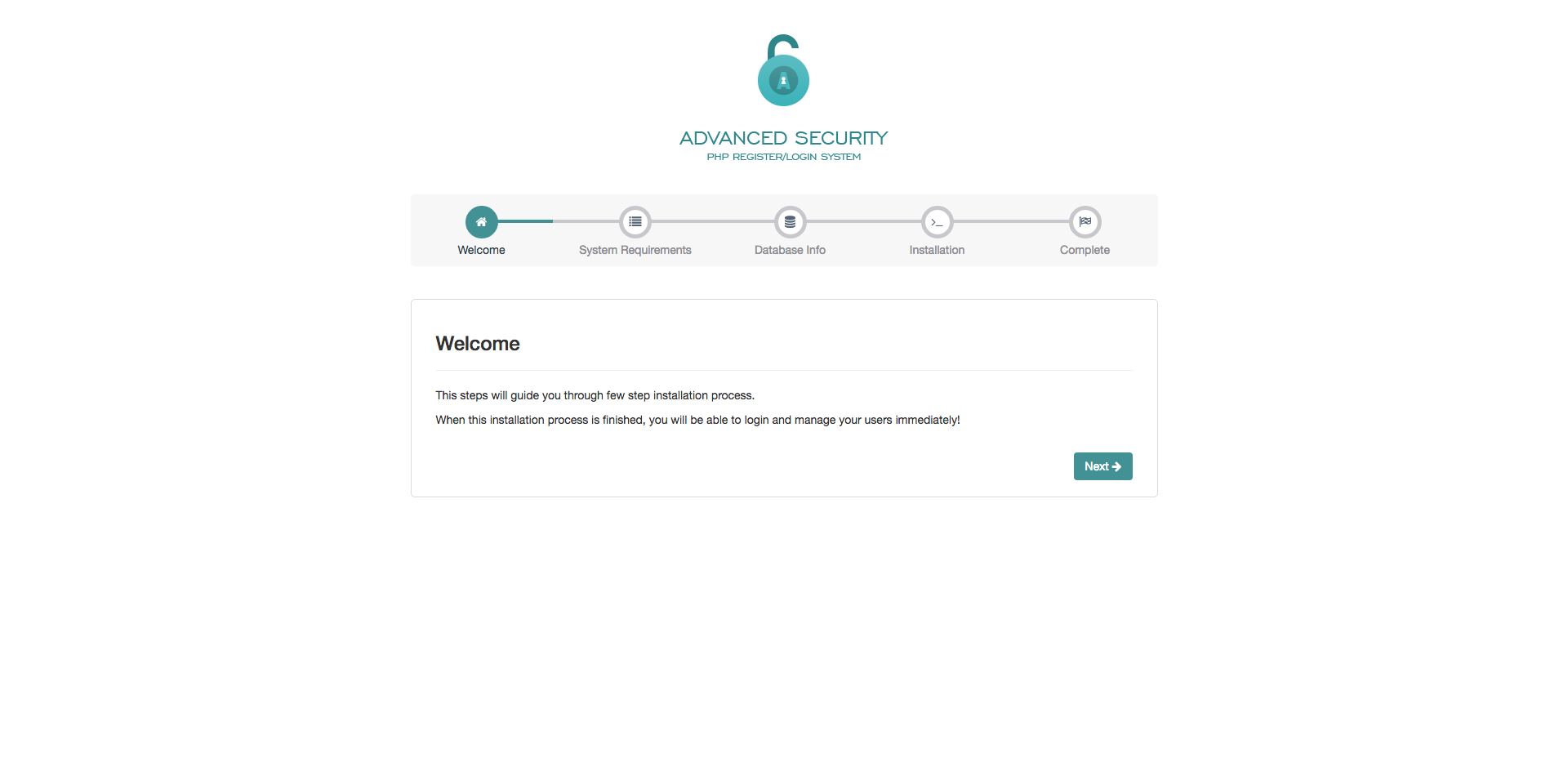
<h4>Step 1 - Welcome Screen</h4>
<p>When you have your database created and ready to use, just navigate to the AS folder on your server and installation wizard will be displayed immediately. For example, if you have uploaded AS script into <strong>auth</strong> folder on your server, then you will be able to start the installation simply by accessing <em>yourdomain.com/auth</em> from your browser. After accessing the described url, the installation wizard will be displayed.</p>
<p><a href="assets/img/install_step1.png"></a></p><p><img src="https://support-hub--assets.s3.eu-west-2.amazonaws.com/assets/1/images/t0fT8K13mFyrpGGM40PAK7mzKNeS0QUWxn7teScr.png" alt="t0fT8K13mFyrpGGM40PAK7mzKNeS0QUWxn7teScr.png" /><br /></p>
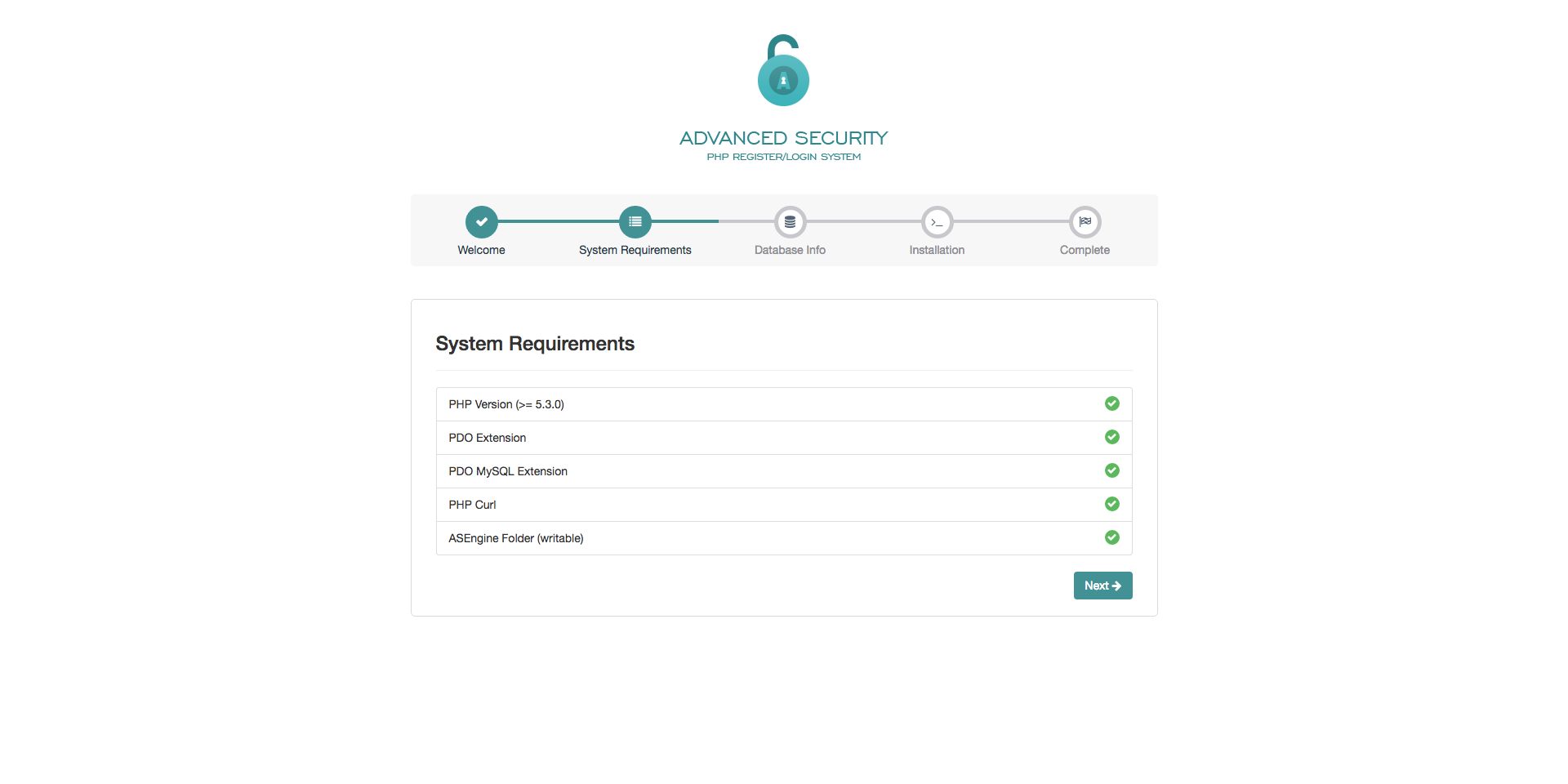
<h4>Step 2 - System Requirements</h4>
<p>By clicking the "Next" button in bottom right corner, "System Requirements" step will be displayed. On this screen you are able to see if your server meets all requirements necessary to install and use the Advanced Security application. If your system meets all the requirements, you can proceed to next step by clicking "Next" button.</p>
<p><a href="assets/img/install_step2.png"></a></p><p><img src="https://support-hub--assets.s3.eu-west-2.amazonaws.com/assets/1/images/UeJxHcNQ0yfOzn9mu6DGgHOJu5UAjBt8GO4ZiTJe.png" alt="UeJxHcNQ0yfOzn9mu6DGgHOJu5UAjBt8GO4ZiTJe.png" /><br /></p>
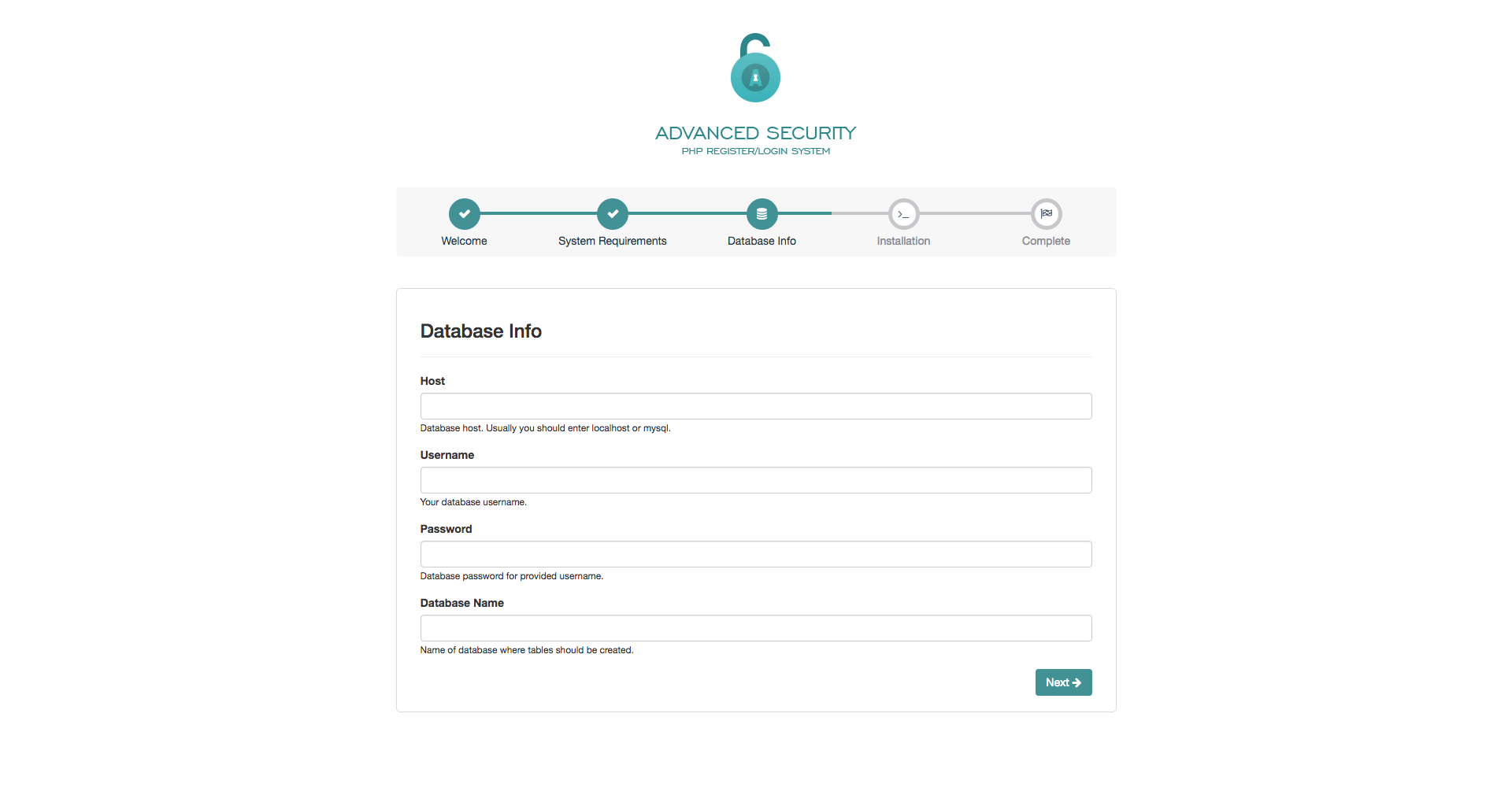
<h4>Step 3 - Database Info</h4>
<p>On this step you need to fill in the database information required for successfully connection to MySQL database. After filling in the required fields, installation wizard will try to connect to your database and, in case there are some problem while establishing the connection, appropriate error message will be displayed.</p>
<p><a href="assets/img/install_step3.png"></a></p><p><img src="https://support-hub--assets.s3.eu-west-2.amazonaws.com/assets/1/images/tULMwQCesMkp9I5XHNSlsRpsvOgVmpOUcleZp2Tp.png" alt="tULMwQCesMkp9I5XHNSlsRpsvOgVmpOUcleZp2Tp.png" /><br /></p>
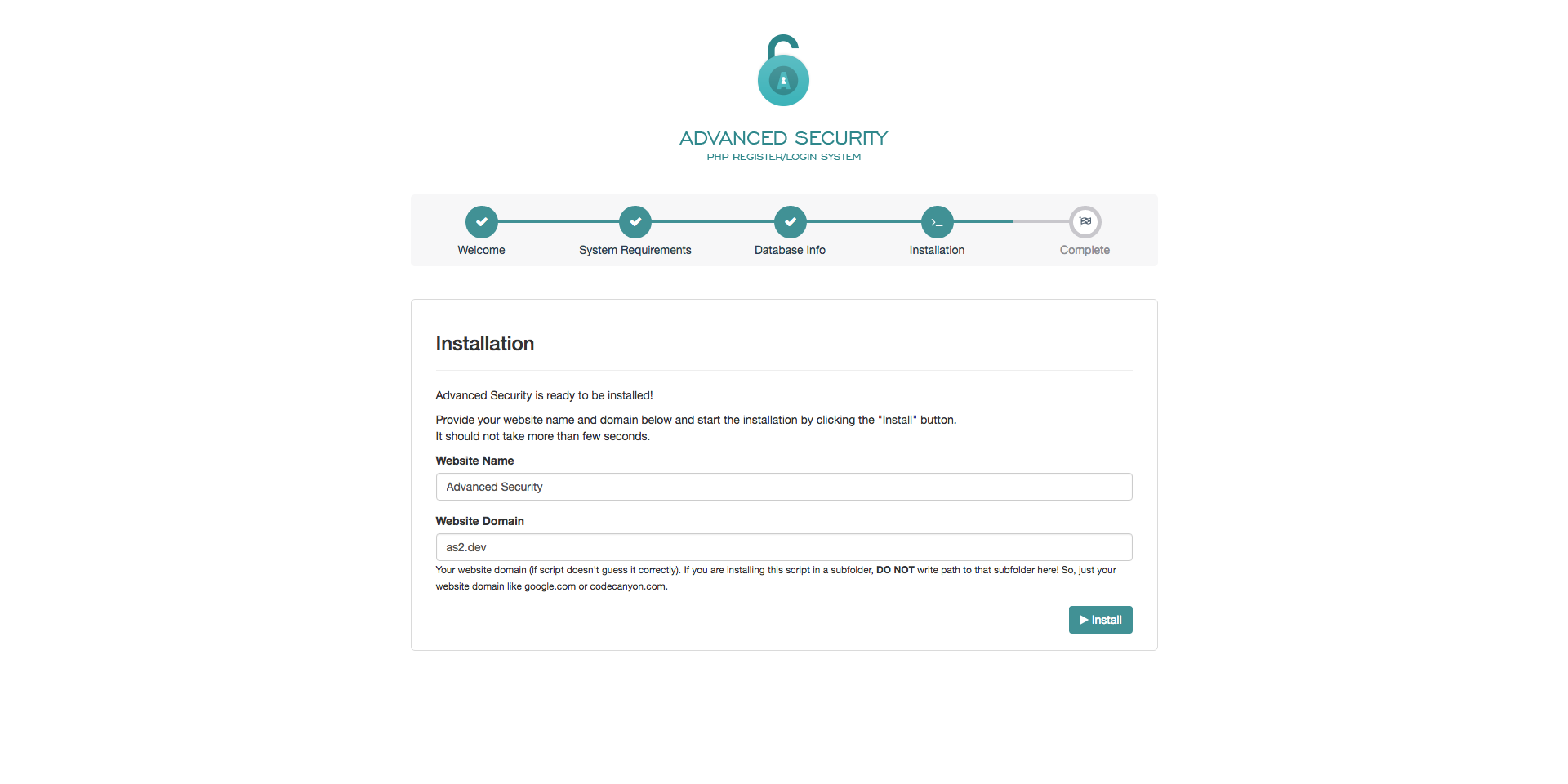
<h4>Step 4 - Installation</h4>
<p>This step is final configuration step that is required to successfully install the application. Here you need to provide your application/website name as well as domain (<strong>without</strong> <code>http://</code>, <code>https://</code> or <code>www</code> prefix). After you provide the required information, just click "Install" button and application should be installed in matter of seconds.</p>
<p><a href="assets/img/install_step4.png"></a></p><p><img src="https://support-hub--assets.s3.eu-west-2.amazonaws.com/assets/1/images/sowP2ZEWJKVgZ0VmpcMzP2sSb5YZnfIQVP5TShYU.png" alt="sowP2ZEWJKVgZ0VmpcMzP2sSb5YZnfIQVP5TShYU.png" /><br /></p>
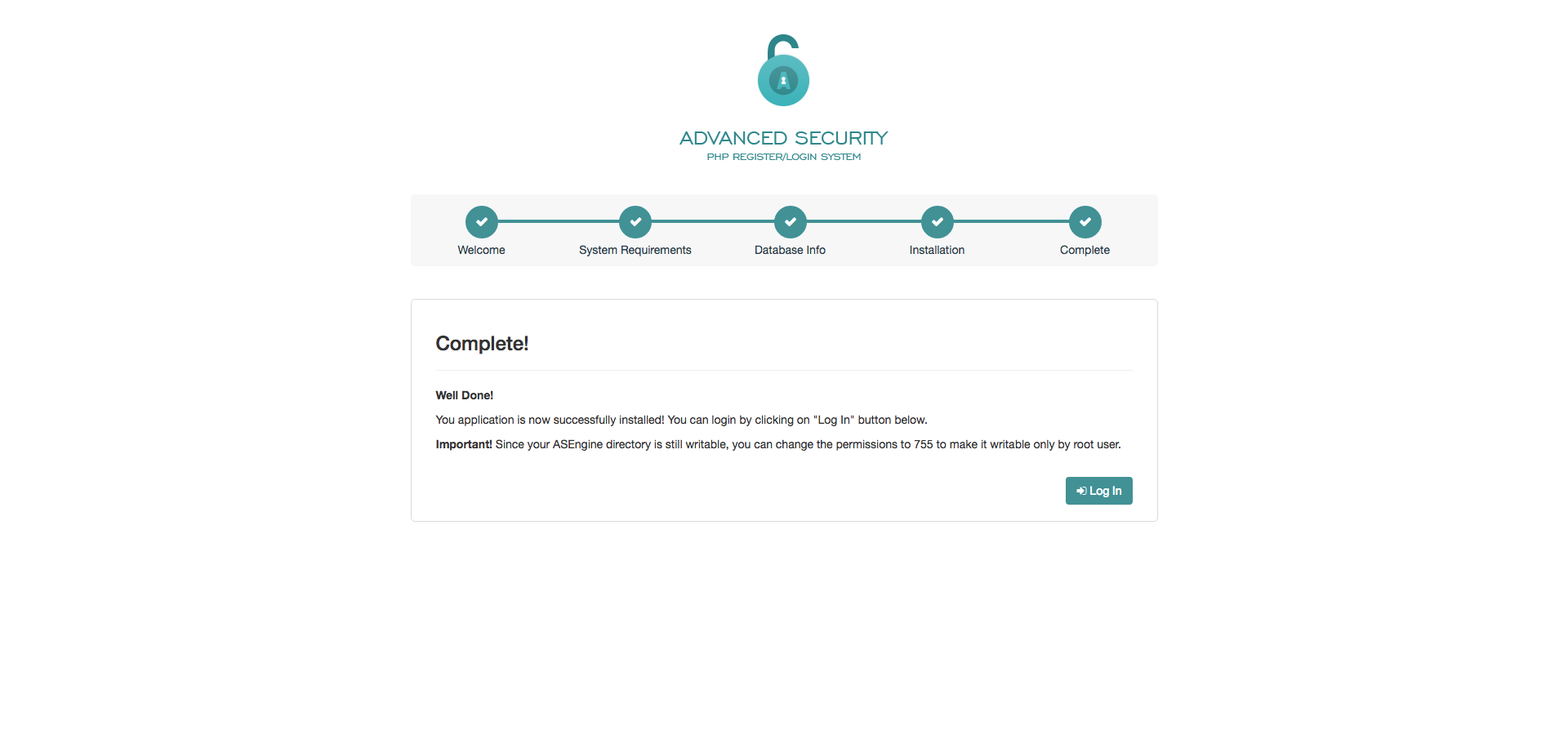
<h4>Step 5 - Complete</h4>
<p>This is the last step of the installation wizard, which means that everything is installed properly and that you can start using your application. By clicking "Log In" button you will be redirected to the login page, where you can login with default administrator credentials:</p>
<ul><li>Username: <strong>admin</strong></li>
<li>Password: <strong>admin123</strong></li>
</ul><p><a href="assets/img/install_step5.png"></a></p><p><img src="https://support-hub--assets.s3.eu-west-2.amazonaws.com/assets/1/images/G6yFTxf996AhkxAedldqHBvE0D8MpDw5ittdeQ5H.png" alt="G6yFTxf996AhkxAedldqHBvE0D8MpDw5ittdeQ5H.png" /><br /></p>

<p><strong>Note!</strong> Since your ASEngine directory is still writable, you should change the permissions to <code>755</code> to make it writable only by root user.</p>]]>
            </summary>
                                    <updated>2018-04-26T22:49:03+00:00</updated>
        </entry>
            <entry>
            <title><![CDATA[Configuration]]></title>
            <link rel="alternate" href="https://milos.support-hub.io/articles/advanced-security-configuration" />
            <id>https://milos.support-hub.io/22</id>
            <author>
                <name><![CDATA[Milos Stojanovic]]></name>
            </author>
            <summary type="html">
                <![CDATA[<p>This section contains some important configuration options that are specific to Advanced Security application. All configuration options are stored inside <code>ASEngine\ASConfig.php</code> file, which is created after successful installation.</p>
<p><a></a></p>
<h3>Timezone</h3>
<p>By default, time zone is set to <code>UTC</code> after you install the application. You can modify that by replacing "UTC" with some other time zone available on following url: <a href="http://php.net/manual/en/timezones.php">http://php.net/manual/en/timezones.php</a></p>
<p>For example, if you want to set up timezone to <code>America/New_York</code>, your configuration should look like this:</p>
<pre><code><span>date_default_timezone_set</span><span>(</span><span>'America/New_York'</span><span>)</span><span>;</span></code></pre>
<p><a></a></p>
<h3>Website Info</h3>
<p>ASConfig file also contains some default website configuration parameters, like website name, domain and script url. You can update those parameters here if you need to, but they all should be properly generated after script is installed.</p>
<p>If you decide to change <code>WEBSITE_DOMAIN</code> parameter, make sure that you prefix it with <strong>http://</strong> or <strong>https://</strong>.</p>
<p><code>SCRIPT_URL</code> parameter represent absolute url to the folder where script is installed. It can look the same as <code>WEBSITE_DOMAIN</code> if your script is installed inside the website root folder, but if it is installed inside some subfolder, the subfolder name should be added here too. For example, if you have installed the script inside <code>auth</code> folder, your <code>SCRIPT_URL</code> constant should look like this:</p>
<pre><code><span>define</span><span>(</span><span>'SCRIPT_URL'</span><span>,</span> 'http<span>:</span><span>//as2.dev/auth');</span></code></pre>
<p><a></a></p>
<h3>Database Configuration</h3>
<p>In order to install the script, you have to provide database credentials, and those credentials are stored into ASConfig.php file after installation is completed. However, if you decide to change some database credentials/ information, you don't have to reinstall the script. You can update those information here:</p>
<p><code>DB_HOST</code> - Your database host. If your database is on the same server as your script, it usually means that you should put <code>localhost</code> here.</p>
<p><code>DB_TYPE</code> - By default, AS support only mysql database, and that means that value of this constant should be set to <code>mysql</code>. Since AS is built on top of PDO, it means that you can use it with some other databases with only few modifications. One of them is to change the value of this constant, and other than that, you will probably have to update the constructor of ASDatabase class, so it can successfully connect to your database.</p>
<p><code>DB_USER</code> - DB User's username.</p>
<p><code>DB_PASS</code> - DB User's password.</p>
<p><code>DB_NAME</code> - Name of database you are connecting to.</p>
<p><a></a></p>
<h3>Session Configuration</h3>
<p><code>SESSION_SECURE</code> (default <code>false</code>) - This constant allow us to force secure sessions if we want to. That actually means that, if you are accessing the website over HTTPS, and you set this parameter to <code>true</code> session won't start if you access the website via HTTP. It's recommended to set this parameter to true in case you want to access the website <strong>ONLY</strong> via HTTPS.</p>
<p><code>SESSION_HTTP_ONLY</code> (default <code>true</code>) - When this option is set to <code>true</code>, generated session cookie will be only accessible by your browser and not from JavaScript code. It is recommended to keep it to true for security reasons.</p>
<p><code>SESSION_USE_ONLY_COOKIES</code> (default <code>true</code>) - Specifies whether the module will only use cookies to store the session id on the client side. Enabling this setting prevents attacks involved passing session ids in URLs. It's recommended to keep the default value</p>
<p><a></a></p>
<h3>Login Configuration</h3>
<p><code>LOGIN_MAX_LOGIN_ATTEMPTS</code> (default <code>20</code>) - Maximum invalid login attempts before user's account is locked for current day. This configuration parameter is used to prevent brute-force attacks, so keep in mind that setting it to some huge number will make it useless.</p>
<p><code>LOGIN_FINGERPRINT</code> (default <code>true</code>) - If this parameter is set to <code>true</code>, every time when user is logged in, hash function will generate string based on your IP Address and your browser name, and store it inside the session. This will prevent someone to steal your session. <strong>Note:</strong> It can cause problems if user IP address changes very often, so in that case you will have to turn it off by setting it to <code>false</code>.</p>
<p><code>SUCCESS_LOGIN_REDIRECT</code> - List of redirect pages/URLs for each user role. By default, it will redirect the user to "index.php" page after successful authentication. For example, if you want to redirect users with <strong>admin</strong> role to <code>users.php</code> page after login, you can do it like this:</p>
<pre><code><span>define</span><span>(</span><span>'SUCCESS_LOGIN_REDIRECT'</span><span>,</span> <span>serialize</span><span>(</span><span>array</span><span>(</span>
    <span>'default'</span> <span>=</span><span>&gt;</span> <span>'index.php'</span><span>,</span> 
    <span>'admin'</span> <span>=</span><span>&gt;</span> <span>'users.php'</span>
<span>)</span><span>)</span><span>)</span><span>;</span></code></pre>
<p><a></a></p>
<h3>Password Configuration</h3>
<p><code>PASSWORD_ENCRYPTION</code> (default <code>bcrypt</code> if available) - Password hash algorithm. Available values are <code>bcrypt</code> and <code>sha512</code>. During the installation, installation wizard will try to set default algorithm to <code>bcrypt</code> if your system supports it. In case that <code>bcrypt</code> is not supported, <code>sha512</code> will be used. It's recommended to use <code>bcrypt</code> algorithm if possible.</p>
<p><code>PASSWORD_BCRYPT_COST</code> (default <code>13</code>) - Bcrypt algorithm has it's <em>cost</em> parameter that will determine the number of rounds this algorithm will use to make the hashed version of provided string. It's recommended to keep it to default value of <code>13</code>.</p>
<p><code>PASSWORD_SHA512_ITERATIONS</code> (default <code>25000</code>) - Number of iterations for sha512 hash function (if PASSWORD_ENCRYPTION is set to <code>sha512</code>). The default value is high enough, but it's highly recommended to use <code>bcrypt</code> algorithm if possible.</p>
<p><code>PASSWORD_SALT</code> - Random, 22 characters long, string from the alphabet "./0-9A-Za-z". It generated during the installation process and you should keep it safe since it is used to hash your passwords.</p>
<p><code>PASSWORD_RESET_KEY_LIFE</code> (default <code>60</code>) - Password reset key life (in minutes). By default, when you request a password reset email, it will be valid in next 60 minutes. After it expires, you will have to request password reset email again.</p>
<p><a></a></p>
<h3>Registration Configuration</h3>
<p><code>MAIL_CONFIRMATION_REQUIRED</code> (default <code>true</code>) - Is mail confirmation required upon successful registration. You can set it to <code>false</code> if you want to allow your users to login right after the registration, without forcing them to confirm their email.</p>
<p><code>REGISTER_CONFIRM</code> (default <code>url-to/confirm.php</code>) - URL to the page that will be used for email configuration. It defaults to <code>confirm.php</code> page.</p>
<p><code>REGISTER_PASSWORD_RESET</code> (default <code>url-to/passwordreset.php</code>) - URL to page that will appear after users click on password reset link inside password reset email.</p>
<p><a></a></p>
<h3>Emails Configuration</h3>
<p><code>MAILER</code> (default <code>mail</code>) - PHP mailer that will be used for sending emails. Available values are <code>mail</code> and <code>smtp</code>. If you set it to <code>mail</code> (which is the default value) AS will try to use default PHP <code>mail()</code> function to send emails. However, keep in mind that some servers are not configured to send emails using <code>mail()</code> function, so you can have problems with it. Also, you probably won't be able to send emails from localhost, if you haven't configured your php installation. In that case, I recommend you to use some SMTP server for sending emails (like <a href="https://www.mailgun.com/" target="_blank" rel="noreferrer noopener">Mailgun</a>) which offers 10,000 free emails per month, and it's really easy to set up.</p>
<p>If you want to use some external SMTP server, besides setting <code>MAILER</code> to <code>smtp</code>, you will have to configure all "SMTP_" parameters. Most services and SMTP servers will provide you the list of those parameters, and here is how you can configure it to send emails using your Gmail account:</p>
<pre><code><span>define</span><span>(</span><span>'MAILER'</span><span>,</span> <span>"smtp"</span><span>)</span><span>;</span>
<span>define</span><span>(</span><span>'SMTP_HOST'</span><span>,</span> <span>"smtp.gmail.com"</span><span>)</span><span>;</span>
<span>define</span><span>(</span><span>'SMTP_PORT'</span><span>,</span> <span>465</span><span>)</span><span>;</span>
<span>define</span><span>(</span><span>'SMTP_USERNAME'</span><span>,</span> <span>"your_email_address@gmail.com"</span><span>)</span><span>;</span>
<span>define</span><span>(</span><span>'SMTP_PASSWORD'</span><span>,</span> <span>"your_gmail_password"</span><span>)</span><span>;</span>
<span>define</span><span>(</span><span>'SMTP_ENCRYPTION'</span><span>,</span> <span>"ssl"</span><span>)</span><span>;</span></code></pre>
<p>In case that this configuration don't work as expected, try to set <code>SMTP_PORT</code> to <code>587</code> and <code>SMTP_ENCRYPTION</code> to <code>tls</code>. More info about Gmail SMTP settings can be found on this URL: <a href="https://support.google.com/a/answer/176600?hl=en">https://support.google.com/a/answer/176600?hl=en</a></p>

<p><strong>Note!</strong> If your server does not require encryption, just leave it blank.</p>

<p><code>MAIL_FROM_NAME</code> - From name used in all emails that are being sent from the application.</p>
<p><code>MAIL_FROM_EMAIL</code> - From email used in all emails that are being sent from the application.</p>]]>
            </summary>
                                    <updated>2018-04-26T22:54:55+00:00</updated>
        </entry>
            <entry>
            <title><![CDATA[Social Authentication]]></title>
            <link rel="alternate" href="https://milos.support-hub.io/articles/advanced-security-social-authentication" />
            <id>https://milos.support-hub.io/24</id>
            <author>
                <name><![CDATA[Milos Stojanovic]]></name>
            </author>
            <summary type="html">
                <![CDATA[<p>Before you enable social configuration, make sure that your <code>SOCIAL_CALLBACK_URI</code> is properly defined inside <code>ASConfig.php</code> file. It should point to <code>socialauth_callback.php</code> file on your server. So, if you have AS installed inside <code>auth</code> folder for example, it should be configured as following:</p>
<pre><code><span>define</span><span>(</span><span>'SOCIAL_CALLBACK_URI'</span><span>,</span> "http<span>:</span><span>//yourwebsite.com/auth/socialauth_callback.php");</span></code></pre>
<p>This is the url that you should enter everywhere you need to provide callback URL for social authentication.</p>
<p><a></a></p>
<h4>Facebook Configuration</h4>
<p><a href="https://developers.facebook.com/docs/apps/register" target="_blank" rel="noreferrer noopener">Here</a> is an detailed explanation of how you can create an Facebook application and acquire application id and secret key, required for social authentication. During the application creation and configuration, make sure that you have entered correct application domain on application's settings page.</p>
<p>After you create an application, you can find your App Id and App Secret keys on your application's Dashboard. After you get the key and the secret, you should enable Facebook authentication and copy those keys into <code>ASConfig.php</code> configuration file as following:</p>
<pre><code><span>define</span><span>(</span><span>'FACEBOOK_ENABLED'</span><span>,</span> <span>true</span><span>)</span><span>;</span>
<span>define</span><span>(</span><span>'FACEBOOK_ID'</span><span>,</span> <span>"your_application_id_from_facebook"</span><span>)</span><span>;</span>
<span>define</span><span>(</span><span>'FACEBOOK_SECRET'</span><span>,</span> <span>"your_application_secret_from_facebook"</span><span>)</span><span>;</span></code></pre>
<p><a></a></p>
<h4>Twitter</h4>
<p>In order to create Twitter application, and get the required Application Id and Secret key, go to <a href="https://apps.twitter.com/" target="_blank" rel="noreferrer noopener">Twitter Application Management</a> and click <strong>Create New App</strong> button at the top right corner. When app creation form is opened, fill all required fields and click <strong>Create your Twitter Application</strong> button at the bottom of the page.</p>

<p><strong>Note!</strong> As it is mentioned above, your <strong>Callback URL</strong> is <code>http://yourwebsite.com/socialauth_callback.php</code>.</p>

<p>After application is created, go to <strong>Keys and Access Tokens</strong> tab, grab your Consumer Key and Consumer Secret and paste them into your <code>ASConfig.php</code> file as follows:</p>
<pre><code><span>define</span><span>(</span><span>'TWITTER_ENABLED'</span><span>,</span> <span>true</span><span>)</span><span>;</span>
<span>define</span><span>(</span><span>'TWITTER_KEY'</span><span>,</span> <span>"your_consumer_key"</span><span>)</span><span>;</span>
<span>define</span><span>(</span><span>'TWITTER_SECRET'</span><span>,</span> <span>"your_consumer_secret"</span><span>)</span><span>;</span></code></pre>
<p><a></a></p>
<h4>Google+</h4>
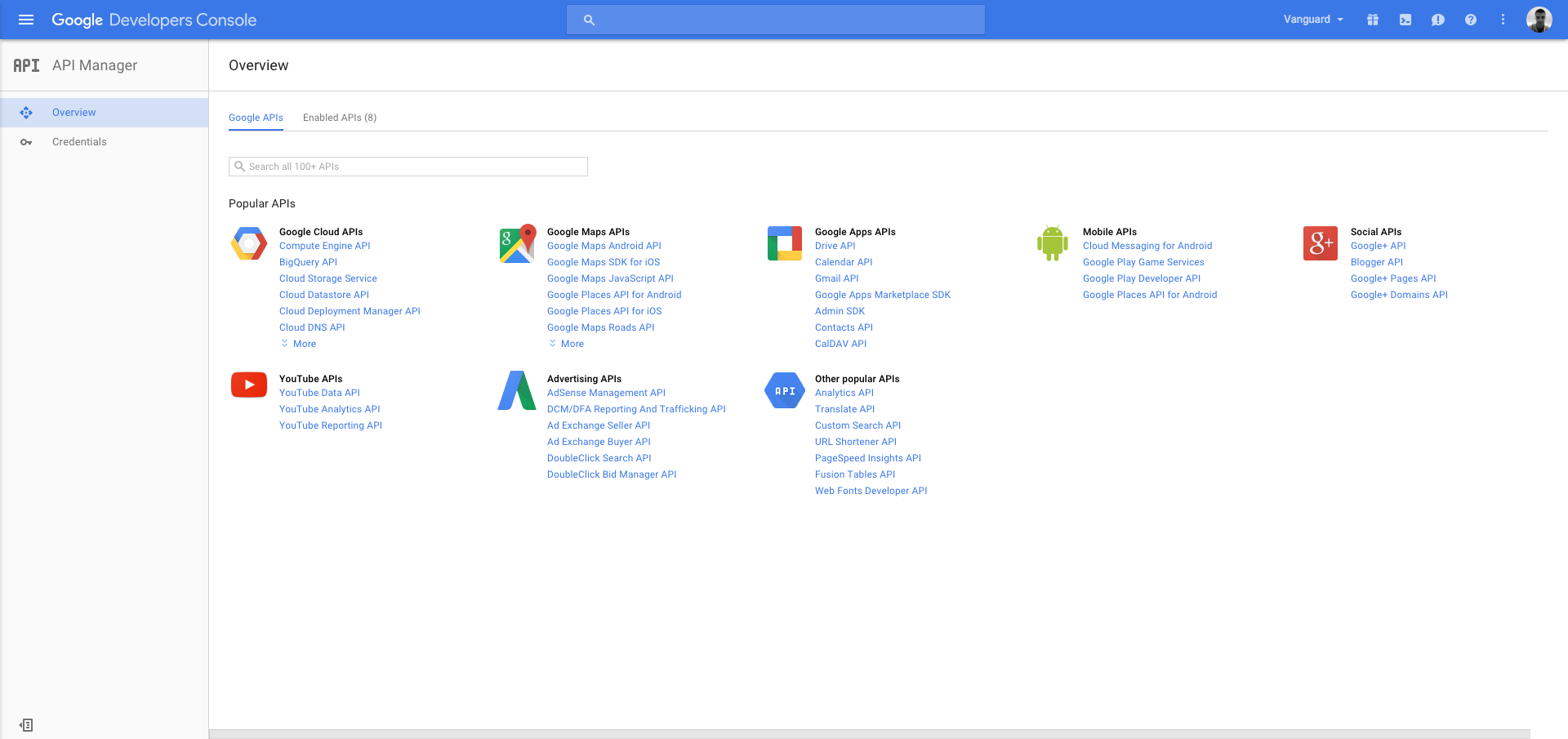
<p>In order to utilise Google+ Authentication, first you need to create new Google Project/Application. To do that, first you have to go to <a href="https://console.developers.google.com/projec" target="_blank" rel="noreferrer noopener">https://console.developers.google.com/projec</a>, click <strong>Create project</strong> button at top left corner and enter your Project name.</p>
<p>After you have created your project, you now have to enable <strong>Google+ API</strong> and get the credentials that will be used for authentication. Go to <a href="https://console.developers.google.com/apis/library" target="_blank" rel="noreferrer noopener">https://console.developers.google.com/apis/library</a>, select your project from dropdown available on top right header and click on Google+ API link inside the list of available Google APIs.</p>
<p><a href="assets/img/g_plus_api.png"></a></p><p><img src="https://support-hub--assets.s3.eu-west-2.amazonaws.com/assets/1/images/0HIFsTn5aVmBRwLrHzW28HauKOy3oR7EKV82doOk.png" alt="0HIFsTn5aVmBRwLrHzW28HauKOy3oR7EKV82doOk.png" /><br /></p>
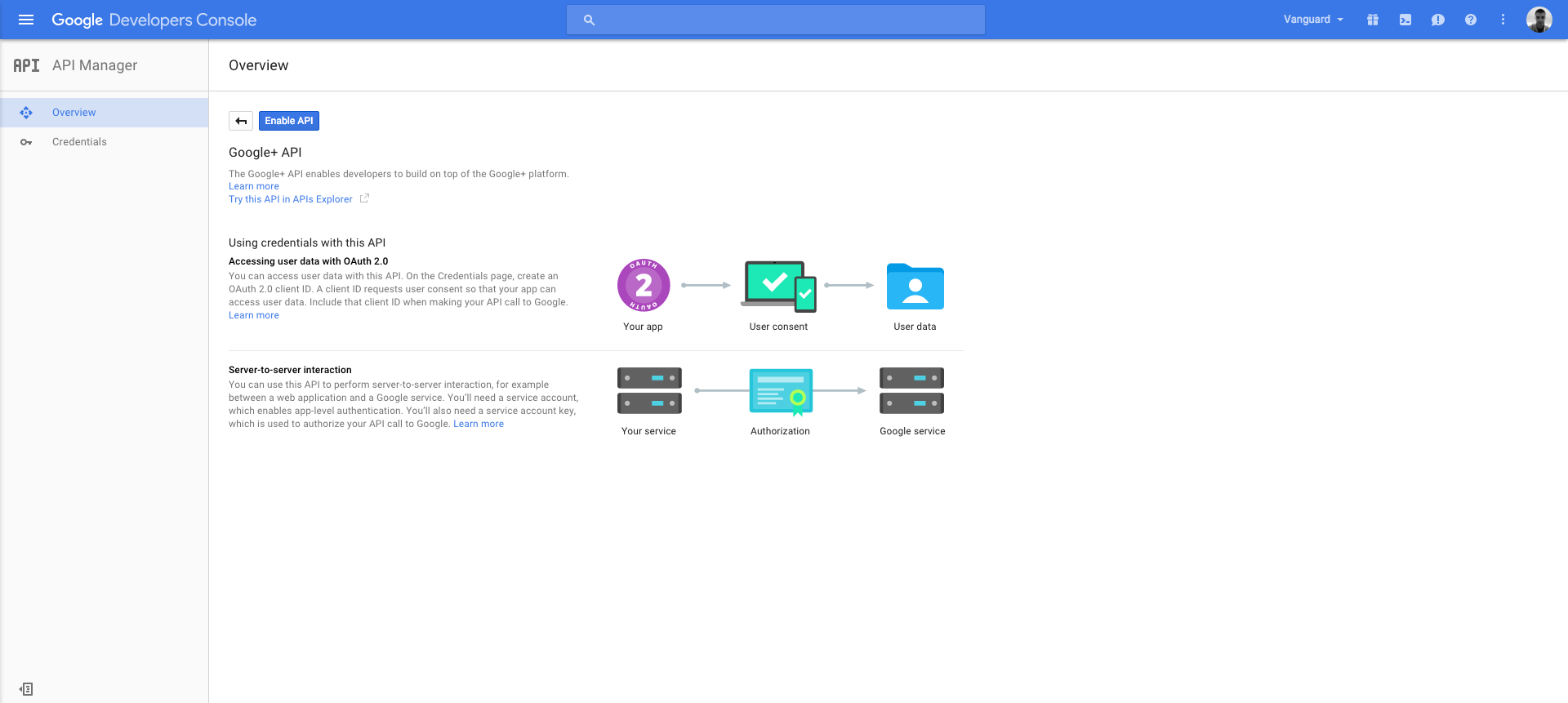
<p>After opening the Google+ API page, click <strong>Enable API</strong> button in order to enable the API.</p>
<p><a href="assets/img/g_plus_api_enable.png"></a></p><p><img src="https://support-hub--assets.s3.eu-west-2.amazonaws.com/assets/1/images/uWEzdvhVzBlEwJmeU7CVLSdLBKLvdOk0iTKbO73X.png" alt="uWEzdvhVzBlEwJmeU7CVLSdLBKLvdOk0iTKbO73X.png" /><br /></p>
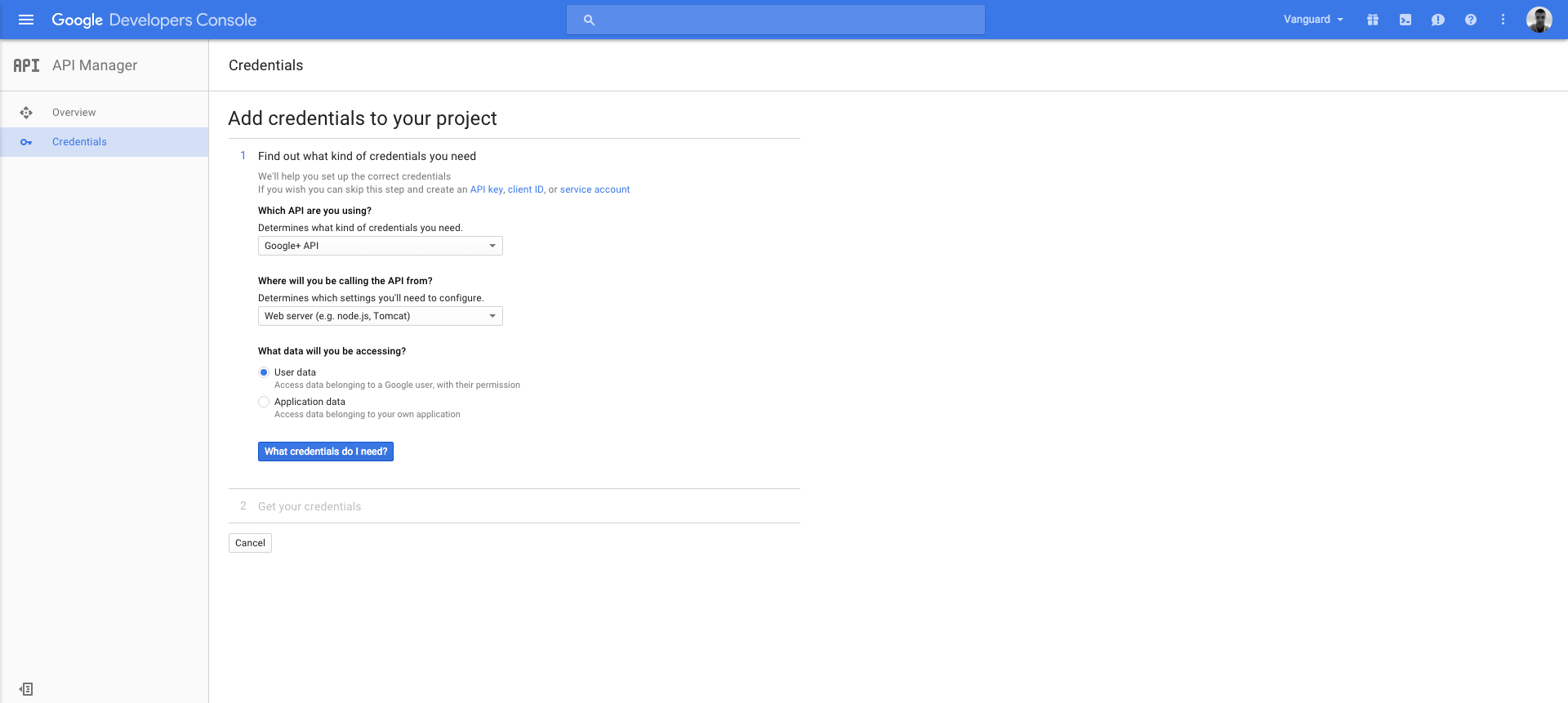
<p>After enabling the API, the only remaining step is to get the credentials you need. Just click on <strong>Go to Credentials</strong> button, fill the displayed credentials form as following and click <strong>What credentials do I need?</strong> button:</p>
<p><a href="assets/img/g_plus_api_credentials1.png"></a></p><p><img src="https://support-hub--assets.s3.eu-west-2.amazonaws.com/assets/1/images/VtG8eAWrvmbhaCR4dSrRgf8uOM0LkWrWnjlv5cxa.png" alt="VtG8eAWrvmbhaCR4dSrRgf8uOM0LkWrWnjlv5cxa.png" /><br /></p>
<p>After entering in the required application Name, make sure that you enter <code>http://YOUR_DOMAIN</code> in <strong>Authorized JavaScript origins</strong> section, and <code>http://YOUR_DOMAIN/socialauth_callback.php</code> in <strong>Authorized redirect URIs</strong> section (basically your <code>SOCIAL_CALLBACK_URI</code> from above).</p>
<p>After you fill those fields, click <strong>Create client ID</strong> button, provide your product name as required, and get your Client Id and Client Secret keys.</p>
<p>When you have those keys, the only thing left for you to do is to paste them into your <code>ASConfig.php</code> file as following:</p>
<pre><code><span>define</span><span>(</span><span>'GOOGLE_ENABLED'</span><span>,</span> <span>true</span><span>)</span><span>;</span>
<span>define</span><span>(</span><span>'GOOGLE_ID'</span><span>,</span> <span>"your_client_id"</span><span>)</span><span>;</span>
<span>define</span><span>(</span><span>'GOOGLE_SECRET'</span><span>,</span> <span>"your_client_secret"</span><span>)</span><span>;</span></code></pre>]]>
            </summary>
                                    <updated>2018-04-26T22:58:12+00:00</updated>
        </entry>
            <entry>
            <title><![CDATA[Localization]]></title>
            <link rel="alternate" href="https://milos.support-hub.io/articles/advanced-security-localization" />
            <id>https://milos.support-hub.io/25</id>
            <author>
                <name><![CDATA[Milos Stojanovic]]></name>
            </author>
            <summary type="html">
                <![CDATA[<p>AS application allows you to easily translate the whole interface to any language you want. All locales are simple <code>.php</code> files located inside <code>Lang</code> folder.</p>
<p><a></a></p>
<h3>Available Locales</h3>
<p>Out of the box, there are <strong>7</strong> different locales that come with AS:</p>
<ul><li>English</li>
<li>Spanish</li>
<li>French</li>
<li>Russian</li>
<li>German</li>
<li>Serbian (Cyrillic) and</li>
<li>Swedish</li>
</ul><p><a></a></p>
<h3>Adding New Locale</h3>
<p>If you want to add new locale, all you need to do is to make a copy of existing language file (en.php for example) located inside Lang directory, rename it to <code>ru.php</code> for example, and translate it. Of course, since this translation file is organized as PHP array, you only translate those values to the right of <code>=&gt;</code> sign.</p>
<p>Next step you need to do is to add a new flag (or organize it however you want) and create a link that will point to <code>?lang=ru</code>, and that's it.</p>
<p>Example:</p>
<pre><code><span><span><span><span>&lt;</span>a</span> <span>href</span><span><span>=</span><span>"</span>?lang<span>=</span>ru<span>"</span></span><span>&gt;</span></span></span>Russian<span><span><span><span>&lt;/</span>a</span><span>&gt;</span></span></span></code></pre>
<p><a></a></p>
<h3>Setting Default Locale</h3>
<p>If you want to set up default application locale, all you need to do is to define it inside <code>ASConfig.php</code> file, like the following:</p>
<pre><code><span>define</span><span>(</span><span>'DEFAULT_LANGUAGE'</span><span>,</span> <span>'es'</span><span>)</span><span>;</span></code></pre> 
<p><strong>Note!</strong> You can name the language files however you want, but you must use the same name (without .php extension) when you define default language or change language by clicking the country icon.
For example, if you create a file named <code>es.php</code> for the Spanish language, then you will use <code>es</code> everywhere you need to set the language to Spanish.</p>]]>
            </summary>
                                    <updated>2020-04-03T17:37:54+00:00</updated>
        </entry>
            <entry>
            <title><![CDATA[Upgrade Guide]]></title>
            <link rel="alternate" href="https://milos.support-hub.io/articles/advanced-security-upgrade-guide" />
            <id>https://milos.support-hub.io/26</id>
            <author>
                <name><![CDATA[Milos Stojanovic]]></name>
            </author>
            <summary type="html">
                <![CDATA[<h3>To 4.0.0 from 3.0.1</h3><p>In this release, the whole codebase is refreshed and updated to support the latest version of PHP. A lot of files have been changed, but for some of them, there are some minor cosmetic updates, like adding return types to class functions, so you don't have to update those files if you don't want to.</p><p>The list of modified files:</p><pre> ASEngine/AS.php                                            |   25 +-<br /> ASEngine/ASAjax.php                                        |   46 +-<br /> ASEngine/ASComment.php                                     |   54 ++-<br /> ASEngine/ASCsrf.php                                        |   42 +-<br /> ASEngine/ASDatabase.php                                    |   37 +-<br /> ASEngine/ASEmail.php                                       |   18 +-<br /> ASEngine/ASHelperFunctions.php                             |   29 +-<br /> ASEngine/ASLang.php                                        |   65 +--<br /> ASEngine/ASLogin.php                                       |  236 +++++-----<br /> ASEngine/ASPasswordHasher.php                              |   25 +-<br /> ASEngine/ASRegister.php                                    |  151 ++++---<br /> ASEngine/ASResponse.php                                    |   36 +-<br /> ASEngine/ASRole.php                                        |   60 +--<br /> ASEngine/ASSession.php                                     |   27 +-<br /> ASEngine/ASUser.php                                        |  139 +++---<br /> ASEngine/ASValidator.php                                   |   60 +--<br /> assets/css/bootstrap.min.css                               |   12 +-<br /> assets/css/bootstrap.min.css.map                           |    2 +-<br /> assets/js/app/index.js                                     |   16 +-<br /> assets/js/vendor/bootstrap.bundle.min.js                   |    7 -<br /> assets/js/vendor/bootstrap.bundle.min.js.map               |    1 -<br /> assets/js/vendor/bootstrap.min.css.map                     |    2 +-<br /> assets/js/vendor/bootstrap.min.js                          |    7 +<br /> assets/js/vendor/bootstrap.min.js.map                      |    1 +<br /> assets/js/vendor/dataTables.bootstrap4.js                  |  184 ++++++++<br /> assets/js/vendor/dataTables.bootstrap5.js                  |   14 -<br /> assets/js/vendor/jquery-validate/additional-methods.js     | 2462 +-<br /> assets/js/vendor/jquery-validate/additional-methods.min.js |    6 +-<br /> assets/js/vendor/jquery-validate/jquery.validate.js        | 3230 +-<br /> assets/js/vendor/jquery-validate/jquery.validate.min.js    |    6 +-<br /> assets/js/vendor/jquery.dataTables.min.js                  |  354 +++++++--------<br /> assets/js/vendor/jquery.min.js                             |    4 +-<br /> assets/js/vendor/popper.min.js                             |    5 +<br /> assets/js/vendor/popper.min.js.map                         |    1 +<br /> composer.json                                              |   10 +-<br /> composer.lock                                              |  405 +++++++++--------<br /> confirm.php                                                |    4 +-<br /> index.php                                                  |   18 +-<br /> install/check.php                                          |    2 +-<br /> install/stubs/config.stub                                  |    8 +-<br /> login.php                                                  |   74 ++--<br /> passwordreset.php                                          |    4 +-<br /> profile.php                                                |   14 +-<br /> socialauth.php                                             |  148 ++++++-<br /> socialauth_callback.php                                    |  148 +------<br /> templates/footer.php                                       |    3 +-<br /> templates/header.php                                       |    2 +-<br /> templates/languages.php                                    |   16 +-<br /> templates/navbar.php                                       |   14 +-<br /> user_roles.php                                             |    4 +-<br /> users.php                                                  |   54 +--<br /> 51 files changed, 4031 insertions(+), 4261 deletions(-)</pre><p><br /></p><h3>To 3.0.1 from 3.0.0</h3>
<p>This is a bug-fix release. You will need to update the modified application files given below to the latest versions and run <code>composer update</code> (or just overwrite the vendor folder if you are not using composer).</p><p>Modified files:</p>
<pre><code> ASEngine/AS.php     |   2 +-
 ASEngine/ASUser.php |   2 +-
 assets/css/app.css  |   8 ++++++++
 composer.json       |   2 +-
 composer.lock       | 129 +++++++++++++++++++++++++++++++++++++++++++++++++++++++++++++++++++++++++++++++++++++++++++++++++++++++++++++++++----------------
 login.php           |   2 +-
 socialauth.php      |   2 +-
 7 files changed, 126 insertions(+), 21 deletions(-)</code></pre>

<h3>To 3.0.0 from 2.4</h3>
<p>Version 3, as another major version, has a lot of mainly frontend breaking changes and the only way to update it is to do do it manually and to update one file at the time.</p>
<p>The app now uses Bootstrap 4 and all frontend files are updated to match the new bootstrap classes. All javascript files are updated as well, so you will need to manually update your old javascript files.</p>
<p>Here are some guidelines that might help you in the update process:</p>
<ul><li>
<p>All JavaScript files are moved from <code>ASLibrary</code> folder to <code>assets/js/app</code> folder and <code>ASLibrary</code> folder is removed from the app.</p>
</li>
<li>
<p>All application CSS files are now in <code>assets/css</code> folder.</p>
</li>
<li>
<p>You can overwrite the complete <code>install</code> folder if you haven't removed it from the app. This will make sure that all future installations of the app work properly.</p>
</li>
<li>
<p>Some of the backend files from <code>ASEngine</code> directory have been refactored, so it is recommended to update them too.</p>
</li>
<li>
<p>The app now uses <a href="https://jqueryvalidation.org/">jQuery Validation</a> plugin for frontend validation, which has it's own language files. The files are located inside <code>assets/js/vendor/jquery-validate/localization</code> directory in case you want to customize them.</p>
</li>
<li>
<p>Overwrite your <code>vendor</code> folder with latest one. In case you modified something inside the vendor folder, just copy new files instead of overwriting. This version is using the most recent packages (which you can update by running <code>composer update</code> btw) so it is important that you update them so application can work properly (especially for social authentication feature).</p>
</li>
<li>Update all files from <code>Lang</code> directory to the latest version, since version 3 of the app have a few more translation strings added.</li>
</ul><h3>To 2.4 from 2.3</h3>
<p>This version contains few bug fixes from previous release. Here is what you wound need to do:</p>
<ul><li>
<p>Overwrite your <code>vendor</code> folder with latest one. In case you modified something inside the vendor folder, just copy new files instead of overwriting. This version is using the most recent packages (which you can update by running <code>composer update</code> btw) so it is important that you update them so application can work properly (especially for social authentication feature).</p>
</li>
<li>
<p>Copy new file called <code>socialauth_callback.php</code> to your AS root directory.</p>
</li>
<li>
<p>Update <code>socialauth.php</code> file with the latest one.</p>
</li>
<li>
<p>Update your social callback url to look like following: <code>http://yourdomain.com/socialauth_callback.php</code></p>
</li>
<li>
<p>Update <code>ASEngine/ASCsrf.php</code> file to the latest version.</p>
</li>
<li>
<p>Overwrite complete <code>install</code> folder if you haven't removed it from the app. This will make sure that all future installations of the app work properly.</p>
</li>
<li>
<p>Make sure that your <code>ASEngine/ASDatabase.php</code> file is up to date with latest version.</p>
</li>
<li>
<p>Update <code>ASEngine/ASLang.php</code> file to match the latest version.</p>
</li>
<li>
<p>Update <code>ASEngine/ASEmail.php</code> file to match the latest version.</p>
</li>
<li>Make sure that you have <code>de.php</code> file inside your <code>Lang</code> folder and then update <code>templates\languages.php</code> file to add German language to the top list of available languages. Also, if you want to display German flag there, you can copy it from the latest version where it is located inside <code>assets\img</code> folder.</li>
</ul><p><a></a></p>
<h3>To 2.3 from 2.2</h3>
<p>This update contains a lot of changes comparing to previous version, and in order to properly do the update, I recommend you to go through all files and carefully update them. In case you haven't modified any of AS files, just overwrite everything and there should not be any issues.</p>
<p>Here are some guidelines on how you should perform the update:</p>
<h4>Vendor Folder</h4>
<p>Overwrite your <code>vendor</code> folder with latest one. In case you modified something inside the vendor folder, just copy new files instead of overwriting.</p>
<h4>Install Folder</h4>
<p>Completely replace the <code>install</code> folder. This is not required if you have app in production, since you won't install it again.</p>
<h4>ASConfig</h4>
<p>Since <code>SESSION_REGENERATE_ID</code> constant is removed, and session is regenerated always when some critical actions occur (after successful authentication, after user update his password etc), you can remove the constant from your <code>ASConfig.php</code> file.</p>
<p>Add following constants to <code>ASConfig.php</code> file:</p>
<pre><code><span>// Name used when emails are sent from your server. </span>
<span>// Default is your website name.</span>
<span>define</span><span>(</span><span>'MAIL_FROM_NAME'</span><span>,</span> <span>"your_mail_from_name_here"</span><span>)</span><span>;</span>

<span>// Email used when emails are sent from your server.</span>
<span>// The recepients will see this as an email from</span>
<span>// which they receive their emails.</span>
<span>define</span><span>(</span><span>'MAIL_FROM_EMAIL'</span><span>,</span> <span>"your_from_email_here"</span><span>)</span><span>;</span></code></pre>
<h4>PHP Classes</h4>
<p>Copy new classes into ASEngine folder Update <code>ASEngine\AS.php</code> file to the latest version</p>
<p>Go through <strong>all</strong> PHP classes, one by one, and move all dependencies to the constructor. For example, if somewhere inside <code>ASUser</code> class you have <code>$validator = new ASValidator();</code> you will create new <code>protected $validator;</code> property and move the ASValidator instance to be passed through the constructor (check latest version of <code>ASUser</code> class). Now, everywhere inside <code>ASUser</code> class you will use validator instance like <code>$this-&gt;validator</code></p>
<p>This has to be done with all dependencies in every PHP class that AS has, and the easiest way to find all dependencies is to simply search the file for "new" keyword. This is simple preparation for some future updates that will modernize the code structure and make script testable and easier to maintain.</p>
<h4>Assets</h4>
<p>You should update <code>assets</code> folder to match the latest version. This basically means that you must copy all new files and folders from latest version, but you don't have to remove old files if you don't want to. Script will just ignore them if they are not included on your pages.</p>
<p>Update <code>ASLibrarly/js/users.js</code>, <code>ASLibrarly/js/roles.js</code> and <code>ASLibrarly/js/register.js</code> to the latest version that contains few fixes. Other JavaScript files located inside <code>ASLibrary/js</code> folder are not modified.</p>
<p>Copy newly created <code>js-bootstrap.php</code> file into <code>ASLibrary/js</code> directory.</p>
<h4>Pages</h4>
<p>Go through all pages (login.php, index.php...) and apply all changes from latest version. If you haven't modified those files, you can just overwrite them.</p>
<p>In case that you are using your own design, you probably don't need to change anything that is HTML/CSS/JavaScript related. All you have to do in that case is to update the query that is responsible for fetching data and displaying it to database (usually located on top of every file).</p>
<p>Update <code>templates/footer.php</code> to include some common scripts as well as newly created <code>js-bootstrap.php</code> file that is now used to initialize <code>$_lang</code> variable and set up jQuery AJAX to send CSRF token automatically. This means that you should now remove <code>$_lang</code> variable initialization from any other files than <code>js-bootstrap.php</code>.</p>]]>
            </summary>
                                    <updated>2022-08-24T10:05:36+00:00</updated>
        </entry>
            <entry>
            <title><![CDATA[Authentication and Registration]]></title>
            <link rel="alternate" href="https://milos.support-hub.io/articles/advanced-security-authentication-and-registration" />
            <id>https://milos.support-hub.io/27</id>
            <author>
                <name><![CDATA[Milos Stojanovic]]></name>
            </author>
            <summary type="html">
                <![CDATA[<h3>Logging In</h3>
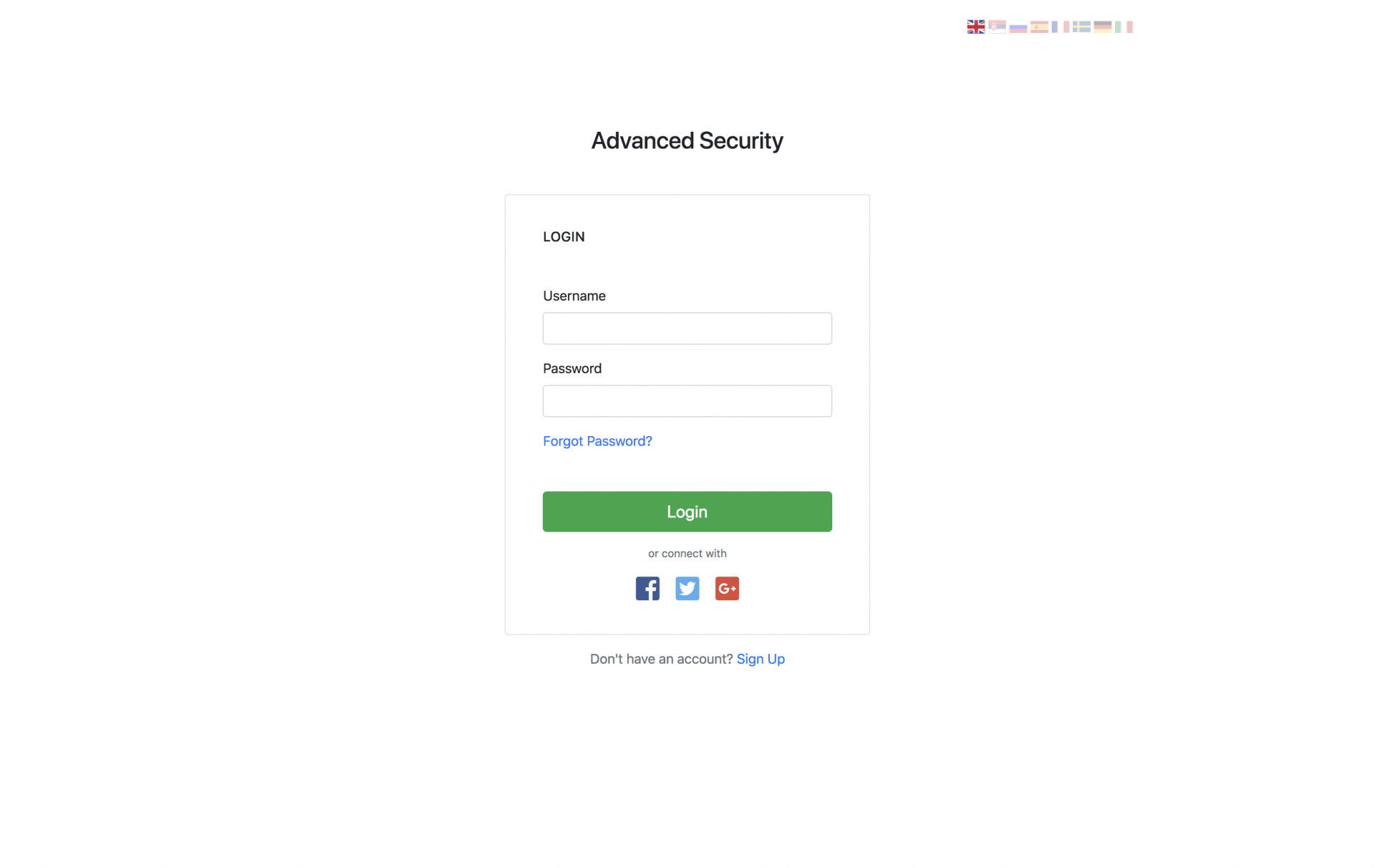
<p>When you try to access any protected file (file that requires authentication) you will automatically be redirected to login page. From there, you are able to log in using your username and password. Login form:</p>
<p><a href="assets/img/login.png"></a></p><p></p><p><img src="https://support-hub--assets.s3.eu-west-2.amazonaws.com/assets/1/images/wOTns9kFNxoR9TU9JCuirUZREHHuBU8Ur4CpFAHv.png" alt="wOTns9kFNxoR9TU9JCuirUZREHHuBU8Ur4CpFAHv.png" /><br /></p>
<p>After successful authentication user will be redirected to the default page for his role as it is described in <a href="https://milos.support-hub.io/articles/advanced-security-configuration#login" target="_blank" rel="noreferrer noopener">the configuration section</a>.</p>
<p><a></a></p>
<h3>Registration</h3>
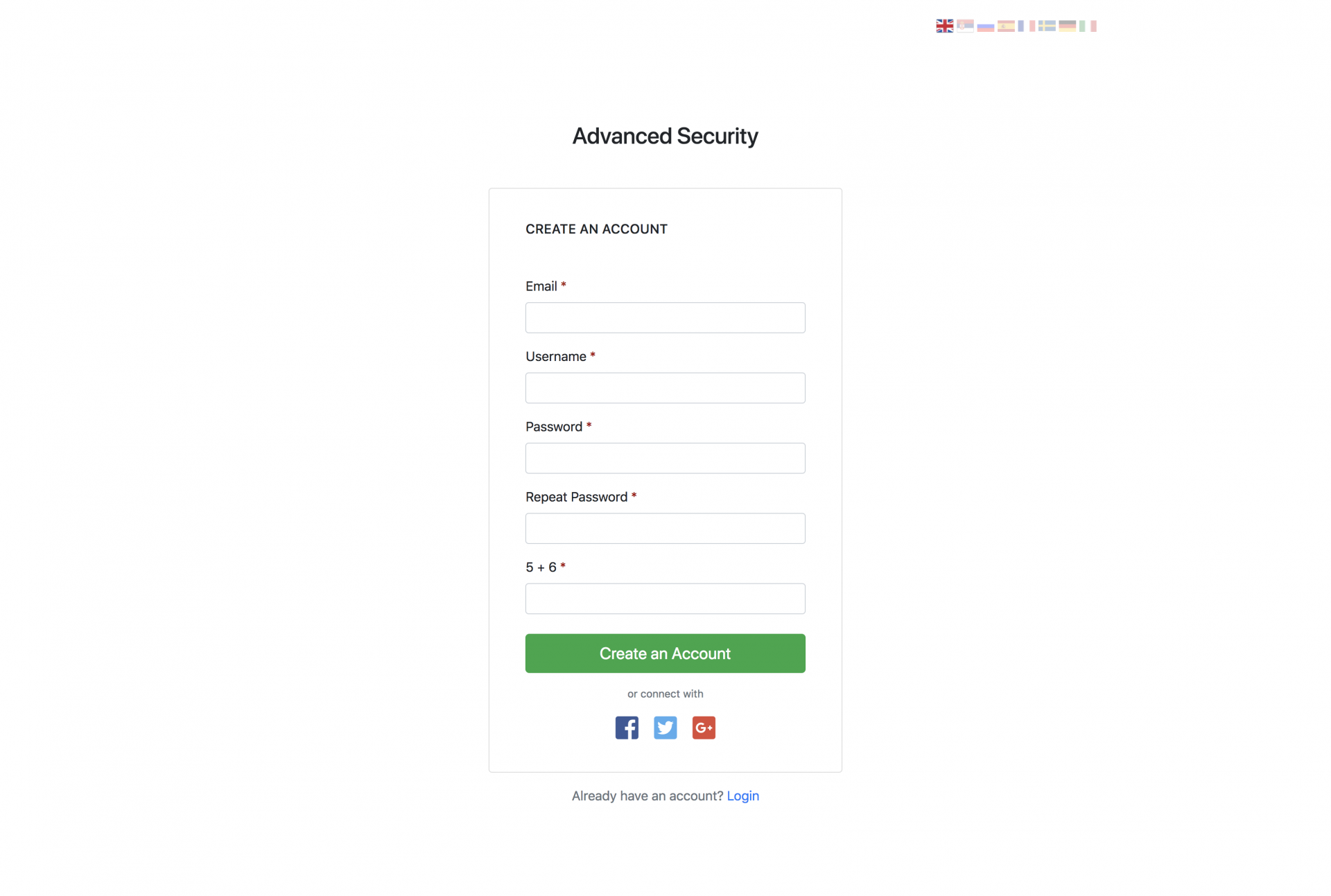
<p>In case that user doesn't have an account, he can create it manually from the registration form (displayed below) or by using any social authentication provider (if enabled by website owner).</p>
<p><a href="assets/img/register.png"></a></p><p></p><p><img src="https://support-hub--assets.s3.eu-west-2.amazonaws.com/assets/1/images/8d9akTXvkjc2sdScBQFzQfHK0lcKLeIzoFQBigiI.png" alt="8d9akTXvkjc2sdScBQFzQfHK0lcKLeIzoFQBigiI.png" /><br /></p>
<p>After successful registration, a user will receive a confirmation email, if it is enabled inside the <a href="https://milos.support-hub.io/articles/advanced-security-configuration#registration" target="_blank" rel="noreferrer noopener">configuration</a>, and after he confirms his email he will be able to log into the application.</p>

<p><strong>Note!</strong> Email confirmation only makes sense if a user has registered by manually filling the registration form. For social authentication, there is no need for email confirmation.</p>

<p><a></a></p>
<h3>Social Authentication</h3>
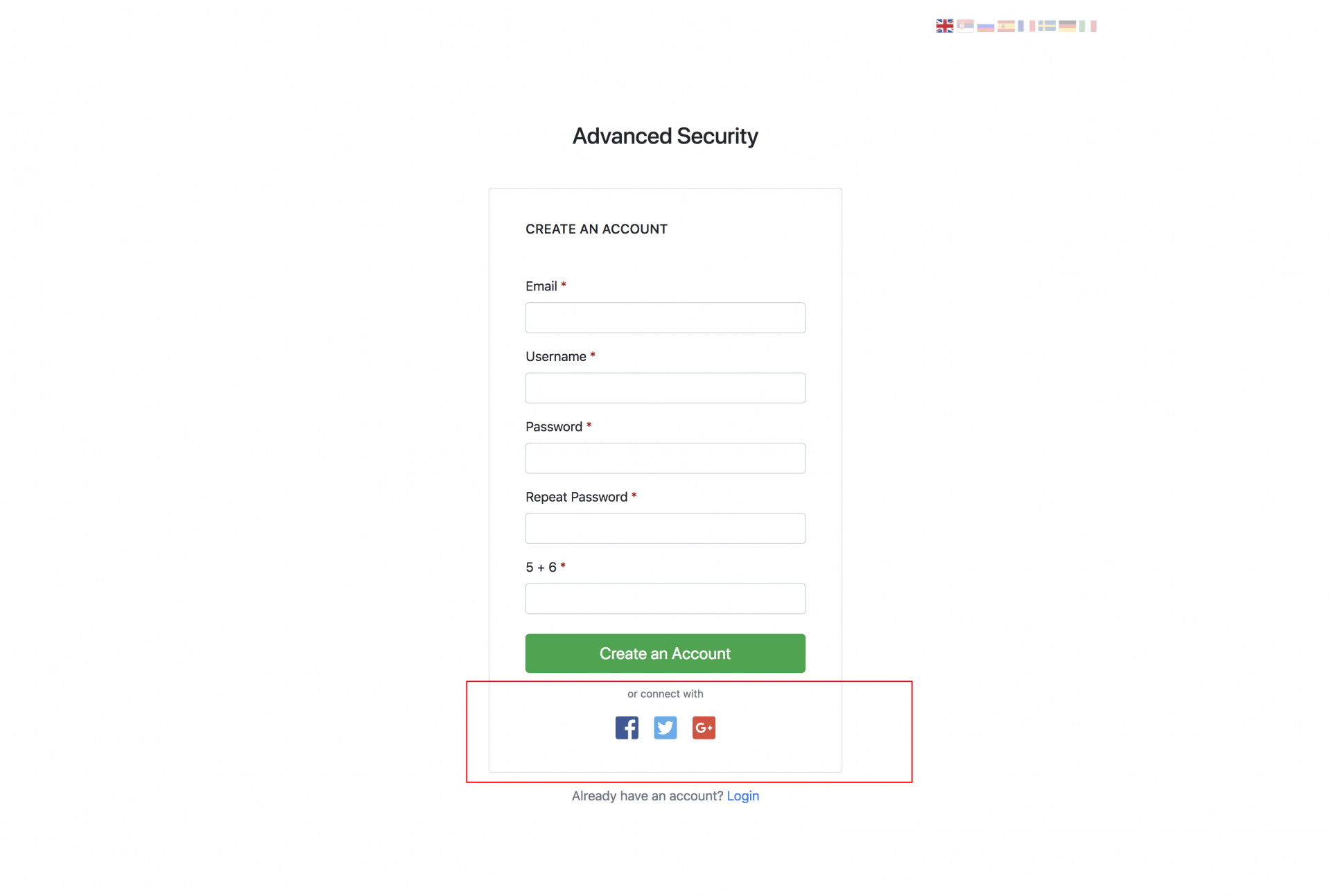
<p>If Social Authentication is enabled as it is described on <a href="https://milos.support-hub.io/articles/advanced-security-social-authentication" target="_blank" rel="noreferrer noopener">social authentication page</a>, then all users are able to create an account (or login if they already have an account) to your system via Facebook, Twitter and Google+ by clicking the desired social network button:</p>
<p><a href="assets/img/social-auth.png"></a></p><p></p><p><img src="https://support-hub--assets.s3.eu-west-2.amazonaws.com/assets/1/images/BLo6eN0gGHGMuy8VwJLMk6RqKa7MKTQlDb7YN0SQ.png" alt="BLo6eN0gGHGMuy8VwJLMk6RqKa7MKTQlDb7YN0SQ.png" /><br /></p>
<p>When a user authenticates with the system for the first time via some social network, his account is automatically created and stored in the database. If he tries to log in again via some other social network option, the system will check if his email exists in the database and, if it does, it will be associated with existing account! If it doesn't, a new account will be created.</p>

<p><a></a></p>
<h3>Password Reset</h3>
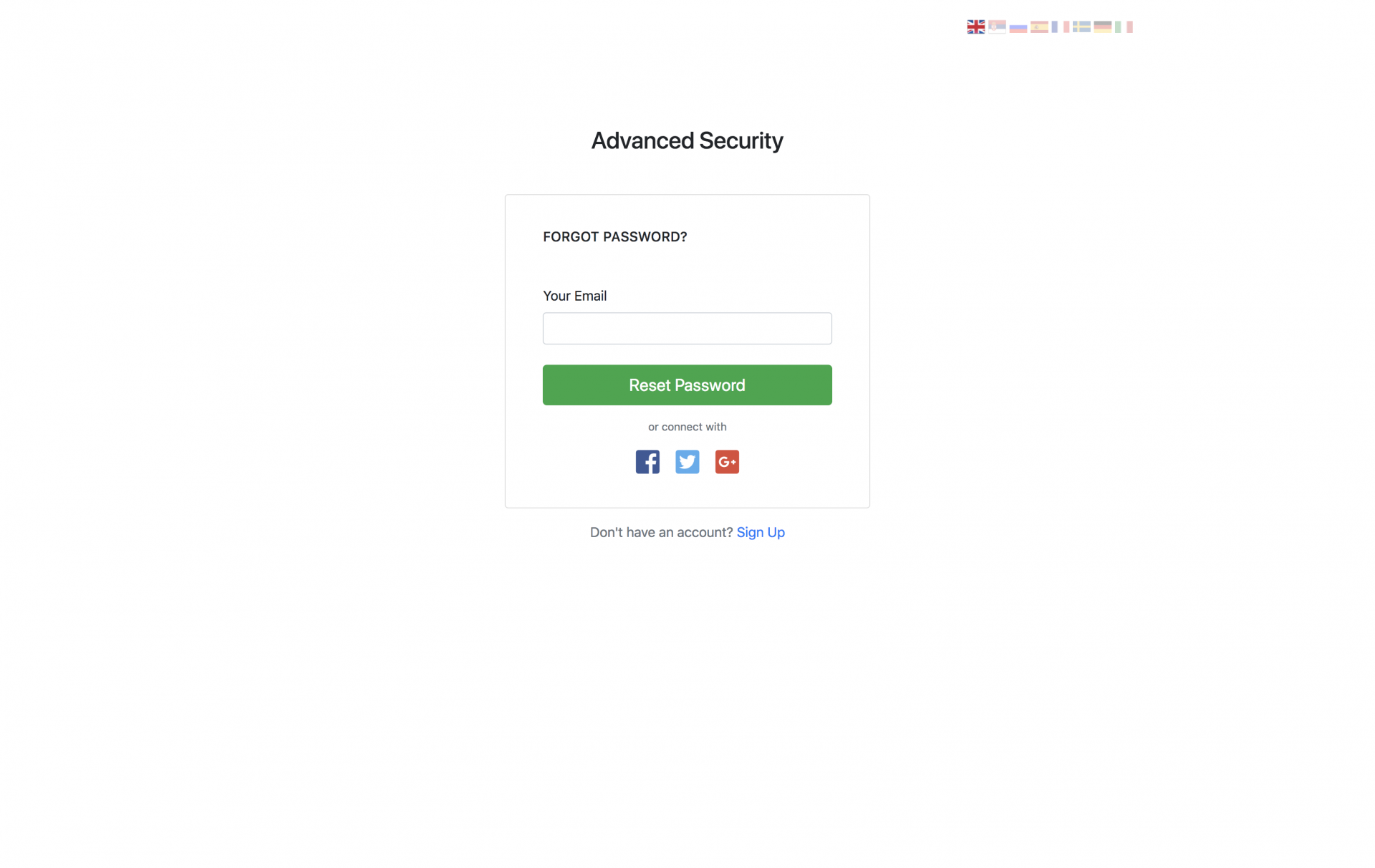
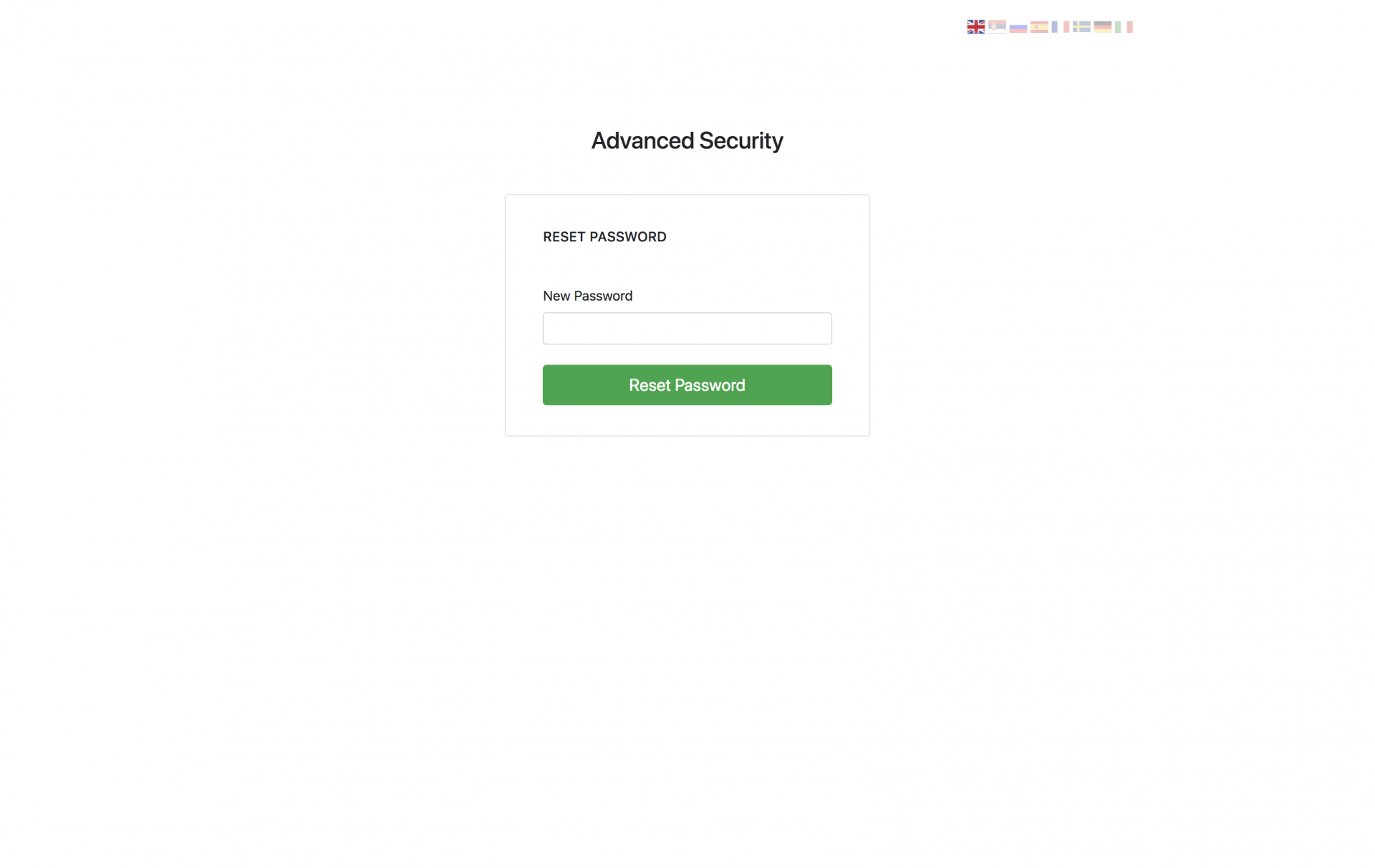
<p>If you have forgotten your password, just select "Forgot password?" tab and enter your email address. The system will send you password reset email which contains a password reset link. If you click on that link, you will be redirected to password reset page, where you can provide your new password that will replace the old one. Forgot Password and Password Reset forms are displayed below:</p><p><br /></p><p><img src="https://support-hub--assets.s3.eu-west-2.amazonaws.com/assets/1/images/9dAW8P3v2Qwu7M0fg4lZJMWVEo2QoBS71kGgpHTD.png" alt="9dAW8P3v2Qwu7M0fg4lZJMWVEo2QoBS71kGgpHTD.png" /><br /></p><p><img src="https://support-hub--assets.s3.eu-west-2.amazonaws.com/assets/1/images/Y1iNdChUgCnQZjTIcvWgui4WFjSabKVeaJDuGTBZ.png" alt="Y1iNdChUgCnQZjTIcvWgui4WFjSabKVeaJDuGTBZ.png" /><br /></p>]]>
            </summary>
                                    <updated>2019-01-16T20:54:10+00:00</updated>
        </entry>
            <entry>
            <title><![CDATA[The Home Page]]></title>
            <link rel="alternate" href="https://milos.support-hub.io/articles/advanced-security-the-home-page" />
            <id>https://milos.support-hub.io/28</id>
            <author>
                <name><![CDATA[Milos Stojanovic]]></name>
            </author>
            <summary type="html">
                <![CDATA[<h3>Posting Comments</h3>
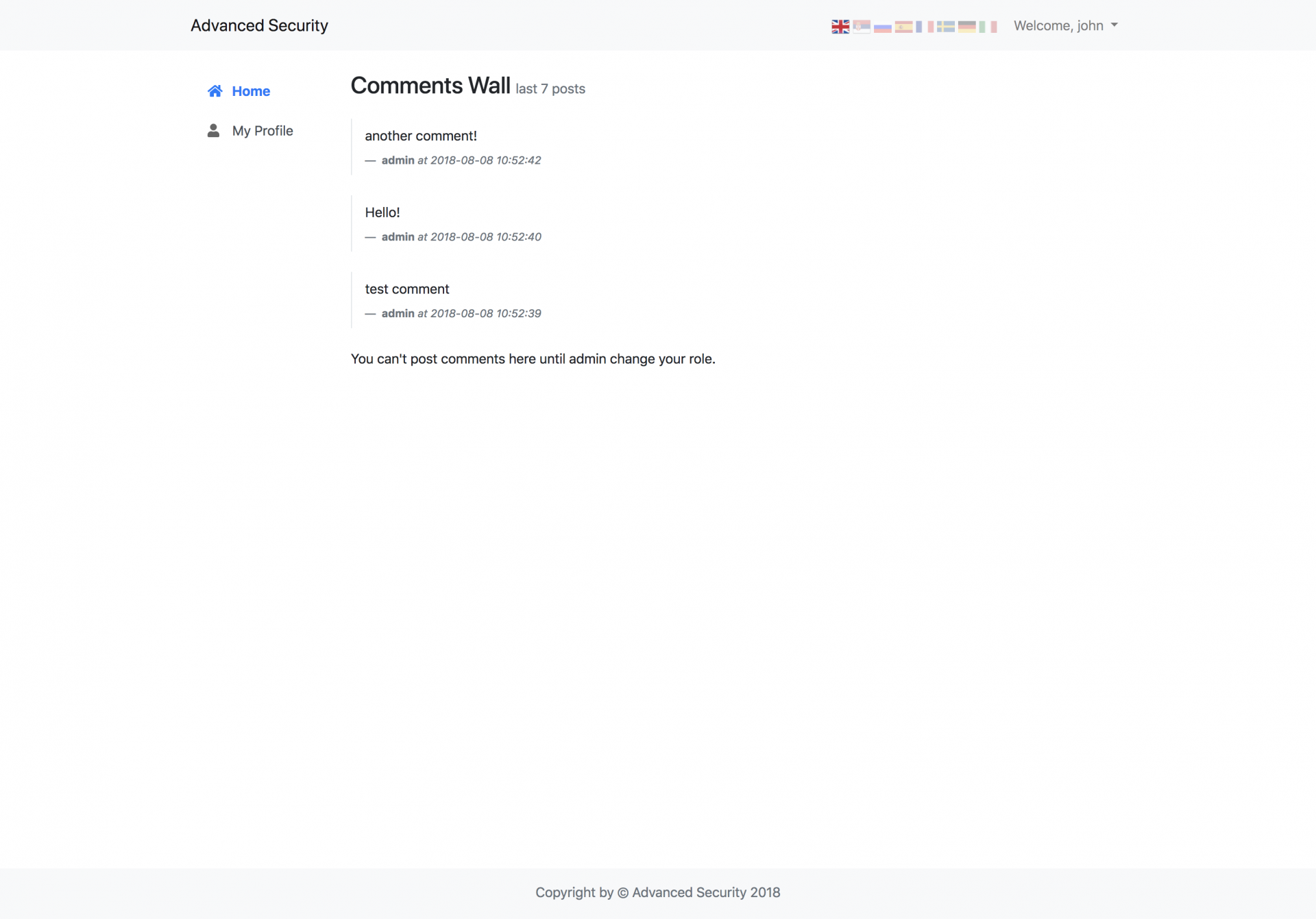
<p>Posting comments is actually a demonstration of how the Advanced Security System can be used in some real-world situations. If your user role is set to <code>user</code> (this is the default value when a new user successfully completes the registration process), you won't be available to post comments.</p>
<p><a href="assets/img/cannot-post-comments.png"></a></p><p></p><p><img src="https://support-hub--assets.s3.eu-west-2.amazonaws.com/assets/1/images/hQQICiYr86282nF1QmtX2aBC092dTuae8Ui488DO.png" alt="hQQICiYr86282nF1QmtX2aBC092dTuae8Ui488DO.png" /><br /></p>
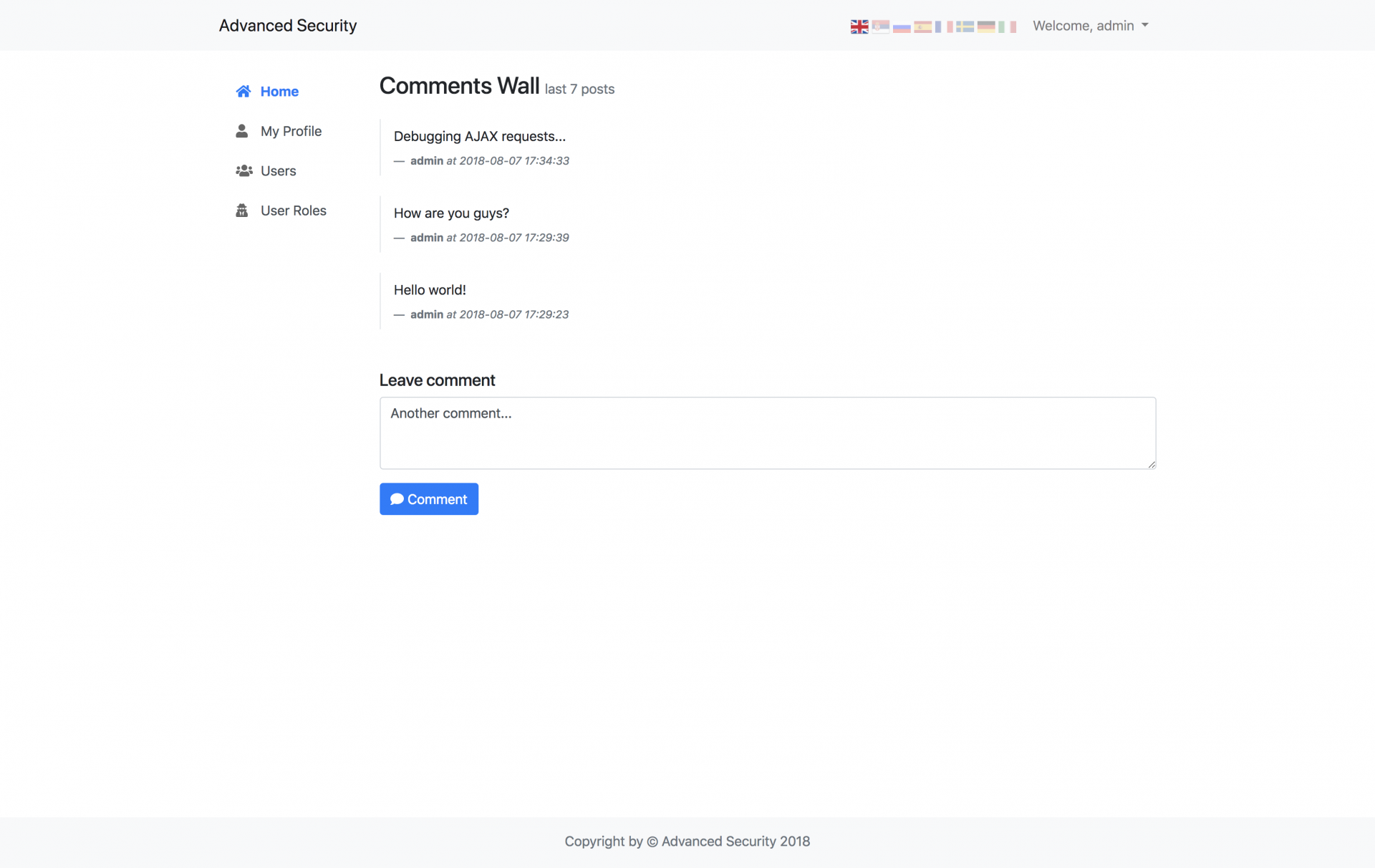
<p>However, if the administrator changes your role to <code>Editor</code>, or any other custom created role, you will be able to post comments.</p>
<p><a href="assets/img/posting-comments.png"></a></p><p></p><p><img src="https://support-hub--assets.s3.eu-west-2.amazonaws.com/assets/1/images/LU6PZUEY5E37yEYvrzVfAoTHvI4GNjM1BE8Lsmvs.png" alt="LU6PZUEY5E37yEYvrzVfAoTHvI4GNjM1BE8Lsmvs.png" /><br /></p>
<p>Posting comments is just an example here, but you get the idea of what you can do by applying the same logic.</p>]]>
            </summary>
                                    <updated>2019-01-16T20:54:10+00:00</updated>
        </entry>
            <entry>
            <title><![CDATA[User's Profile]]></title>
            <link rel="alternate" href="https://milos.support-hub.io/articles/advanced-security-users-profile" />
            <id>https://milos.support-hub.io/29</id>
            <author>
                <name><![CDATA[Milos Stojanovic]]></name>
            </author>
            <summary type="html">
                <![CDATA[<h3>Updating The Profile</h3>
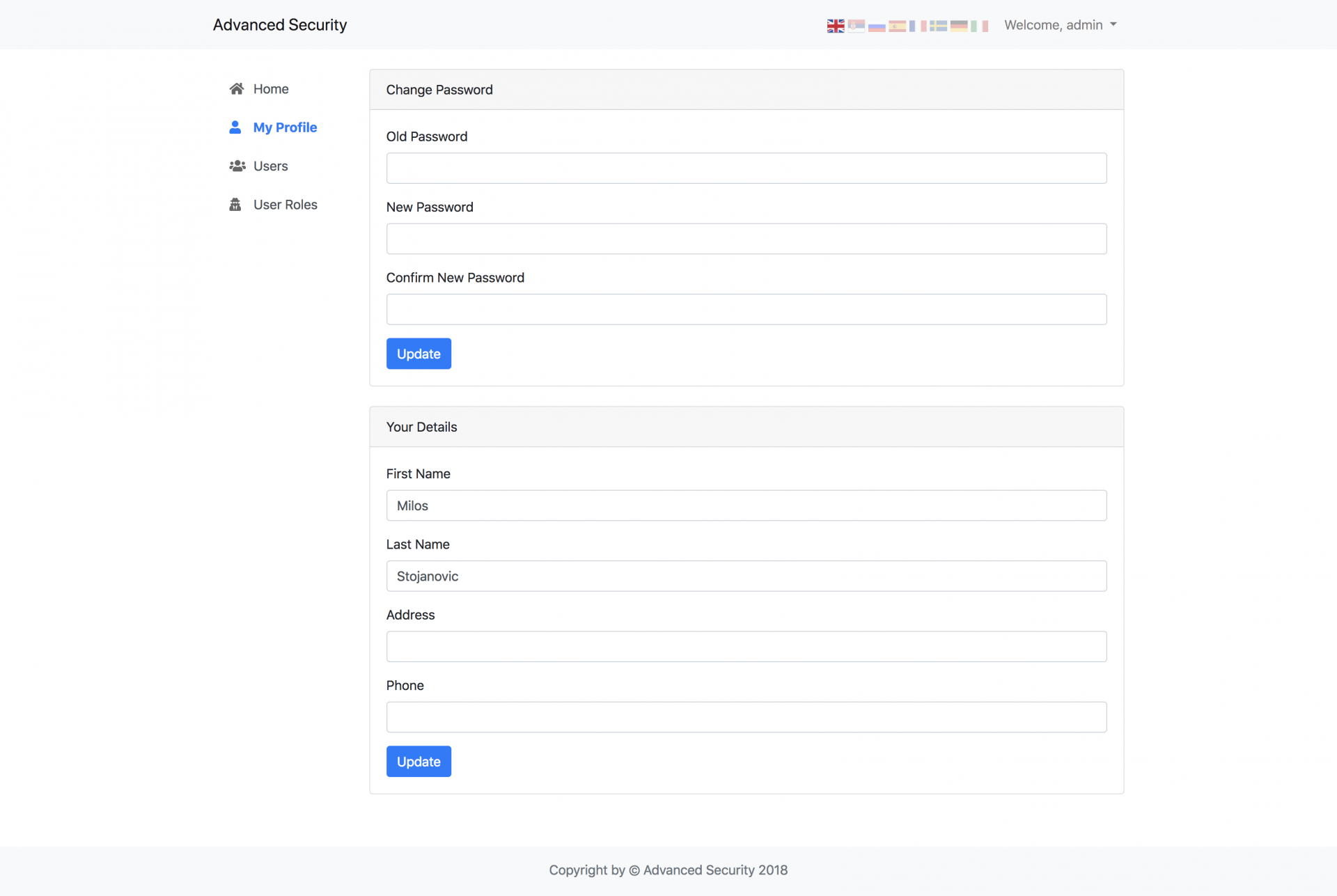
<p>You can navigate to profile page by clicking <strong>My Profile</strong> from sidebar navigation menu or from the drop-down menu from top-right corner. The profile page is displayed below:</p>
<p><a href="assets/img/profile.png"></a></p><p></p><p><img src="https://support-hub--assets.s3.eu-west-2.amazonaws.com/assets/1/images/bdVUo9aMQphMc2yLXkrXQaV0aGQuR4XYVwrGbfLP.png" alt="bdVUo9aMQphMc2yLXkrXQaV0aGQuR4XYVwrGbfLP.png" /><br /></p>
<p>From the profile page, users are able to update details like First and Last name, Address and Phone. Also, on the same page, they can change their password.</p>

<p><strong>Note!</strong> Users are not able to change their username and email address. If they want to change any of those details, they will have to contact the administrator.</p>]]>
            </summary>
                                    <updated>2019-01-16T20:54:10+00:00</updated>
        </entry>
            <entry>
            <title><![CDATA[User Management]]></title>
            <link rel="alternate" href="https://milos.support-hub.io/articles/advanced-security-user-management" />
            <id>https://milos.support-hub.io/30</id>
            <author>
                <name><![CDATA[Milos Stojanovic]]></name>
            </author>
            <summary type="html">
                <![CDATA[<p>If you are logged in as Administrator, you are available to manage registered website users.</p>
<p>To do this, go to Users page.</p>
<p>There is 3 type of users (3 different user roles) by default:</p>
<ul><li>Admin</li>
<li>Editor</li>
<li>User</li>
</ul><p>For every user displayed in the users table, there is one blue button in "Action" column. Depending on the user's role, text on the blue button can be <strong>User</strong>, <strong>Editor</strong> or any new role added by admin. <em>Admin</em> users won't be displayed there since there can be only one admin. More about how you can utilize different user roles and act differently for different user roles can be found in <a href="https://milos.support-hub.io/articles/authorization-in-advanced-security" target="_blank" rel="noreferrer noopener">the authorization section</a>.</p>
<p>On users page, you are able to search through all users by typing words inside the search box located above the table. Users will be automatically filtered and displayed. Also, you can sort all columns the column header, and paginate through table records using pagination located below the users table.</p>
<p><a></a></p>
<h3>Create New User</h3>
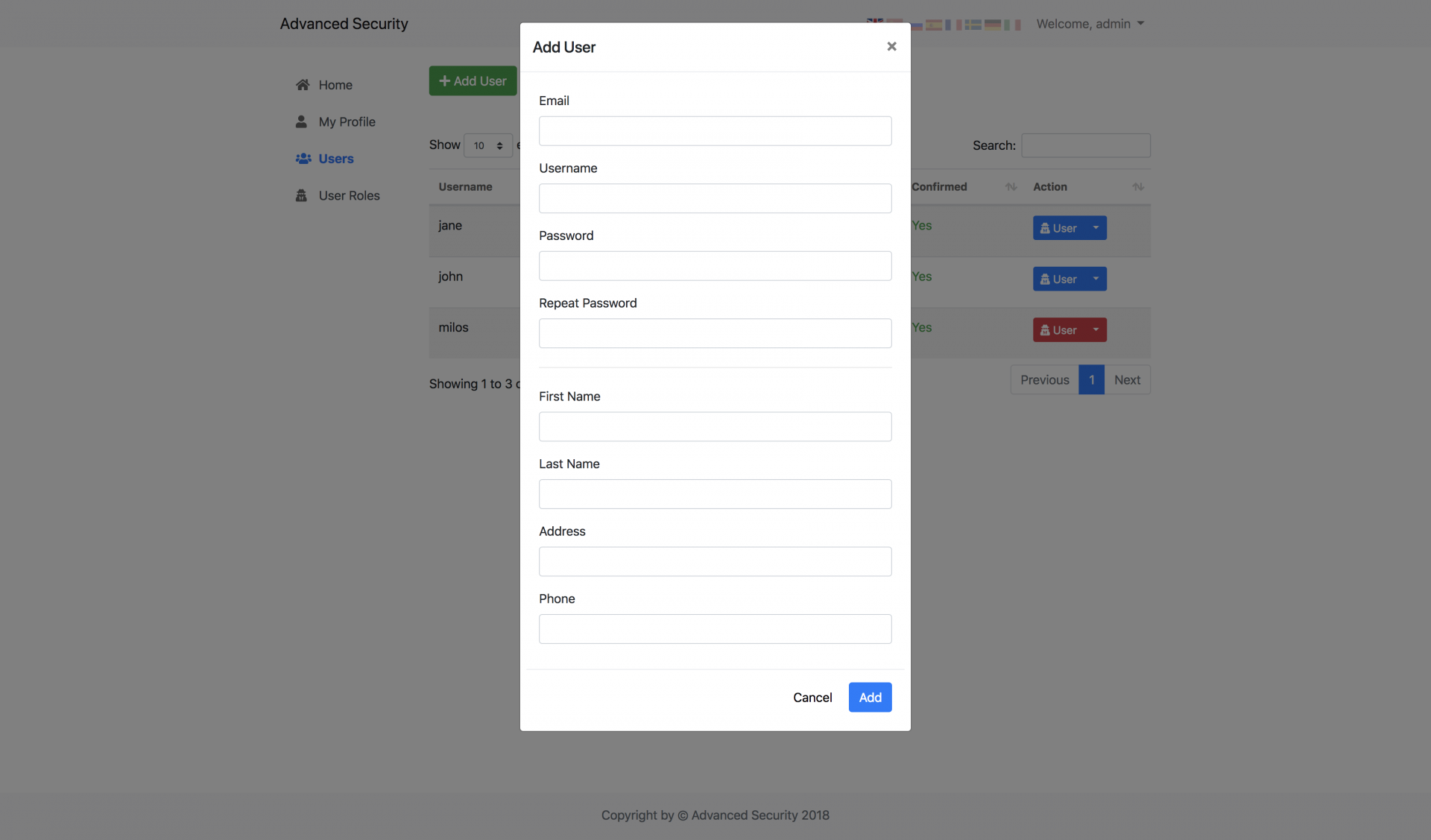
<p>As an administrator, you can add new users manually. To do that, just click "Add User" button located above the users table and fill the required info.</p>
<p><a href="assets/img/create-user.png"></a></p><p></p><p><img src="https://support-hub--assets.s3.eu-west-2.amazonaws.com/assets/1/images/OPd9ysL7NQz8axzHJk2nIdJvYJIixSKFpPJPervf.png" alt="OPd9ysL7NQz8axzHJk2nIdJvYJIixSKFpPJPervf.png" /><br /></p>
<p><a></a></p>
<h3>Edit User</h3>
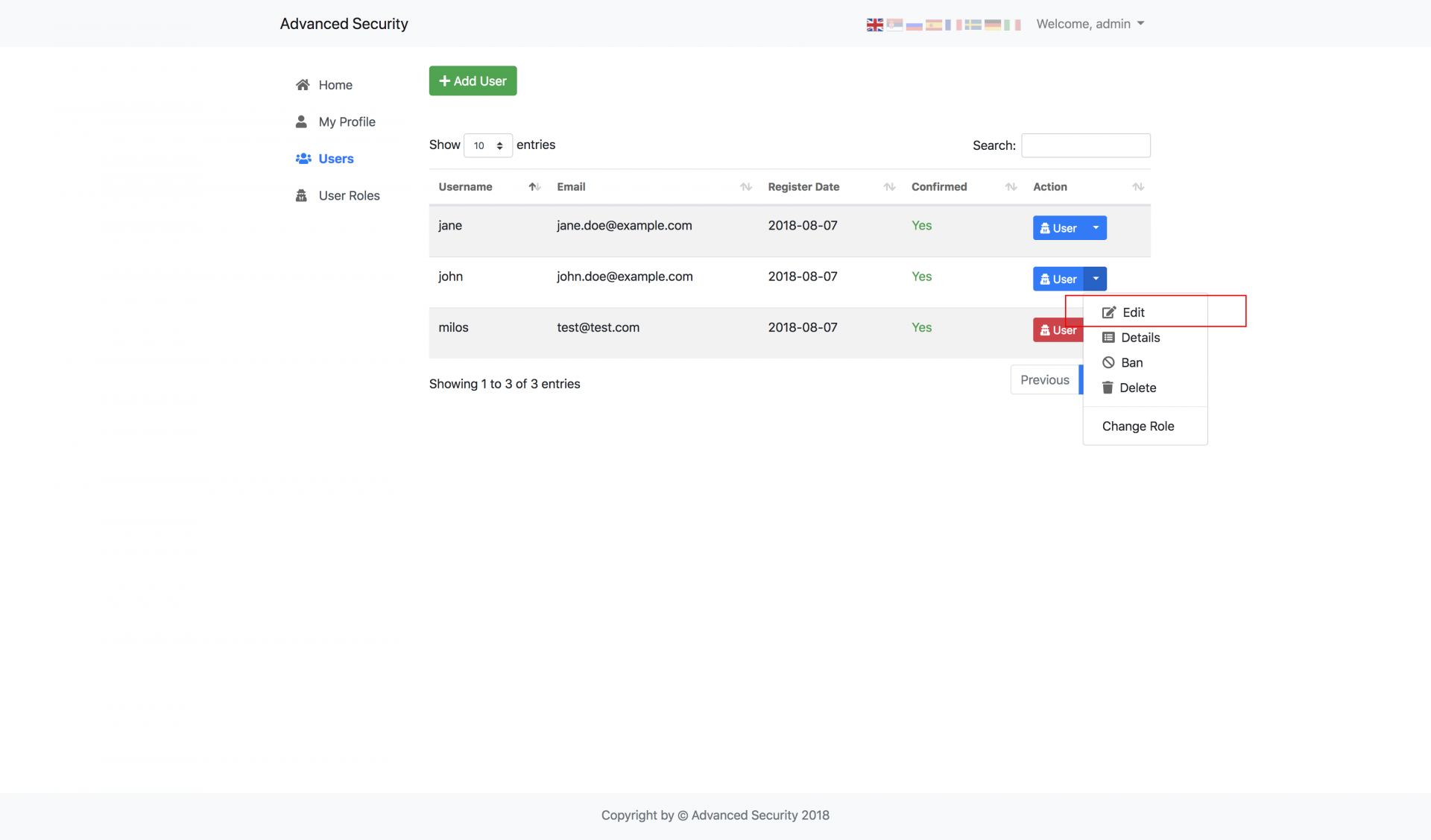
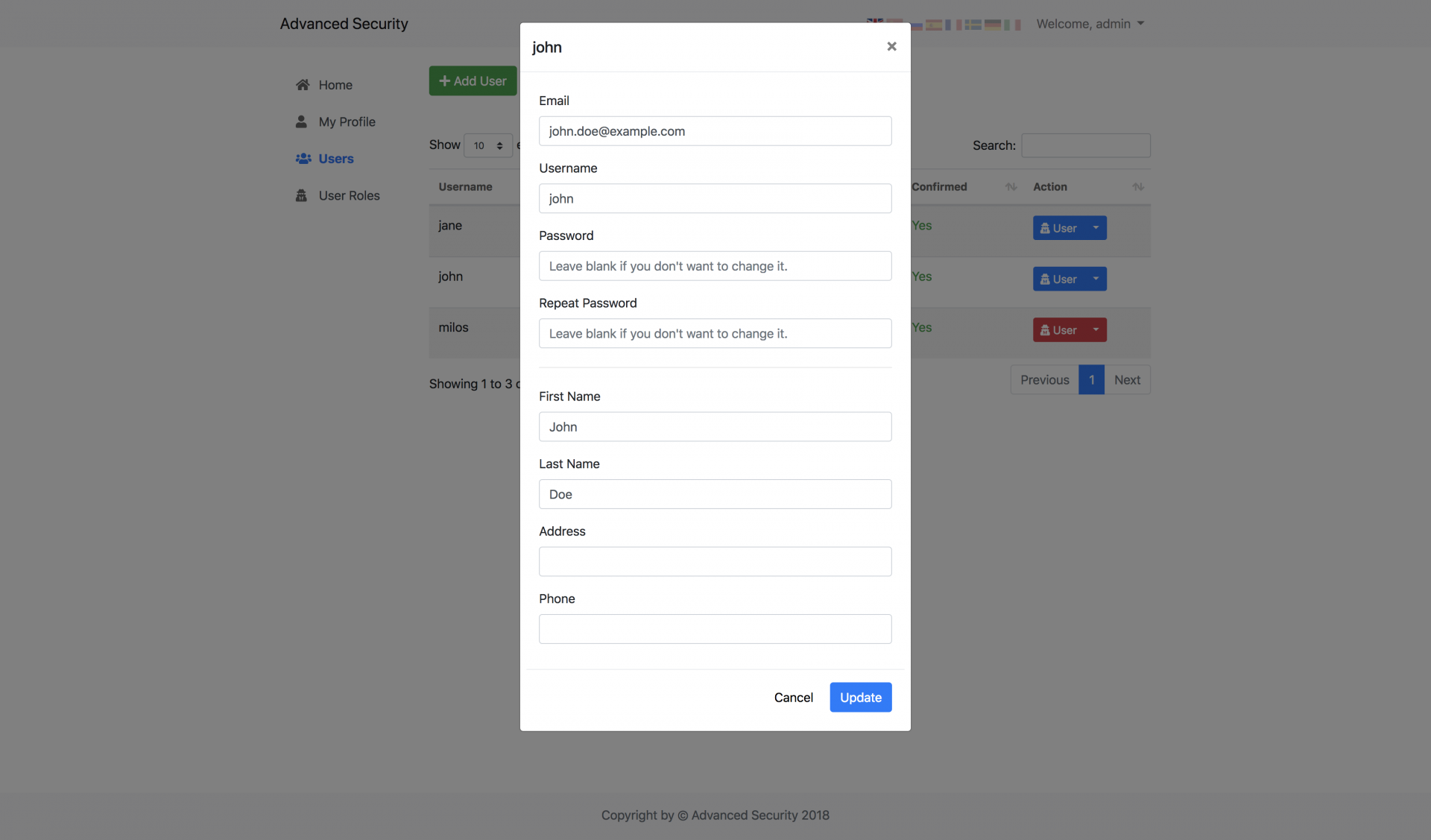
<p>Edit existing users is also a breeze. Just click small caret to the right of the blue button and select "Edit".</p>
<p><a href="assets/img/edit-user1.png"></a></p><p></p><p><img src="https://support-hub--assets.s3.eu-west-2.amazonaws.com/assets/1/images/8ntwgaNROs9P5tJKckwWCVLe8RahZO3VRWVnTEAH.png" alt="8ntwgaNROs9P5tJKckwWCVLe8RahZO3VRWVnTEAH.png" /></p><p><img src="https://support-hub--assets.s3.eu-west-2.amazonaws.com/assets/1/images/pjUrL07oL48yRIhujUIazDJmArhscZr3yN2AVuHk.png" alt="pjUrL07oL48yRIhujUIazDJmArhscZr3yN2AVuHk.png" /><br /></p><p> <a href="assets/img/edit-user2.png"></a></p><p><br /></p>
<p><a></a></p>
<h3>Display User Details</h3>
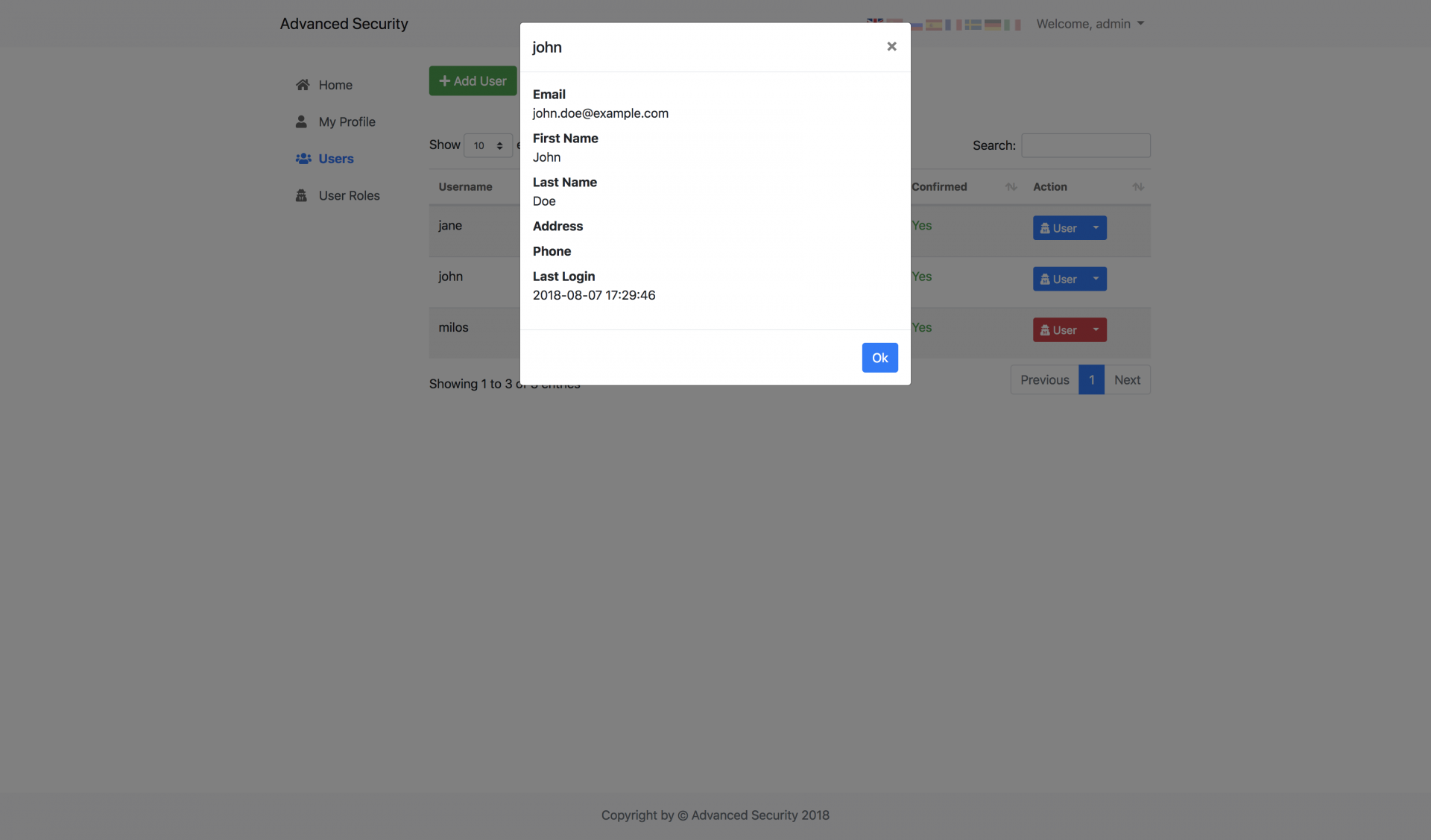
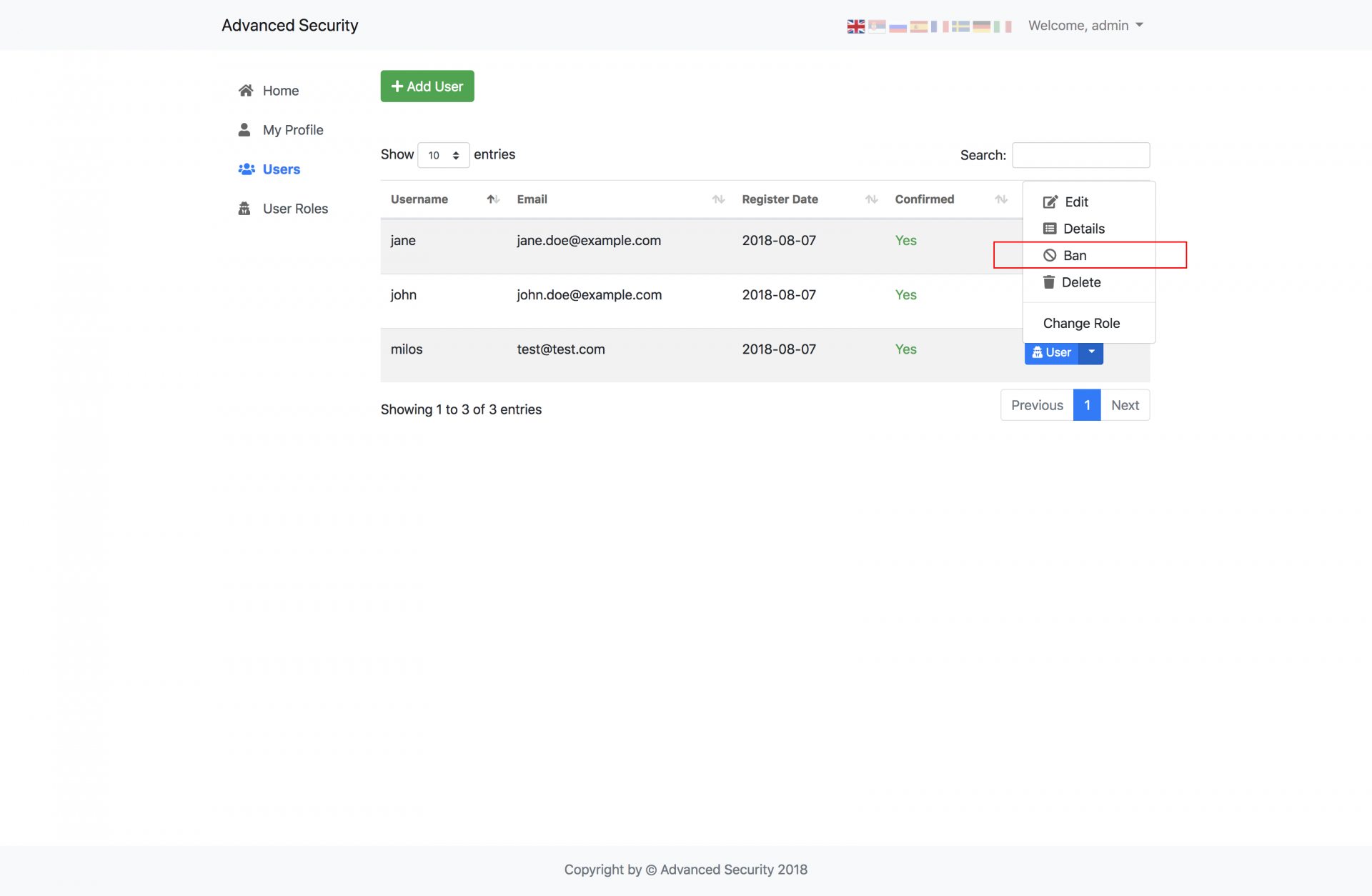
<p>In order to view user details without editing them, just click the small caret to the right of the blue button, and select <strong>Details</strong> option from the drop-down menu.</p>
<p><a href="assets/img/details.png"></a></p><p></p><p><img src="https://support-hub--assets.s3.eu-west-2.amazonaws.com/assets/1/images/0MTEcKJxkBwSlwf7mDSmsXEtw7uDQijH4KnuHqJ5.png" alt="0MTEcKJxkBwSlwf7mDSmsXEtw7uDQijH4KnuHqJ5.png" /><br /></p>
<p><a></a></p>
<h3>Ban User</h3>
<p>If you want to keep the user in the database and just disable his account, you can simply ban that user by selecting Ban option from drop-down menu. All banned users have their button inside Action column painted in <strong>red</strong>.</p>
<p><a href="assets/img/banned-users.png"></a></p><p></p><p><img src="https://support-hub--assets.s3.eu-west-2.amazonaws.com/assets/1/images/GfFLJwnVZnpweffkq0lPJ5wMXg6pXI2ijCtRubOI.png" alt="GfFLJwnVZnpweffkq0lPJ5wMXg6pXI2ijCtRubOI.png" /><br /></p>
<p><a></a></p>
<h3>Delete User</h3>
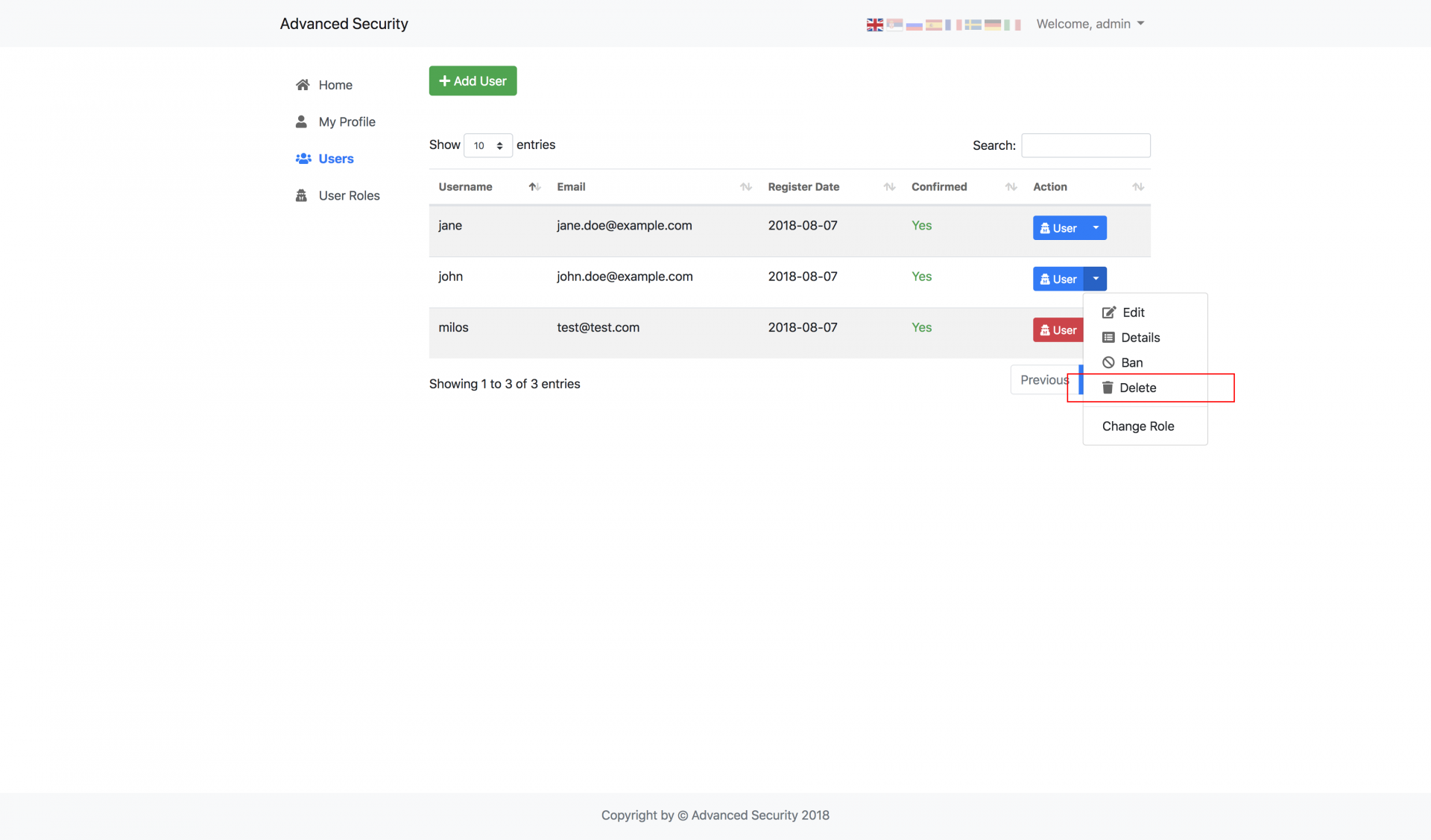
<p>You can delete the specific user by clicking small caret to the right of the blue button, and select the<strong> Delete</strong> option from the drop-down menu.</p>
<p><a href="assets/img/delete-user.png"></a></p><p></p><p><img src="https://support-hub--assets.s3.eu-west-2.amazonaws.com/assets/1/images/SgdG3Y6R7qWD3lNgSf5A81MB1GfL5YGEHJ9O8zFD.png" alt="SgdG3Y6R7qWD3lNgSf5A81MB1GfL5YGEHJ9O8zFD.png" /><br /></p>
<p><a></a></p>
<h3>Change User's Role</h3>
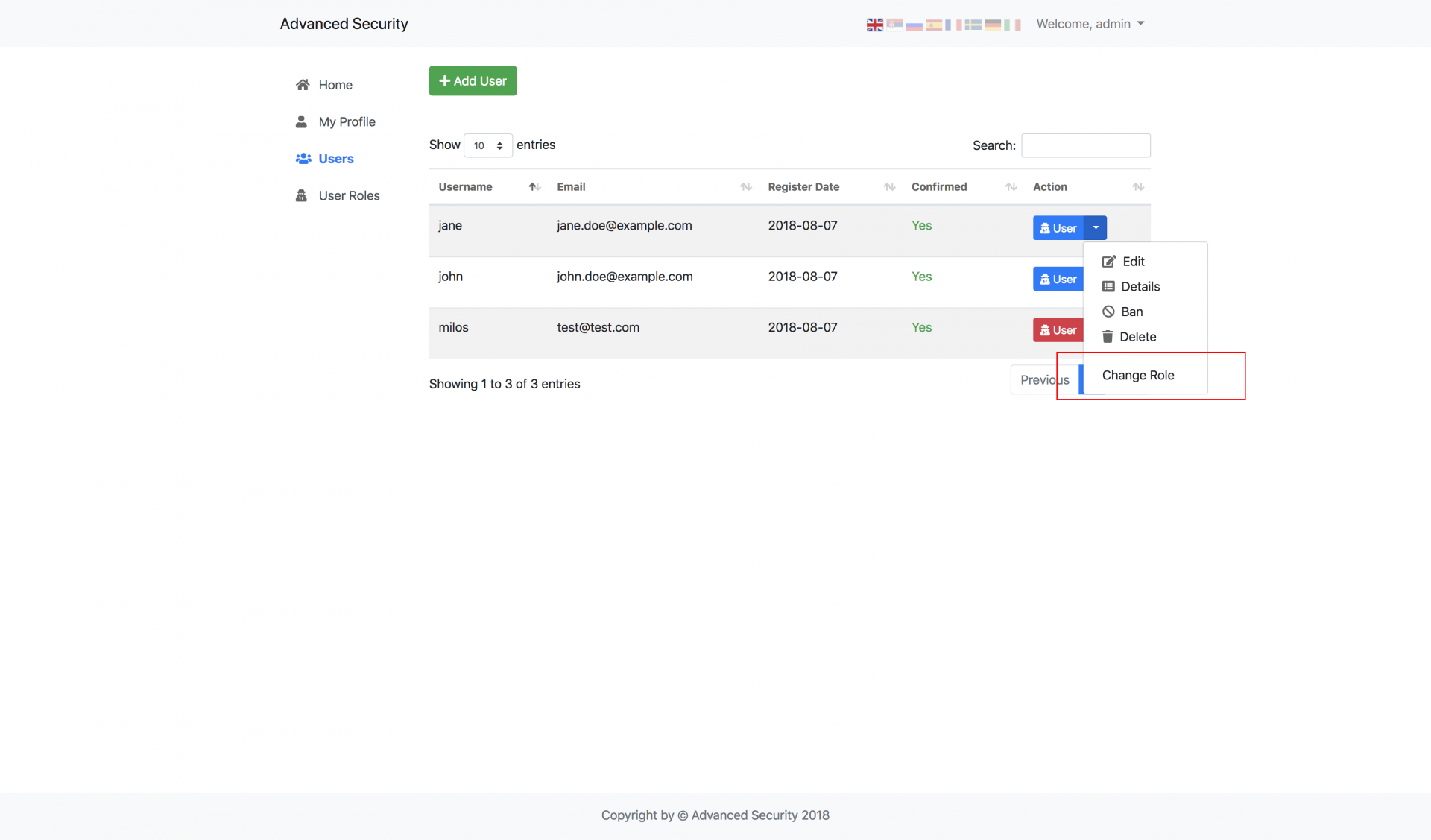
<p>User role can be changed to any available user role, no matter if its a default or manually added one. You can change user's role by clicking small caret to the right of the blue button and selecting <strong>Change Role</strong></p>
<p><a href="assets/img/change-role-menu.png"></a></p><p></p><p><img src="https://support-hub--assets.s3.eu-west-2.amazonaws.com/assets/1/images/8yePMl62tK5zEKZtLRYTn0YGX0eFD8JyCdP5BlqT.png" alt="8yePMl62tK5zEKZtLRYTn0YGX0eFD8JyCdP5BlqT.png" /><br /></p>
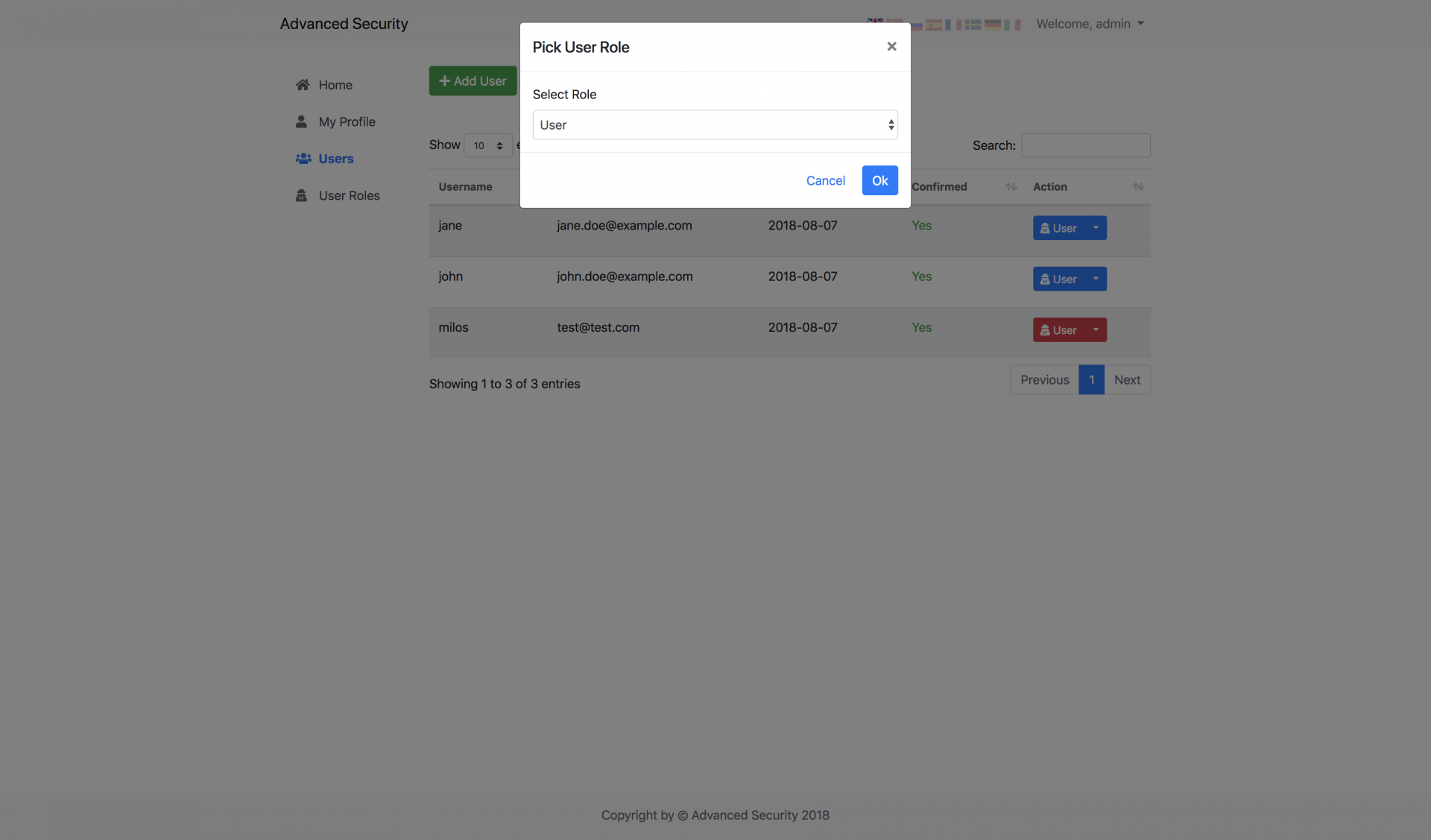
<p>After that, just select the desired user role from the dropdown list and click <strong>Ok</strong>.</p>
<p><a href="assets/img/change-role-modal.png"></a></p><p><img src="https://support-hub--assets.s3.eu-west-2.amazonaws.com/assets/1/images/hLEguKR16ssdhGKus3GNv29oHz25q4DOKwS3cFQz.png" alt="hLEguKR16ssdhGKus3GNv29oHz25q4DOKwS3cFQz.png" /><br /></p>]]>
            </summary>
                                    <updated>2023-04-12T16:59:54+00:00</updated>
        </entry>
            <entry>
            <title><![CDATA[System Roles]]></title>
            <link rel="alternate" href="https://milos.support-hub.io/articles/advanced-security-system-roles" />
            <id>https://milos.support-hub.io/31</id>
            <author>
                <name><![CDATA[Milos Stojanovic]]></name>
            </author>
            <summary type="html">
                <![CDATA[<p>In order to manage user roles, just open <strong>User Roles</strong> page by selecting it from sidebar navigation menu.</p>
<p><a></a></p>
<h3>Create New Role</h3>
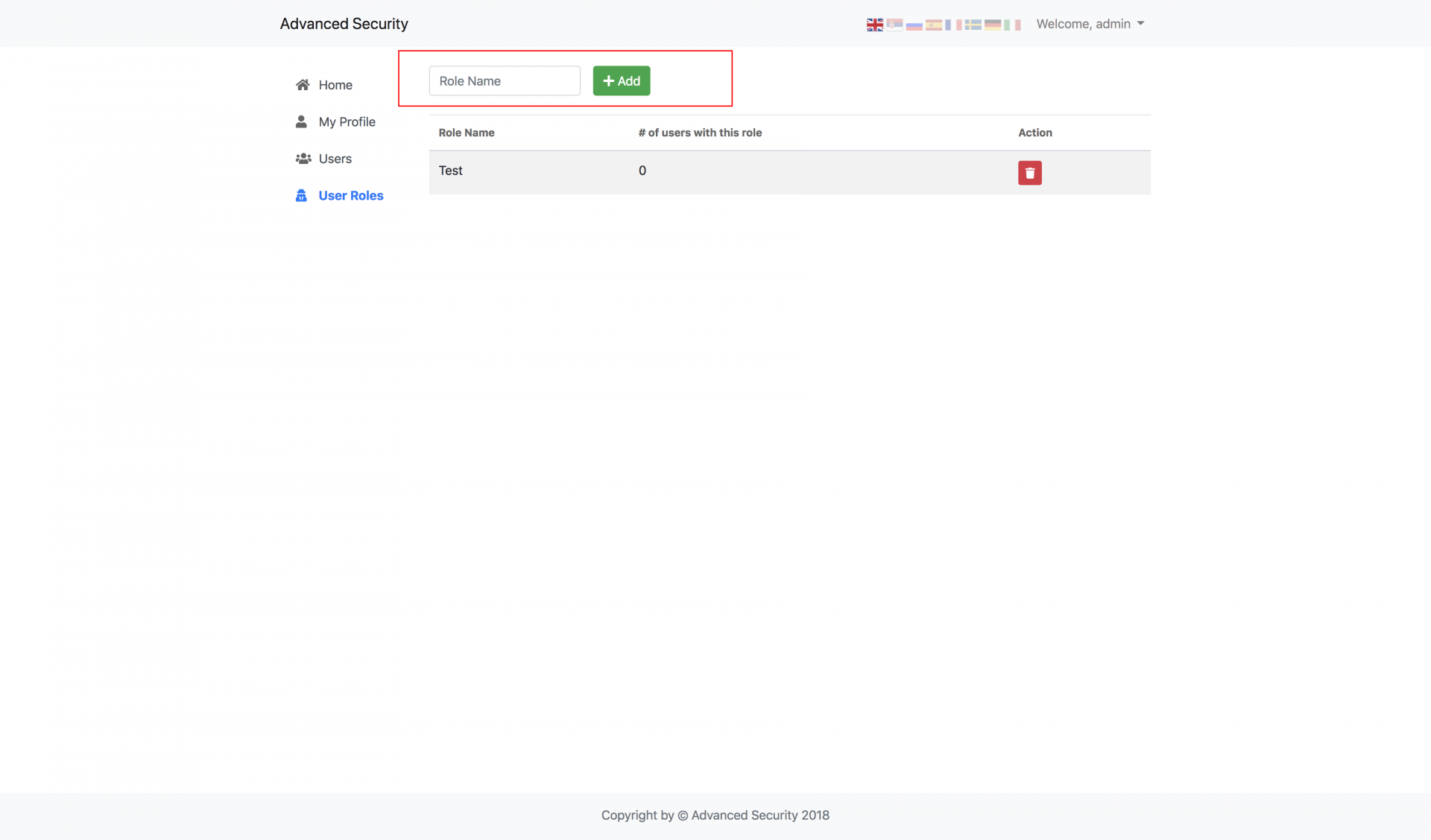
<p>To add a new role, simply enter new role name and click Add. The new role will be automatically added. It's recommended to use one-word role because it will be easier for you to check if the user has a specific role inside the source code. Every role name will be converted to lower case.</p>
<p><a href="assets/img/create-role.png"></a></p><p><img src="https://support-hub--assets.s3.eu-west-2.amazonaws.com/assets/1/images/fmoJwowim31sEZOXWkuE6r5eKzQb8TflOrFc3y10.png" alt="fmoJwowim31sEZOXWkuE6r5eKzQb8TflOrFc3y10.png" /><br /></p>
<p><a></a></p>
<h3>Delete Role</h3>
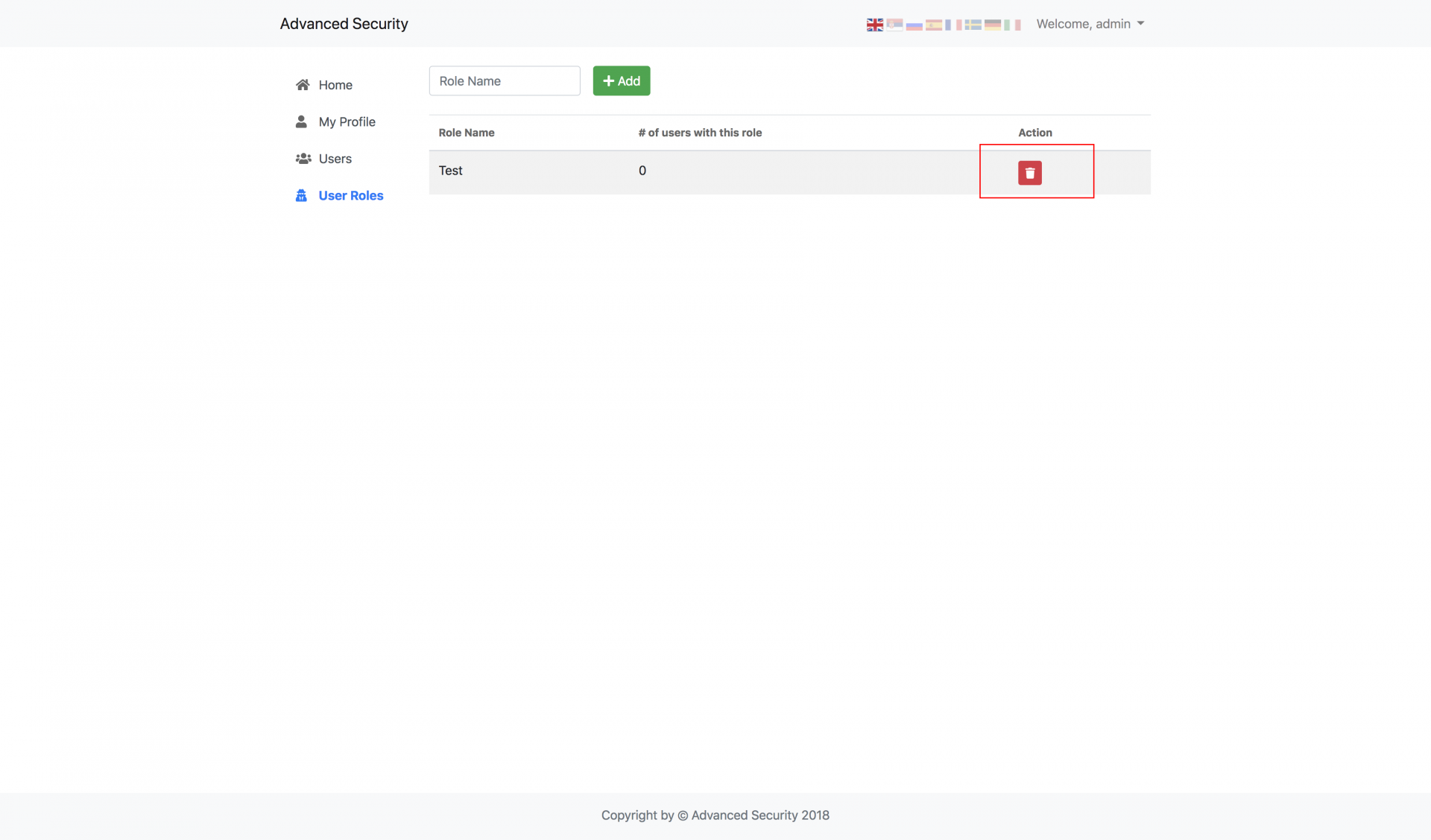
<p>To delete a role, just click <strong>Delete</strong> button next to role you want to delete. If there are users that already have this user role, they will be returned back to the<strong> User</strong> role.</p>
<p><a href="assets/img/delete-role.png"></a></p><p><img src="https://support-hub--assets.s3.eu-west-2.amazonaws.com/assets/1/images/hJoiwB28U0Mmy1p98Emy5F9mi1cLfMNwRXJyez8x.png" alt="hJoiwB28U0Mmy1p98Emy5F9mi1cLfMNwRXJyez8x.png" /><br /></p>]]>
            </summary>
                                    <updated>2019-01-16T20:54:10+00:00</updated>
        </entry>
            <entry>
            <title><![CDATA[Developer Guide]]></title>
            <link rel="alternate" href="https://milos.support-hub.io/articles/advanced-security-developer-guide" />
            <id>https://milos.support-hub.io/32</id>
            <author>
                <name><![CDATA[Milos Stojanovic]]></name>
            </author>
            <summary type="html">
                <![CDATA[<p>This short guide will help you to continue developing your system based on AS or to figure out what is wrong if something doesn't work as expected on your server.</p>
<p><a></a></p>
<h3>Debug Mode</h3>
<p>By default, the system is configured to <strong>not</strong> display any errors. This is simply the way to protect some sensitive information that can possibly be displayed to your end users when your website is in production.</p>
<p>However, while developing some new features or customizing the system, it's much easier if you enable the <code>DEBUG</code> mode and see all the errors on the screen. To enable <code>DEBUG</code> mode, just edit <code>ASEngine\AS.php</code> and <code>DEBUG</code> constant to <code>true</code>.</p>

<p><strong>Note!</strong> Always set <code>DEBUG</code> to <code>false</code> when your website is in production!</p>

<p><a></a></p>
<h3>Debugging AJAX Requests</h3>
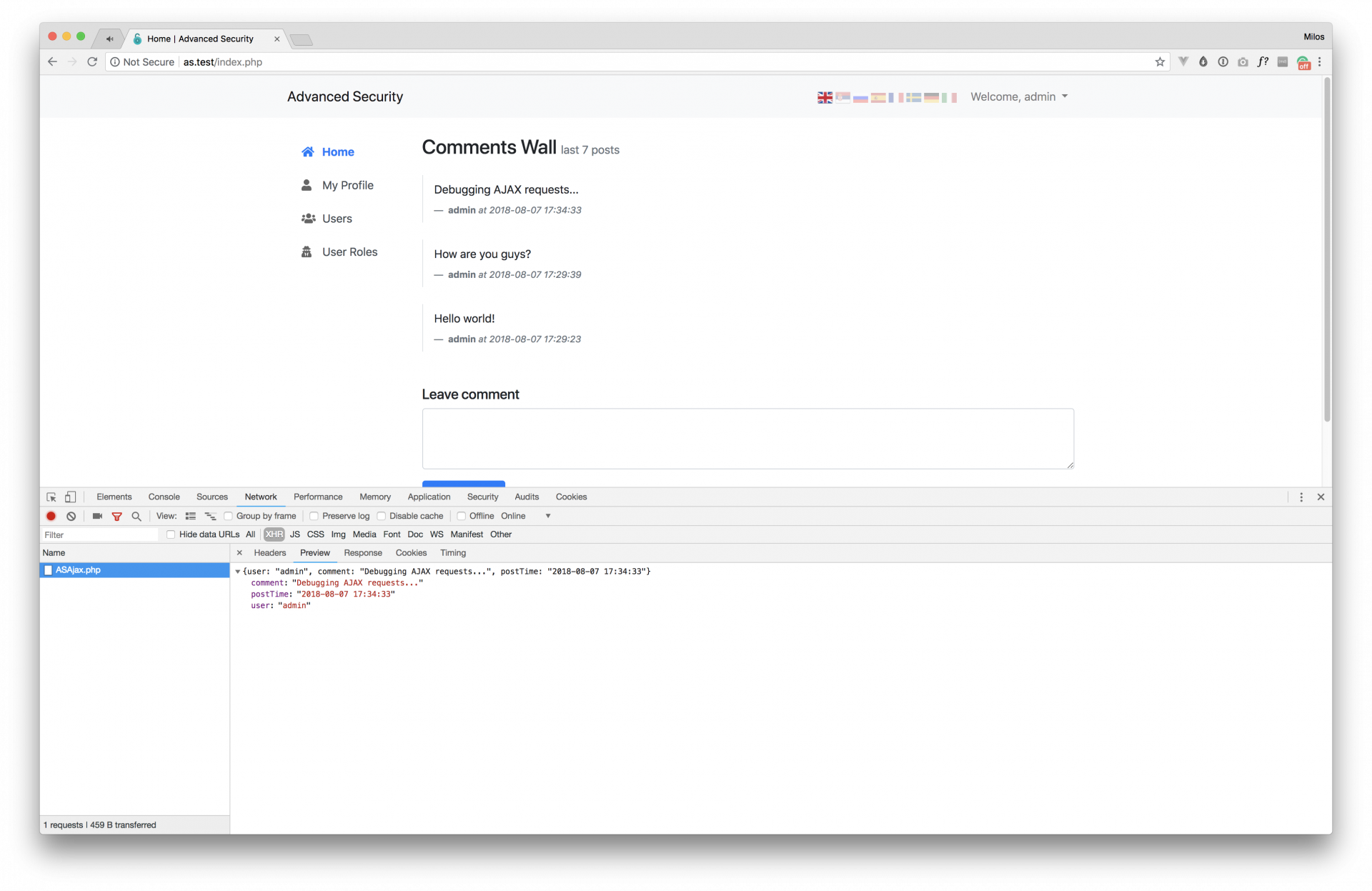
<p>Since this script uses AJAX for communicating with the server, it's useful to know how you can debug all those ajax requests to see if something went wrong with it. The following guide is for Chrome users, but it's almost identical in any browser.</p>
<p>1) Open "Chrome Developer Tools" by simply clicking anywhere on the page and selecting "Inspect" from the context menu. More details and shortcuts are available <a href="https://developers.google.com/web/tools/chrome-devtools/iterate/inspect-styles/shortcuts?hl=en">here</a>.</p>
<p>2) Navigate to <strong>Network</strong> tab. Here you will be able to see all HTTP request sent from your browser.</p>
<p>3) Perform any action inside the AS (we will add new comment for the sake of this example) and check the Request/Response info:</p>
<p><a href="assets/img/debugging-ajax-requests.png"></a></p><p></p><p><img src="https://support-hub--assets.s3.eu-west-2.amazonaws.com/assets/1/images/ZOjtCSwxf3ayKTMsOCfVIE664Xa3nUQLDoGKa6zW.png" alt="ZOjtCSwxf3ayKTMsOCfVIE664Xa3nUQLDoGKa6zW.png" /><br /></p>
<p>As you can see from that screenshot from above, you are able to see complete request and response including all headers and data. This will help you to see if the server returns everything you expect for specific HTTP Request. In case that you have <a href="#debug-mode">debug mode</a> enabled, and there are some PHP errors, they will be displayed here as well.</p>]]>
            </summary>
                                    <updated>2019-01-16T20:54:37+00:00</updated>
        </entry>
            <entry>
            <title><![CDATA[Dependency Injection Container]]></title>
            <link rel="alternate" href="https://milos.support-hub.io/articles/advanced-security-dependency-injection-container" />
            <id>https://milos.support-hub.io/33</id>
            <author>
                <name><![CDATA[Milos Stojanovic]]></name>
            </author>
            <summary type="html">
                <![CDATA[<h3>What is DI Container?</h3>
<p>A dependency injection (DI) container can be defined as an object that knows how to instantiate and configure objects and all their dependent objects.</p>
<p>Lets take a look into an example to better understand how you can use DI Container to instantiate objects. We will use some pseudo Container class here, just so you can get the basic idea.</p>
<pre><code><span>$container</span> <span>=</span> <span>new</span> <span>Container</span><span>(</span><span>)</span><span>;</span>

<span>// Tell the container how he should instantiate the UserService class.</span>
<span>// This class depends upon UserRepository, so it has to be passed as </span>
<span>// a parameter.</span>
<span>$container</span><span>-</span><span>&gt;</span><span>bind</span><span>(</span><span>'user_service'</span><span>,</span> <span>function</span> <span>(</span><span>)</span> <span>{</span>
    <span>return</span> <span>new</span> <span>UserService</span><span>(</span><span>new</span> <span>UserRepository</span><span>)</span><span>;</span>
<span>}</span><span>)</span><span>;</span>

<span>// Getting user service out of the container</span>
<span>$userService</span> <span>=</span> <span>$container</span><span>-</span><span>&gt;</span><span>get</span><span>(</span><span>'user_service'</span><span>)</span><span>;</span>

<span>// We can now use $userService (which is intance of UserService class)</span>
<span>// and do anything we want with it without worrying about how it is </span>
<span>//instantiated.</span></code></pre>
<p>UserService class has only one dependency, so it is not a problem to instantiate it whenever we need it. However, imagine some class with 3-4 dependencies where each dependency has it's own dependencies. It will be a nightmare to instantiate such classes. That's where DI Container comes into play and make things a lot easier.</p>
<p>You can start learning more about Dependency Injection and DI Containers here: <a href="http://www.phptherightway.com/#containers" target="_blank" rel="noreferrer noopener">http://www.phptherightway.com/#containers</a></p>
<p><a></a></p>
<h3>Pimple</h3>
<p>Pimple is a small Dependency Injection Container for PHP, and since AS starves to simplicity and ease of use, it uses Pimple to make instantiating classes a breeze.</p>
<p>Here is an example how to use Pimple for our UserService from previous chapter:</p>
<pre><code><span>$container</span> <span>=</span> <span>new</span> <span>Pimple<span>\</span>Container</span><span>(</span><span>)</span><span>;</span>

<span>$container</span><span>[</span><span>'user_service'</span><span>]</span> <span>=</span> <span>function</span> <span>(</span><span>)</span> <span>{</span>
    <span>return</span> <span>new</span> <span>UserService</span><span>(</span><span>new</span> <span>UserRepository</span><span>)</span><span>;</span>
<span>}</span><span>)</span><span>;</span>

<span>// Getting user service out of the container</span>
<span>$userService</span> <span>=</span> <span>$container</span><span>[</span><span>'user_service'</span><span>]</span><span>;</span></code></pre>
<p>More about Pimple is available <a href="http://pimple.sensiolabs.org/">here</a>.</p>
<p><a></a></p>
<h3>Pimple in AS</h3>
<p>All Advanced Security classes (starting from version 2.3) are being instantiated out of the container.</p>
<p>For example, if you want to instantiate <code>ASLogin</code> class, which has two dependencies (<code>ASDatabase</code> and <code>ASPasswordHasher</code>), can be instantianted like this:</p>
<pre><code><span>$asLogin</span> <span>=</span> <span>$container</span><span>[</span><span>'login'</span><span>]</span><span>;</span></code></pre>
<p>And it is bound to a container like this:</p>
<pre><code><span>$container</span><span>[</span><span>'login'</span><span>]</span> <span>=</span> <span>$container</span><span>-</span><span>&gt;</span><span>factory</span><span>(</span><span>function</span> <span>(</span><span>$c</span><span>)</span> <span>{</span>
    <span>return</span> <span>new</span> <span>ASLogin</span><span>(</span><span>$c</span><span>[</span><span>'db'</span><span>]</span><span>,</span> <span>$c</span><span>[</span><span>'hasher'</span><span>]</span><span>)</span><span>;</span>
<span>}</span><span>)</span><span>;</span></code></pre>
<p>AS provides one additional helper method <code>app()</code> that can be used to resolve some class out of the container anywhere inside the application. For example, if we want to resolve this ASLogin class, as in example above, we can do it by using <code>app</code> function like following:</p>
<pre><code><span>$asLogin</span> <span>=</span> <span>app</span><span>(</span><span>'login'</span><span>)</span><span>;</span></code></pre>
<p>All container bindings are defined inside <code>ASEngine/AS.php</code> file, so you can check that file and learn more about how you can instantiate different AS classes out of the container.</p>]]>
            </summary>
                                    <updated>2019-01-16T20:54:37+00:00</updated>
        </entry>
            <entry>
            <title><![CDATA[Protect Your Pages]]></title>
            <link rel="alternate" href="https://milos.support-hub.io/articles/advanced-security-protect-your-pages" />
            <id>https://milos.support-hub.io/34</id>
            <author>
                <name><![CDATA[Milos Stojanovic]]></name>
            </author>
            <summary type="html">
                <![CDATA[<p>If you already have some PHP pages that you want to protect, or you are using AS as a base and adding new pages to it, you will probably want to protect those files and allow access to authenticated users only. To do so, just add the following code snippet at the very top of your PHP file and you are good to go:</p>
<pre><code><span>&lt;?php</span>

<span>include</span> <span>'ASEngine/AS.php'</span><span>;</span>

<span>if</span> <span>(</span><span>!</span> <span>app</span><span>(</span><span>'login'</span><span>)</span><span>-</span><span>&gt;</span><span>isLoggedIn</span><span>(</span><span>)</span><span>)</span> <span>{</span>
    <span>redirect</span><span>(</span><span>"login.php"</span><span>)</span><span>;</span>
<span>}</span></code></pre>
<p>The code above will just check if user is logged in, and redirect him to login.php if he is not logged in.</p>
<p>If you want to redirect users to any other page (instead of login.php), just update the redirect function and pass the page (or external URL) you want.</p>

<p><strong>Note!</strong> Make sure that you place the code snippet from above at the very top of your php file. There shouldn't be any HTML (not even a empty space) before it since that will prevent PHP session to start properly.</p>

<h4>Redirect to a custom page after login</h4>
<p>Check <a href="https://milos.support-hub.io/articles/advanced-security-configuration#login" target="_blank" rel="noreferrer noopener">login configuration section</a> for more information.</p>]]>
            </summary>
                                    <updated>2019-01-16T20:54:37+00:00</updated>
        </entry>
            <entry>
            <title><![CDATA[CSRF Protection and Forms]]></title>
            <link rel="alternate" href="https://milos.support-hub.io/articles/csrf-protection-and-forms" />
            <id>https://milos.support-hub.io/35</id>
            <author>
                <name><![CDATA[Milos Stojanovic]]></name>
            </author>
            <summary type="html">
                <![CDATA[<p>If you want to add new forms and extend the application, you need to make sure that you send the CSRF token whenever a form is submitted. To learn more about CSRF protection check <a href="https://en.wikipedia.org/wiki/Cross-site_request_forgery">this article</a>.</p>
<h2>AJAX Forms</h2>
<p>If you are using jQuery and send form data via AJAX, then you just need to make sure that following script is included on your page (right after you include jQuery), since it will configure all AJAX requests to automatically send CSRF token to the server:</p>
<pre><code><span>&lt;!-- Make sure that this script file is included on the page after you include jQuery --&gt;</span>
<span><span><span>&lt;</span>script</span> <span>src</span><span><span>=</span><span>"</span>app/js/app/bootstrap.php<span>"</span></span><span>&gt;</span></span><span></span><span><span><span>&lt;/</span>script</span><span>&gt;</span></span></code></pre>
<p>This script is already included on all AS pages by default (check <code>templates/footer.php</code> for example).</p>
<h2>Regular Forms</h2>
<p>If you are not using AJAX to send the data to the server, and you use regular <code>&lt;form&gt;</code> elements instead, you will need to add CSRF token as a hidden input field to each form you create. The hidden input field should look like the following:</p>
<pre><code><span><span><span>&lt;</span>from</span><span>&gt;</span></span>
    &lt;input type="hidden" name="<span>&lt;?= ASCsrf::getTokenName() ?&gt;</span>" value="<span>&lt;?= ASCsrf::getToken() ?&gt;</span>"&gt;
    <span>&lt;!-- ... --&gt;</span>
<span><span><span>&lt;/</span>from</span><span>&gt;</span></span></code></pre>]]>
            </summary>
                                    <updated>2019-01-16T20:54:37+00:00</updated>
        </entry>
            <entry>
            <title><![CDATA[Working with Session]]></title>
            <link rel="alternate" href="https://milos.support-hub.io/articles/working-with-session" />
            <id>https://milos.support-hub.io/36</id>
            <author>
                <name><![CDATA[Milos Stojanovic]]></name>
            </author>
            <summary type="html">
                <![CDATA[<h3>ASSession Class</h3>
<p>By including <code>ASEngine/AS.php</code> file into some of your own files, your session will be automatically started. However, if you want to do it by your self, you need to call <code>startSession()</code> method from ASSession class.</p>
<pre><code><span>ASSession<span>::</span></span><span>startSession</span><span>(</span><span>)</span><span>;</span></code></pre> 
<p><strong>Note!</strong> Always start session using this function because it will start secure session!</p>

<p>If you want to destroy existing session, just call <code>destroySession()</code> method:</p>
<pre><code><span>ASSession<span>::</span></span><span>destroySession</span><span>(</span><span>)</span><span>;</span></code></pre>
<p>In order to store something to the session, you can use <code>set</code> method</p>
<pre><code><span>ASSession<span>::</span></span><span>set</span><span>(</span><span>"something"</span><span>,</span> <span>5</span><span>)</span><span>;</span></code></pre>
<p>And if you want to get something from the session, for example user ID, call <code>get</code> method</p>
<pre><code><span>$userId</span> <span>=</span> <span>ASSession<span>::</span></span><span>get</span><span>(</span><span>"user_id"</span><span>)</span><span>;</span></code></pre>
<p>If you want to unset some session item, you can do it by calling <code>destroy</code> method</p>
<pre><code><span>ASSession<span>::</span></span><span>destroy</span><span>(</span><span>'someething_that_was_set_before'</span><span>)</span><span>;</span></code></pre>
<p><a></a></p>
<h3>Session Lifetime</h3>
<p>By default, AS session cookie will use lifetime configuration from your <code>php.ini</code> file, which usually means that session cookie will expire right after you close the browser window. In order to modify that, just edit ASSession class and inside <code>startSession</code> function replace <code>$cookieParams["lifetime"]</code> with an integer that represent lifetime of the session cookie in <strong>seconds</strong>. For example, if you want your cookie to expire after 2 hours, your <code>startSession</code> method should look like following:</p>
<pre><code><span>public</span> <span>static</span> <span>function</span> <span>startSession</span><span>(</span><span>)</span>
<span>{</span>
    <span>//...</span>
    <span>session_set_cookie_params</span><span>(</span>
        <span>7200</span><span>,</span>
        <span>$cookieParams</span><span>[</span><span>"path"</span><span>]</span><span>,</span>
        <span>$cookieParams</span><span>[</span><span>"domain"</span><span>]</span><span>,</span>
        <span>SESSION_SECURE</span><span>,</span>
        <span>SESSION_HTTP_ONLY</span>
    <span>)</span><span>;</span>
    <span>//...</span>
<span>}</span></code></pre>
<p><a></a></p>
<h3>Session Cookie for Multiple Subdomains</h3>
<p>In order to allow auth cookie to be shared across multiple subdomains, just go to <code>ASEngine/ASSession.php</code>, and replace <code>$cookieParams["domain"]</code> with <code>.domain.com</code> inside <code>startSession</code> method, and you are good to go.</p>]]>
            </summary>
                                    <updated>2019-01-16T20:54:37+00:00</updated>
        </entry>
            <entry>
            <title><![CDATA[Currently Authenticated User]]></title>
            <link rel="alternate" href="https://milos.support-hub.io/articles/as-currently-authenticated-user" />
            <id>https://milos.support-hub.io/37</id>
            <author>
                <name><![CDATA[Milos Stojanovic]]></name>
            </author>
            <summary type="html">
                <![CDATA[<p>After the user is successfully authenticated, his unique ID is stored inside the session and it can be easily obtained like following:</p>
<pre><code><span>// Id of currently authenticated user</span>
<span>$userId</span> <span>=</span> <span>ASSession<span>::</span></span><span>get</span><span>(</span><span>'user_id'</span><span>)</span><span>;</span></code></pre>
<p>This ID can be used anywhere inside the application where we need to get the id for the current user. However, just to make things easier, information for the currently authenticated user is stored inside the container, so you can easily get all the info about the user without having to manually fetch his info. More about it in the following section.</p>
<p><a></a></p>
<h3>User Details</h3>
<p>As mentioned, all details about currently authenticated user are stored inside the <a href="container.html">container</a> and can be easily accessed from anywhere inside the application like this:</p>
<pre><code><span>$user</span> <span>=</span> <span>app</span><span>(</span><span>'current_user'</span><span>)</span><span>;</span>

<span>// $user is actually a stdClass object, and it contains </span>
<span>// the following data</span>
<span>$user</span><span>-</span><span>&gt;</span><span>id</span><span>;</span> <span>// user's unique id</span>
<span>$user</span><span>-</span><span>&gt;</span><span>email</span><span>;</span> <span>// user's email address</span>
<span>$user</span><span>-</span><span>&gt;</span><span>first_name</span><span>;</span> <span>// user's first name</span>
<span>$user</span><span>-</span><span>&gt;</span><span>last_name</span><span>;</span> <span>// user's last name</span>
<span>$user</span><span>-</span><span>&gt;</span><span>confirmed</span><span>;</span> <span>// boolean - TRUE if user is confirmed, FALSE otherwise</span>
<span>$user</span><span>-</span><span>&gt;</span><span>role</span><span>;</span> <span>// name of user's role</span>
<span>$user</span><span>-</span><span>&gt;</span><span>role_id</span><span>;</span> <span>// role id</span>
<span>$user</span><span>-</span><span>&gt;</span><span>phone</span><span>;</span> <span>// user's phone number</span>
<span>$user</span><span>-</span><span>&gt;</span><span>address</span><span>;</span> <span>// user's address</span>
<span>$user</span><span>-</span><span>&gt;</span><span>is_banned</span><span>;</span> <span>// boolean - TRUE if user is banned, FALSE otherwise</span>
<span>$user</span><span>-</span><span>&gt;</span><span>is_admin</span><span>;</span> <span>// boolean - TRUE if user is admin (has "admin" role), FALSE otherwise</span>
<span>$user</span><span>-</span><span>&gt;</span><span>last_login</span><span>;</span> <span>// Date and time last login</span></code></pre>
<p>The advantage of this approach is that you can access the current user anywhere inside the application, and it is smart enough to query the database only once, no matter how many times you call <code>app('current_user')</code>.</p>]]>
            </summary>
                                    <updated>2019-01-16T20:54:37+00:00</updated>
        </entry>
            <entry>
            <title><![CDATA[Managing User Details]]></title>
            <link rel="alternate" href="https://milos.support-hub.io/articles/as-managing-user-details" />
            <id>https://milos.support-hub.io/38</id>
            <author>
                <name><![CDATA[Milos Stojanovic]]></name>
            </author>
            <summary type="html">
                <![CDATA[<h3>Get Info</h3>
<p>You can get the basic user info (data from <code>as_users</code> db table) like following:</p>
<pre><code><span>$info</span> <span>=</span> <span>app</span><span>(</span><span>'user'</span><span>)</span><span>-</span><span>&gt;</span><span>getInfo</span><span>(</span><span>$userId</span><span>)</span><span>;</span></code></pre>
<p><code>$info</code> will be an array containing following information:</p>
<pre><code><span>$user_id</span>            <span>=</span> <span>$info</span><span>[</span><span>'user_id'</span><span>]</span><span>;</span>
<span>$email</span>              <span>=</span> <span>$info</span><span>[</span><span>'email'</span><span>]</span><span>;</span>
<span>$username</span>           <span>=</span> <span>$info</span><span>[</span><span>'username'</span><span>]</span><span>;</span>
<span>$password</span>           <span>=</span> <span>$info</span><span>[</span><span>'password'</span><span>]</span>
<span>$confirmation_key</span>   <span>=</span> <span>$info</span><span>[</span><span>'confirmation_key'</span><span>]</span><span>;</span>
<span>$confirmed</span>          <span>=</span> <span>$info</span><span>[</span><span>'confirmed'</span><span>]</span><span>;</span>
<span>$password_reset_key</span> <span>=</span> <span>$info</span><span>[</span><span>'password_reset_key'</span><span>]</span><span>;</span>
<span>$register_date</span>      <span>=</span> <span>$info</span><span>[</span><span>'register_date'</span><span>]</span><span>;</span>
<span>$user_role</span>          <span>=</span> <span>$info</span><span>[</span><span>'user_role'</span><span>]</span><span>;</span>
<span>$last_login</span>         <span>=</span> <span>$info</span><span>[</span><span>'last_login'</span><span>]</span><span>;</span></code></pre> 
<p><strong>Note</strong> <code>app('user')</code> will just resolve the instance of ASUser class for you (check <a href="container.html">container</a> section for details). If you want to get the user's info from some other class that already have instance of ASUser class injected through the constructor (like <code>ASComment</code> class for example), you can use it like usual: <code>$this-&gt;users-&gt;getInfo($userId)</code>.</p>

<p><a></a></p>
<h3>Update Info</h3>
<p>You can update every user's information by passing it as an array item to <code>updateInfo</code> method.</p>
<p>So, if you want to update user's email, you will do this:</p>
<pre><code><span>app</span><span>(</span><span>'user'</span><span>)</span><span>-</span><span>&gt;</span><span>updateInfo</span><span>(</span><span>$userId</span><span>,</span> <span>array</span><span>(</span>
    <span>"email"</span> <span>=</span><span>&gt;</span> <span>$newEmail</span>
<span>)</span><span>)</span><span>;</span></code></pre>
<p>And if you want to update last_login, username and confirmation_key, you will just put it inside an array, and pass it to updateInfo function, like this</p>
<pre><code><span>$user</span><span>-</span><span>&gt;</span><span>updateInfo</span><span>(</span><span>$userId</span><span>,</span> <span>array</span><span>(</span>
    <span>"last_login"</span> <span>=</span><span>&gt;</span> <span>$newLastLoginValue</span><span>,</span>
    <span>"username"</span> <span>=</span><span>&gt;</span> <span>$newUsername</span><span>,</span>
    <span>"confirmation_key"</span> <span>=</span><span>&gt;</span> <span>$newConfirmationKey</span>
<span>)</span><span>)</span><span>;</span></code></pre> 
<p><strong>Note</strong> Don't forget that you can get the id for currently authenticated user <a href="current-user.html">from the container</a>.</p>

<p><a></a></p>
<h3>Get Details</h3>
<p>You can get user details (data from <code>as_user_details</code> db table) like following:</p>
<pre><code><span>$details</span> <span>=</span> <span>app</span><span>(</span><span>'user'</span><span>)</span><span>-</span><span>&gt;</span><span>getDetails</span><span>(</span><span>$userId</span><span>)</span><span>;</span></code></pre>
<p><code>$details</code> will be an array with following fields:</p>
<pre><code><span>$first_name</span> <span>=</span> <span>$details</span><span>[</span><span>'first_name'</span><span>]</span><span>;</span>
<span>$last_name</span>  <span>=</span> <span>$details</span><span>[</span><span>'last_name'</span><span>]</span><span>;</span>
<span>$address</span> <span>=</span> <span>$details</span><span>[</span><span>'address'</span><span>]</span><span>;</span>
<span>$phone</span> <span>=</span> <span>$details</span><span>[</span><span>'phone'</span><span>]</span><span>;</span></code></pre>
<p><a></a></p>
<h3>Update Details</h3>
<p>Updating user details works the same as updating user info.</p>
<p>So, if you want to update <strong>address</strong> and <strong>phone</strong>, you can do it like following:</p>
<pre><code><span>app</span><span>(</span><span>'user'</span><span>)</span><span>-</span><span>&gt;</span><span>updateDetails</span><span>(</span><span>$userId</span><span>,</span> <span>array</span><span>(</span>
     <span>"address"</span> <span>=</span><span>&gt;</span> <span>$newAddress</span><span>,</span>
     <span>"phone"</span> <span>=</span><span>&gt;</span> <span>$newPhone</span>
<span>)</span><span>)</span><span>;</span></code></pre>]]>
            </summary>
                                    <updated>2019-01-16T20:54:37+00:00</updated>
        </entry>
            <entry>
            <title><![CDATA[Authorization]]></title>
            <link rel="alternate" href="https://milos.support-hub.io/articles/authorization-in-advanced-security" />
            <id>https://milos.support-hub.io/39</id>
            <author>
                <name><![CDATA[Milos Stojanovic]]></name>
            </author>
            <summary type="html">
                <![CDATA[<p>Every AS user has a role assigned to his account. We are able to get that role and determine should we display some content to that user, or perform some action.</p>
<p><a></a></p>
<h3>User's Role</h3>
<p>As it was already mentioned inside <a href="https://milos.support-hub.io/articles/as-currently-authenticated-user" target="_blank" rel="noreferrer noopener">current user</a> page, we are able to get the role of currently authenticated user like following:</p>
<pre><code><span>$role</span> <span>=</span> <span>app</span><span>(</span><span>'current_user'</span><span>)</span><span>-</span><span>&gt;</span><span>role</span><span>;</span></code></pre>
<p>If we want to get the role of any other user, all we need is his id:</p>
<pre><code><span>$userId</span> <span>=</span> <span>123</span><span>;</span>

<span>// $role variable will now contain the role name for </span>
<span>// user with provided id</span>
<span>$role</span> <span>=</span> <span>app</span><span>(</span><span>'role'</span><span>)</span><span>-</span><span>&gt;</span><span>getRole</span><span>(</span><span>$userId</span><span>)</span><span>;</span></code></pre>
<p><a></a></p>
<h3>Role-specific Content</h3>
<p>And now, let's say that currently authenticated user is able to leave the comment on our home page only if he <strong>does not</strong> have the <strong>user</strong> role. This can be accomplished as follows:</p>
<pre><code><span>$role</span> <span>=</span> <span>app</span><span>(</span><span>'current_user'</span><span>)</span><span>-</span><span>&gt;</span><span>role</span><span>;</span>

<span><span>&lt;?php</span> <span>if</span><span>(</span><span>$role</span> <span>!=</span> <span>'user'</span><span>)</span><span>:</span> <span>?&gt;</span></span>
      <span><span><span><span>&lt;</span>div</span> <span>class</span><span><span>=</span><span>"</span>leave-comment<span>"</span></span><span>&gt;</span></span></span>
            <span><span><span><span>&lt;</span>div</span> <span>class</span><span><span>=</span><span>"</span>control-group<span>"</span></span><span>&gt;</span></span></span>
                <span><span><span><span>&lt;</span>h5</span><span>&gt;</span></span></span>Leave comment<span><span><span><span>&lt;/</span>h5</span><span>&gt;</span></span></span>
                <span><span><span><span>&lt;</span>div</span> <span>class</span><span><span>=</span><span>"</span>controls<span>"</span></span><span>&gt;</span></span></span>
                    <span><span><span><span>&lt;</span>textarea</span> <span>id</span><span><span>=</span><span>"</span>comment-text<span>"</span></span><span>&gt;</span></span></span><span><span><span><span>&lt;/</span>textarea</span><span>&gt;</span></span></span>
                    <span><span><span><span>&lt;</span>button</span> <span>class</span><span><span>=</span><span>"</span>btn btn-success<span>"</span></span> <span>id</span><span><span>=</span><span>"</span>comment<span>"</span></span><span>&gt;</span></span></span>Comment<span><span><span><span>&lt;/</span>button</span><span>&gt;</span></span></span>
                <span><span><span><span>&lt;/</span>div</span><span>&gt;</span></span></span>
            <span><span><span><span>&lt;/</span>div</span><span>&gt;</span></span></span>
      <span><span><span><span>&lt;/</span>div</span><span>&gt;</span></span></span>
<span><span>&lt;?php</span> <span>else</span><span>:</span> <span>?&gt;</span></span>
      <span><span><span><span>&lt;</span>p</span><span>&gt;</span></span></span>You can't post comments here until admin change your role<span>.</span><span><span><span><span>&lt;/</span>p</span><span>&gt;</span></span></span>
<span><span>&lt;?php</span> <span>endif</span><span>;</span> <span>?&gt;</span></span></code></pre>]]>
            </summary>
                                    <updated>2019-01-16T20:54:37+00:00</updated>
        </entry>
            <entry>
            <title><![CDATA[Database Queries]]></title>
            <link rel="alternate" href="https://milos.support-hub.io/articles/advanced-security-database-queries" />
            <id>https://milos.support-hub.io/40</id>
            <author>
                <name><![CDATA[Milos Stojanovic]]></name>
            </author>
            <summary type="html">
                <![CDATA[<p>Advanced Security comes with a simple database abstraction class that you can use to communicate with the database. <code>ASdatabase</code> class extends native PDO class, you can use any PDO function you want. You can learn more about PDO inside the <a href="http://php.net/manual/en/book.pdo.php" target="_blank" rel="noreferrer noopener">PHP documentation</a>.</p>
<p><a></a></p>
<h3>Opening the Connection</h3>
<p>You can get the instance of ASDatabase class out of <a href="https://milos.support-hub.io/articles/advanced-security-dependency-injection-container" target="_blank" rel="noreferrer noopener">the container</a>, like following:</p>
<pre><code><span>$db</span> <span>=</span> <span>app</span><span>(</span><span>'db'</span><span>)</span><span>;</span></code></pre>
<p>Since it is resolved out of the container as a singleton, every time you call <code>app('db')</code> you will get the same instance of ASDatabase class, which prevents simultaneous database connections during the same HTTP request.</p>
<p><a></a></p>
<h3>SELECT</h3>
<p>Just write regular SQL query and use parameters instead of variables (<code>:id</code> is parameter in this case). The second method parameter is bind array. This is an array where the key represents the name of SQL query parameter (<code>id</code> in this case, without "<strong>:</strong>") and value for that key should be the value you want to replace that parameter inside SQL query:</p>
<pre><code><span>$result</span> <span>=</span> <span>$db</span><span>-</span><span>&gt;</span><span>select</span><span>(</span>
    <span>"SELECT * FROM `as_user_details` WHERE `user_id` = :id"</span><span>,</span>
    <span>array</span> <span>(</span><span>"id"</span> <span>=</span><span>&gt;</span> <span>$userId</span><span>)</span>
<span>)</span><span>;</span></code></pre>
<p>If you don't have any parameter inside SQL query, just don't pass anything as a second method parameter, as follows:</p>
<pre><code><span>$result</span> <span>=</span> <span>$db</span><span>-</span><span>&gt;</span><span>select</span><span>(</span><span>"SELECT * FROM `as_users`"</span><span>)</span><span>;</span></code></pre>
<p>The result will <strong>always</strong> be <b>an array</b>!</p>
<p>If result should be only one database row or only one database column, you can access it like this:</p>
<pre><code><span>//result of first query</span>
<span>$userDetails</span> <span>=</span> <span>$result</span><span>[</span><span>0</span><span>]</span><span>;</span></code></pre>
<p>If there will be multiple rows, you can iterate through them with simple foreach:</p>
<pre><code><span>foreach</span><span>(</span><span>$result</span> <span>as</span> <span>$user</span><span>)</span> <span>{</span>    
    <span>echo</span> <span>$user</span><span>[</span><span>'email'</span><span>]</span><span>;</span>    
    <span>echo</span> <span>$user</span><span>[</span><span>'username'</span><span>]</span><span>;</span>    
<span>}</span></code></pre>
<p><a></a></p>
<h3>INSERT</h3>
<p>In order to insert something into the database, insert method need 2 parameters.</p>
<p>The first parameter is <strong>table name</strong> and the second one is <strong>an array</strong> where keys represent names of database columns, and values represent what should be written into that database column.</p>
<p>So, if you want to insert a new user into your database, you need to write this:</p>
<pre><code><span>$db</span><span>-</span><span>&gt;</span><span>insert</span><span>(</span><span>'as_users'</span><span>,</span> <span>array</span><span>(</span>
    <span>"email"</span> <span>=</span><span>&gt;</span> <span>$email</span><span>,</span>
    <span>"username"</span>  <span>=</span><span>&gt;</span> <span>$username</span><span>,</span>
    <span>"password"</span>  <span>=</span><span>&gt;</span> <span>$password</span><span>,</span>
    <span>"confirmation_key"</span> <span>=</span><span>&gt;</span> <span>$key</span><span>,</span>
    <span>"register_date"</span> <span>=</span><span>&gt;</span> <span>$date</span>
<span>)</span><span>)</span><span>;</span></code></pre>
<p><a></a></p>
<h3>UPDATE</h3>
<p>Update method needs 4 parameters.</p>
<ul><li>
<p>First one is database table that should be updated.</p>
</li>
<li>
<p>Second one is array where keys are names of columns that should be updated and values are new values for those columns.</p>
</li>
<li>
<p>Third parameter is <code>SQL WHERE</code> query part. Remember that you need to use sql parameters for every variable that you want to pass to the query to prevent SQL Injection.</p>
</li>
<li>And fourth parameter is bind array with key =&gt; value pair for every sql parameter you have added into sql query.</li>
</ul><p>So, if you want to update user's password, and you have <code>$userId</code> for that user, you can do it like this:</p>
<pre><code><span>$db</span><span>-</span><span>&gt;</span><span>update</span><span>(</span>
    <span>'as_users'</span><span>,</span>
    <span>array</span> <span>(</span><span>"password"</span> <span>=</span><span>&gt;</span> <span>$newPassword</span><span>)</span><span>,</span>
    <span>"user_id = :id"</span><span>,</span>
    <span>array</span><span>(</span><span>"id"</span> <span>=</span><span>&gt;</span> <span>$user_id</span><span>)</span>
<span>)</span><span>;</span></code></pre>
<p>This is actually converted to</p>
<pre><code><span>"UPDATE `as_users` SET `password` = '$newPassword' WHERE `user_id` = '$user_id'"</span></code></pre>
<p>but we use PDO prepared statements to prevent <strong>SQL injection</strong>!</p>
<p><a></a></p>
<h3>DELETE</h3>
<p>In order to delete something from database, you need to pass 3 parameters to delete method:</p>
<ul><li>
<p>First one is database table name from which you want to delete.</p>
</li>
<li>
<p>Second is SQL WHERE query part, using parameters.</p>
</li>
<li>And third is an array with key =&gt; value pair for every SQL parameter inside your WHERE query part.</li>
</ul><p>So, if you want to delete all comments posted by user with specific <code>$userId</code>, you need to do the following</p>
<pre><code><span>$db</span><span>-</span><span>&gt;</span><span>delete</span><span>(</span>
    <span>"as_comments"</span><span>,</span>
    <span>"posted_by = :id"</span><span>,</span> 
    <span>array</span><span>(</span><span>"id"</span> <span>=</span><span>&gt;</span> <span>$userId</span><span>)</span>
<span>)</span><span>;</span></code></pre>]]>
            </summary>
                                    <updated>2019-01-16T20:54:37+00:00</updated>
        </entry>
            <entry>
            <title><![CDATA[Working with Comments]]></title>
            <link rel="alternate" href="https://milos.support-hub.io/articles/working-with-comments-in-as" />
            <id>https://milos.support-hub.io/41</id>
            <author>
                <name><![CDATA[Milos Stojanovic]]></name>
            </author>
            <summary type="html">
                <![CDATA[<p>If you want to work with ASComments class, first you need to create new object of that class. Although you can do it manually, it's recommended to just resolve it out of <a href="container.html">the container</a> with all it's dependencies:</p>
<pre><code><span>$comment</span> <span>=</span> <span>app</span><span>(</span><span>'comment'</span><span>)</span><span>;</span></code></pre>
<p><a></a></p>
<h3>Adding New Comment</h3>
<p>To insert new comment into database, you need $userId of user who is posting the comment and comment text.</p>
<p>Usually logged user is posting the comment (unless you want to make it different) and his user Id can be found inside the session, or you can get it from the container, as it is explained <a href="current-user.html">here</a>.</p>
<p>To insert new comment, just call <code>insertComment</code> method and pass two mentioned parameters</p>
<pre><code><span>$comment</span><span>-</span><span>&gt;</span><span>insertComment</span><span>(</span><span>$userId</span><span>,</span> <span>$commentText</span><span>)</span><span>;</span></code></pre>
<p><a></a></p>
<h3>User's Comments</h3>
<p>If you want to get all comments from specific user, you need to do the following</p>
<pre><code><span>$comment</span><span>-</span><span>&gt;</span><span>getUserComments</span><span>(</span><span>$userId</span><span>)</span><span>;</span></code></pre>
<p><a></a></p>
<h3>Last X Comments</h3>
<p>To get last X comments from database, just call <code>getComments</code> method and pass number of comments as parameter. If you call <code>getComments</code> without parameters, you will get last 7 comments from database.</p>
<pre><code><span>$comment</span><span>-</span><span>&gt;</span><span>getComments</span><span>(</span><span>)</span><span>;</span>   <span>//returns last 7 comments</span>
<span>$comment</span><span>-</span><span>&gt;</span><span>getComments</span><span>(</span><span>20</span><span>)</span><span>;</span> <span>//returns last 20 comments</span></code></pre>]]>
            </summary>
                                    <updated>2019-01-16T20:54:37+00:00</updated>
        </entry>
            <entry>
            <title><![CDATA[How to redirect a user back to the page he was on after login?]]></title>
            <link rel="alternate" href="https://milos.support-hub.io/articles/how-to-redirect-a-user-back-to-the-page-he-was-on-after-login" />
            <id>https://milos.support-hub.io/369</id>
            <author>
                <name><![CDATA[Milos Stojanovic]]></name>
            </author>
            <summary type="html">
                <![CDATA[<p>By default, you can set the default redirect page per user role <a href="https://milos.support-hub.io/articles/advanced-security-configuration#login-configuration" target="_blank" rel="noreferrer noopener">inside the configuration file</a>.</p><p>However, if you just want to redirect your customers back to the page they tried to access before they were redirected to the login.php page, you will need to modify the application like following:</p><p>1) Add the following code to the <b>login.php</b> file, right below the AS.php file is included:</p><pre>ASSession::set('prev_page', $_SERVER['HTTP_REFERER']);</pre><p>2) Modify the <b>userLogin</b><span> method in <b>ASLogin</b> class by updating the respond function call at the bottom of that method to look like the following:</span></p><pre><span>//...

respond(array(<br /></span><span>    'status' =&gt; 'success',<br /></span><span>    'page' =&gt; ASSession::get('prev_page', get_redirect_page())<br /></span><span>));</span></pre>]]>
            </summary>
                                    <updated>2019-03-13T09:57:59+00:00</updated>
        </entry>
    </feed>